
Youre on the go, your Apple Watch is at 5%, and you realize you left your magnetic charger at home. Panic sets in can you charge it without that puck? The short answer: no, not truly. But here is the good news: you can charge your Apple Watch without the official magnetic charger, just not without a magnetic charging method. Every Apple Watch from Series 1 to Series 10, Ultra, and SE relies on magnetic inductive charging.
This guide reveals every safe, tested way to keep your Apple Watch alive when the standard charger is not an option. You will learn about alternative power sources, portable accessories, and the best solutions for travel, office, or emergency situations.
Power Your Apple Watch From Any USB-C Source
You do not need Apple wall adapter to charge your watch. As long as you have the magnetic charging cable, you can plug it into any powered USB-C port.
Charge From a Laptop or Desktop Computer
Your MacBook, Windows PC, or Chromebook can power your Apple Watch in a pinch. Connect the USB-C end of your magnetic cable to the computer port.
Charging starts automatically when the watch snaps into place. Expect slower speeds: a full 0 to 100% charge takes about 2.5 hours on a laptop versus 1 hour 3 minutes with a 20W adapter. Make sure your laptop is not asleep or unplugged because USB ports often shut off power during sleep mode.
Use a USB-C Power Bank
Portable power banks with USB-C output let you charge your Apple Watch anywhere. Use your existing magnetic cable and choose a power bank with at least 5V/1A output for stable charging. Larger banks of 10,000mAh or more can fully charge your watch 3 to 4 times.
Warning: Avoid ultra-cheap power banks. They may lack over-current protection and damage your watch.
Reverse Charge From iPhone 15 or Later
You can charge your Apple Watch using your iPhone if you have an iPhone 15, 16, or newer. Plug the Apple Watch magnetic charger into your iPhone USB-C port, place the watch on the magnetic puck, and charging begins though it draws significant battery from your phone.
Battery cost: A full Apple Watch charge uses about 26% of an iPhone 16 Pro battery. Use this only in emergencies.
Portable Magnetic Adapters for Travel
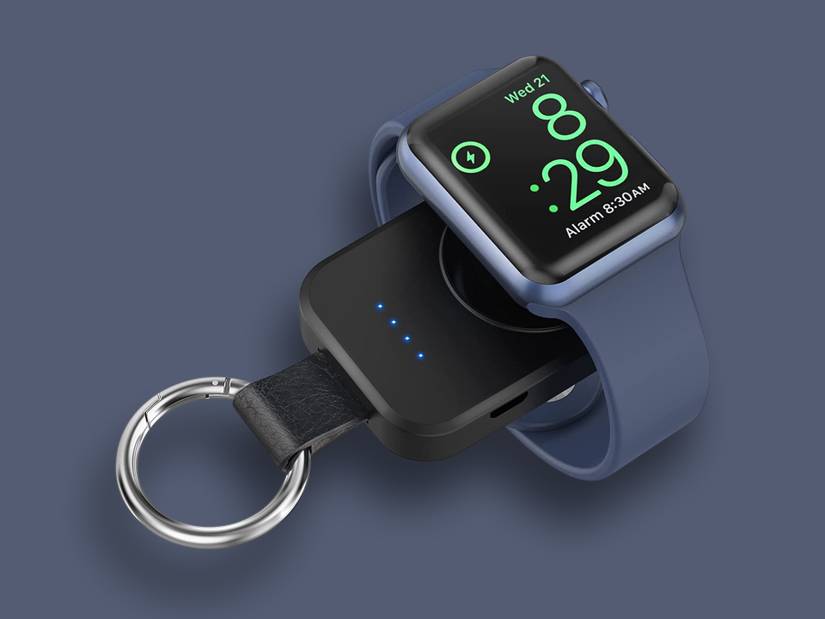
These are game-changers for travel: tiny, keychain-sized magnetic pucks that plug directly into USB-C or USB-A ports.
Keychain Magnetic Chargers
Compact adapters like the Anker or Belkin keychain chargers integrate the magnetic puck and USB plug into one unit. No loose cables, just unfold and attach to any USB port. They weigh under 1 oz and fit on a keyring.
How to use:
- Plug the adapter into a powered USB-C or USB-A source
- Snap your watch onto the magnetic end
- Watch for the green lightning bolt
Charging time is about 2 hours 15 minutes, slower than wall charging due to lower power delivery. These are best for travelers, commuters, and emergency backup.
Magnetic Wireless Power Banks
Forget cables. These pocket-sized power banks have built-in magnetic charging pads. Just stick your watch on and go.
Anker MagGo 10K Power Bank
One of the top MFi-certified options with 10,000mAh capacity. It charges Apple Watch Series 9 to 47% in 30 minutes. The built-in USB-C cable makes self-charging easy, and 30W output allows fast charging your phone too.
EcoFlow RAPID Magnetic Power Bank
Compact and rugged with phone-sized design. It has fast charging support and LED battery indicator, ideal for camping, hiking, or off-grid use.
Note: These banks must be pre-charged. They typically deliver 1 to 2 full watch charges per cycle.
Multi-Device Charging Stations for Home or Office
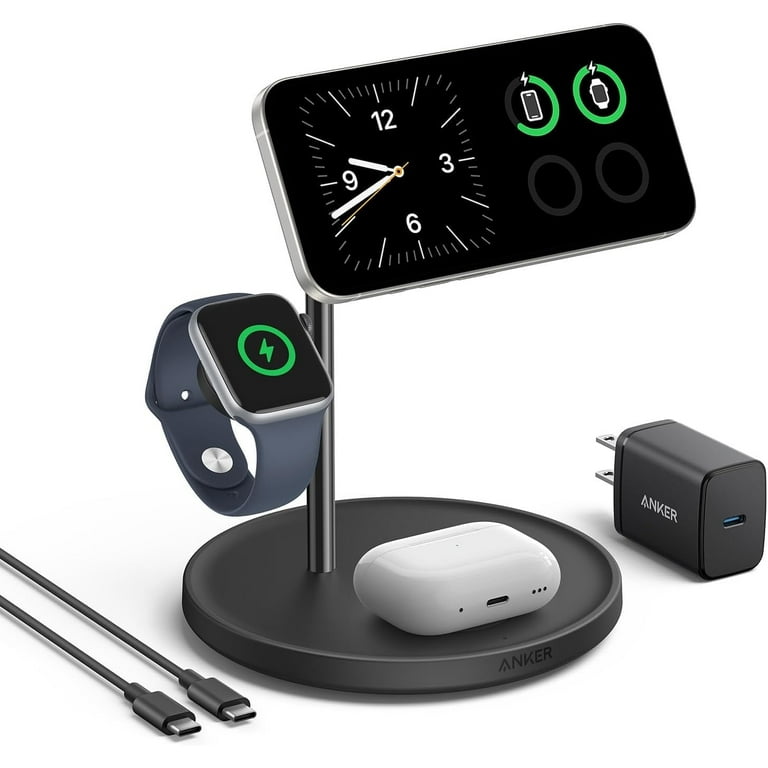
If you own an iPhone, AirPods, and Apple Watch, a 3-in-1 station eliminates cable clutter and charges everything at once.
Anker MagGo Foldable 3-in-1 Station
This MFi-certified station has a magnetic puck for Apple Watch, MagSafe-compatible iPhone charging, and Qi pad for AirPods. It folds flat for travel.
Performance: Charges Apple Watch Series 9 to 47% in 30 minutes, matching Apple official charger. Best for nightstands, office desks, or minimalist setups.
Pro tip: Look for models with non-slip surfaces to prevent your watch from sliding off.
Car Charging Solutions

Running late? Charge your Apple Watch while driving. No wall outlet needed.
Car USB Port Plus Magnetic Cable
Most modern vehicles have USB-C ports. Just plug in your magnetic charger and place the watch on the puck. It works with all Apple Watch models but expect about 2 hours for a full charge, slower than wall charging. Ensure the car is on or in accessory mode because some USB ports shut off when the engine is off.
Portable Power Stations With Wireless Pads
Portable power stations like BLUETTI AC180 or AC500 have built-in 15W wireless pads. The hack: attach a third-party magnetic puck to the wireless pad using adhesive, then place your Apple Watch on it.
BLUETTI AC180 is best for camping and travel with one 15W pad. BLUETTI AC500 is for home backup with two 15W pads but is not portable.
Solar Charging for Off-Grid Use
When the grid fails, solar power keeps your Apple Watch alive.
Solar Panel Plus Magnetic Cable
Use a solar-powered USB-C panel to run your magnetic charger. Requires direct sunlight and charging is slow, 3 or more hours for a full charge. Ideal for backpacking, emergencies, or disaster prep.
Solar Power Stations
Devices like EcoFlow RIVER 3 Plus have 600W output and 220W solar input with USB-C and USB-A ports. They can charge Apple Watch, phone, laptop, and even small appliances.
Note: Solar charging depends on weather. Keep a backup power bank ready.
Avoid Ineffective Battery Bands
Some brands sell battery cases or power bands that claim to extend Apple Watch battery life. Do not waste money on these. They add only 1 to 2 hours of extra use, charge slowly, make the watch bulky and uncomfortable, and often disconnect due to weak magnets.
Choose MFi-Certified Accessories
Not all chargers are safe. Using uncertified gear risks damaging your watch.
MFi Versus Non-Certified Chargers
MFi-certified chargers have over-current and over-voltage protection, strong and secure snap magnets, and charging speeds that match Apple standards. They cost $20 to $50. Non-certified chargers risk fire or damage, have weak magnets that cause frequent dropouts, and may deliver unstable or slow charging. They cost $5 to $15 but are often unsafe.
Always look for the Made for Apple Watch logo.
Trusted brands include Anker for reliable and fast MFi-certified options, Belkin as an Apple partner with durable build, EcoFlow for high-capacity solar and power banks, and BLUETTI for off-grid energy solutions.
Avoid $5 Apple Watch compatible chargers. They often lack safety circuits.
Troubleshooting Charging Issues
Even with the right tools, problems happen. Here is how to fix them.
Watch Will Not Charge
- Inspect the charger for frayed cables or bent pins
- Clean the back of the watch using a dry microfiber cloth to remove lint, sweat, or debris
- Restart the watch by holding side button plus Digital Crown for 10 seconds
- Force restart by holding both buttons until Apple logo appears
- Test the power source with a different USB port or adapter
- Try another cable to rule out accessory failure
- Update WatchOS to the latest software
- Contact Apple Support if nothing works
Common problems include weak magnet causing watch to fall off easily, gunk buildup blocking charging contacts, faulty car USB port common in older vehicles, and non-MFi charger that watch may not recognize.
Maximize Battery Health
Charging habits affect long-term battery life.
Best Practices
Avoid 0% and 100% daily. Keep battery between 20% and 80%. Unplug at 80 to 100% to prevent overcharging stress. Do not charge overnight every night. Avoid extreme temperatures, do not charge in direct sun or freezing cold.
Extend Battery Life
Lower screen brightness, enable Power Saving Mode, disable background app refresh, limit GPS and heart rate monitoring, turn off Always-On Display, manage notifications with only essential apps, use Silent Mode, and keep software updated.
Safety First: What to Avoid
Red flags include watch does not snap securely, no green lightning bolt after 1 minute, frequent disconnections, and watch gets hot during charging. Stop using the charger immediately if any of these occur.
Dangerous practices include taping the watch to charger which is a fire hazard, using damaged cables which risk short circuit, charging on uneven surfaces which causes poor contact and overheating, and non-certified multi-docks which may overheat or spark.
Always use MFi-certified gear. Your watch safety depends on it.
Frequently Asked Questions About Charging Apple Watch Without Magnetic Charger
Can I charge Apple Watch with iPhone charger?
Yes, but only to power the magnetic charging cable. The iPhone USB-C adapter works perfectly. Just plug your Watch cable into it.
Can I charge Apple Watch with my iPhone?
Yes, if you have iPhone 15 or later. Plug the magnetic charger into your iPhone USB-C port. It drains about 26% of the phone battery for a full watch charge.
Can I use a Qi wireless charger?
Only Apple Watch Series 7 and later support limited Qi charging, and it is slower and unreliable. Not recommended for daily use.
What if I lost my charger?
Replace it with MFi-certified magnetic cable, keychain magnetic adapter, magnetic power bank, or 3-in-1 charging station.
Do all Apple Watches use the same charger?
Yes, all models use magnetic chargers. Newer cables support faster charging, but older ones still work.
How long to charge Apple Watch?
Zero to 80% takes about 1.5 hours. Zero to 100% takes about 2.5 hours, varying by model and charger.
Key Takeaways for Charging Apple Watch Without the Official Charger
While you cannot charge an Apple Watch without a magnetic method, you are never truly powerless. With an MFi-certified magnetic accessory and any USB-C power source, you can keep your watch running. Laptop USB ports, power banks, iPhone reverse charging, solar panels, and car ports all work when you need them most. Prioritize safety by using certified gear, avoid cheap knockoffs that risk damage, and always carry a backup solution like a keychain adapter or portable power bank. That dead watch problem is a thing of the past.



