
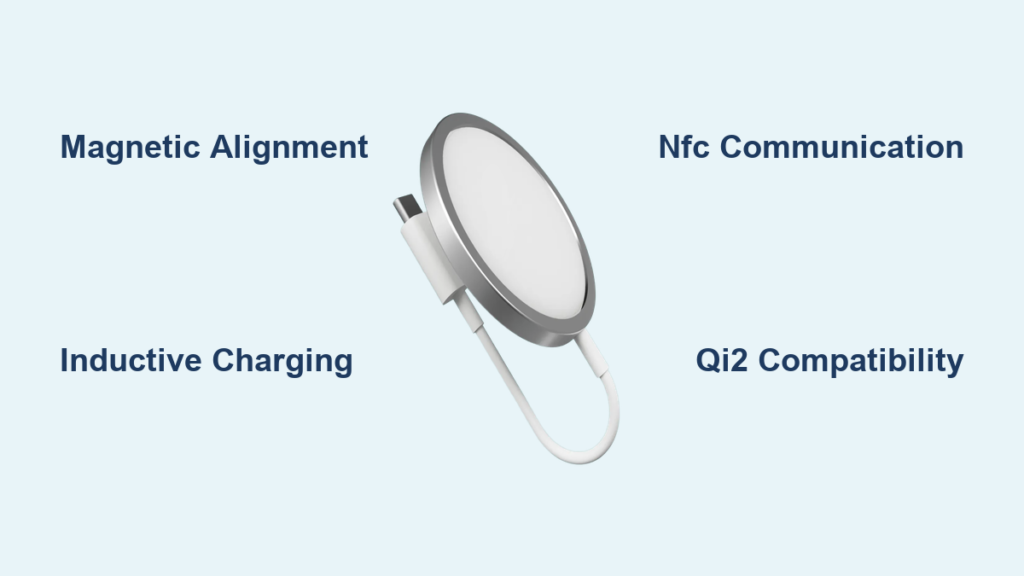
If you have ever snapped your iPhone onto a charger and felt it magnetically click into place, you have experienced MagSafe charging. But how does a Mag charger work? It is not just magnets and coils; it is a precision-engineered system combining magnetic alignment, inductive power transfer, and smart communication to deliver faster, more reliable charging than standard wireless pads.
In this guide, you will learn exactly how a Mag charger works, from the physics of electromagnetic induction to the role of NFC in smart charging, and discover how it is shaping the future of wireless power across Apple and Android devices through the new Qi2 standard.
The Magnetic Snap: How Alignment Works
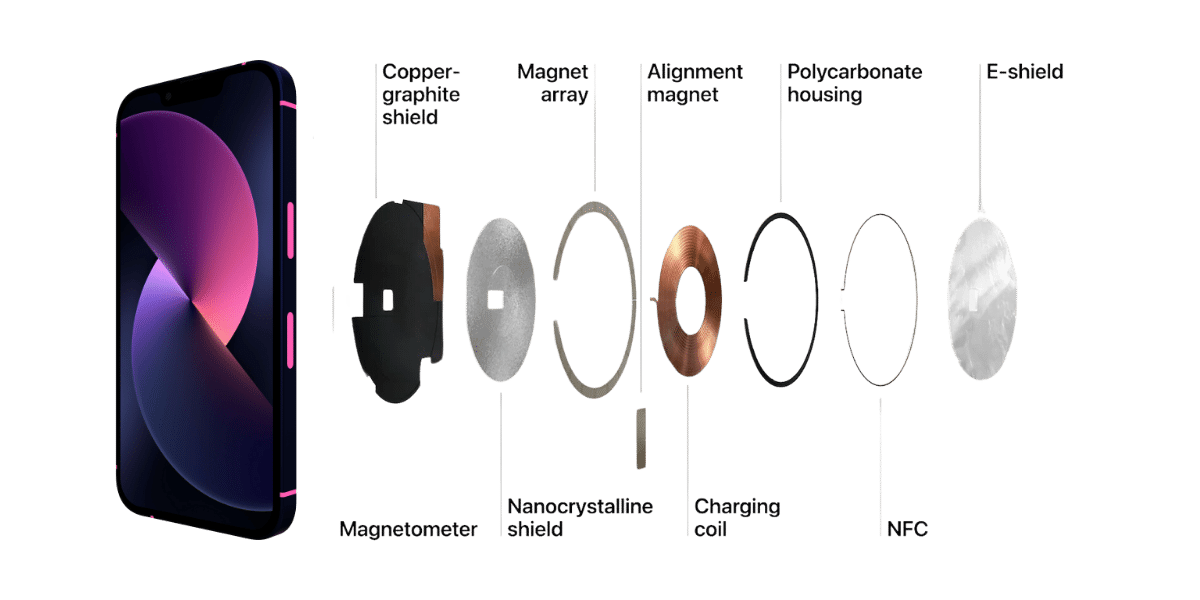
At the core of every MagSafe-compatible iPhone is a circular array of 16 or more neodymium rare-earth magnets embedded around the wireless charging coil. These ultra-strong magnets are precisely arranged to match an identical ring inside MagSafe chargers and accessories.
When you bring a MagSafe charger near your iPhone, the magnetic fields attract each other and the rings self-align into perfect concentric positioning. You hear and feel a distinct tactile snap that confirms secure attachment. This eliminates the frustration of misaligned charging pads where even a small offset can reduce efficiency or stop charging entirely.
Why Magnets Improve Charging Efficiency
Standard Qi wireless chargers rely on loose inductive coupling, meaning the phone must be manually centered over the charging pad. Any deviation increases the air gap between coils, reducing efficiency. MagSafe solves this with tight magnetic coupling.
The benefits include reduced air gap to near zero, ensuring optimal coil-to-coil alignment every time, and minimized energy loss and heat generation. As a result, MagSafe delivers more consistent and efficient charging than standard Qi, even at higher power levels.
Pro Tip: Thick cases or metal objects between the phone and charger can interfere with the magnetic field. Use only MagSafe-compatible cases for best results.
Wireless Power: The Science of Induction

MagSafe uses the same fundamental principle as all wireless charging: electromagnetic induction, based on Faradays Law. Here is how it works.
The transmitting coil in the MagSafe charger receives alternating current from the power adapter. This creates an oscillating electromagnetic field. The field induces an alternating current in the receiving coil inside the iPhone. The phone converts this current into direct current to charge the battery.
Because MagSafe ensures perfect coil alignment, the system operates as a tightly coupled inductive system, unlike standard Qi, which often functions as a loosely coupled one. Tight coupling means less energy wasted as heat, which translates to faster, safer charging.
Backward Compatibility with Qi Standard
MagSafe is built on the Qi wireless charging standard, ensuring compatibility. Any Qi-certified charger can charge a MagSafe iPhone at up to 7.5W. A MagSafe charger can charge older iPhones iPhone 8 through 11 via Qi, but without magnetic alignment or fast charging.
However, only MagSafe-enabled devices achieve 15W or 25W charging speeds, thanks to precise alignment and smart power management. Standard Qi delivers up to 7.5W while MagSafe delivers up to 25W on iPhone 16 with a 30W or higher adapter.
Smart Charging: The NFC Communication Layer

Beyond magnets and coils, MagSafe uses Near Field Communication to enable intelligent interactions. When your iPhone connects to a MagSafe charger, the charger sends identification data via NFC. The iPhone recognizes the type of accessory, whether it is a charger, wallet, or battery pack.
Based on this handshake, the system displays a custom charging animation, adjusts charging speed dynamically, and activates battery health optimization and thermal protection. This two-way communication prevents overcharging, slows down charging when temperatures rise, and supports optimized battery charging, a feature that learns your routine and delays full charging until you need it.
Real-World Benefit: Leaving your iPhone on the charger overnight is safe. MagSafe protects battery longevity.
Accessory Recognition and User Experience
NFC allows the iPhone to distinguish between MagSafe charger, MagSafe battery pack, MagSafe wallet, and third-party accessories. Each triggers a unique response. Battery packs show charge level in the battery widget. Wallets notify you if left behind. Mounts enable features like Continuity Camera, using iPhone as a Mac webcam.
User Note: A weak magnetic pull or missing animation may indicate a non-certified or incompatible accessory.
Charging Speeds: What Your iPhone Can Handle
| iPhone Model | Max MagSafe Charging Speed | Required Adapter |
|---|---|---|
| iPhone 12 through 15 | Up to 15W | 20W USB-C or higher |
| iPhone 12 mini, 13 mini | Up to 12W | 20W USB-C or higher |
| iPhone 16 series | Up to 25W | 30W USB-C or higher |
| iPhone 8 through 11 | Up to 7.5W | Any USB adapter |
| AirPods MagSafe case | Up to 7.5W | Any MagSafe charger |
Important: To reach 25W on iPhone 16, you must use a 30W or higher USB-C power adapter. Many third-party adapters claim high wattage but underdeliver. For reliable performance, use Apple-certified or MFi Made for iPhone adapters.
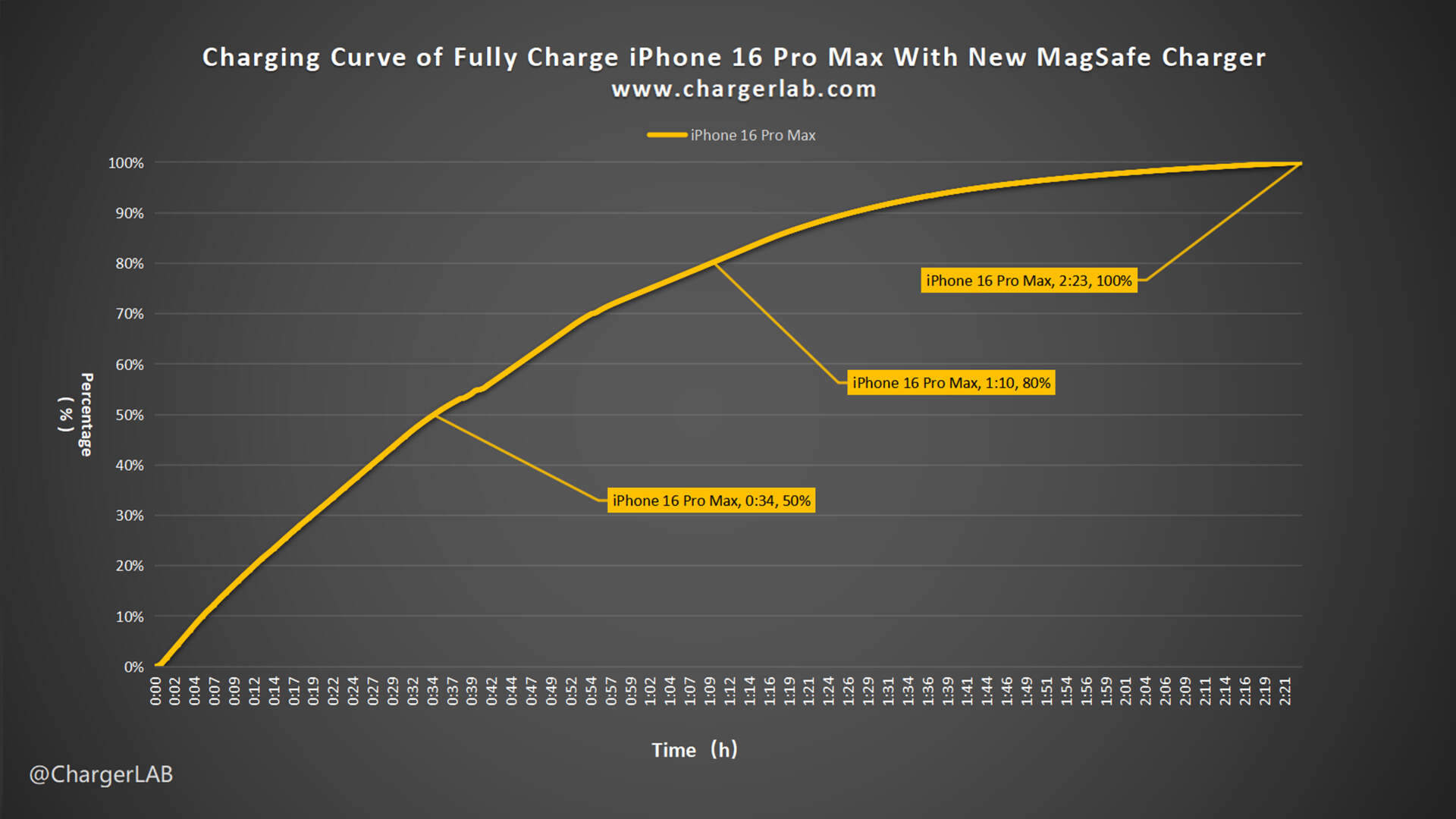
Real-World Charging Times include iPhone 16 at 25W achieving 0 to 50 percent in approximately 30 minutes, iPhone 15 at 15W achieving 0 to 50 percent in approximately 35 minutes, and standard Qi at 7.5W achieving 0 to 50 percent in 60 or more minutes. Fast charging stops at 80 percent to protect battery health, then slows for the final 20 percent.
Device Compatibility: Which Phones Work
MagSafe is natively supported on iPhone 12 and later, including Pro, Pro Max, and Plus variants. The excluded model is iPhone SE third generation, which has wireless charging but no MagSafe magnets.
These models contain the internal magnet ring and optimized charging circuitry for full MagSafe functionality.
AirPods and Other Apple Devices
AirPods third generation, Pro first and second generation, and Pro third generation with MagSafe Charging Case charge at up to 7.5W. Apple Watch is not compatible and uses a different magnetic charging system. MacBooks with original MagSafe 2006 through 2019 and MagSafe 3 2021 are incompatible with iPhone MagSafe chargers.
Clarification: Same name, different technology. iPhone MagSafe is not the same as MacBook MagSafe.
Qi2: MagSafe-Inspired Charging for Android
The Qi2 standard, launched by the Wireless Power Consortium, brings MagSafe-like functionality to Android. Key features include an identical magnetic alignment ring, up to 15W charging, and full compatibility with MagSafe chargers.
Supported by Samsung, Google, OnePlus, and Xiaomi, Qi2 devices like Samsung Galaxy S24 series, Google Pixel 8 Pro, and OnePlus 12 can snap onto MagSafe chargers and charge at full speed. Qi2 may become the global standard for magnetic wireless charging, enabling true cross-platform compatibility.
Can Non-MagSafe Phones Use Mag Chargers
Yes, but with limitations. Older iPhones 8 through 11 charge via Qi at 7.5W with no magnetic snap. Android phones can use MagSafe-compatible cases or adhesive magnetic rings. The result is magnetic attachment, but charging is often limited to 7.5W unless the phone supports Qi2.
Warning: Placing magnets incorrectly, such as over the logo instead of the coil, can block charging.
The MagSafe Accessories Ecosystem
MagSafe is not just for charging. It powers a growing ecosystem of snap-on accessories including cases, wallets, battery packs, mounts, and third-party add-ons.
Cases, Wallets, and Battery Packs
MagSafe cases contain an embedded magnet array that aligns perfectly with iPhone is internal magnets. They are available in silicone, clear, FineWoven from Apple, or third-party options. They must be labeled MagSafe compatible or Made for MagSafe.
Avoid thick non-MagSafe cases because they block magnetic alignment. MagSafe wallets hold 2 to 3 cards and some cash, attach magnetically to iPhone, integrate with Find My network, and send alerts if wallet detaches. User feedback indicates they are convenient but may fall off during active use.
MagSafe battery packs snap onto iPhone 12 and later, providing 40 to 70 percent extra charge, and show battery level in iOS widget. Apple discontinued its Lightning version in 2023. Now available from Anker, Belkin, and Mophie, offering USB-C pass-through charging. Best use is on-the-go top-ups, not full-day power replacement.
Mounts and Third-Party Add-Ons
Popular MagSafe accessories include car mounts for vent, dashboard, or CD slot, desk stands for FaceTime or charging, and laptop mounts to attach iPhone to MacBook as Continuity Camera. Over 2,000 MagSafe-compatible accessories now exist globally.
Certification: MagSafe Certified vs Compatible
| Term | Meaning | Charging Speed | Reliability |
|---|---|---|---|
| MagSafe Certified | Apple-approved, meets strict standards | Up to 25W | Guaranteed compatibility, thermal protection |
| MagSafe Compatible | Third-party, not officially tested | Usually 7.5W to 15W | Variable quality, may lack smart features |
Recommendation: For full-speed charging and safety, choose MagSafe Certified or Qi2-certified products.
Setup and Optimization Tips
To use a Mag charger correctly, connect the MagSafe charger to a USB-C cable and plug into a 20W for 15W or 30W or higher for 25W USB-C power adapter. Place on a flat, stable surface. Bring iPhone close and feel the magnetic snap. See charging animation appear in 2 to 3 seconds.
Pro Tip: If no snap or animation, check for thick cases, metal objects, or low-quality adapters.
Maximizing Charging Speed
To get the most from your Mag charger, use Apple-certified or MFi adapters and cables, keep charging surface clean and dust-free, remove cardholders or metal plates, and charge in cool, ventilated areas. Avoid direct sunlight or hot environments.
Troubleshooting: Slow charging? Switch to an official 20W or 30W adapter because many third-party bricks underdeliver.
Safety, Heat, and Long-Term Use
MagSafe is safe for daily use. Apple includes multiple safety layers, including auto-stop charging at 100 percent, thermal throttling if device overheats, battery health optimization, and magnets tested safe for pacemakers and medical devices.
Expert Verdict: It is safe to leave your iPhone on MagSafe overnight.
Managing Heat Buildup
Wireless charging generates more heat than wired. MagSafe mitigates this by throttling power when temperatures rise, using adaptive algorithms, and recommending room-temperature charging.
Best practices include removing thick cases during charging, avoiding charging in cars or direct sun, and using chargers with good heat dissipation. Cheap, uncertified chargers may overheat and pose fire risks.
Magnet Longevity: Do They Wear Out
No. The neodymium magnets are permanent and designed to last. There is no degradation from daily attachment or detachment. They retain strength for years and are unaffected by normal use.
Source Confirmation: You should not notice any decline in magnetic strength over time.
Maintenance and Troubleshooting
Clean your Mag charger by unplugging before cleaning, wiping with dry lint-free cloth, and lightly dampening for stubborn dirt, never soaking. Avoid chemicals or abrasives. Store in cool, dry place, avoid extreme heat, humidity, or sunlight, and wrap cables loosely to prevent wire damage.
Maintenance Tip: Clean weekly to maintain efficiency and magnetic strength.
Common Issues and Fixes
If your device is not charging, the likely cause is misalignment, debris, or faulty adapter. Solution is to reposition phone, clean surface, and test adapter.
If charging is slow, the likely cause is low-wattage adapter, thick case, or heat. Solution is to use 20W or 30W adapter, remove case, and cool device.
If the snap is weak, the likely cause is non-MagSafe case or metal interference. Solution is to switch to MagSafe case and remove cards.
If there is no animation, the likely cause is software glitch or dirty surface. Solution is to restart phone and clean charger.
If overheating occurs, the likely cause is poor ventilation or cheap charger. Solution is to move to cooler area and use certified charger.
Advanced Fix: If issues persist, update iOS or reset network settings.
The Future of Magnetic Charging
Qi2 is poised to make MagSafe-style charging standard across brands. It enables Android phones to snap onto MagSafe chargers, supports up to 15W with potential for 20W to 30W or higher in the future, and could expand to wearables, laptops, and IoT devices.
Prediction: MagSafe may evolve from a brand name to a de facto standard for magnetic charging.
Innovation in Accessories
With over 2,000 MagSafe-compatible products, innovation continues in modular tools like clip-on lenses and barcode scanners, wearable sensors like magnetic health monitors, and vehicle integration like in-dash charging with data passthrough.
Apple ecosystem strategy ensures MagSafe remains a long-term platform, not just a charging method.
Frequently Asked Questions About Mag Chargers
Does MagSafe work with any iPhone model
MagSafe works natively with iPhone 12 and later models, including all Pro, Pro Max, and Plus variants. The iPhone SE third generation supports wireless charging but does not have the MagSafe magnet ring.
Can I use MagSafe charger with Android phones
Yes, Android phones can charge on MagSafe chargers using standard Qi protocol at up to 7.5W. For magnetic attachment, you need a MagSafe-compatible case or adhesive magnetic ring. Newer Android phones supporting Qi2 can achieve full 15W charging speeds.
Why does my MagSafe charger feel warm during use
MagSafe chargers generate heat because wireless charging is less efficient than wired charging. The iPhone manages this by throttling power if temperatures rise too high. Using certified chargers, removing thick cases, and charging in cool areas helps reduce heat buildup.
Can I leave my iPhone on MagSafe charger overnight
Yes, it is safe. MagSafe includes battery health optimization that learns your routine and delays full charging until needed. The iPhone also stops charging at 100 percent and monitors temperature throughout the night.
Do MagSafe magnets lose strength over time
No. The neodymium magnets used in MagSafe are permanent and designed to last for years without degradation. Daily attachment and detachment does not affect their strength.
What happens if I use a non-MagSafe case with a MagSafe charger
Non-MagSafe cases may block or weaken the magnetic connection, leading to slower charging or no charging at all. Thick cases create too much distance between coils, reducing efficiency. For best results, use MagSafe-compatible cases labeled as such.
Key Takeaways for Understanding Mag Chargers
MagSafe combines magnetic alignment, inductive charging, and NFC communication to deliver precise, efficient, and intelligent wireless charging. The ring of neodymium magnets ensures perfect coil alignment every time, enabling faster and more reliable power transfer than standard Qi chargers. NFC enables smart features like accessory recognition, customized charging animations, and battery health management that standard Qi cannot provide.
Native support extends to iPhone 12 and later, excluding iPhone SE third generation, while the new Qi2 standard brings MagSafe-like magnetic charging to Android devices at up to 15W. The growing ecosystem of over 2,000 accessories, from wallets to battery packs to car mounts, transforms MagSafe from a charging method into a modular platform.
For optimal performance, use MagSafe Certified or Qi2-certified products with a 20W or 30W adapter depending on your iPhone model. Proper setup, maintenance, and adapter selection ensure you get the fastest, safest charging experience possible while protecting your battery for years to come.





