
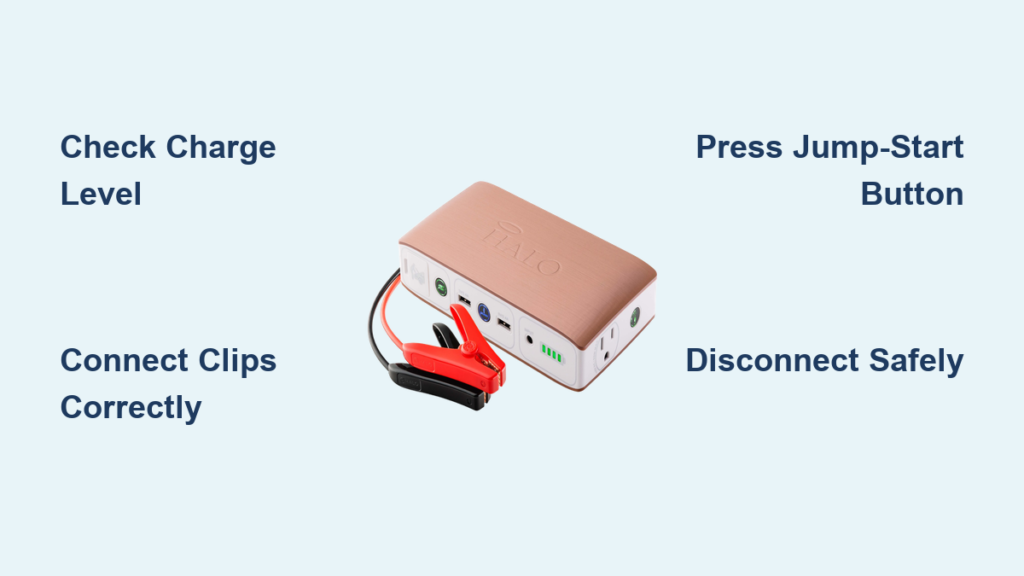
If your car won’t start in freezing weather or you’re stranded with a flat tire on a remote road, the Halo battery charger could be your lifeline. More than just a jump starter, this compact device powers phones, inflates tires, and even doubles as an emergency flashlight, all from a unit that fits in your glove box. But knowing how to use a Halo battery charger correctly is key to unlocking its full potential and staying safe.
Whether you own a Halo Bolt, Halo Bolt Air, or the upgraded Air+ model, this guide walks you through every function. You’ll learn exactly what to do and what to avoid, based on real-world performance data and technical specifications. By the end, you’ll be ready for any roadside emergency with confidence.
Prepare for Jump Starting Your Vehicle
Before attempting to start your vehicle, ensure the Halo battery charger is ready and safe to use.
Check Charge Level and Battery Health
Always verify the Halo Bolt has at least 50% charge, though 70% or higher is ideal for cold weather or larger engines. Use the LCD screen on Air and Air+ models to view battery percentage and connected car voltage.
Things to watch for:
– Below 30%: Recharge before use
– Red flashing light: Low power or connection error
– Solid green after button press: Safe to proceed
Pro Tip: Test your Halo every 3 months, even if unused. Lithium batteries degrade slowly over time but can hold charge for up to a year when stored properly.
Gather Safety Gear and Position the Unit
Wear gloves and eye protection before handling any battery-related equipment. Place the Halo Bolt on a dry, stable surface near the battery. Turn off all vehicle systems including lights, radio, AC, and ignition, then engage the parking brake.
Critical: The Halo delivers power only when the jump-start button is pressed. This prevents sparks during connection and makes it safer than traditional jumper cables.
Connect Jumper Cables Correctly
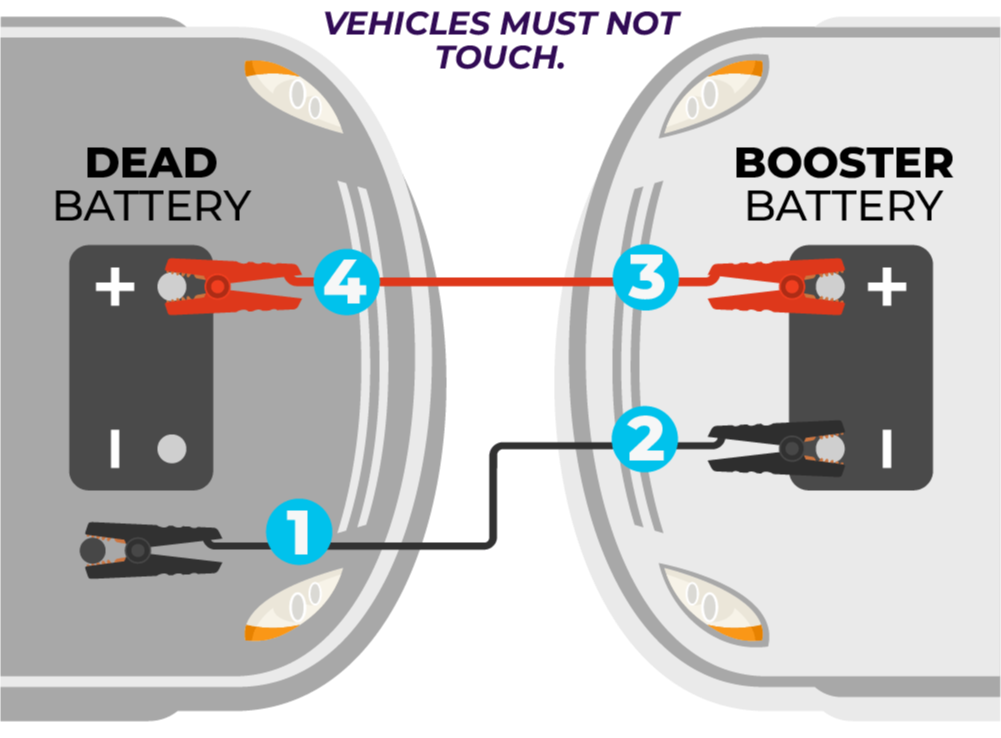
Improper connections can damage your vehicle or the Halo unit. Follow these steps precisely.
Attach Clips to the Halo Bolt
Open the clip cover on the device. Insert the adapter plug with the flat clip going into the flat slot and the round clip into the round slot. Push firmly until fully seated.
Design Safety: The one-way insertion ensures correct polarity and prevents incorrect plug orientation.
Connect to Battery Terminals
Connect the clips to your car battery using this polarity guide:
- Red clip connects to Positive (+) terminal, marked with “+” or a red cap
- Black clip connects to Negative (-) terminal or ground, marked with “-” or black cap
Grounding Alternative: If the negative terminal is corroded or hard to reach, attach the black clip to an unpainted metal surface like a bolt or engine bracket. Just keep it away from fuel lines and moving parts.
Never reverse the clamps. While the Halo has reverse polarity protection and won’t deliver power if reversed, repeated mistakes may harm internal electronics.
Activate and Start the Engine
Now that everything is connected, it’s time to crank the engine.
Press and Hold Jump-Start Button
Press and hold the jump-start button. Watch for the flashing green light, which indicates the system self-check is running. Wait for the solid green light, which confirms connection verified, polarity correct, and sufficient charge.
No spark until activation: This safety feature eliminates accidental short circuits during setup.
Crank the Engine
Turn the ignition key or press start while holding the jump button. Most vehicles start within 1 to 3 seconds. Success is confirmed by immediate engine turnover, even in temperatures as low as 14°F (-10°C).
If engine doesn’t start: Release the button, wait 10 seconds, then retry. Recheck connections and charge level. For deeply discharged batteries below 6V, wait 5 to 10 minutes to allow partial charging before attempting again.
Disconnect Safely After Start
Improper disconnection risks damaging your car’s electrical system.
Remove Clamps in Correct Order
Turn off the engine briefly, then remove the black negative clip first. Remove the red positive clip next. Unplug the adapter from Halo Bolt and store all components in the carrying case.
Recharge immediately after use, even if only partially drained, to maintain readiness.
Charge Devices Anywhere
Beyond jump-starting, the Halo acts as a powerful portable power station.
Use USB and AC Ports Effectively
The Halo offers multiple output options for different devices:
- USB-A ports deliver 5V/2.1A, ideal for phones, tablets, and GPS units
- USB-C ports vary by model, with some supporting Power Delivery for modern smartphones
- AC outlet provides 110V at approximately 100W for laptops, blenders, and mini-fridges
- 12V DC port works like a cigarette lighter for coolers and car vacuums
Real-World Use: Van lifers use the Halo to run blenders, charge laptops, and power LED lights during off-grid camping.
Limitation: USB ports do not support fast charging for tablets or laptops. They are ideal for emergency top-ups, not full recharges.
Detach and Use the Power Bank
On Halo Bolt models with a removable power bank, slide out the unit for independent use. Charge phones, earbuds, or GPS devices while on the go. Reinsert and recharge via the main unit when done.
Perfect for: Road trips, blackouts, or when you need power without turning on the car.
Inflate Tires with Built-In Compressor

Available on Halo Bolt Air and Air+ models, the air compressor helps maintain proper tire pressure.
Set and Inflate to Target PSI
Unscrew the tire valve cap. Connect the chuck using the screw-on main hose for the best seal. Use the control panel to set the desired PSI. Press the inflate button and the unit stops automatically at the target.
Speed: Takes about 1 to 2 minutes to add 5 to 10 PSI to a standard passenger tire.
Verify Pressure with External Gauge
Despite the digital display, the built-in gauge reads consistently 5 PSI lower than calibrated gauges. One test showed 40 PSI delivered when 35 PSI was set. Always double-check with a standalone tire gauge for accuracy.
Chuck Warning: The extension hose uses a clamp-on design, which is harder to secure than the screw-on main chuck. Prefer the main hose when possible.
Monitor Performance and Battery Life
Stay informed about your Halo’s status and longevity.
Read the LCD Display Accurately
On Halo Bolt Air and Air+ models, the display shows the Halo battery level, real-time and target tire pressure, and connected car battery voltage. Seeing the car battery voltage helps diagnose whether the issue is the battery or another electrical problem.
Track Recharge Cycles and Lifespan
The battery is lithium-ion or LiPo chemistry with a lifespan of 300 to 500 full charge cycles. Charge retention lasts up to one year in storage. Recharge time is 3 to 5 hours via wall charger or 6 to 8 hours via car adapter.
Pro Tip: Recharge using solar surplus or free power sources during van life or overlanding trips to extend utility.
Troubleshoot Common Problems

Even reliable devices can encounter issues. Here’s how to fix them fast.
No Light When Pressing Button
Cause: Battery fully depleted
Fix: Recharge using AC wall charger for at least 30 minutes
Flashing Red Light
Cause: Reverse polarity or poor connection
Fix: Disconnect clamps, reattach with correct polarity, and ensure clips are firmly on clean terminals
Engine Cranks Slowly
Cause: Low Halo charge or extremely cold battery
Fix: Let the Halo boost the car battery for 1 to 2 minutes before starting. Try again with solid green light.
Air Compressor Does Not Stop
Cause: Faulty pressure sensor or overfilling
Fix: Manually release air using the valve. Reboot the unit by unplugging and reconnecting. Always verify final PSI with external gauge.
AC Outlet Not Working
Cause: Overload, device draws more than 100W
Fix: Unplug the appliance, wait 1 minute, then retry with a lower-wattage device.
Handle Special Scenarios
The Halo works beyond standard 12V cars, even in unusual conditions.
Use on Deeply Discharged Batteries
If the car battery reads below 6V, connect Halo as normal. Wait 5 to 10 minutes to allow partial charge transfer. Press the jump button and start the engine. Repeat if needed.
Success Case: Used to start a Honda Civic with a severely drained battery after three attempts.
Note: The Halo is for emergency boosting, not full recharging. Drive the car for at least 20 minutes afterward or use a dedicated charger.
Work with Positive Ground Vehicles
Classic British cars like MG and Triumph often have positive ground systems, but the Halo works safely. Connect red clip to positive terminal and black clip to negative or ground. Follow the same procedure as negative ground vehicles.
Expert Confirmation: “The module cares not.” This means the Halo responds only to polarity, not ground type.
Maintain and Store Properly
Long-term reliability depends on smart care.
Recharge After Every Use
Even after a single phone charge or brief jump-start, plug into the wall charger. Allow it to reach 100% before storing. This maintains readiness for your next emergency.
Battery Health Rule: Avoid deep discharges. Lithium batteries last longest when kept between 20% and 100%.
Store in Optimal Conditions
Store in a cool, dry place such as a garage, trunk, or closet. The temperature range should be 32°F to 95°F (0°C to 35°C). Check every 3 to 6 months and recharge if below 50%.
Cold Test: One user reported full function after 2 months in a cold truck, proving excellent low-temperature retention.
Know What the Halo Cannot Do
Understanding limitations prevents frustration.
Do Not Expect Fast Device Charging
There is no support for tablet fast charging. The AC outlet is limited to approximately 100W, so it won’t run high-draw appliances like space heaters.
Avoid Large Engines Without Verification
The Halo is best suited for 4- and 6-cylinder gasoline engines. It may struggle with large V8s, diesel engines, and commercial trucks.
Test First: If unsure, try a brief connection and check for solid green light before cranking.
Never Use in Wet Conditions
The Halo is not waterproof. There is risk of short circuit or electric shock. Wait for dry conditions or cover the battery area before use.
Upgrade to Ultimate Models for Better Performance

Newer versions offer improved usability.
BOLT Ultimate 3.0 and 4.0 Improvements
These models feature longer jumper cables, which improve access in tight engine bays. They have enhanced software diagnostics, durable casing, upgraded components, and better cable management.
User Feedback: “The longer cables made all the difference in my SUV.”
Price Range: $179.99 (Air+) to $229.99 (Ultimate 4.0)
Final Tips and Best Practices
Maximize your Halo’s value with these expert-backed habits.
Keep It Ready at All Times
Store in the glove compartment, center console, or emergency kit. Keep cables plugged in and ready in the carrying bag. Recharge every 3 months if unused.
Use It Beyond Emergencies
Power tailgate parties with blenders and lights. Charge devices during blackouts. Inflate sports balls or air mattresses. Use flashlight mode for camping or power outages.
Night Safety Tip: Use flashing red light mode as a hazard signal during roadside stops.
Frequently Asked Questions About Halo Battery Charger
How long does it take to recharge a Halo battery charger fully?
Using the included AC wall charger, a full recharge takes 3 to 5 hours. Using the car adapter takes 6 to 8 hours. The recharge rate via car adapter is approximately 2% per 10 minutes.
Can the Halo battery charger jump-start a dead car battery?
Yes, the Halo can jump-start vehicles with deeply discharged batteries, even those reading below 6V. Connect the Halo, wait 5 to 10 minutes for partial charging, then attempt to start. Multiple attempts may be needed for severely drained batteries.
Does the Halo battery charger work in cold weather?
Yes, the Halo has been tested and proven to work in temperatures as low as 14°F (-10°C). For best results in cold weather, ensure the Halo is charged to 70% or higher before attempting a jump-start.
How many times can a fully charged Halo jump-start a vehicle?
A fully charged Halo Bolt can perform up to 13 jump-starts on full-size trucks like a Dodge Ram 1500, or up to 20 jump-starts on midsize SUVs like a Nissan Rogue. The actual number depends on the vehicle size and battery condition.
Is the built-in tire pressure gauge on the Halo accurate?
The built-in air compressor consistently reads 5 PSI lower than calibrated tire gauges. For example, setting 35 PSI may actually deliver 40 PSI. Always verify final pressure with a separate, reliable tire gauge for accuracy.
Can I use the Halo to power my laptop or small appliances?
Yes, the AC outlet provides 110V at approximately 100W, which works for laptops, blenders, and small appliances. However, it cannot handle high-wattage devices like space heaters or microwaves. USB ports do not support fast charging for tablets or laptops.
Key Takeaways for Using Your Halo Battery Charger
The Halo battery charger is an exceptionally valuable emergency device that combines jump-starting, device charging, tire inflation, and emergency lighting into one compact unit. Its foolproof design with reverse polarity protection and spark-free operation makes it safe for almost anyone to use. Remember to keep the unit charged to at least 50% at all times, recharge after every use, and test it every 3 months to ensure readiness.
For tire inflation, always verify pressure with an external gauge since the built-in compressor reads approximately 5 PSI low. The Halo works reliably in cold weather down to 14°F and can handle deeply discharged batteries by allowing 5 to 10 minutes of partial charging before cranking. Store it in your glove compartment or emergency kit, keep it accessible, and you’ll have peace of mind on every drive.
Now that you know how to use a Halo battery charger safely and effectively, keep it charged, accessible, and ready. You never know when you’ll need it.





