
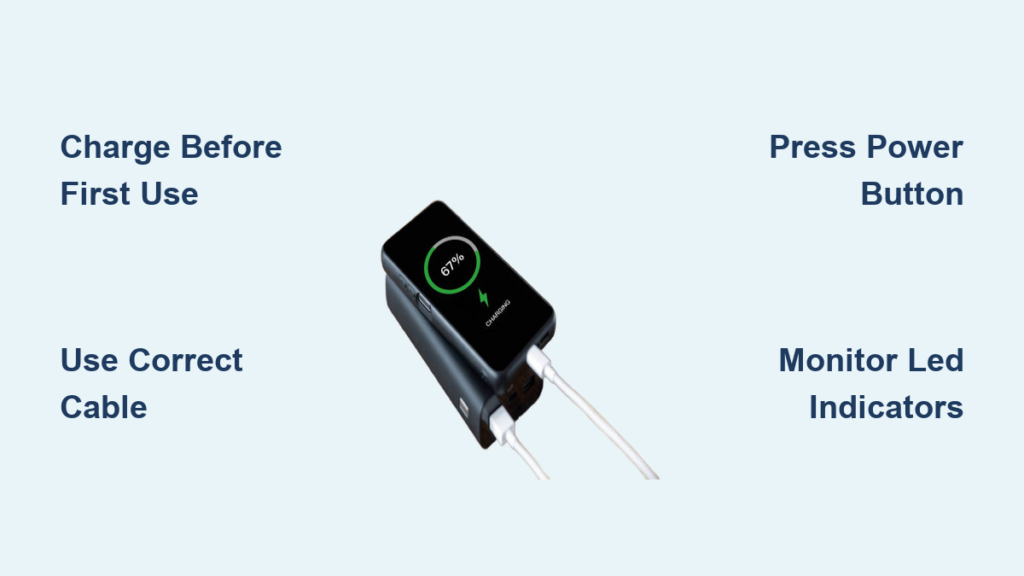
Running out of battery on your phone while on the go is more than an inconvenience. It can mean missing an important call, losing navigation in an unfamiliar area, or being disconnected during an emergency. That is where a portable battery charger, commonly known as a power bank, becomes essential. These compact devices store energy to recharge smartphones, tablets, earbuds, and other USB-powered gadgets when wall outlets are not available. Knowing how to use a portable battery charger properly ensures your devices stay powered when it matters most.
This guide walks you through every step, from charging the power bank itself to safely powering your devices. It covers compatibility, maintenance, troubleshooting, and best practices. Whether you are using a small 5,000 mAh model for daily commutes or a high-capacity 20,000 mAh unit for travel, these techniques will maximize efficiency, safety, and lifespan.
Precharge the Power Bank Before First Use
Before using a portable battery charger for the first time or after it has been fully drained, you must charge the power bank itself. This initial charge helps calibrate the internal battery management system for accurate capacity readings.
Connect to a Reliable Power Source
Use a compatible cable, usually USB-C or micro-USB, and plug one end into the power bank input port. Connect the other end to a wall adapter, not a computer USB port, for faster and more stable charging. Wall adapters with 5V/2A output deliver power more efficiently than lower-output sources.
Monitor LED Indicators
Most power banks feature four LED lights to indicate charge level. One light means 0 to 25 percent, two lights mean 26 to 50 percent, three lights mean 51 to 75 percent, and four lights mean 76 to 100 percent. Wait until all lights are solid before disconnecting.
Charging time varies by capacity:
• 5,000 mAh takes approximately 2 to 3 hours
• 10,000 mAh takes approximately 4 to 6 hours
• 20,000 mAh takes approximately 6 to 10 hours
Connect Your Device Using the Right Cable
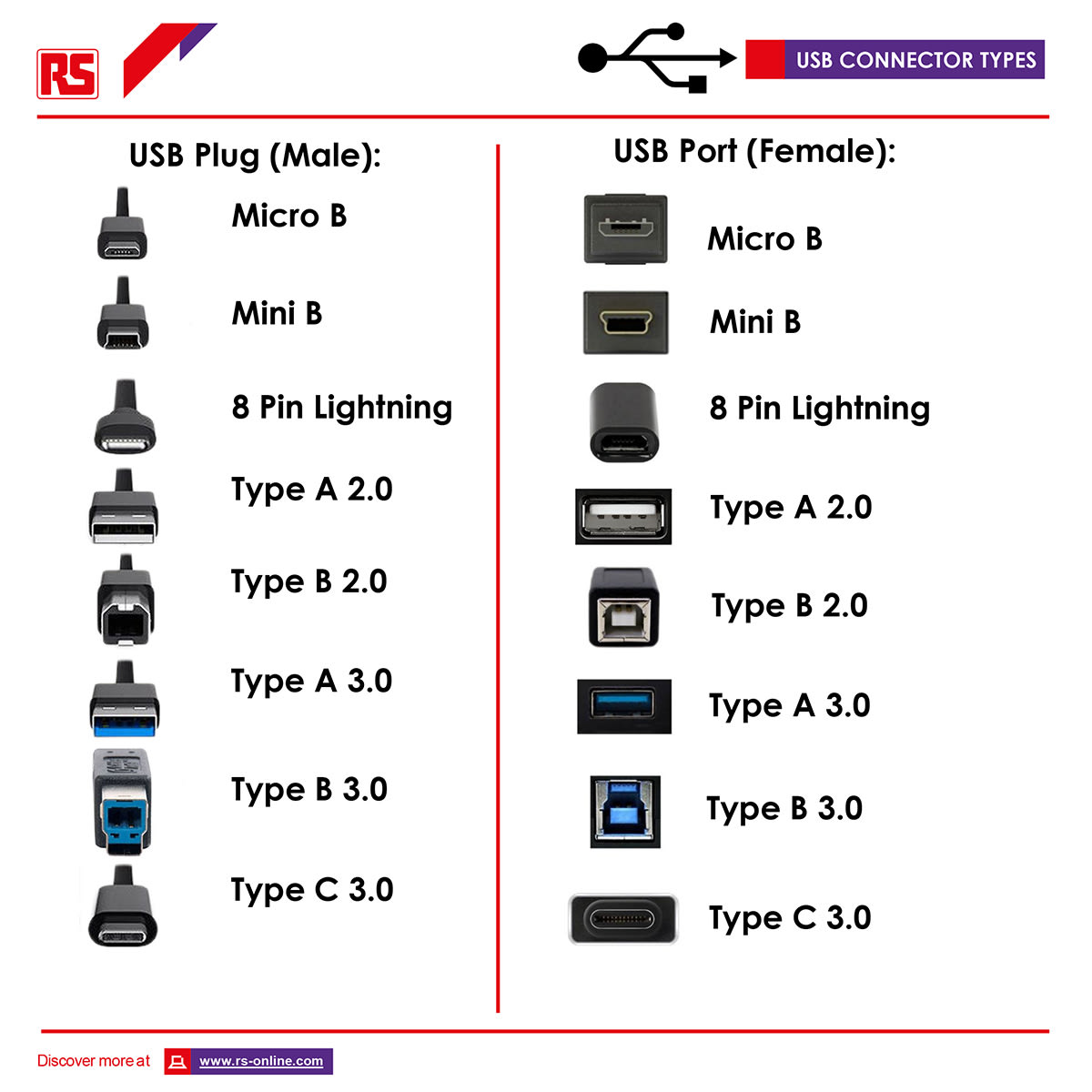
Once your power bank is fully charged, it is ready to power your devices. Using the correct cable ensures efficient charging and prevents damage to your devices.
Match Your Device Charging Cable
Use a cable compatible with your device. Lightning cables work for iPhones, and you should use MFi-certified cables for reliability. USB-C cables are required for Android phones, newer iPads, and iPhone 15 and later models. USB-C to USB-C cables enable fast charging with PD-compatible devices. Avoid cheap or frayed cables because they reduce charging speed and can pose safety risks.
Plug Into the Output Port
Insert the USB end into the power bank output port, which is usually labeled “OUT.” Then connect the other end to your device. Most modern power banks start charging automatically when a device is detected.
Activate Charging on Manual Power Banks
Some models require a button press to begin power delivery. If your device is not charging, you may need to activate the power bank manually.
Press the Power Button
Press the power button once to initiate charging. Listen for a beep or check for LED flashing to confirm activation. Make sure the power bank has remaining charge before attempting to connect your device.
Monitor Charging Status While Powering Up
Keep an eye on both your device and the power bank during charging to ensure everything is working properly.
Track Device Battery Level
Watch the battery icon on your phone or tablet. Charging may slow down if you are using GPS, streaming video, or gaming. Turning off your device or enabling airplane mode will charge it faster.
Read Power Bank LEDs
LEDs show remaining capacity on the power bank. Refer to your model manual because some blink during charging while others display steady lights. A rapidly flashing light may indicate a fault that requires attention.
Understand Real-World Efficiency

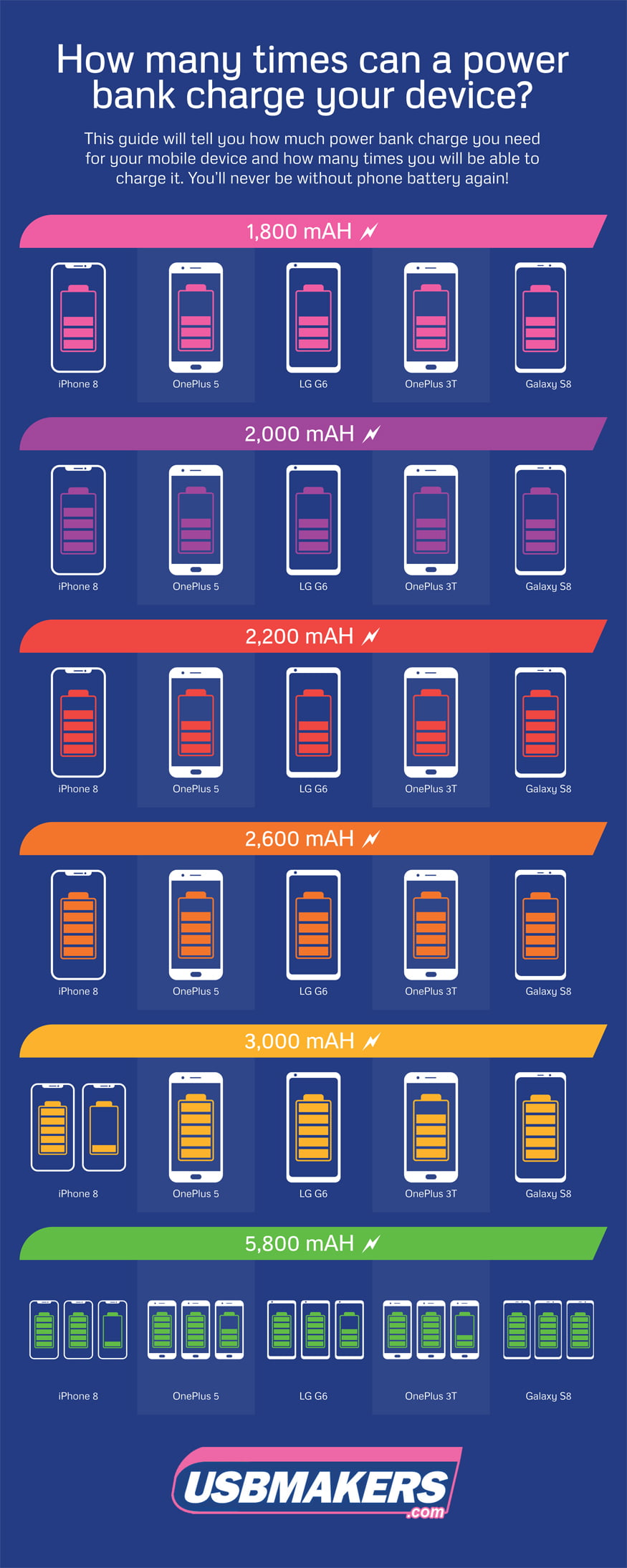
Due to energy loss from voltage conversion and heat, only 60 to 80 percent of the rated capacity is usable. A 10,000 mAh power bank delivers approximately 7,000 mAh to your phone. This means a 10,000 mAh unit can charge an iPhone 14, which has a 3,200 mAh battery, about two times.
Disconnect Safely to Protect Your Devices
Improper disconnection can lead to data loss or battery wear. Following the correct order protects your device charging port.
Unplug in the Right Order
Remove the cable from your device first, then unplug from the power bank. This prevents electrical surges and protects your device port from damage.
Avoid Overcharging
Modern smartphones stop drawing power at 100 percent, but leaving them connected for hours can cause minor battery stress. Unplug once fully charged or at your target level, such as 80 percent for longevity.
Recharge the Power Bank After Each Use
A drained power bank will not help when you need it most. Recharging promptly ensures readiness.
Charge After Each Use
Recharge the power bank as soon as possible after use. Waiting too long can lead to deep discharge, which damages lithium-ion cells over time.
Use Fast-Charging Accessories
To save time, use a wall adapter and cable that support the power bank maximum input, such as USB-C PD input. This cuts recharge time by up to 50 percent compared to standard 5V/1A chargers.
Match Charger Capacity to Your Device Needs
Not all power banks work equally well with every device. Choosing the right capacity and output ensures optimal performance.
Check Port Compatibility
USB-A ports are common but slower. USB-C ports support faster charging and newer devices. Dual or multi-port models charge two devices at once, though this may reduce speed per port.
Verify Output Speed
Look for 5V/2.1A output for fast phone charging. USB Power Delivery or Quick Charge 3.0 plus provides rapid charging on compatible devices. An 18W PD power bank can charge an iPhone 15 to 50 percent in approximately 30 minutes.
Choose the Right Capacity
Select capacity based on your needs. A 5,000 mAh unit works for daily top-ups and charging earbuds, providing one to 1.5 charges. A 10,000 mAh unit suits commuting and short trips, providing two to three charges. A 20,000 mAh or larger unit is ideal for travel and multiple devices, providing four or more charges.
Airline rules limit power banks to 100Wh or less, which is approximately 27,000 mAh, in carry-on luggage. Avoid placing power banks in checked baggage.
Maintain Your Power Bank for Long-Term Use
Proper care extends your power bank life and keeps it safe to use.
Avoid Extreme Temperatures
Never leave a power bank in hot cars above 35 degrees Celsius or 95 degrees Fahrenheit. Freezing conditions below 0 degrees Celsius or 32 degrees Fahrenheit also damage performance. Heat accelerates battery degradation while cold reduces temporary performance.
Prevent Physical Damage
Do not drop or crush the unit. Store it in a protective case if carried loose. Keep it away from water and humidity.
Clean Charging Ports
Use a dry toothbrush or compressed air to remove lint and dust from USB ports. Dirty contacts cause poor connections and slow charging.
Store Properly for Extended Breaks
How you store a power bank affects its longevity.
Short-Term Storage
For storage under one month, store fully charged. This is ideal for daily carry units used weekly.
Long-Term Storage
For storage over one month, charge to 50 to 60 percent and store in a cool, dry place. Recharge every three to six months to prevent deep discharge. Lithium batteries degrade faster when stored at 0 percent or 100 percent charge.
Follow Essential Safety Precautions
Modern power banks include built-in protections, but safe habits are still crucial.
Built-In Safety Features
Overcharge protection stops charging at 100 percent. Over-discharge protection prevents cell damage below 3V. Short-circuit and surge protection blocks dangerous current spikes. Temperature monitoring reduces output if overheating occurs.
Safe Usage Habits
Use only certified cables and adapters. Do not cover the power bank during use, such as under a pillow. Avoid charging the power bank and your phone at the same time because this generates excess heat. Never open or modify the unit because exposed lithium cells are hazardous.
Warning: If the power bank feels hot, smells odd, or appears swollen, stop using it immediately and dispose of it at an e-waste facility.
Troubleshoot Common Charging Problems
Quick fixes for frequent issues help you get back to using your devices.
No Power Output
If there is no power output, the power bank may be dead. Recharge it. Some models require manual activation, so press the power button. A faulty cable may also be the cause, so try a different certified cable.
Slow Charging
Slow charging may occur if using a low-output port. Use a 5V/2.1A or PD port instead. Heavy device usage during charging also slows progress, so reduce screen brightness or close apps. Poor-quality cables cause slow charging, so replace with high-speed USB-C or MFi cables.
Overheating
High ambient temperature causes overheating. Move to shade or a cooler area. Charging while gaming causes excess heat, so pause intensive tasks. A defective unit may overheat, so discontinue use and check the warranty.
Swollen or Leaking Unit
If the unit is swollen or leaking, stop using it immediately. Do not puncture or throw in regular trash. Dispose at a certified e-waste center.
Maximize Your Power Bank Lifespan
A well-maintained power bank lasts 2 to 3 years with proper care.
Expected Lifespan
Power banks typically provide 300 to 500 full charge cycles before capacity drops to 80 percent. Recharging from 20 to 100 percent every two days equals approximately a two-year lifespan.
Warranty Coverage
Reputable brands offer 12 to 24 month warranties covering defects. These warranties cover manufacturing defects but not physical damage or misuse. Register online if required.
Signs It Is Time to Replace
Replace your power bank if it takes much longer to charge devices. Replace if it loses charge quickly when idle. Replace if LEDs show full but it shuts off under load. Replace if there is physical damage or swelling.
Pro Tip: Buy from trusted brands like Anker, Nimble, or Belkin with safety certifications including CE, FCC, and RoHS.
Frequently Asked Questions About Portable Battery Chargers
How long does it take to fully charge a portable battery charger?
Charging time depends on capacity and input specifications. A 5,000 mAh power bank takes approximately 2 to 3 hours. A 10,000 mAh unit takes 4 to 6 hours. A 20,000 mAh unit takes 6 to 10 hours. Using a wall adapter with higher output, such as 5V/2A, speeds up the process compared to computer USB ports.
Can I use my phone while it is charging from a power bank?
Yes, you can use your phone while it charges. However, intensive activities like gaming, video streaming, or GPS navigation will slow down the charging speed. For fastest results, turn off your device or enable airplane mode during charging.
How many times can a power bank charge my phone?
This depends on the power bank capacity and your phone battery size. A 10,000 mAh power bank delivers approximately 7,000 mAh of usable energy, which charges an iPhone 14 about two times. A 5,000 mAh unit provides one to 1.5 charges, while a 20,000 mAh unit provides four or more charges.
Is it safe to leave a power bank charging overnight?
Modern power banks have overcharge protection that stops charging at 100 percent. However, leaving the power bank plugged in for extended periods after reaching full charge can contribute to minor battery degradation over time. It is better to unplug once fully charged.
What should I do if my power bank gets hot during use?
Some warmth is normal during charging, but excessive heat indicates a problem. Stop using the power bank and move it to a cooler location. Do not cover it with blankets or place it in enclosed spaces. If the heat persists or the unit smells odd or swells, discontinue use immediately and dispose of it properly.
Can I bring a power bank on an airplane?
Yes, you can bring power banks in carry-on luggage. Airline regulations limit power banks to 100Wh or less, which is approximately 27,000 mAh. Most consumer power banks fall well below this limit. Check the watt-hour rating on your device before traveling, and always keep power banks in your carry-on bag, never in checked luggage.
Key Takeaways for Using Portable Battery Chargers

Using a portable battery charger effectively requires more than just plugging in. It involves smart habits and proper care to ensure reliability when you need it most.
Always start with a fully charged unit, especially before first use or after storage. Use high-quality, certified cables that match your device, whether Lightning for iPhones or USB-C for Android and modern devices. Monitor charging progress through LED indicators on both the power bank and your device. Disconnect safely by removing the cable from your device first, then from the power bank. Recharge the power bank promptly after use to prevent deep discharge that damages lithium-ion cells.
Store your power bank at 50 to 60 percent charge for long breaks, and avoid extreme temperatures that accelerate degradation. Inspect regularly for physical damage, swelling, or unusual heat. When it is time to replace, dispose of old units at certified e-waste facilities rather than regular trash.
By following these steps, you will keep your phone powered through commutes, trips, and emergencies. A portable battery charger is not just a backup; it is a reliable power partner for modern life. With proper use, it ensures you are never left powerless when you need it most.





