
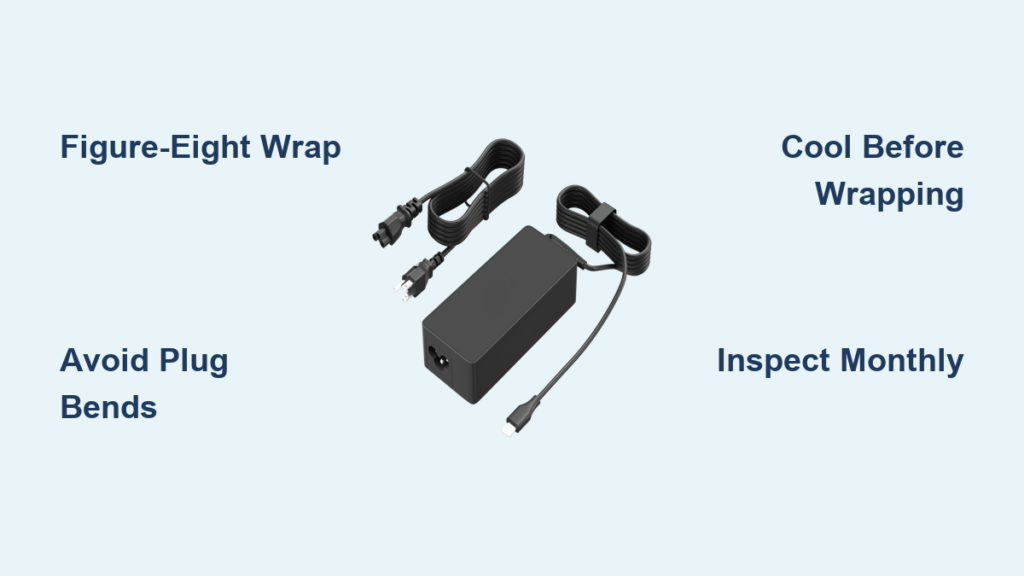
A frayed or failing Chromebook charger often isn’t a sign of poor quality. It’s usually the result of improper wrapping and handling. Learning how to wrap a Chromebook charger correctly can extend its life by years, prevent charging issues, and save you money on replacements. With students, teachers, and remote workers relying on these devices daily, mastering the right technique is essential for protecting your investment.
This guide covers the best wrapping methods, common mistakes to avoid, proper securing techniques, and inspection tips to keep your charger functioning reliably. Whether you’re managing a classroom of devices or caring for your personal charger, these practices will help ensure consistent performance.
The Figure-Eight Method for Chromebook Chargers

The figure-eight (or accordion) method is the gold standard for wrapping a Chromebook charger. This technique prevents internal wire damage by eliminating twists and sharp bends, preserving flexibility and conductivity over time.
Starting at the Wall Plug End
Always begin wrapping from the heavier AC plug end. This reduces strain on the more delicate USB-C connector and aligns with manufacturer-recommended handling practices. Hold the plug in one hand and let the cord drape naturally downward before you begin forming loops.
Forming Smooth Alternating Loops
Using both hands, create a continuous figure-eight pattern by following these steps:
- Loop the cord over one hand, then under the next
- Maintain a natural bend angle, never forcing the cable into tight angles
- Keep loops consistent at approximately 6 to 8 inches wide to avoid kinking
- Hold the bundle together with one hand while preparing to secure it
This technique mimics how professionals coil audio and power cables, distributing stress evenly and preventing torsion buildup that can degrade internal wiring over time.
Avoiding Cable Twists
As you wrap, check that the cord doesn’t rotate. A twisted cable can damage internal wiring, leading to intermittent charging or complete failure. If you notice twists forming, unwind and restart the process to ensure proper strain distribution.
Pro Tip: Practice the figure-eight motion slowly at first. Once mastered, this wrapping technique takes less than 30 seconds and becomes second nature.
Wrapping a Chromebook Charger with the Coil Method
The coil method serves as an acceptable alternative when the figure-eight technique isn’t practical, such as in tight spaces or for quick temporary storage.
Creating Loose Coils
When using this method, follow these guidelines:
- Use your hand or wrist as a guide to form gentle circular loops
- Keep each loop loose, never winding tightly like a garden hose
- Aim for a diameter of at least 6 inches to protect internal conductors
- Avoid tight winding, which compresses and damages internal copper wires
Tight coiling compresses the copper wires and insulation inside the cable, significantly increasing the risk of breakage over time, especially near the connector ends.
Why the Figure-Eight Remains Preferred
Repeated tight coiling may lead to cable fatigue, particularly near the plug and USB-C ends where strain relief zones are designed to flex slightly. The figure-eight method better distributes tension and prevents this fatigue, making it the recommended approach for long-term storage.
How to Secure Your Wrapped Charger
A properly wrapped charger stays neat only if fastened correctly. Using the right tool and technique prevents unraveling without damaging the cord.
Using the Built-In Elastic Strap
Most Chromebook chargers come with a mid-cable elastic strap featuring Velcro. To use it effectively:
- Position the strap at the top of the bundle after forming your figure-eight
- Open the loop and pass the strap around the coils once
- Fasten the Velcro securely but not tightly
Over-tightening can compress the cable and degrade insulation over time, defeating the purpose of careful wrapping.
Orienting Velcro Outward
Always orient the Velcro side facing outward. This orientation provides several benefits:
- Quick release when you need to unwrap
- Easy visual inspection during monthly checks
- Faster scanning in school or office environments
Institutional Insight: Schools that standardize outward-facing Velcro report 25% faster device collection during tech turnover and inventory checks.
Safe Substitutes for Missing Straps
If the original elastic strap is lost or broken, these alternatives work safely:
- Fabric-covered hair ties — gentle, stretchy, and widely available
- Soft rubber bands — replace every 4 to 6 weeks to prevent drying or snapping
- Reusable Velcro wraps — ideal for long-term replacement, available in 6-inch or 12-inch lengths
Avoid narrow elastic bands or latex rubber, as these can dig into the cable jacket or leave sticky residue that attracts debris.
Common Wrapping Mistakes to Avoid

Even small errors can drastically shorten your charger’s lifespan. Steer clear of these frequent mistakes to protect your investment.
Never Bend Near the Plug Ends
Do not crease or bend the cable within 2 inches of either plug. These strain relief zones are designed to flex slightly, but sharp bends here cause cracks in the insulation and break internal wires. This is the most common location for charger failures.
Don’t Wrap a Warm Charger
Heat softens the cable jacket. Wrapping while the charger is warm from use can set permanent kinks or deformations into the cable. Always let the charger cool completely before storing it.
Never Yank the Cord from the Outlet
Always pull by the plug head, never by the cable. Repeated tugging stresses the connection point inside the connector and can disconnect internal wires, causing intermittent charging or complete failure.
Fact: Up to 70% of charger failures stem from physical damage caused by improper handling and storage, not from electrical issues or manufacturing defects.
Monthly Inspection Tips for Chromebook Charger
Regular checks catch problems early and extend charger life significantly. Monthly inspections can increase charger lifespan by up to 40%, according to institutional IT data.
Warning Signs to Look For
During your monthly inspection, check for these indicators of damage:
- Fraying or cracking in the insulation, especially near plugs
- Discoloration or melting around connectors, which indicates overheating
- Intermittent charging or slow power delivery
- Loose fit in the wall outlet or Chromebook port
If you notice any of these warning signs, stop using the charger immediately to prevent safety hazards.
Testing Charging Performance
Plug in your Chromebook and observe these performance indicators:
- Does the device charge consistently without dropping power?
- Does the battery level rise within 10 minutes of charging?
- Does the charger feel unusually hot to the touch during use?
A failing charger may still work intermittently but poses a fire risk. Replace any charger showing signs of damage rather than attempting repairs with tape or glue.
Expert Note: Most OEM Chromebook chargers come with a 1-year limited warranty, but physical damage from improper wrapping is typically not covered.
Understanding Your Chromebook Charger Design

Knowing your charger’s build helps you handle it properly and understand why certain wrapping techniques matter.
Standard Chromebook Charger Specifications
Most Chromebook chargers share these characteristics:
- Cable length: 48 inches (1.2 meters) — long enough for flexibility, short enough to avoid excess slack
- Power output: 45W for most models, though some newer ones use 65W
- Connectors: USB-C for the device end, standard AC plug for wall outlet
- Cable diameter: approximately 4mm, requiring a minimum bend radius of 1 inch
- Strain relief: Molded rubber at both ends to absorb tension
Built-In Durability Features
Your charger includes several protective elements:
- Flexible TPE or PVC jacketing — resists cracking and abrasion
- Integrated elastic strap — designed for repeated use
- Overmolded connectors — prevent pull-induced wire separation
Handle with care to preserve these protective elements. The strain relief zones near the plugs are specifically designed to flex slightly, but they have limits.
Best Practices for Different Users
Different users have different needs. Tailor your approach accordingly to maximize charger longevity.
For K-12 Students
Students should follow these specific practices:
- Learn the figure-eight method early in the school year
- Use rubber bands or hair ties as backup fasteners when the original strap is lost
- Store wrapped chargers in a padded compartment or soft pouch inside backpacks
Field Result: Schools that train students on proper wrapping techniques see a 30% drop in annual charger replacements, saving significant budget dollars.
For Teachers and IT Staff
Educators and technology staff should enforce these standards:
- Require figure-eight fold with outward-facing Velcro on all devices
- Conduct monthly visual audits during device check-ins
- Keep spare Velcro wraps and hair ties on hand for students who lose theirs
For Remote Learners and Travelers
Portable users should take these additional precautions:
- Wrap using the figure-eight method and store in a fabric sleeve or padded case
- Never stuff a charger into a backpack without protection
- Unwrap fully before charging to prevent heat buildup in the cable
Extending Your Chromebook Charger Lifespan
Small daily habits make a big difference in how long your charger lasts. A properly maintained charger typically lasts 2 to 3 years under daily use, while one that is mistreated may fail in under a year.
Smart Storage Habits
Follow these storage guidelines:
- Store in a cool, dry place away from hot cars, direct sunlight, and damp areas
- Heat and UV exposure degrade rubber and plastic components over time
- Never step on or pinch the cord beneath furniture or door frames
- Even minor repeated pressure can crush internal wires
Fastener Maintenance
Replace worn fasteners regularly to maintain secure wrapping:
- Swap rubber bands and hair ties every 4 to 8 weeks
- Degraded fasteners can snap or leave residue on cables
- Keep extras on hand so you never wrap with a worn tie
Longevity Benchmark: Proper wrapping combined with smart storage habits can double your charger’s functional lifespan, making the small effort well worth it.
Warranty and Replacement Information
Understanding warranty coverage helps you make smart decisions about charger care and replacement.
What Is Covered
Most OEM Chromebook chargers include these warranty terms:
- 1-year limited warranty covering manufacturing defects
- Coverage does not extend to physical damage from improper handling
- Replacement cost ranges from $20 to $40 per unit as of 2024
Safety Considerations
Keep these safety points in mind:
- Using damaged or uncertified chargers can void device warranties
- Damaged chargers pose fire risks, especially when left unattended during charging
- Third-party chargers may lack safety certifications — use OEM when possible
Key Takeaways for Wrapping Your Chromebook Charger
Wrapping a Chromebook charger correctly isn’t just about neatness. It’s about safety, performance, and cost savings that add up over time.
The figure-eight method remains the gold standard for protecting internal wiring. Always start wrapping from the wall plug end and form consistent 6 to 8 inch loops. Secure your wrapped charger with the built-in elastic strap, keeping the Velcro facing outward for quick access and easy inspection.
Avoid common mistakes like bending near the plug ends, wrapping warm chargers, or yanking the cord from outlets. Inspect your charger monthly for fraying, discoloration, or loose connections. Replace any damaged charger immediately rather than attempting temporary fixes.
Whether you’re a student, teacher, or remote professional, a few seconds of proper care today can save hours of frustration and dollars in replacement costs tomorrow. Your Chromebook depends on its charger for reliable operation, and protecting that connection is simpler than you might think.
Frequently Asked Questions About Wrapping a Chromebook Charger
What is the best way to wrap a Chromebook charger?
The figure-eight (accordion) method is the best technique. Create alternating loops over and under, keeping each loop 6 to 8 inches wide. This distributes stress evenly and prevents internal wire damage.
Can I use a regular rubber band to wrap my Chromebook charger?
Yes, soft rubber bands work as a temporary substitute. Replace them every 4 to 6 weeks to prevent drying, snapping, or leaving sticky residue on the cable.
How often should I inspect my Chromebook charger?
Inspect monthly for signs of wear, damage, or fraying. Check for discoloration near connectors, which indicates overheating, and test that charging works consistently.
Why does my charger stop working after a few months?
Most charger failures result from physical damage caused by improper wrapping, yanking the cord from the outlet, or bending too close to the plug ends. Up to 70% of charger failures stem from handling issues, not electrical defects.
Is it okay to wrap my charger while it’s still warm?
No. Always let the charger cool completely before wrapping. Heat softens the cable jacket, and wrapping while warm can set permanent kinks or deformations into the cable.
Where can I buy replacement straps for my Chromebook charger?
Replacement Velcro wraps are available in electronics stores and online retailers in 6-inch and 12-inch lengths. Fabric-covered hair ties also work well as substitutes and are widely available at drugstores and supermarkets.





