
Your PSP charger is missing, and you want to keep playing your favorite games. The good news is that you can charge a PSP without the original charger using several reliable methods that work with common tech you already own. Whether you have a PSP-1000, PSP-2000, PSP-3000, or PSP Go, there is a solution that fits your situation and technical comfort level.
This guide covers every tested method for charging your PSP without the original adapter. You will learn which methods work for your specific model, what equipment you need, and how to avoid common mistakes that could damage your device. Each approach is broken down into simple steps so you can get back to gaming quickly.
Charge PSP-2000/3000 via USB
The PSP-2000 and PSP-3000 support USB charging when powered on, making them the easiest models to charge without the original wall adapter.
Enable USB Charging Mode
Before connecting your PSP to a USB power source, you must enable the charging setting:
- Power on your PSP
- Navigate to Settings
- Select System Settings
- Choose USB Charge and set it to On
- Optionally enable USB Auto Connect for faster recognition
Connect to a USB Power Source
Once charging is enabled, connect your PSP to any compatible power source:
- Use a data-capable mini-USB cable (not charge-only)
- Plug the mini-USB end into the port on the right side of the device
- Connect the USB-A end to a computer, USB wall adapter, power bank, or powered USB hub
Verify Charging Is Active
Look for these indicators to confirm charging is working:
- Screen displays “USB Mode”
- Battery icon animates (moves back and forth)
- Power light blinks green, then turns solid orange
Important: The PSP must be powered on and have some battery remaining. A completely dead battery cannot be revived via USB.
Charging Times: Using a 1A or 2.1A wall adapter provides faster charging (4-5 hours). Computer USB ports at 500mA take 5-6 hours for a full charge.
Use a Universal 5V Adapter (All PSP Models)
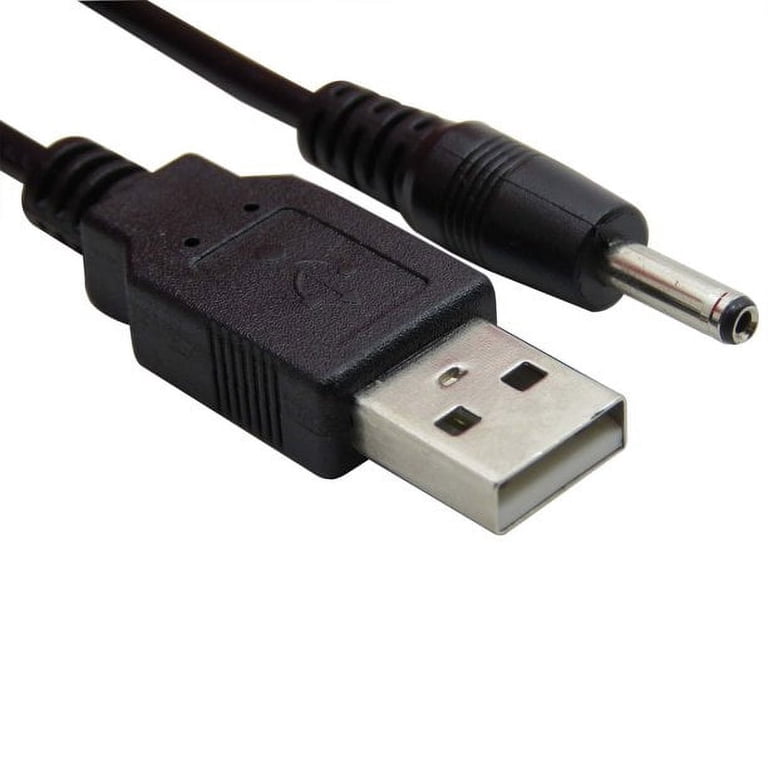
Any PSP model can be charged using a compatible 5V DC power adapter, regardless of whether the original charger is available.
Required Specifications
Your adapter must meet these exact requirements:
- Voltage: 5V DC (exact match required)
- Current: 1A minimum, 2A recommended
- Connector: 4.0mm × 1.35mm barrel plug
- Polarity: Center-positive (outer sleeve negative)
Warning: Never use 9V, 12V, or reverse polarity adapters. This can permanently damage your PSP.
How to Connect
- Acquire a universal 5V adapter (old phone charger works well)
- Use a PSP USB-to-barrel adapter or create a custom cable
- Plug into the PSP charging port (bottom-right corner)
- Verify the power light turns solid orange
Tested Compatible Sources: Many users report success with old Nokia chargers, Samsung Galaxy wall adapters with the correct barrel plug, and universal travel chargers.
PSP-1000 USB Charging Workarounds

The PSP-1000 does not support USB charging natively. Its USB port is data-only, but alternative solutions exist.
Use a USB-to-Barrel Adapter
This plug-and-play solution works on all PSP models including the PSP-1000:
- Purchase a PSP USB charging adapter (search “PSP micro-USB converter”)
- Plug a standard USB cable into the adapter
- Insert the barrel plug into the PSP charging port
- Connect to any 5V source (wall adapter, power bank, computer)
Verified User Report: “I charge my PSP-1000 using a Taobao adapter and my phone charger. Works perfectly.”
DIY Spliced Cable (Advanced Users)
For a permanent, low-cost solution, splice a USB cable to a PSP barrel plug:
- Cut a 5V USB cable and keep the barrel plug from an old PSP charger
- Strip the wires carefully
- Connect USB red (positive) to PSP red (positive)
- Connect USB black (negative) to PSP black (negative)
- Insulate each joint with heat shrink tubing or electrical tape
- Test with a 5V source before regular use
Cost: Approximately $3 in parts versus $15+ for a new charger.
Safety Note: Double-check polarity before connecting. Reverse polarity can destroy the battery.
Charge the PSP Go Without the Dock
The PSP Go lacks standard ports and charges via a proprietary dock, but alternatives are available.
Use a Micro-USB Charging Adapter
Third-party adapters convert the slide-in port to standard micro-USB:
- Purchase a PSP Go micro-USB adapter ($5-$12 on Amazon or AliExpress)
- Plug in any micro-USB cable
- Connect to a 5V source (wall adapter, power bank, computer)
Advantages: Charges while powered off, unlike PSP-2000/3000.
Disadvantage: Some adapters have a slight wobble. Ensure secure fit before leaving unattended.
Official Charging Dock Option
The N100 charging dock remains the most reliable method:
- Slide PSP Go into the dock
- Connect the dock’s micro-USB cable to any 5V source
- Orange LED indicates charging
- Full charge takes approximately 4 hours
Availability: Official docks are discontinued but available secondhand.
Direct Battery Charging (All Models)

Bypass the PSP entirely by charging the battery externally. This method works on any PSP model.
What You Will Need
- 5V USB wall adapter
- USB cable (you will cut and strip this)
- Small Phillips screwdriver
- Isopropyl alcohol (for cleaning contacts)
Step-by-Step Process
- Remove the back cover (four screws)
- Pull out the battery carefully
- Cut and strip a USB cable, discarding the green and white data wires
- Connect red (USB positive) to the battery positive terminal
- Connect black (USB negative) to the battery negative terminal
- Plug into the 5V source to begin charging
- Reinstall after 2-4 hours
Safety Warnings: Never use chargers above 5V or 1A. Do not leave unattended. Disconnect when fully charged.
Solder a USB Port Mod (Permanent Fix)
Upgrade your PSP-2000 or PSP-3000 with a micro-USB or USB-C port for modern charging convenience.
Tools Required
- Micro-USB or USB-C DIP adapter board
- Soldering iron with fine tip
- Screwdriver set
- Heat shrink tubing
Installation Steps
- Disassemble the PSP by removing rear, top, and bottom screws
- Carefully lift the front housing
- Locate the charging port wires (left wire is VBUS/positive, right is GND/negative)
- Solder the wires to the new port adapter
- Mount the port using hot glue or small screws
- Reassemble and test with any Android charger
Benefits: No more proprietary cables. Charge like a modern phone.
Warning: Use only 5V chargers. Avoid fast-charging adapters (QC3.0, PD) as they can damage the device.
Alternative Power Sources That Work
You do not need a wall outlet. These tested sources deliver reliable 5V power:
- Computer USB port: Works but slower
- Power bank: Ideal for travel (PSP must be on except PSP Go)
- Car USB charger: Works with stable 5V output
- TV USB port: Only if powered when TV is off
- Solar charger: Must regulate to 5V
- Universal battery charger dock: Charge battery externally
Travel Tip: Power banks are ideal for retro gamers on the go.
Troubleshoot Charging Problems
PSP Does Not Charge via USB
- Power on the PSP first (required for 2000/3000 models)
- Enable USB Charge in System Settings
- Use a 1A+ wall adapter instead of computer ports
- Clean battery contacts with isopropyl alcohol
Power Light Blinks Green but No Charge
- Try a different cable or adapter
- Inspect the port for debris or bent pins
- Test with another PSP if available
- The battery may be completely dead
Third-Party Charger Fails After Short Use
- Buy from reputable sellers with verified reviews
- Avoid chargers under $3
- Choose chargers with overcurrent protection
Safety and Battery Care Tips
Avoid These Risks
- Overvoltage: Use only 5V sources
- Reverse polarity: Always verify red-to-red, black-to-black
- Overcharging: Disconnect when battery is full
- Unattended DIY setups: Monitor direct battery charging
Extend Battery Life
- Store at 50% charge if unused for extended periods
- Replace old batteries ($8-$15 on Amazon)
- Avoid charging on beds or couches
- Lithium-ion batteries degrade over time. A 10-year-old PSP may need a new battery even if charging works.
Best Method by PSP Model
| Model | Recommended Charging Method |
|---|---|
| PSP-1000 | USB-to-barrel adapter or DIY spliced cable |
| PSP-2000 | USB cable (device powered on) |
| PSP-3000 | USB cable (device powered on) |
| PSP Go | Micro-USB adapter or official dock |
Frequently Asked Questions About Charging a PSP Without the Charger
Can I charge my PSP-1000 via USB?
No, the PSP-1000 does not support USB charging natively. Its USB port is data-only. Use a USB-to-barrel adapter or DIY spliced cable instead.
How long does USB charging take on PSP-2000/3000?
Using a computer USB port (500mA) takes 5-6 hours. Using a 1A or 2.1A wall adapter reduces this to 4-5 hours.
Can I use a phone charger to charge my PSP?
Yes, if the phone charger outputs 5V DC and you use the correct barrel adapter or cable. Avoid fast-charging adapters.
What happens if I use the wrong voltage adapter?
Using 9V, 12V, or reverse polarity can permanently damage your PSP charging circuit or battery. Always verify specifications before connecting.
Can I charge my PSP while playing?
No, the PSP will discharge while in use even when connected to USB power. Charging only occurs when the device is idle or powered off (PSP Go only).
Is it safe to charge my PSP overnight?
It is not recommended to leave any device charging unattended overnight. Disconnect when fully charged to extend battery lifespan.
Key Takeaways for Charging Your PSP Without the Original Charger
The right method depends entirely on your PSP model. PSP-2000 and PSP-3000 users have the easiest path with built-in USB charging. PSP-1000 owners need adapters or DIY solutions. PSP Go users rely on third-party adapters or secondhand docks.
Always use 5V power sources and verify polarity before connecting any DIY setup. Cheap, unregulated chargers risk damaging your device. A $5 universal adapter or USB-to-barrel converter is the safest investment for reliable charging.
Practical Next Step: Determine your PSP model, then choose the matching method from this guide. Order a USB-to-barrel adapter online or repurpose an old phone charger to get your PSP powered and back in your hands today.





