
You’re on a shoot, your Canon camera battery is dead, and you’ve lost the charger. It’s a frustrating but common scenario for photographers and videographers. The good news is that you don’t always need the original Canon charger to power up your battery. Depending on your camera model and battery type, there are several reliable ways to charge a Canon battery without its dedicated charger using USB-C, power banks, universal chargers, or portable solar stations.
This guide reveals nine proven methods to charge your Canon battery without the official charger, backed by technical specs and critical safety insights. Whether you’re a travel photographer, event shooter, or studio pro, you’ll learn how to keep your gear running anywhere, anytime.
Check Your Canon Battery Model First
Before trying any alternative charging method, identify your battery type. Not all Canon batteries support in-camera or USB charging, and using the wrong method can damage your equipment.
Common Canon Batteries and Charging Support
| Battery | In-Camera USB Charging? | Requires External Charger? |
|---|---|---|
| LP-E6 / E6N / E6NH | Yes (in R-series, RP, R6) | No |
| LP-E17 | Yes (M50, M50 Mark II) | No |
| LP-E10 | No (T7, SL3) | Yes |
| LP-E5 | No (5D Mark II) | Yes |
| NB-4L | No (PowerShot) | Yes |
Mirrorless models like the EOS R, RP, R5, and R6 support USB-C Power Delivery charging. Most DSLRs like the Rebel T7, T6, and 77D do not. Check your camera’s manual or Canon’s website to confirm USB charging compatibility before proceeding.
Use In-Camera USB-C Charging (No Charger Needed)
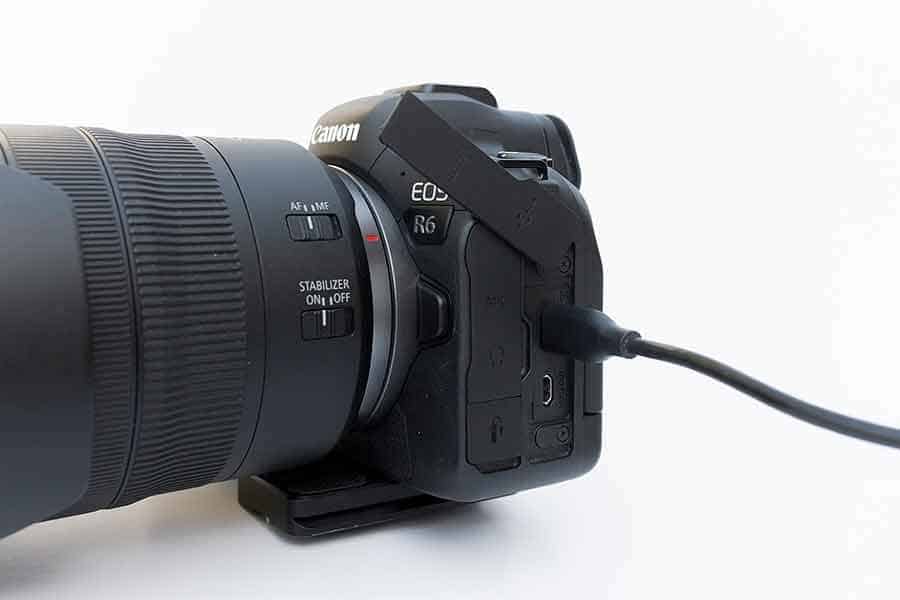
If you own a modern Canon mirrorless camera, you can charge the battery while it’s inside the camera with no removal required. This is the most convenient method for compatible models.
Compatible Canon Models
- EOS R, RP, R3, R5, R6, R6 Mark II
- EOS R7, R8, R10, R50, R100
- EOS M50 / M50 Mark II
- PowerShot G5 X Mark II, G7 X Mark III
Rebel T7, T6, SL3, and 7D models lack USB-C ports and cannot charge this way.
What You Need
- USB-C to USB-C cable (PD-rated)
- Power source with USB Power Delivery (PD) such as a wall charger (18W or higher), PD power bank, laptop with Thunderbolt 3/4, or car charger with USB-C PD
Use a certified PD cable. Cheap cables often lack the handshake protocol needed for charging.
How to Charge Step by Step
- Insert battery into the camera
- Power off the camera (required for EOS RP)
- Connect USB-C cable from camera to power source
- Look for orange/green LED near battery door or on-screen battery plus plug icon
- Charging completes in 1.5 to 3 hours
LP-E6NH with 18W PD charges in about 2 hours. EOS R5 with 30W PD charges in approximately 1.5 hours. Non-PD laptops may not charge at all.
Model-Specific Charging Rules
| Model | Charge While On? | Must Be Off? |
|---|---|---|
| EOS RP | No | Yes |
| EOS R6 / R5 | Yes | No |
| EOS R / R7 / R10 | Yes | No |
| M50 Mark II | Yes | No |
For long video shoots, use a 30W or higher PD charger. You can shoot and charge simultaneously on R5 and R6 models.
Use a Universal Battery Charger

For DSLRs or compact cameras that don’t support USB charging, a universal battery charger is your best alternative. These chargers work with multiple battery sizes and brands.
Types of Universal Chargers
| Type | Best For | Price |
|---|---|---|
| Adjustable Plate | LP-E6, LP-E17, LP-E10 | $15-$30 |
| LCD Display | Studio use, voltage monitoring | $25-$50 |
| Multi-Bay | Event photographers (2-4 batteries) | $40-$80 |
How to Use
- Insert battery into the charger
- Adjust metal contacts to fit terminals
- Plug into wall outlet or USB power bank
- Wait for LED to turn green (fully charged)
Only use chargers that list your battery model in compatibility. Mismatched voltage can cause fire or battery swelling.
Safety Features to Look For
- Overcharge protection
- Auto shutoff
- Overcurrent and short-circuit protection
- Temperature monitoring
Avoid no-name brands from unknown sellers. Stick to Anker, Wasabi, or PowerExtra for reliability.
Charge With a USB-Powered External Charger
This method is ideal for LP-E10 (Rebel T7) or LP-E17 (M50) users without USB-C cameras. USB-powered chargers let you charge using any USB power source.
How It Works
- Plug a USB-powered charger into a phone wall adapter, power bank, or laptop USB port
- Insert battery into the charger
- Charge completes in 2 to 3 hours
This is perfect for travel, events, or emergency charging when you need a backup power source.
Example: LP-E10 USB charger accepts input from USB-A or USB-C and outputs 7.2V at 700mA. Compatible with Anker, Samsung, or Apple USB chargers.
Some USB-powered chargers lack safety circuits, so choose models from reputable brands.
Use a Dummy Battery + AC Adapter
For studio work, product shoots, or live streaming, a dummy battery system provides unlimited power without battery swaps. This setup keeps your camera running continuously.
What You Need
- Dummy battery (e.g., D-Tap to LP-E6)
- AC adapter (100-240V to 7.4V DC)
- Optional: DC coupler (Canon DR-E6 for LP-E6)
Setup Steps
- Remove internal battery
- Insert dummy battery and route cable through battery door
- Connect to AC adapter or V-mount battery
- Plug in and camera powers on
Use velcro straps or a cage system (like SmallRig) to secure the cable during shoots.
Best Use Cases
- Studio photography
- Time-lapse sequences
- Video production
- Live streaming
This eliminates battery wear and the downtime of swapping batteries during critical shoots.
Charge With a Power Bank (On the Go)

A PD-compatible power bank lets you charge your Canon battery in the field with no wall outlet needed. This is essential for travel and outdoor photography.
Best Power Banks for Canon
| Model | Output | Capacity | Best For |
|---|---|---|---|
| Anker PowerCore 26800 PD | 100W USB-C | 26,800mAh | Fast R5/R6 charging |
| Jackery Explorer 100 Plus | 99.2Wh | Airline-safe | Travel |
| Anchor PD Power Bank | 65W | Budget option | Reliable backup |
| Jackery Explorer 300 Plus | 295Wh | Solar-compatible | Off-grid |
How to Charge
- Use USB-C to USB-C PD cable
- Connect camera to power bank
- Turn on power bank if required
- Wait for charging indicator
LP-E6NH charges in 1.5 to 2 hours from an Anker power bank. Mount the power bank to your camera rig with velcro or a cage for stable time-lapse work.
Use Solar Charging (Off-Grid Power)
For camping, hiking, or emergency use, solar power stations offer sustainable charging in remote locations where electricity is unavailable.
Recommended Solar Setup
- Jackery Explorer 300 Plus with SolarSaga 100W panel
- Recharges in 5 to 8 hours under sunny conditions
- Can charge EOS R6 three to four times on full battery
| Camera | Power Draw | Jackery 100 Plus Runtime |
|---|---|---|
| EOS R6 | 12W | About 7 hours |
| EOS C300 | 11.7W | About 7.2 hours |
| EOS C500 | 24W | About 3.5 hours |
Charge your power bank during the day using solar panels, then use it to charge your camera at night. Cloudy weather reduces efficiency by 50 to 80 percent.
Try Direct DC Power (Emergency Only)
This method is for experts only and carries significant risks. Only attempt if you have electrical engineering knowledge.
Requirements
- DC power supply (9V for 7.4V LP-E6)
- Resistor to limit current
- Multimeter
- Insulated wires
Steps
- Connect DC positive to resistor to battery positive
- Connect DC negative to battery negative
- Monitor voltage and current continuously
Risk of overcharging, fire, or explosion exists. This method is not recommended for casual users.
Charge From a Laptop or Desktop
Most modern laptops with Thunderbolt 3/4 or USB-C PD can charge Canon cameras. This works well for travelers with limited outlets.
How to Do It
- Use USB-C to USB-C cable
- Connect camera to laptop
- Keep laptop awake (charging stops if it sleeps)
- Check for charging indicator
Older laptops without PD will not charge the battery. Use a laptop with Thunderbolt 3/4 for reliable charging.
Use a Car Charger (On-the-Road Solution)
Keep your camera powered during road trips using a PD-compatible car charger. This solves battery issues while driving to locations.
What You Need
- PD-compatible car charger (USB-C, 18W or higher)
- USB-C to USB-C cable
Steps
- Plug into 12V socket
- Connect to camera
- Start engine (some cars disable power when off)
Never connect directly to the car battery without regulation, as this risks overvoltage damage.
Fix Common Charging Failures
Even with the right gear, charging can fail. Here’s how to troubleshoot the most common issues.
No Charging Light
- Cause: Low-power source (5V/0.5A)
- Fix: Use 18W or higher PD charger
Charging Stops Intermittently
- Cause: Power bank can’t sustain output
- Fix: Use wall charger or high-capacity bank
Battery Drains While Charging
- Cause: Input power is less than camera power draw
- Fix: Turn camera off during charging
Only Charges When Off
- Cause: Model limitation (EOS RP)
- Fix: Power off before connecting
Maximize Battery Life and Safety
Prolong your battery’s lifespan and avoid hazards by following these best practices.
Best Practices
- Recharge at 20 to 30 percent, avoid full discharges
- Store in cool, dry place
- Use original or certified accessories
- Keep batteries warm in cold weather
- Use viewfinder instead of LCD (saves 30 percent power)
- Turn off image stabilization when on tripod
Never charge batteries in microwave, oven, or direct sunlight.
Frequently Asked Questions About Charging Canon Battery Without Charger
Can I charge Canon with a phone charger?
Yes, if it supports USB Power Delivery (18W or higher). Most modern fast chargers from iPhone, Samsung, and other brands work with compatible Canon cameras.
Can I use HDMI to charge?
No. HDMI carries video and audio only with no power delivery capability.
Can I charge NB-4L without a charger?
No. NB-4L (used in PowerShot cameras) requires a dedicated external charger. These compact models do not support USB charging.
Can I charge multiple batteries at once?
Yes. Use a multi-bay universal charger that handles 2 to 4 batteries simultaneously. These typically cost $40 to $80.
How long does USB charging take?
LP-E6NH takes about 2 hours with 18W PD. EOS R5 with 30W PD charges in approximately 1.5 hours. Laptop (non-PD) takes 2.5 hours or may not charge at all.
Final Recommendations for Charging Canon Battery Without Charger
- Use an 18W or higher PD charger for reliable charging performance.
- Use a USB-C to USB-C PD cable and avoid cheap alternatives.
- Check if your camera must be off to charge, as some models like EOS RP require this.
- Carry a PD power bank for field use when outlets are unavailable.
- Use Jackery or Anker power stations for off-grid charging needs.
- Buy a replacement charger for unsupported models like NB-4L and LP-E10.
- Avoid non-PD chargers, unregulated power sources, and DIY voltage hacks.
You don’t need the original Canon charger to keep shooting. With the right tools like USB-C PD, power banks, universal chargers, or dummy batteries, you can charge your Canon battery anywhere. Match the method to your camera model, prioritize safety, and always verify compatibility. When in doubt, consult your camera’s manual or Canon’s official support resources.





