
You plug in your phone, but the charging icon looks slow. Is your charger actually fast or just pretending? With so many chargers labeled “fast” despite delivering standard speeds, knowing how to identify a fast charger is essential for getting real performance. True fast charging is not about branding. It is about power output, communication protocols, and compatible hardware.
In this guide, you will learn how to spot a real fast charger using physical labels, device feedback, cable specs, and testing tools. You will also discover common myths, compatibility traps, and what to look for in both wired and wireless setups.
Check Output Wattage and Voltage

The simplest way to identify a fast charger is by checking its output wattage. While any charger above 5W technically charges faster than old models, modern fast charging starts at 18W. Anything below this is likely standard or moderately improved, not truly fast.
Look for 18W or Higher Output
Find the output label on the charger, usually printed on the side or bottom. Ignore the input specs like 100-240V. Focus only on output, which lists volts, amps, and sometimes watts. Use this formula:
Watts = Volts × Amps
Examples include:
• 5V × 1A = 5W (standard, slow)
• 5V × 2.4A = 12W (moderate)
• 9V × 2A = 18W (minimum for fast charging)
• 20V × 3.25A = 65W (laptop-level fast charging)
If the label shows 18W or higher, you are likely holding a fast charger.
Identify Multiple Voltage Outputs
A key sign of a smart fast charger is multiple voltage options listed on the output label. For example, 5V, 9V, 12V, or 20V with varying amps. This indicates support for dynamic power negotiation, where the charger adjusts voltage and current based on what your device needs. Without this, even high-wattage chargers cannot deliver fast charging.
Pro Tip: Chargers with only a single voltage like 5V 3A may offer faster-than-standard speeds but lack protocol-based optimization. True fast chargers list at least two voltages.
Read Fast Charging Labels and Logos
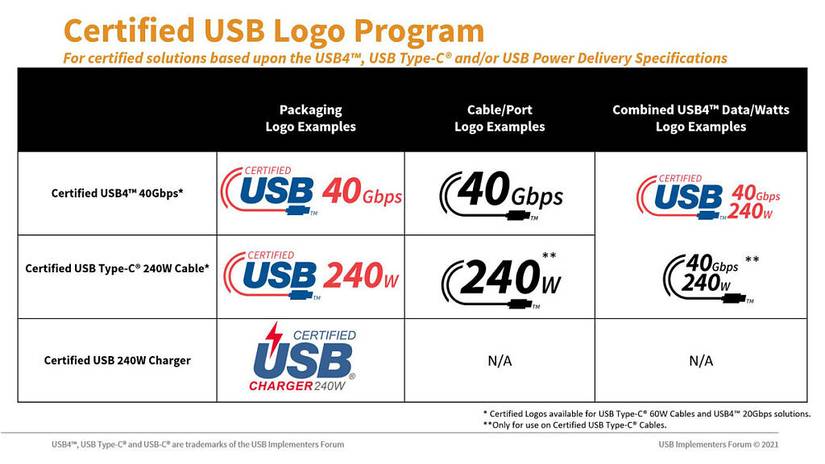
Manufacturers use logos and terms to indicate fast charging support. Look for these on the charger or packaging to separate real fast charging from marketing fluff.
Recognize Key Certification Marks
Look for these indicators:
• “USB Power Delivery” or “PD” (universal standard used by Apple, Samsung, Google, and most laptops)
• “Quick Charge 3.0/4+/5” (Qualcomm protocol common in Android phones)
• “PPS” (Programmable Power Supply, needed for 45W Samsung Galaxy charging)
• “Super Fast Charging” (Samsung branding for 25W+ wired charging)
• “MagSafe” or “Qi2” (indicates 15W magnetic wireless fast charging)
Warning: Terms like “Rapid Charging” or “Turbo” without a standard like PD or QC may be marketing fluff. Always verify output specs.
Understand Protocol Compatibility
Not all fast charging works with every device. USB PD works with iPhone, iPad, MacBook, Pixel, Galaxy, and most USB-C devices. Quick Charge works with Snapdragon-powered Android phones. PPS is required for full 45W speed on Galaxy S23 and S24 Plus models. MagSafe works with iPhone 12 and newer with magnetic alignment. Qi2 works with any Qi2-certified phone.
Example: A 45W USB PD charger without PPS will only charge a Galaxy S24 at 25W, not full speed. Always match the protocol.
Test with Your Device: On-Screen Confirmation
Your phone is the best detector. Plug in and look for real-time feedback to confirm fast charging is active.
Watch for Fast Charging Messages
Android devices display specific messages. Samsung shows “Fast charging,” “Super Fast charging,” or “Super Fast Charging 2.0.” Google Pixel displays “Charging quickly” or a bolt icon. OnePlus and Xiaomi may show wattage or charging stage. If only “Charging” appears, fast charging is not active.
iPhones do not show text messages, but iPhone 8 and newer support fast charging with a 20W or higher USB-C PD charger and a USB-C to Lightning cable. Some users report a double chime when connecting a compatible fast charger, versus a single chime for standard ones.
This confirmation results from a successful handshake, a power negotiation between the charger and device. No handshake means no fast charging.
Inspect the Charging Cable

Cables are often the hidden bottleneck. Even the best charger fails with a poor cable.
Use USB-C to USB-C or USB-C to Lightning
For wired fast charging, use USB-C to USB-C for Android phones, tablets, and laptops. Use USB-C to Lightning for iPhone fast charging. Avoid old micro-USB or USB-A to Lightning cables. They max out at lower speeds.
Check for 5A and E-Marker Support
For chargers above 60W, cable current rating matters. A 3A cable maxes out at 60W. A 5A cable supports 100W or higher. High-current cables often have an e-marker chip that tells the charger how much power the cable can handle. These are labeled “100W,” “140W,” or “240W” on packaging or near connectors.
Pro Tip: Cheap cables may claim “fast charging” but lack e-markers. They limit even a 140W charger to 60W.
Match Port Type to Charging Standard
The port type gives clues about charging capability.
Prefer USB-C Over USB-A
USB-A is the older rectangular design. It supports Quick Charge up to about 18W and is being phased out. USB-C is the oval, reversible port required for USB Power Delivery. It supports up to 240W with USB PD 3.1 and is the standard on modern devices.
Myth: All USB-C chargers are fast. This is false. Some deliver only 5V/1A (5W). Always check output specs.
Use Testing Tools for Verification
For definitive proof, use testing tools to verify actual performance.
Try a Charging Speed App
On Android, apps can show real-time charging data. Ampere displays charging current, voltage, and whether fast charging is active. AccuBattery tracks speed, estimates time to full, and monitors health.
To test, drain the battery to 20% or lower. Plug in with your charger and cable. Open Ampere and wait 1-2 minutes. Check the charging current. Results under 1000mA indicate standard or slow charging. 1500-3000mA indicates fast charging is active. Above 3000mA indicates ultra-fast charging like 25W or higher.
Use a USB Power Meter
For definitive proof, use a USB power meter like the Power-Z KM001C or UGREEN tester. These plug between the charger and cable and display real-time voltage, current, and wattage. They also show whether PD or QC handshake succeeded and e-marker data.
This is best for tech-savvy users, reviewers, or anyone buying high-wattage chargers.
Verify Wireless Fast Charging Support
Wireless fast charging requires specific hardware and standards.
Look for 15W and Qi2/MagSafe
Standard Qi delivers only 5W and is slow with inconsistent alignment. MagSafe (Apple) delivers 15W with magnetic snap alignment. Qi2 (2024 and newer) delivers 15W with magnetic alignment and universal compatibility. Samsung Wireless Fast Charging delivers 10-15W and works with Galaxy phones.
To get 15W wireless fast charging, you need a 15W-capable phone, a MagSafe or Qi2-certified charger, and magnetic alignment for efficient power transfer. Avoid generic Qi pads claiming fast charging. Many default to 5W.
Match Charger to Device Requirements
Using a powerful charger on a device that only supports lower power will not damage it, but you will not get faster charging unless the device supports the protocol.
Know Your Device’s Fast Charging Needs
iPhone 12-15 requires 20W minimum and supports about 27W with USB PD. Galaxy S23/S24 requires 25W minimum and supports 45W with PPS. Google Pixel 8 requires 21W and supports 21W with USB PD and PPS. iPad Pro requires 20W minimum and supports up to 67W with USB PD. MacBook Air requires 30W minimum and supports 67W with USB PD. MacBook Pro requires 67W minimum and supports up to 140W with USB PD 3.1.
Myth Busting: A higher-wattage charger is safe. Devices draw only the power they need. A 140W MacBook charger works safely with an iPhone.
Avoid Common Fast Charging Myths
Fast Charging Damages Battery
This is false. Modern devices use adaptive charging algorithms that slow down charging after 80%, reduce speed when hot, and pause or trickle charge overnight. Long-term battery impact is minimal under normal use.
All USB-C Cables Are the Same
This is false. Many cheap USB-C cables lack e-markers, support only 3A (60W max), and overheat or fail under high load. Always use certified cables, especially for 65W or higher charging.
Any 30W Charger Will Fast Charge My Phone
This is not guaranteed. The device must support the same protocol. A 30W PD charger will not fast charge a OnePlus phone using Dash Charge unless it is compatible.
Bottom Line: Fast charging requires three-way compatibility: charger, cable, and device.
Choose Safe and Efficient Fast Charging
Use Certified Accessories
Stick to OEM or certified third-party brands like Apple, Samsung, Anker, Belkin, Baseus, and AUKEY. Look for USB-IF or MFi certification. Certified products meet safety, efficiency, and durability standards.
Monitor Heat and Usage Habits
Fast charging generates heat. To protect battery health, avoid charging under pillows or in direct sunlight. Remove thick cases during fast charging. Enable Optimized Battery Charging (iOS) or Adaptive Charging (Android).
Pro Tip: Charge in Airplane Mode to boost speed by 10-25% by reducing background activity.
Maintain Cables Properly
Extend cable life and performance by unplugging by the head, not the cord. Store loosely coiled. Keep connectors clean with a dry brush. Replace frayed or stiff cables immediately.
Final Checklist: Is It Really a Fast Charger?
Use this checklist to verify a genuine fast charger:
• Output 18W or higher with multiple voltages
• Labels indicating USB PD, Quick Charge, PPS, MagSafe, or Qi2
• Cable is USB-C to USB-C or USB-C to Lightning, 5A-rated for more than 60W
• Port is USB-C for high-wattage delivery
• Device shows “Fast Charging” or app reads more than 1500mA
• USB power meter confirms PD or QC handshake and wattage
• Certified from reputable brand with USB-IF or MFi certification
• PPS support for 45W on Samsung Galaxy S23/S24 Plus
• No bottlenecks in any component
Frequently Asked Questions About Identifying Fast Chargers
How do I know if my charger is fast charging?
Check the output label on your charger for 18W or higher. Look for multiple voltage outputs like 5V, 9V, 12V. Your device should display “Fast charging” on screen, or you can use an app like Ampere to verify current above 1500mA.
What wattage is considered fast charging?
Modern fast charging starts at 18W. True fast charging for smartphones typically ranges from 18W to 65W. Laptops require 65W or higher. Anything below 18W is considered standard or moderate charging.
Do all USB-C chargers support fast charging?
No. Some USB-C chargers deliver only 5V/1A (5W). Always check the output specifications. Look for USB PD or Quick Charge labels to ensure fast charging capability.
Can I use a laptop charger to fast charge my phone?
Yes. Modern devices negotiate the maximum safe power level. A 65W or 140W laptop charger will safely deliver 20W to a phone. The phone controls how much power it draws.
What is the fastest wireless charging standard?
Qi2 and MagSafe both support 15W wireless fast charging. Samsung supports 10-15W on compatible Galaxy devices. These are the current fastest wireless standards available.
Key Takeaways for Identifying a Fast Charger
Identifying a fast charger requires looking beyond marketing labels. Check the output wattage first. True fast charging starts at 18W and requires multiple voltage options. Verify the protocol matches your device. USB PD is universal, but Samsung phones need PPS for full 45W speed. Cable quality matters enormously. A poor cable can bottleneck even the best charger. Use certified accessories from reputable brands. Test with your device or a power meter to confirm actual performance. By understanding these principles, you can confidently identify genuine fast chargers and optimize your charging speed, safety, and device longevity.





