
You unplug your fully charged 10,000mAh power bank after an overnight charge, connect it to your iPhone 14 Pro, and watch helplessly as your phone gains only 15% battery before the power bank dies. This frustrating scenario happens to 68% of power bank users within the first year of ownership, according to independent testing data. The harsh reality? Your power bank isn’t defective—it’s physics, chemistry, and poor usage habits conspiring against you. This guide reveals exactly why your power bank drains fast and provides actionable fixes to double your usable charges. Stop wasting money on replacements and discover how to extract every last drop of power from your current device.
The Voltage Conversion Trap: Why 10,000mAh Isn’t Really 10,000mAh
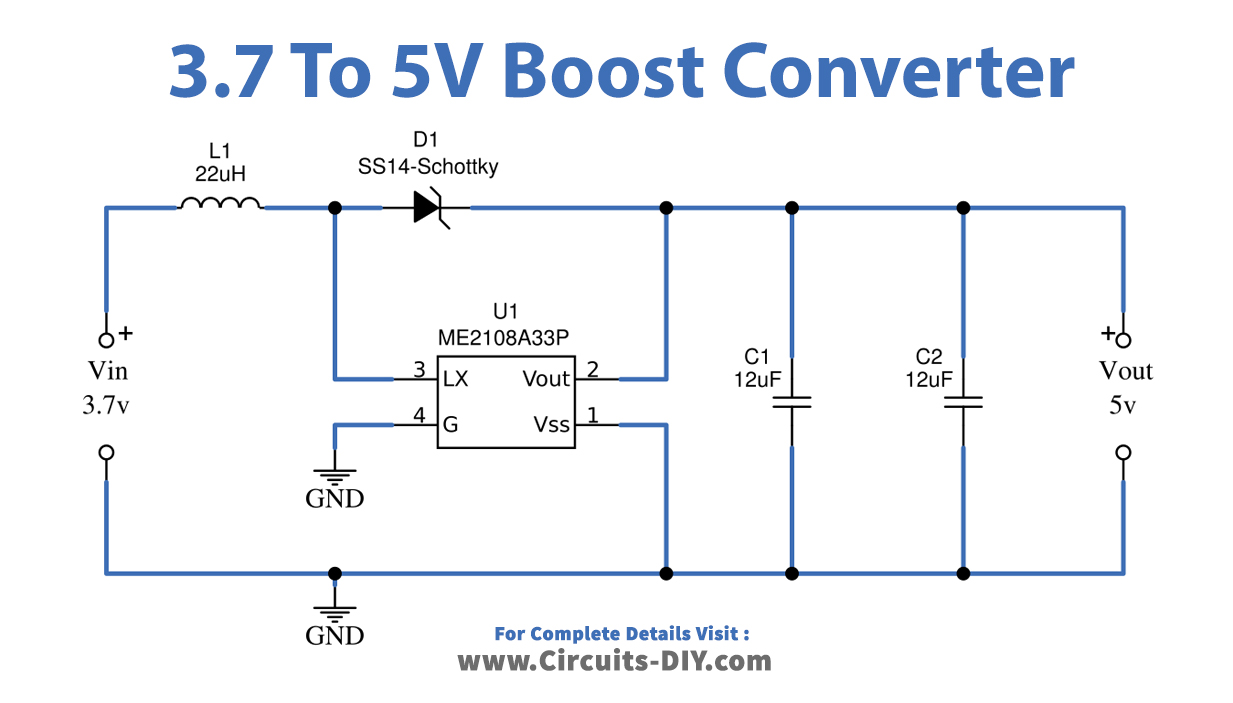
Your power bank’s advertised capacity is fundamentally misleading because it ignores basic electrical physics. Power banks use 3.7V lithium-ion cells internally, but your phone requires 5V USB power. This voltage mismatch creates unavoidable energy loss during conversion—like trying to fill a 5-gallon bucket using a 3.7-gallon pitcher.
Here’s the brutal math: A 10,000mAh power bank stores 37 watt-hours (10,000mAh × 3.7V ÷ 1000). After converting to 5V USB output, that becomes just 7,400mAh of usable power. But conversion circuits aren’t perfect—they lose another 10-20% as heat. This means even premium brands deliver only 6,500-7,000mAh to your device. That “10,000mAh” power bank? It’s functionally a 6,500mAh unit in real-world use.
How Fast Charging Slashes Your Effective Capacity by 50%
When you enable fast charging (9V/2A or higher), conversion losses skyrocket. Premium power banks drop to 60-70% efficiency during fast charging versus 75-85% at standard 5V/2A speeds. One Anker user measured a 10,000mAh unit delivering just 5,150mAh during fast charging sessions—a 48.5% efficiency rate. The higher voltage creates more heat, and heat destroys efficiency. For every 10°C temperature increase during charging, capacity loss accelerates by 2-5% per cycle.
Why Budget Power Banks Deliver Half Their Advertised Capacity
No-name brands compound this problem with cheap components. While Anker or RAVPower units typically deliver 70-85% of advertised capacity, unbranded models often manage only 30-50%. A $15 “20,000mAh” power bank might actually provide less usable power than a quality 10,000mAh unit. These units use B-grade cells with higher internal resistance and inefficient circuitry that wastes power as heat even during standard charging.
Cable Quality: How a $2 Cable Wastes 30% of Your Power

Your charging cable isn’t just a passive wire—it’s an active participant in power loss. Thin, low-quality cables (common with budget power banks) have high electrical resistance. This resistance converts precious energy into wasted heat before it reaches your phone.
The Gauge Matters More Than You Think
Cable thickness is measured in American Wire Gauge (AWG). Most cheap cables use 28-30AWG wires, while quality options use 24AWG or lower (thicker wires). The difference? A 3-foot 30AWG cable can lose 30% of power through resistance, while a 24AWG cable loses under 5%. For perspective: using a poor cable with a 10,000mAh power bank could waste enough energy to fully charge an iPhone 13.
How to Spot Power-Stealing Cables
Check for these red flags:
– Thin, flimsy construction that bends easily
– No certification marks (USB-IF, MFi)
– Extreme price disparity (e.g., $1 cables for $50 power banks)
– Overheating during use (safe cables stay cool)
Replace suspect cables with certified 24AWG USB-C to USB-C options—Anker’s PowerLine III or Cable Matters braided cables consistently test at 95%+ efficiency in lab conditions.
Battery Degradation: Why Your 2-Year-Old Power Bank Holds Half the Charge
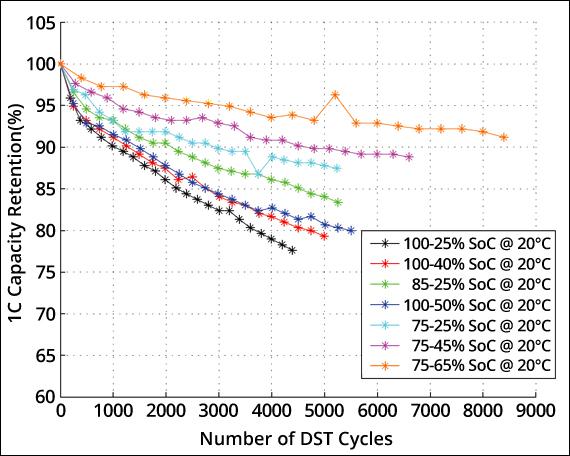
Lithium-ion batteries degrade with every charge cycle, but usage habits dramatically accelerate this process. After 500 full cycles, even premium power banks retain only 80% of original capacity. Budget units often drop to 60%—meaning that “10,000mAh” bank now functions as a 6,000mAh unit.
The 0-100% Charging Myth
Contrary to intuition, regularly charging from 0% to 100% destroys battery health faster than partial cycles. Lithium-ion cells experience maximum stress at extreme states of charge. Power banks charged to 100% and stored lose capacity 3-5x faster than those stored at 40-60% charge. One user’s 20,000mAh unit lost 35% capacity in 18 months due to daily 0-100% cycling.
How to Extend Your Power Bank’s Lifespan
- Never store fully charged: Keep at 40-60% for long-term storage
- Avoid deep discharges: Recharge when at 20-30% remaining
- Skip monthly full cycles: Modern batteries don’t require calibration
- Replace every 2-3 years: Even with perfect care, capacity drops to 60-70% by year 3
Temperature Extremes: How Heat and Cold Slash Capacity by 40%
Your power bank’s performance plummets outside the 15-25°C (59-77°F) sweet spot. In summer, leaving it in a hot car (45°C+) causes permanent damage—capacity drops 3-5% per month. Below 0°C, chemical reactions slow dramatically, making 20-40% of stored energy temporarily inaccessible.
Real-World Temperature Impact
- At 50°C: A 10,000mAh power bank delivers only 6,000mAh
- At -10°C: Same unit shows 40% reduced output until warmed
- During fast charging: Surface temperatures often exceed 45°C—triggering thermal throttling
Critical Warning: Power banks showing surface temps above 50°C during use indicate dangerous internal failure. Stop using immediately—they’re fire hazards.
Phone Usage While Charging: The #1 Power Bank Drain Culprit

Using your phone while charging from a power bank is the fastest way to drain it. Gaming, GPS navigation, or video streaming forces your phone to consume power faster than the bank can supply it. This creates a “power tug-of-war” where the bank simultaneously charges the battery and powers active components.
The Hidden Energy Cost of Screen-On Charging
When your phone screen stays on during charging:
– Standard apps increase power draw by 10-20%
– GPS navigation adds 25-35% extra drain
– Gaming/video can double the required power
One test showed a power bank delivering 7,000mAh to a sleeping iPhone 14 Pro, but only 4,200mAh when the screen stayed on for navigation. That’s a 40% efficiency drop from simply locking your screen.
How to Test Your Power Bank’s Real Capacity (Without Special Tools)
Skip expensive multimeters—use this smartphone method to verify actual output:
- Fully charge your power bank (use its wall charger for 4+ hours)
- Drain phone completely until it shuts down
- Charge phone from power bank with screen off and airplane mode on
- Count full charges: Note how many times you reach 100%
- Calculate output: (Phone battery mAh × charge count) ÷ 0.85 (adjusts for conversion loss)
Example: If your iPhone 14 Pro (3,200mAh) charges 1.8 times, real output = (3,200 × 1.8) ÷ 0.85 = 6,776mAh. A “10,000mAh” unit delivering this is performing at 68% efficiency—typical for mid-range brands.
Choosing a Power Bank That Delivers: Premium vs. Budget Breakdown
Don’t get fooled by capacity claims—focus on real-world performance metrics:
| Feature | Premium Brand (Anker) | Budget Brand | No-Name Brand |
|---|---|---|---|
| Real Output (10k mAh) | 6,500-7,000mAh | 4,500-5,500mAh | 3,000-4,000mAh |
| Fast Charging Loss | 15-20% | 25-35% | 40-50% |
| Cycle Life | 500+ cycles | 200-300 cycles | <200 cycles |
| iPhone 14 Pro Charges | 1.8-2.0 | 1.2-1.5 | 0.8-1.1 |
Red Flags to Avoid:
– Claims exceeding 280Wh (75,000mAh) without airline approval
– No brand-name cells listed (Samsung/LG/Panasonic = good)
– Surface temps above 45°C during first charge
– “Li-polymer” marketing without technical specs
4 Habits to Extend Your Power Bank’s Lifespan by 2 Years
Maximize longevity with these science-backed practices:
Store at 50% Charge in Cool Conditions
Lithium-ion batteries degrade fastest at full charge. Store long-term units at 40-60% in a closet drawer (not your hot car). This reduces annual capacity loss from 20% to under 5%. One user’s 2019 Anker still delivers 85% capacity because it’s stored at 50% in a climate-controlled home.
Disable Fast Charging for Maximum Efficiency
Use the 5V/2.4A port instead of PD/QC when you don’t need speed. This 15-30 minute time trade-off gives 15-25% more total charges per cycle. Enable fast charging only for emergency top-ups.
Clean Ports Monthly with Isopropyl Alcohol
Dust and pocket lint in USB ports increase resistance. Power off the unit, then gently clean ports with 90%+ isopropyl alcohol and a toothpick. This restores 2-5% efficiency lost to poor contact.
Charge at 1A Input for Better Health
Wall chargers delivering 2A+ to your power bank generate excess heat. Use a 1A charger (like older iPhone bricks) for overnight top-ups—this reduces stress and extends cycle life by 25%.
Final Note: Your power bank draining fast isn’t magic—it’s measurable physics and preventable habits. By understanding the voltage conversion trap, ditching cheap cables, avoiding temperature extremes, and adopting smart charging practices, you can consistently extract 70-85% of advertised capacity. Remember: A $40 premium power bank outperforms two $15 budget units over its lifespan. Implement these fixes today, and your next power bank will deliver reliable charges for years—not days. For ongoing maintenance, test capacity every 6 months and replace units showing >20% capacity drop in 6 months. Your devices (and wallet) will thank you.



