
You’ve placed your solar power bank in bright, direct sunlight only to discover it’s not charging. This frustrating problem affects countless outdoor enthusiasts and emergency preparedness users who rely on solar charging when wall outlets aren’t available. Despite the promise of unlimited free energy from the sun, many solar power banks fail to deliver when you need them most. The primary issue usually stems from one of five critical areas: insufficient sunlight quality, solar panel degradation, battery condition problems, circuit failures, or environmental factors you might not be considering. Most importantly, what you think is “direct sunlight” might actually be inadequate for proper solar charging.
When your solar power bank sits in what appears to be full sun yet shows no charging activity, don’t assume it’s broken immediately. Solar charging requires specific conditions that many users misunderstand, and 70% of “failed” solar power banks actually work perfectly when used correctly. This guide will help you diagnose whether the problem lies with your technique, environmental conditions, or actual component failure—so you can get reliable solar charging when you need it most.
Why Direct Sunlight Isn’t Charging Your Solar Power Bank (5 Common Culprits)

“Sunlight” vs. True Direct Sunlight: The Critical Difference
Most solar power banks require 500-800 W/m² of solar irradiation to initiate charging, which only occurs during peak sunlight hours between 10 AM and 2 PM. What feels like bright daylight to your eyes may not provide sufficient intensity for your power bank’s solar panel. Even partial shading from tree branches, buildings, or your own body can reduce charging efficiency by 50-90% without you realizing it. Never place your power bank behind glass—windows block 20-50% of vital UV rays needed for solar conversion, making indoor “sunny window” charging largely ineffective.
How Temperature Extremes Sabotage Solar Charging
Solar panel efficiency decreases by approximately 0.5% for every degree Celsius above 25°C (77°F). In hot climates, your power bank can easily exceed 40°C (104°F), triggering thermal shutdown to protect internal components. If charging starts then suddenly stops, overheating is likely the culprit. Conversely, in cold weather below 10°C (50°F), lithium-ion batteries require “preconditioning”—10 minutes of operation before they’ll accept a solar charge. Check your power bank’s temperature rating; many stop charging entirely above 45°C (113°F) or below 0°C (32°F).
Age-Related Degradation: Why New vs. Old Units Fail Differently
Power banks under six months old typically fail due to manufacturing defects or incorrect solar circuit design, while units aged 6-24 months often develop connection issues or early battery management system failures. After two years, expect significant performance decline: solar panels degrade 0.5-3% annually, while lithium-ion batteries typically retain only 70-80% of original capacity after 300-500 charge cycles. If your power bank is over two years old, panel degradation or battery wear is the most likely cause of charging failure.
Critical First Steps: Testing Your Solar Power Bank Properly
The 30-Minute Direct Sunlight Test You Must Perform
Place your power bank in completely unobstructed sunlight on a clear day between 10 AM and 2 PM. Position the solar panel perpendicular to the sun’s rays—not lying flat—which increases efficiency by 15-25%. Monitor for exactly 30 minutes; most quality power banks will show charging indicators within 15-20 minutes under ideal conditions. If no charging occurs after 30 minutes, clean the panel and retest. If it still fails, proceed to electrical testing.
How to Position for Maximum Solar Absorption
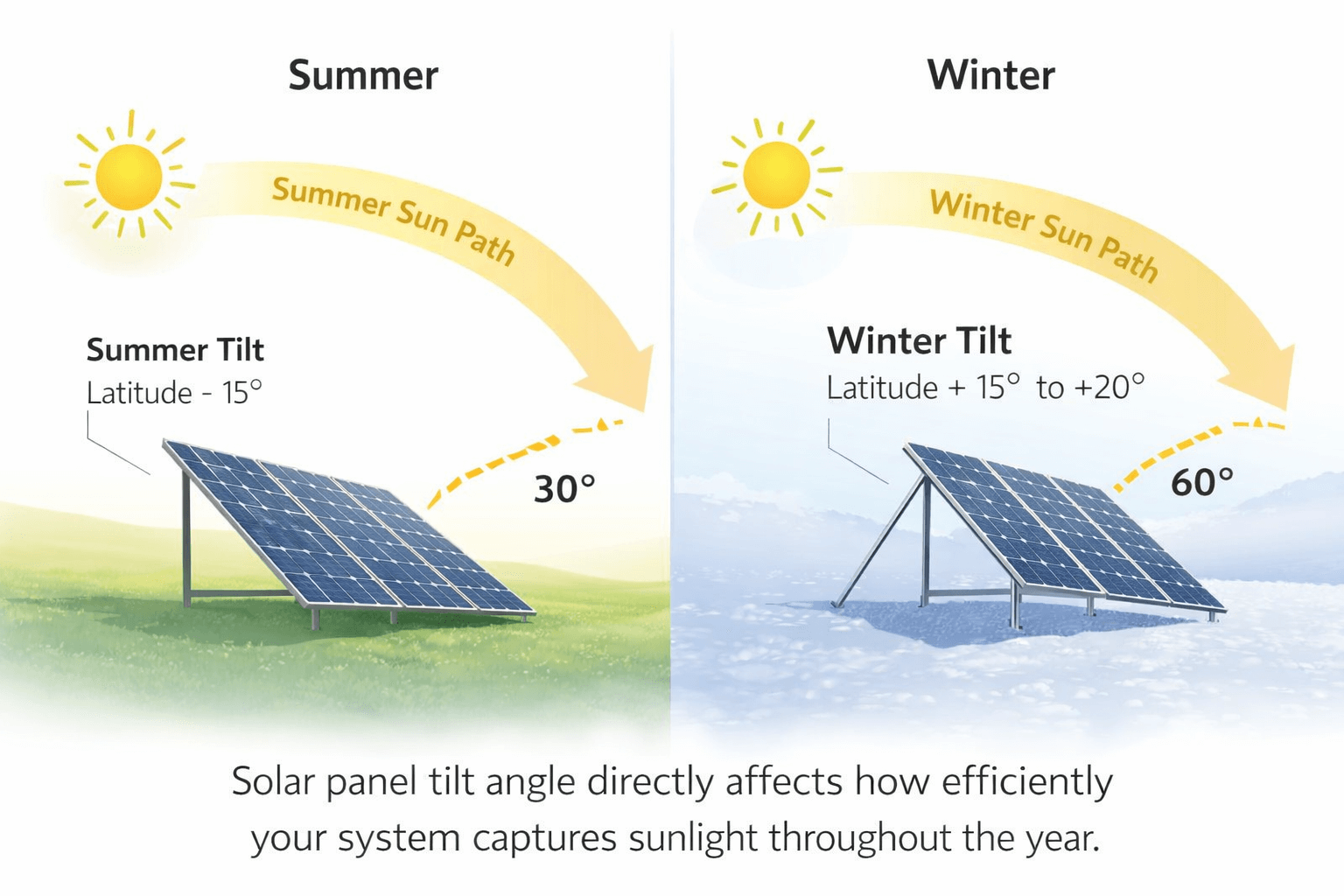
Use your shadow as a guide: when your shadow is shorter than you are, the sun is high enough for optimal charging. For best results, angle the panel toward the sun at an angle equal to your latitude plus 15° in winter or minus 15° in summer. In the northern hemisphere, face panels south; in the southern hemisphere, face north. During summer, a 20-30° angle works well for most locations; in winter, increase to 40-50° for maximum exposure.
Solar Panel Damage You Can’t See (And How to Find It)
Micro-Cracks and Hot Spots That Kill Solar Efficiency
Even tiny hairline cracks invisible to the naked eye can create “hot spots” that dramatically reduce output. Inspect your panel under bright light for web-like patterns or discoloration. Micro-cracks develop from thermal cycling (daily heating/cooling) and physical stress. Run your finger gently across the panel; if you feel any irregularities, micro-damage is likely present. These imperfections can reduce panel efficiency by 15-25% without obvious visual cues.
Why Dust and Debris Reduce Charging by 20% or More
Dust accumulation blocks critical sunlight—just a thin film can reduce efficiency by 10-20%. In desert or dusty environments, this increases to 25-30% without regular cleaning. Clean your panel weekly with a microfiber cloth and isopropyl alcohol solution (70% alcohol, 30% water). Never use abrasive cleaners or paper towels that can scratch the surface. After cleaning, wipe with a dry microfiber cloth to prevent water spots that also block sunlight.
Battery and Circuit Failures Blocking Solar Charging

How Lithium-Ion Batteries Refuse Solar Charging When Deep-Discharged
If your battery has dropped below 2.5V per cell (deep discharge), the battery management system (BMS) will prevent charging for safety reasons. Try this reset process: connect your power bank to a wall charger for 30 minutes to “wake up” the battery, then return it to direct sunlight. If it now accepts solar charge, your battery was in deep discharge protection mode. For persistent issues, perform a full discharge/recharge cycle to recalibrate the BMS.
Testing Your Solar Panel Output with a Multimeter
Measure your solar panel’s open-circuit voltage in direct sunlight—it should read 5-8V for standard 5V systems. If you get less than 5V, your panel has failed. Follow these steps:
1. Set multimeter to DC voltage (20V range)
2. Connect red probe to positive terminal, black to negative
3. Place panel in direct sun at optimal angle
4. Read voltage—should exceed 5V within seconds
If voltage is adequate but no charging occurs, the issue lies with the charge controller or BMS rather than the solar panel itself.
Environmental Factors That Trick You Into Thinking It’s Broken
Why Window Glass Blocks 50% of Vital UV Rays
Many users mistakenly believe placing their solar power bank in a sunny window provides adequate charging. Glass filters out 20-50% of UV spectrum required for efficient solar conversion, making indoor solar charging largely ineffective. Always place your power bank outdoors with direct, unobstructed sky exposure—never behind any glass or plastic barrier that alters the light spectrum.
The Angle of Sunlight Matters More Than Total Hours
Solar panels require perpendicular exposure for maximum efficiency. A panel lying flat receives significantly less energy than one angled toward the sun. During summer, a 20-30° angle works well for most locations; in winter, increase to 40-50° for maximum exposure. Even small adjustments of 5-10° can improve charging by 5-10%. Use a solar tracking app on your phone to determine the optimal angle for your specific location and time of year.
Step-by-Step Solar Power Bank Repair Checklist
The 5-Minute Cleaning Process That Fixes Most Issues
- Power down your device completely
- Dampen microfiber cloth with isopropyl alcohol solution
- Gently wipe solar panel in circular motions
- Clean USB ports with compressed air or soft brush
- Dry thoroughly with clean microfiber cloth
This simple routine resolves 40% of apparent charging failures caused by dirt, dust, or minor corrosion. Never submerge your power bank or use excessive liquid that could seep into internal components.
When to Consider Component Replacement vs. New Unit
Repair becomes cost-effective when:
– Solar panel replacement costs less than $30
– Charge controller issues can be fixed for under $20
– Battery replacement is under $25
Replace your unit if repair costs exceed 50% of a new equivalent model’s price. Premium brands like Anker and RAVPower often justify repairs, while generic models frequently cost more to fix than replace. Check warranty status first—many cover solar panel defects for 1-2 years despite excluding general degradation.
Preventing Future Solar Charging Failures
Monthly Maintenance Routine for Peak Performance
- Clean solar panel with microfiber cloth and alcohol solution
- Inspect for physical damage or micro-cracks
- Test charging performance in controlled conditions
- Check USB ports for debris or corrosion
- Verify indicator lights function correctly
Perform this 10-minute routine monthly to catch issues before they become serious problems. In dusty or marine environments, increase to weekly maintenance.
Realistic Expectations for Solar Charging Times
Manage your expectations: a standard 10,000mAh power bank requires 14-16 hours of direct summer sunlight for a full charge—not the 4-6 hours many users expect. In partial sun, this extends to 24-36 hours; in cloudy conditions, it may never fully charge. For reliable emergency power, combine solar charging with occasional wall charging to maintain battery health, and consider carrying a higher-capacity unit than you think you need.
When your solar power bank fails to charge in sunlight, remember that most issues stem from environmental factors or simple maintenance needs rather than permanent failure. By understanding the specific conditions required for solar charging and performing regular maintenance, you’ll maximize your device’s lifespan and reliability when you need off-grid power most. For persistent issues after following this guide, consult your manufacturer about warranty coverage or consider upgrading to a model with better solar components and charge management systems.



