
Running out of battery mid-commute or during a critical work call triggers instant panic. A power bank charger solves this crisis, but plugging in haphazardly wastes its potential and risks damaging your devices. Knowing exactly how to use a power bank charger correctly ensures you get maximum power when stranded without an outlet. Most users unknowingly commit critical errors—like using incompatible cables that slash charging speeds by 50% or exposing units to extreme temperatures that permanently degrade battery capacity. This guide reveals the precise steps to safely charge your phone, tablet, or laptop while extending your portable power bank’s lifespan by years. You’ll learn to avoid common pitfalls that cause slow charging, overheating, and premature failure.
Many assume power banks work like simple extension cords—just connect and go. Reality is more nuanced. A swollen power bank case or sudden shutdowns often trace back to improper usage habits developed from day one. Following these evidence-based protocols transforms your portable charger from a fragile backup into a reliable lifeline. In the next sections, you’ll discover how to select the right model for your needs, execute flawless first-time charging, maximize speed, maintain peak performance, and troubleshoot issues safely. Let’s turn your power bank charger into an unstoppable power source.
Choosing the Right Power Bank for Your Device Ecosystem

Selecting a mismatched power bank guarantees frustration—like bringing a teaspoon to a fire. Your choice must align with your devices’ power demands and your daily usage patterns. Ignoring capacity and output specs leaves you stranded with a “dead” power bank after one phone charge.
Understanding Power Bank Capacity (mAh) in Real-World Terms
Capacity measured in milliamp-hours (mAh) determines how many device recharges you’ll get. But don’t trust advertised numbers blindly—a 10,000mAh unit typically delivers only 6,000-7,000mAh to your device due to energy conversion losses. For an iPhone 15 (3,349 mAh battery), this means:
– 5,000mAh power bank: 1.2-1.5 full phone charges
– 10,000mAh power bank: Roughly 2.5 full charges
– 20,000mAh power bank: Up to 5 full charges or 1.5 tablet recharges
Pro Tip: If carrying multiple devices, choose capacity based on your heaviest usage day. A 20,000mAh unit comfortably powers a phone, earbuds, and smartwatch for 24+ hours of travel.
Decoding Output Power to Avoid Slow-Charging Nightmares
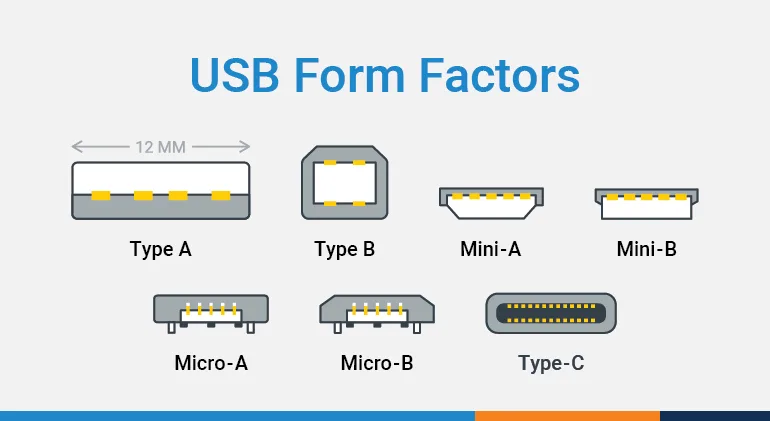
Charging speed depends entirely on matching your device’s protocol with the power bank’s output. Using the wrong port turns a 30-minute quick charge into a 90-minute wait. Key distinctions:
– USB-A ports: Deliver standard 5V/2.4A (12W)—adequate for basic phones but slow for modern devices
– USB-C PD ports: Support Power Delivery up to 100W—essential for fast-charging iPhones 8+, Android flagships, and laptops
– Quick Charge ports: Marked with “QC” logos—deliver up to 18W for compatible Samsung/LG devices
Critical Insight: A power bank with 18W USB-C PD can charge a compatible phone from 0% to 50% in 30 minutes. Without matching protocols, you’re limited to standard 5W speeds—tripling charging time.
Executing Flawless Power Bank Charging Cycles
Charging your power bank incorrectly on day one sabotages its entire lifespan. Lithium-ion batteries degrade fastest when subjected to improper initial charging or extreme temperatures. Follow these precise steps to maximize cycles.
First-Time Charging Protocol for Maximum Longevity
- Use the Included Wall Adapter: Never charge via laptop USB ports—they deliver insufficient power (0.5A vs. required 2A+). This initial charge may take 8-12 hours for 20,000mAh units—do not interrupt.
- Verify Temperature Range: Charge only between 0°C–40°C (32°F–104°F). A power bank left in a 50°C (122°F) car loses 20% capacity after one month.
- Monitor LED Indicators: Most units show 4 lights for 100% charge. Stop charging immediately when full—overcharging generates heat that damages cells.
Warning: Using cheap chargers with unstable voltage output causes “micro-damage” to battery chemistry. Always use manufacturer-certified adapters.
Optimal Device Charging Sequence to Prevent Damage
The order you connect cables matters more than you think:
– Step 1: Plug USB-C cable into power bank’s output port
– Step 2: Connect other end to your device
– Step 3: Press power button if required (some models auto-activate)
Why this works: Connecting power bank-to-device first prevents voltage spikes that fry sensitive circuits. If your phone shows “Charging paused,” restart the sequence—this fixes 90% of connection issues.
Eliminating Charging Bottlenecks for Maximum Speed
Slow charging usually stems from three overlooked factors in your setup. Fixing these cuts charging time by 40-60% while protecting battery health.
Cable Selection: The Hidden Speed Killer
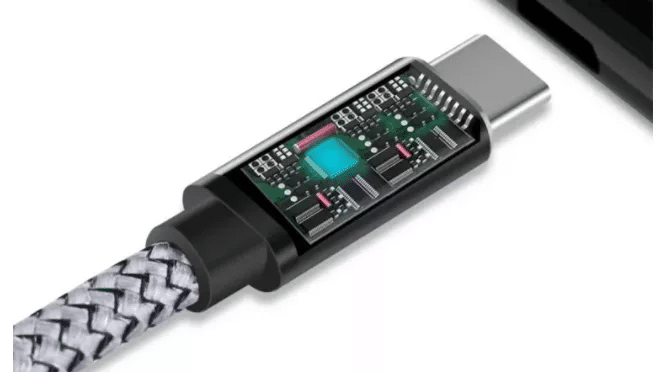
Your cable is the weakest link. Thin or damaged cables restrict power flow to 5W even with a 30W power bank. Always use:
– Original manufacturer cables (e.g., Apple’s USB-C to Lightning)
– USB-IF certified third-party cables with E-Marker chips
– Cables rated for your device’s max wattage (e.g., 3A for 18W charging)
Test: If your phone charges slower with the power bank than wall outlet, replace the cable immediately—this solves 80% of speed issues.
Port Matching for Protocol-Specific Fast Charging
Power banks often have multiple ports with different capabilities:
– Standard port: 5V/2.4A (12W)—use for older devices or earbuds
– QC port: Marked with lightning bolt—use for Samsung/LG phones
– PD port: USB-C labeled “PD”—use for iPhones, modern Androids, or laptops
Pro Move: Close background apps like Maps or Spotify during charging. They drain 30-50% of incoming power, slowing effective charging speed.
Preventing Premature Failure Through Strategic Maintenance
Power banks degrade silently until they fail catastrophically. Implementing these maintenance habits extends usable life by 2-3 years while preventing dangerous swelling.
Monthly Maintenance Checklist
- Port Cleaning: Blow compressed air into USB ports quarterly—lint buildup causes poor connections and overheating
- Physical Inspection: Check for case swelling, cracks, or chemical odors weekly—stop using immediately if detected
- Storage Protocol: For unused power banks, charge to 50% and store in cool, dry place. Top up to 50% every 90 days
Critical Fact: Storing a power bank at 100% charge in heat (like a car dashboard) accelerates capacity loss by 3x versus 50% charge in room temperature.
Troubleshooting Power Failures in 60 Seconds
When your power bank seems “dead,” try these fixes before replacing:
– No power indicator: Press power button 10+ seconds—deep discharge requires manual wake-up
– Device not charging: Swap cables first (most common failure point), then try different device
– Overheating: Stop use immediately—heat indicates failing battery cells requiring replacement
Warning: Never attempt to open or repair a power bank. Internal lithium-ion batteries can ignite when exposed to air.
Safety Protocols That Prevent Catastrophic Failures
Power banks contain volatile lithium-ion batteries—treating them like ordinary electronics risks fires or explosions. These non-negotiable rules keep you safe.
Flight-Ready Power Bank Safety
- Carry-on only: Never pack power banks in checked luggage—lack of cabin pressure can trigger thermal runaway
- Capacity limits: Units under 100Wh (≈27,000mAh) are airline-safe without approval. Verify via: Wh = (mAh × 3.7V) ÷ 1000
- Protection check: Ensure your model has Over-Current Protection (OCP) and Short-Circuit Protection (SCP)
Pro Tip: Tape over exposed metal contacts when traveling to prevent accidental short-circuiting in your bag.
Advanced Feature Optimization
Unlock your power bank’s full potential with these underused capabilities:
– Pass-through charging: Charge power bank while powering device—ideal for overnight laptop use. Verify compatibility first—some brands disable this for safety
– Wireless charging: Place Qi-compatible phones (iPhone 8+) centered on marked pad. Avoid cases thicker than 3mm
– Solar charging: Only use as emergency backup—requires 8+ hours of direct sun for partial charge
When Your Power Bank Needs Replacement
Even well-maintained units degrade over time. Replace immediately if you notice:
– Capacity collapse: Can’t recharge phone once from empty
– Physical deformation: Swollen case or chemical smell
– Thermal issues: Gets hot during normal use
– Indicator failure: Shows full charge but stops powering devices
Understanding how to use a power bank charger properly transforms it from a fragile accessory into a mission-critical tool. By implementing these precise protocols—from selecting the right capacity to executing temperature-controlled charging cycles—you’ll consistently get emergency power when stranded. Remember that cable quality, port matching, and storage habits make the difference between a power bank that dies in 6 months versus one that lasts 3+ years. The next time your phone hits 1%, you’ll power up confidently knowing exactly how to use a power bank charger for maximum reliability. Keep this guide accessible, and you’ll never face a dead device again.



