
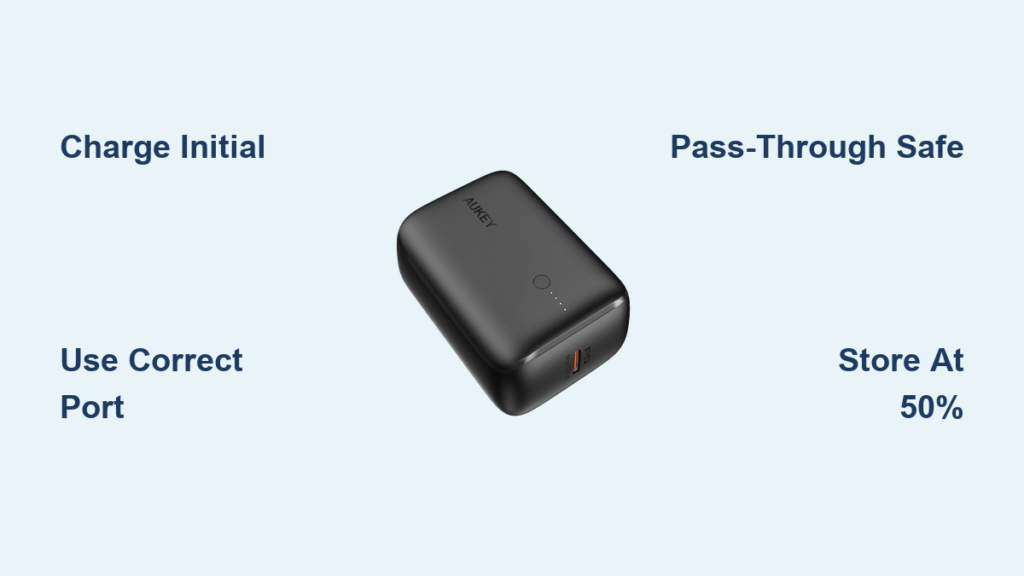
Your Aukey power bank sits in your bag, promising emergency power for your devices—but are you actually using it correctly? Many users miss out on its full potential or accidentally shorten its lifespan through simple mistakes. Whether you’ve just unpacked your PB-XD10 or have been using an Aukey power bank for months, this guide shows you exactly how to use aukey power bank devices to maximize charging speed, battery life, and reliability. You’ll learn the specific steps to properly charge your power bank, which ports deliver the fastest charging for different devices, and how to avoid common pitfalls that drain your emergency power when you need it most.
Most people assume power banks work the same way—just plug and play—but understanding your specific Aukey model’s capabilities makes all the difference. The popular PB-XD10, for example, packs 10,050mAh across three high-quality Panasonic battery cells, but without proper usage techniques, you might only get 6,500mAh of actual usable power. By the end of this guide, you’ll know precisely how to use aukey power bank features like pass-through charging safely, maintain optimal battery health, and troubleshoot issues before they leave you stranded with dead devices.
Decoding Your Aukey Power Bank: Model Numbers, Capacity & Ports
Before plugging anything in, identify exactly what you’re working with. The Aukey PB-XD10 (a common model) contains three Panasonic NCR18650B 3350mAh battery cells that combine for 10,050mAh total capacity. Don’t be fooled by the marketing number—due to voltage conversion inefficiencies, you’ll actually get about 6,500-7,500mAh of usable power at 5V for your devices. At just 188 grams (6.6 oz), it delivers an excellent power-to-weight ratio that won’t weigh down your pocket or bag.
Identifying Your Power Bank’s Input and Output Ports
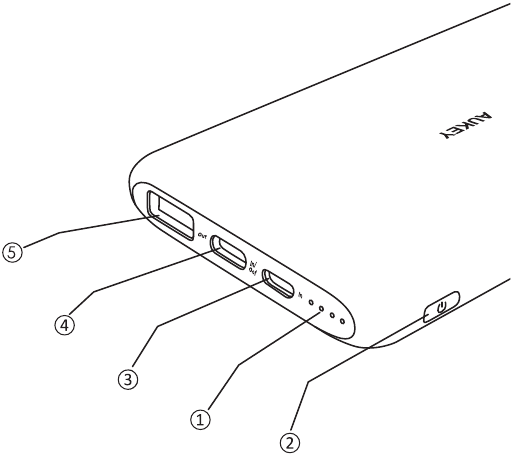
Your Aukey power bank has specific ports designed for different charging scenarios—using the wrong one wastes time and energy:
- USB-C Port (Input/Output): This dual-purpose port supports 18W USB Power Delivery. Use it to rapidly recharge the power bank itself (in 3-4 hours with a compatible charger) OR to fast-charge compatible devices like newer iPhones and Android phones.
- USB-A Port (Output Only): Typically colored blue, this port supports Quick Charge 3.0 for compatible Android devices. It delivers up to 18W but only works with devices that support this protocol.
- Power Button: Press this to activate charging or check remaining capacity via the LED indicators.
Critical Tip: Fast charging requires matching protocols between your power bank and device. Your iPhone 12+ will get USB-PD fast charging from the USB-C port, while a Samsung Galaxy S21 needs the USB-A port for Quick Charge compatibility.
Why Capacity Ratings Are Misleading (And What to Expect)
That 10,000mAh rating? It’s technically accurate but practically misleading. Here’s why:
- Battery cells operate at 3.7V, but your devices need 5V—this voltage conversion loses 10-20% of the energy
- A 10,050mAh power bank actually holds 37Wh of energy (10,050mAh × 3.7V ÷ 1000)
- After conversion to 5V, you get approximately 7,400mAh of usable capacity (37Wh × 85% efficiency ÷ 5V)
- Real-world results: Expect 3-4 full charges for an average smartphone (3,000-3,500mAh battery)
First-Time Setup: Charging Your Aukey Power Bank Correctly
Step-by-Step Initial Charge Procedure
- Use the right charger: Grab an 18W or higher USB-PD wall charger (not the slow 5W one that came with your old phone)
- Connect with quality cable: Insert a USB-C to USB-C cable into both the charger and your power bank’s USB-C port
- Monitor the charge: LEDs will light up showing progress—expect 3-4 hours for a full charge
- Complete the cycle: Let it reach 100% before first use (this helps calibration)
Warning: Never use damaged cables or third-party chargers that don’t explicitly support USB-PD. Poor quality accessories can trigger the power bank’s safety cutoffs, leaving you with an apparently “dead” device.
Why Initial Charging Matters for Battery Health
Your Aukey power bank’s lithium-ion cells need proper initial conditioning. Skipping this step or using slow chargers creates uneven cell balancing that reduces overall capacity. The PB-XD10’s battery management system works best when first charged with the recommended 18W input—it ensures all three internal cells charge uniformly. You’ll notice noticeably faster subsequent recharges when you follow this protocol.
Maximizing Fast Charging: USB-PD vs Quick Charge 3.0 Explained

Which Port Should You Use for Your Device?
Stop guessing—match your device to the right port for maximum speed:
- iPhone 8 or newer / iPad Pro: USB-C port (USB-PD) for 18W charging
- Samsung Galaxy S8 or newer: USB-A port (Quick Charge 3.0) for fastest results
- Google Pixel 3 or newer: USB-C port (USB-PD)
- Tablets or laptops: USB-C port (check device compatibility first)
Pro Tip: If your device supports both standards (like newer Samsungs), the USB-C port often delivers more consistent fast charging. Test both ports with your specific device to see which performs better.
Troubleshooting Slow Charging: 3 Common Mistakes
Your Aukey power bank isn’t broken—these simple errors cause most slow-charging issues:
- Mistake #1: Using a standard USB-A to USB-C cable instead of USB-C to USB-C for USB-PD charging
- Mistake #2: Plugging into the USB-A port when your device requires USB-PD (common with newer iPhones)
- Mistake #3: Using a wall charger that doesn’t support 18W output (check the label for “USB-PD” or “Power Delivery”)
Fix any of these, and you’ll instantly double or triple your charging speed. Always verify both ends of your charging ecosystem support the same protocol.
Pass-Through Charging: How to Use It Safely on Your Aukey PB-XD10
What Pass-Through Charging Actually Does
Unlike competitors like Anker that disable this feature, your Aukey PB-XD10 intelligently splits incoming power between recharging itself and powering your devices. When plugged into a wall charger while charging your phone:
- Total input (18W) gets distributed between the power bank’s battery and your device
- Example: 10W to your phone + 8W to recharge the power bank
- Works with both USB-A and USB-C outputs simultaneously
Important Limitation: Pass-through charging generates more heat than normal operation. Use it occasionally (like during travel), not as your permanent charging solution, to maximize battery lifespan.
Step-by-Step Pass-Through Charging Instructions
- Plug your wall charger into a power outlet
- Connect USB-C cable from charger to power bank’s USB-C input port
- Within 10 seconds, connect your device to either output port
- Verify both the power bank LEDs and your device show charging
- Monitor temperature—stop if either becomes uncomfortably warm
Warning: Never use pass-through charging with cheap chargers or in hot environments. The combined heat from simultaneous input/output can trigger thermal protection and halt charging.
Why Your Aukey Power Bank Isn’t Charging (And How to Fix It)

Immediate Troubleshooting Checklist
When your power bank seems dead, work through these steps before assuming it’s broken:
- Check the cable: Swap in a known-good USB-C to USB-C cable (many issues stem from faulty cables)
- Verify the charger: Test with a different USB-PD wall charger if available
- Reset the power bank: Press and hold the power button for 15 seconds
- Deep charge attempt: Leave connected to wall charger for 30+ minutes before checking again
Most Common Fix: 80% of “dead” power banks simply need a deep recharge after complete discharge. Lithium-ion batteries can enter safety lockout below 2.5V per cell—this requires extended charging to reactivate.
When to Replace Your Aukey Power Bank
All batteries degrade over time—watch for these signs it’s time for a replacement:
- Holds less than 60% of original capacity (charges your phone once instead of 3-4 times)
- Gets unusually hot during normal use
- Swells or shows physical damage
- Fails to charge beyond 50% even after reset attempts
Most Aukey power banks last 2-3 years with proper care. Don’t risk device damage by using a severely degraded unit.
Step-by-Step: Extending Your Aukey Power Bank’s Battery Life
Daily Charging Habits That Add Years to Your Power Bank
Forget everything you’ve heard about “draining to zero”—modern lithium-ion cells thrive on partial cycles:
- Keep charge between 20-80% for daily use (press the power button to check)
- Avoid leaving it plugged in after reaching 100%
- Never store completely drained—recharge to 50% if unused for weeks
- Skip fast charging when you have time for a standard 5-hour charge
Expert Note: The PB-XD10’s battery management system automatically optimizes charging, but your usage patterns still significantly impact long-term health. Treat it like your phone battery—gentle charging extends its life.
Temperature Management: The Silent Killer
Extreme temperatures destroy lithium-ion batteries faster than any other factor:
- Never leave in cars: Summer interiors exceed 60°C (140°F)—well beyond the 35°C safe limit
- Avoid direct sunlight: Even 20 minutes can raise internal temperature past critical levels
- Cold weather caution: Below 0°C (32°F), charging slows dramatically—warm it in your pocket first
Store and use your Aukey power bank where you’d feel comfortable—between 0°C and 35°C (32°F to 95°F).
Traveling with Your Aukey: Airline Regulations & Power Tips
TSA-Compliant Travel Checklist
Before packing your power bank for flights, verify these critical requirements:
- Capacity limit: Must be under 100Wh (27,000mAh at 3.7V)—your 10,050mAh PB-XD10 is well within limits
- Carry-on only: Never pack power banks in checked luggage
- Protection: Keep terminals covered (use a case or place in plastic bag)
- Capacity display: Ensure mAh rating is clearly printed on the unit
Pro Travel Tip: Pack a 3-in-1 travel adapter with USB ports—this lets you charge your power bank from international outlets without carrying multiple adapters.
Cleaning & Maintenance: Keeping Your Aukey Power Bank in Top Shape
Monthly Maintenance Routine
- Port cleaning: Use compressed air (not sharp objects) to remove lint from ports
- Surface wipe: Dampen microfiber cloth with isopropyl alcohol for disinfecting
- Capacity check: Fully discharge while powering a single device to verify remaining capacity
- Firmware check: Visit Aukey’s website quarterly for any firmware updates
Critical Warning: Never use liquids directly on your power bank. Even small amounts can seep into ports and cause short circuits. Always apply cleaning solutions to a cloth first.
Storage Guide: Preparing Your Aukey Power Bank for Long-Term Use
Step-by-Step Storage Protocol
When storing your power bank for more than a month:
- Charge or discharge to exactly 50% (three LEDs lit on PB-XD10)
- Power down completely (no LEDs showing)
- Place in anti-static bag or original packaging
- Store in cool, dry place (15-25°C / 59-77°F ideal)
- Recharge to 50% every 3 months during extended storage
Why this works: Lithium-ion batteries degrade fastest at full charge or complete discharge. The 50% “storage charge” minimizes chemical stress during inactivity.
Final Note: Your Aukey power bank delivers exceptional value when used correctly—but improper handling can cut its lifespan in half. By following these specific protocols for charging, maintenance, and storage, you’ll maximize both the immediate performance and long-term reliability of your device. Remember the golden rules: always use quality cables, keep it between 20-80% for daily use, and never expose it to extreme temperatures. Implement just the charging and storage techniques from this guide, and you’ll notice improved performance from your very next charge cycle. For ongoing optimization, revisit the port-matching guidelines before charging critical devices—those few seconds checking compatibility will save you valuable time when power matters most.



