
You’ve charged your power bank all night, but when you plug in your dying phone in the morning, it barely delivers a 10% boost. Frustrating? Absolutely. The truth is, most users miss critical visual and behavioral cues that signal a truly full charge. Misinterpreting these indicators leads to premature disconnection, reduced battery lifespan, and that sinking feeling when your backup power fails you. This guide cuts through the confusion with model-specific signals, troubleshooting tricks, and safety protocols to ensure your power bank delivers every promised milliamp. You’ll learn exactly how to verify 100% capacity—whether you own a $15 budget model or a high-end smart power bank.
Decoding Power Bank LED Light Patterns: Solid vs. Flashing Signals
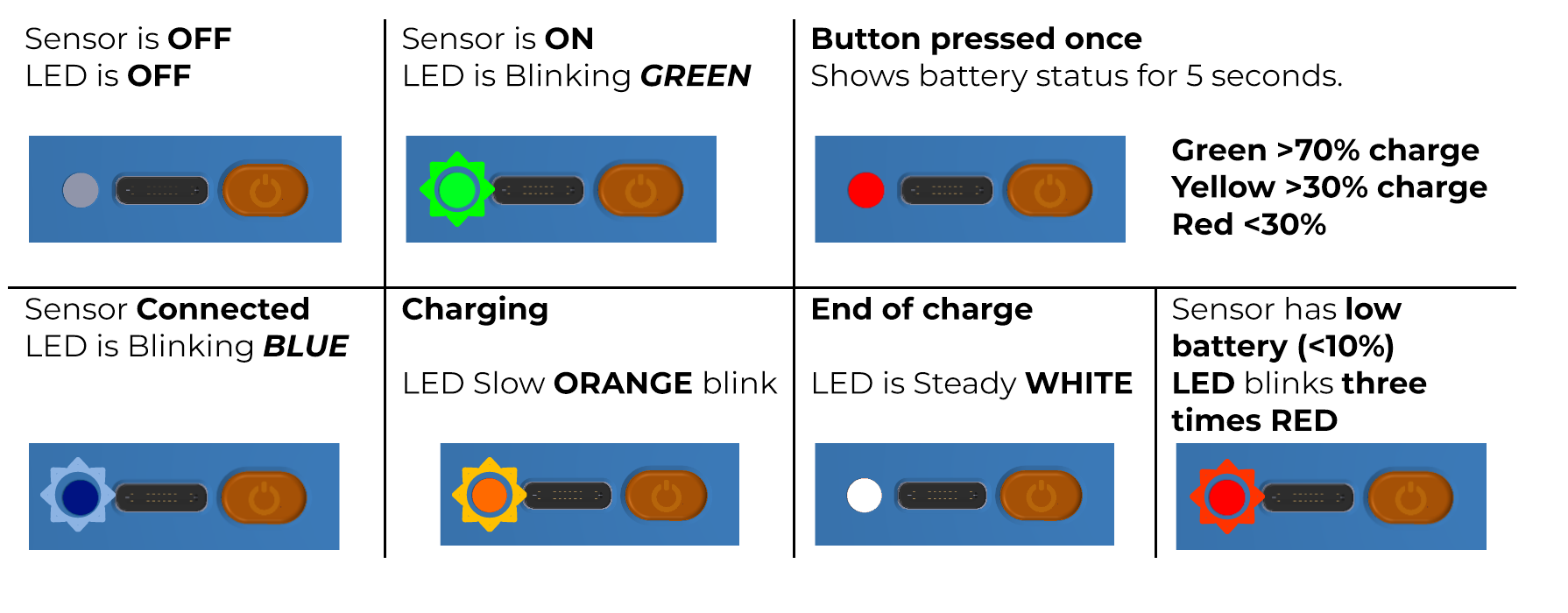
LED indicators remain the most common charging status system across all price points. But confusing flashing sequences with solid lights causes critical errors. Here’s how to read them correctly for immediate accuracy.
Why Your 4-LED Power Bank Lies When It Shows All Lights Lit
Most 10,000mAh power banks use four LEDs where each light represents 25% capacity. The critical mistake users make: Disconnecting when all lights first illuminate. During charging, LEDs light sequentially (one light = 0-25%, two lights = 26-50%, etc.). But when the fourth LED activates, it flashes for 30-90 minutes while the battery undergoes cell balancing—a final stabilization phase before true 100% capacity. Only when all four LEDs glow steadily without flashing is the power bank fully charged. Disconnecting during the flashing phase risks only achieving 92-95% capacity, explaining why your “full” bank underperforms later.
Single-LED Power Banks: The Color Shift That Matters Most
Budget models often use one LED with color changes instead of multiple lights. While red typically means charging, the exact transition point varies significantly:
– Anker/Aukey: Pulsing red → Solid blue (not green) when full
– Xiaomi: Rapid white flashing → Steady white glow
– Mophie: Dim red pulse → Light completely turns off
Pro Tip: Shine a flashlight on the LED if ambient light drowns it out. Many users miss the subtle color shift from “charging red” to “full blue” in daylight.
Digital Display Power Banks: When “100%” Isn’t Actually Full
High-capacity models (20,000mAh+) increasingly feature digital screens showing exact percentages. But these displays hide nuances that impact readiness.
Why Your Power Bank Shows 100% Too Early (And What to Do)
Even with a digital display, 99% ≠ 100% readiness. Most power banks hit 99% in 80% of the total charge time, then enter “trickle charge” mode for the final 1%. During this phase:
– The percentage display freezes at 99% for 20-45 minutes
– Input wattage drops from 18W to 2-3W (visible on USB-C PD displays)
– The casing cools from warm to room temperature
Critical Action: Wait until the display shows exactly “100%” or “FULL”—not 99%—and the input wattage drops significantly. Disconnecting at 99% sacrifices 5-7% usable capacity, especially noticeable on large-capacity banks.
Wireless Power Bank Charging Cues You’re Missing
Wireless charging models add unique signals:
– Qi-certified banks pulse blue during charging → solid green when full
– Some (like Anker PowerCore Wireless 10K) emit a single confirmation beep
– If using the bank’s wireless pad while charging, the indicator shows dual pulses (one for input, one for output)
Warning: Never judge wireless bank fullness by phone charging speed alone. A slow-charging phone may mask incomplete power bank capacity.
Brand-Specific Full-Charge Signals: Anker, Xiaomi, RAVPower Compared

Generic guides fail because indicator logic varies drastically by brand. Use these model-specific signals for 100% accuracy.
Anker PowerCore Models: Beyond the Blue Light
While most Anker units use blue lights, the behavior differs by generation:
– PowerCore II (2020+): Pulsing blue → Solid blue with no dimming
– PowerCore Essential: Blue pulses rapidly → Slows to gentle breath → Solid
– 737 (GaN Prime): Digital display shows “F” instead of 100%
Expert Note: Anker’s newer models enter “standby mode” 2 hours after full charge, turning lights completely off. Check the display button—pressing it should show 100%.
Xiaomi Power Banks: The Hidden Blink Rate Clue
Xiaomi’s LED system tricks many users:
– Charging: Last LED blinks rapidly (1 flash/second)
– Final 5%: Blink slows to 1 flash/3 seconds
– Fully charged: Steady solid light with zero blinking
If the final LED blinks even once per minute, charging continues. Xiaomi’s trick? The blink rate slows imperceptibly—it’s not truly full until absolute stillness.
Troubleshooting False “Full Charge” Readings: 3 Critical Checks
When your power bank claims 100% but dies mid-charge, these diagnostic steps reveal the real issue.
Step 1: Verify Input Source Power (The 2A Rule)
Problem: Power bank shows “full” after 1 hour but only delivers 30% to your phone.
Diagnosis: Weak charger input. A 10,000mAh bank needs ≥2A input to charge fully.
Fix:
– Use the original 18W USB-C charger (not a 5W phone charger)
– Check cable for damage—frayed wires reduce input current by 40%+
– Measure actual input: If wattage <80% of charger rating (e.g., 14W on 18W charger), replace cable
Step 2: Test for Battery Degradation (The Capacity Drop Test)
Problem: Same power bank now charges faster but holds less power.
Diagnosis: Aging lithium cells lose capacity. A worn 20,000mAh bank may only hold 14,000mAh.
Check:
1. Fully charge the bank (all LEDs solid)
2. Charge a new phone from 0% to 100%
3. Repeat until bank depletes
Healthy bank: 20,000mAh = ~8 full phone charges (2,500mAh phone)
Degraded bank: Delivers ≤5 charges despite showing “100%”
Step 3: Reset Faulty Indicators (Pinhole Button Fix)
Problem: Lights cycle erratically or freeze at 75%.
Cause: Battery Management System (BMS) glitch.
Solution:
1. Fully discharge power bank (run until lights die)
2. Wait 10 minutes
3. Press reset button (tiny hole near USB ports) for 15 seconds with paperclip
4. Recharge—indicators should now sync correctly
Safety Protocol: When to Unplug to Prevent Damage
Ignoring these signals risks battery swelling or fire—not just reduced lifespan.
The 15-Minute Rule for Maximum Longevity
Disconnect within 15 minutes of confirmed full charge (all LEDs solid/digital 100%). Extended connection causes:
– Trickle charging cycles that degrade cells 3x faster
– Phantom drain from indicator circuits (consumes 0.5-2% daily)
– Heat buildup if left on hot surfaces (e.g., car dashboards)
Exception: Power banks with “storage mode” (like Anker 737) automatically enter low-power state after 2 hours. Confirm via manual.
Temperature Danger Zones You Must Monitor
A power bank should never exceed 40°C (104°F) during charging. Use your hand as a gauge:
– ✅ Safe: Warm but comfortable to hold (≤35°C)
– ⚠️ Caution: Too hot for prolonged touch (35-40°C) – pause charging
– ❌ Danger: Painfully hot (≥41°C) – unplug immediately and discard
Pro Tip: Charge on wood/metal surfaces, never beds or couches where heat traps.
Final Verification: The Phone Charge Test That Never Lies
When indicators confuse you, this test confirms true capacity:
1. Fully charge power bank using correct charger/cable
2. Power off a freshly drained phone (0% battery)
3. Plug into power bank’s primary output port
4. Monitor phone charging:
– True full charge: Phone reaches 100% in one continuous session
– Incomplete charge: Phone stalls at 95-98% or needs reconnection
Why this works: Power banks deliver unstable voltage when not truly full, causing phone charging algorithms to pause prematurely.
Final Note: Your power bank’s readiness hinges on recognizing model-specific signals—not generic assumptions. Always disconnect within 15 minutes of verified full charge using the indicators for your exact model. For persistent issues, consult your manufacturer’s manual (search “[Your Model] full charge indicator”) as reset procedures vary. Remember: A power bank showing “100%” but failing to deliver full charges has likely degraded—replace units older than 2 years for safety. Keep this guide handy during your next charge cycle, and your backup power will never fail you again.



