
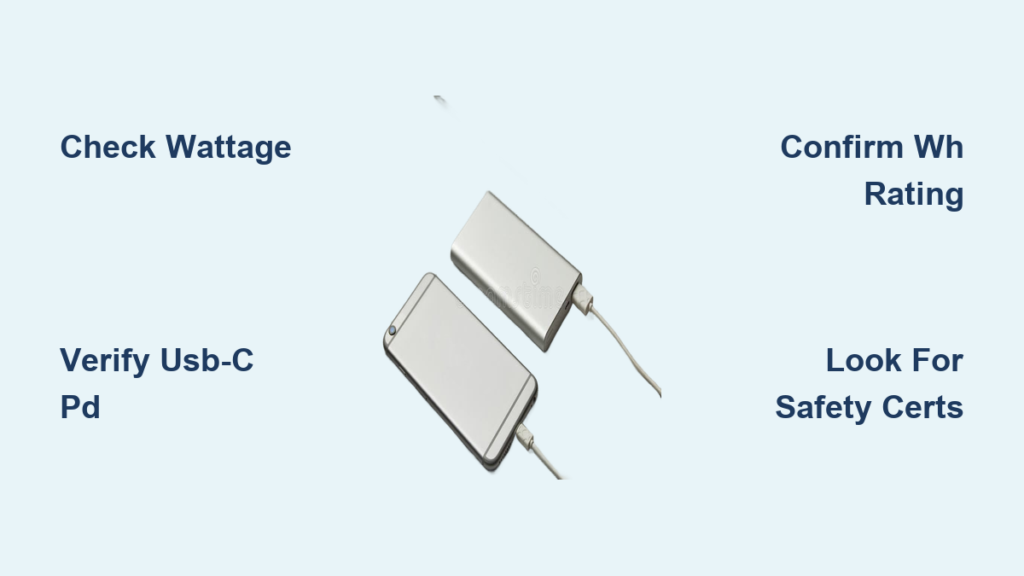
Your laptop battery dying during a critical presentation or while working remotely isn’t just inconvenient—it can cost you business, opportunities, and peace of mind. Unlike phone power banks, laptop charging requires significantly more power and specific technical compatibility. Choosing the wrong model leaves you stranded with a dead device when you need it most. This guide cuts through the marketing jargon to show you exactly how to select a power bank that delivers reliable laptop charging anywhere.
Calculate Your Exact Laptop Wattage Requirement (Before You Buy)
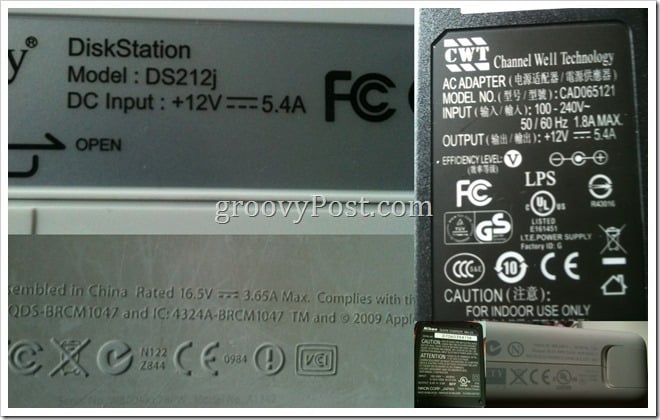
Your laptop’s power needs aren’t optional—they’re non-negotiable specifications that determine whether a power bank will actually work. Ignoring this step is the #1 reason people end up with useless “laptop” power banks.
Locate Your Laptop’s Power Adapter Specifications
Flip over your laptop’s original AC adapter and find the “Output” section. You’ll see two critical numbers: Voltage (V) and Amperage (A). For example, a common specification reads “19.5V ⎓ 3.33A.” These values represent your laptop’s specific power requirements that any power bank must match.
Pro-Tip: Check the bottom of your laptop too—some manufacturers list power requirements there as a backup. Never guess these values.
Convert Volts and Amps to Wattage (Simple Formula)
Multiply your laptop’s voltage by amperage to determine the minimum wattage your power bank must deliver: Watts = Volts × Amps. Using the example above: 19.5V × 3.33A = 65W.
This number is critical: A 45W power bank won’t properly charge a 65W laptop while in use. The laptop may draw power faster than the power bank can supply, causing it to drain even while “charging.” Always select a power bank with output wattage matching or exceeding your calculation.
Why Watt-Hours (Wh) Matters More Than Milliamp-Hours (mAh)

Manufacturers prominently display mAh ratings because they look impressive, but this number is misleading for laptop power banks. Watt-hours (Wh) provide the accurate measurement you need to determine real-world charging capacity.
The Critical Conversion Formula You Must Know
To convert the advertised mAh rating to meaningful Wh: Wh = (mAh × 3.7V) ÷ 1,000. For example, a 20,000mAh power bank equals 74Wh (20,000 × 3.7 ÷ 1,000 = 74).
This conversion matters because airlines regulate power banks by Wh (not mAh), and Wh directly indicates how many times you can charge your laptop. Always verify the Wh rating before purchasing—reputable brands list this clearly on packaging or product pages.
How to Estimate Real-World Charging Cycles
Due to efficiency losses (typically 15-20%), a 100Wh power bank delivers about 80-85Wh of usable energy. To calculate potential laptop charges: Usable Wh ÷ Laptop Battery Capacity (Wh).
If your laptop has a 58Wh battery (common for 13″ MacBooks), a 100Wh power bank provides approximately 1.4 full charges (85Wh ÷ 58Wh = 1.46). This calculation prevents disappointment when your “20,000mAh” power bank only delivers one partial charge.
USB-C Power Delivery: The Non-Negotiable Requirement for Modern Laptops
Unless you own an older laptop with a barrel charger, USB-C Power Delivery (PD) is essential for proper laptop charging. This technology enables the necessary power negotiation between your devices.
Check Your Laptop’s USB-C PD Compatibility
Most laptops from 2016 onward with USB-C ports support Power Delivery, but verify by checking if your original charger uses USB-C. Modern ultrabooks like MacBook Airs, Dell XPS models, and Lenovo ThinkPads require USB-C PD specifically—no adapter or cable substitution works.
Warning: Don’t assume all USB-C ports support charging—some are data-only. Your laptop’s charging port must explicitly support Power Delivery.
Minimum Wattage Requirements by Laptop Type
- Ultrabooks (MacBook Air, Dell XPS 13): Requires 45W-65W USB-C PD output
- 14″-16″ Laptops (MacBook Pro 14″/16″): Needs 85W-100W USB-C PD output
- Gaming Laptops: Typically requires 100W+ (often through proprietary barrel connectors)
A power bank advertising “USB-C charging” isn’t sufficient—you must confirm it delivers the specific wattage your laptop requires through its USB-C PD implementation.
Match Power Bank Wattage to Your Specific Laptop Model
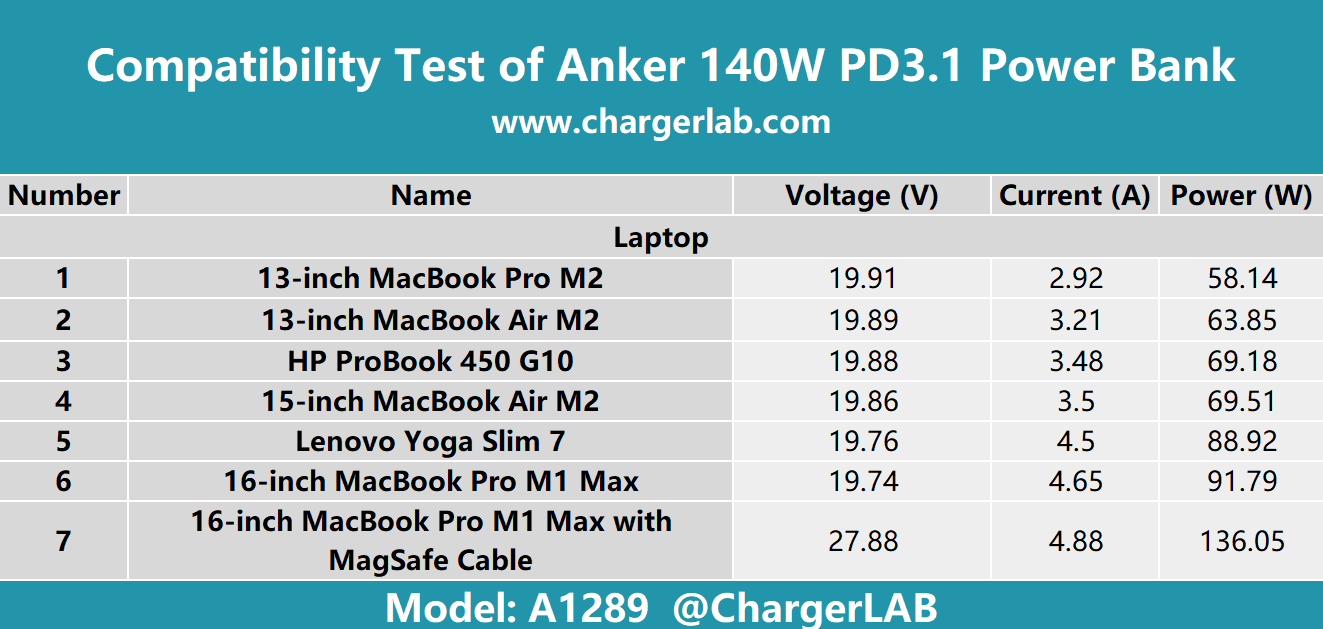
Choosing the right power bank depends entirely on your laptop’s specifications, not generic recommendations. Here’s how to match wattage requirements to common laptop categories.
Ultrabooks (MacBook Air, Dell XPS): 45W-65W Requirements
For thin-and-light laptops like MacBook Airs or Dell XPS 13s, a 65W USB-C PD power bank is the sweet spot. This delivers enough power to charge while using the laptop moderately. Look for models with 60-100Wh capacity (20,000-27,000mAh) that stay under airline limits.
Pro-Tip: The Anker 737 Power Bank (100W output, 24,000mAh) works perfectly for most ultrabooks and recharges itself in 1.8 hours via 140W input.
14″-16″ Laptops (MacBook Pro): 85W-100W Requirements
Larger laptops like 14″ and 16″ MacBook Pros require higher wattage. While they might accept lower-wattage chargers for basic use, you’ll experience slow charging or net battery drain during intensive tasks. Invest in a 100W USB-C PD power bank with at least 99Wh capacity.
Critical check: Verify the power bank can deliver 20V at 5A (100W) specifically—some claim 100W but only deliver it through multiple ports combined.
Gaming/Workstation Laptops: Special Considerations
Most gaming laptops (Alienware, ASUS ROG) require 150W-300W and often use proprietary barrel connectors rather than USB-C charging. Standard power banks won’t deliver sufficient power for active use—they might only slow battery drain.
Your best option: Look for portable power stations with DC output matching your laptop’s voltage/amperage requirements. These larger units (200Wh+) with dedicated barrel plug adapters provide the necessary wattage but sacrifice portability.
Airline-Approved Power Banks: Stay Under 100Wh Limit
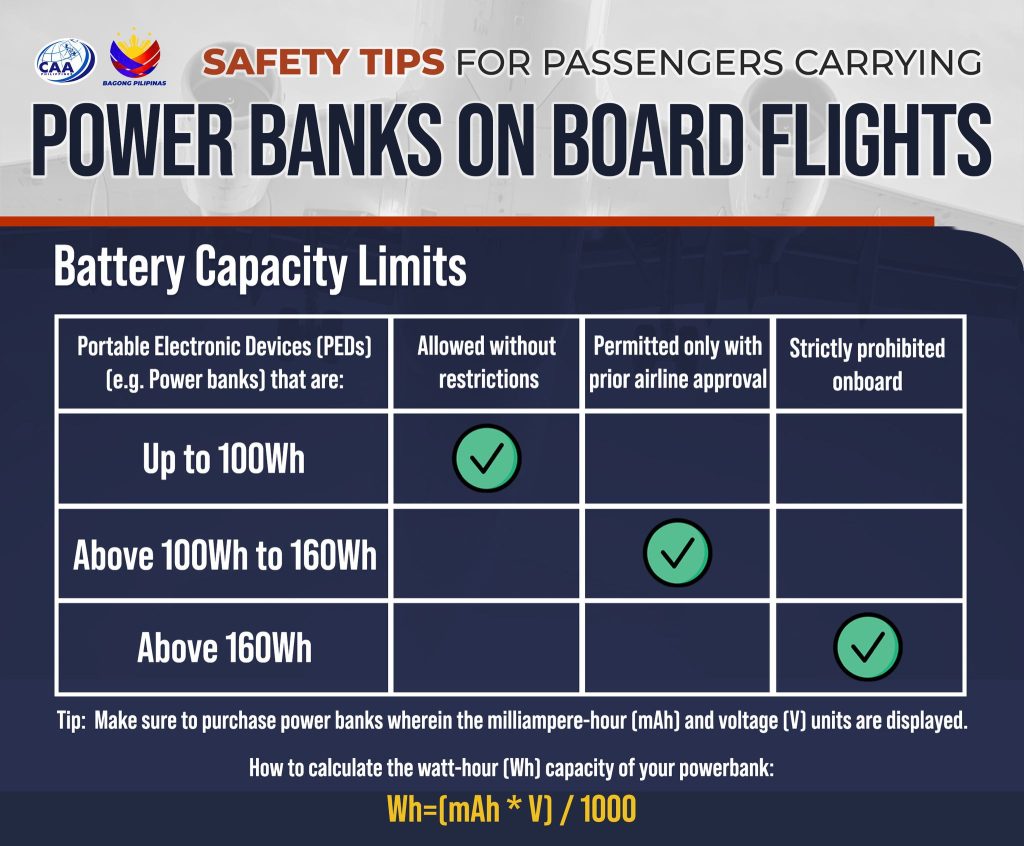
Nothing ruins travel plans like having your power bank confiscated at security. Understanding airline regulations prevents this common but avoidable problem.
The 99.9Wh Maximum for Hassle-Free Travel
The FAA and IATA limit power banks to 100Wh (watt-hours) in carry-on luggage without special permission. The largest capacity you can bring on most flights is 99.9Wh, which converts to approximately 27,000mAh at 3.7V.
Calculate before you fly: Multiply mAh by 3.7, then divide by 1,000. If the result exceeds 100, you’ll need airline approval (and may still be denied).
How to Verify Watt-Hour Rating on Product Labels
Reputable manufacturers clearly display Wh ratings on product labels—look for a number followed by “Wh.” If only mAh appears, calculate it yourself using the formula. Power banks lacking Wh specifications often exceed legal limits or misrepresent capacity.
Warning: Never pack power banks in checked luggage—they’re prohibited in all cases due to fire risk.
Critical Features Beyond Basic Specifications
While wattage and capacity are foundational, these additional features determine real-world usability and longevity.
Fast Recharging Input (Why 30W+ Matters)
A 100Wh power bank charged through a 10W micro-USB port takes 10+ hours to recharge. Look for power banks with 30W-100W USB-C PD input that recharge in 1-3 hours instead. This feature is essential for travelers who need to recharge between flights.
Time comparison: A 100Wh power bank with 100W input recharges in ~1.2 hours versus 12+ hours with basic input.
Multi-Device Charging Without Power Loss
Premium power banks maintain full laptop charging capability while simultaneously powering phones or tablets. Check the “total output” specification—some models reduce laptop charging wattage when other devices connect.
Ensure your chosen model maintains at least 60W to your laptop when charging additional devices—a critical feature for professionals on the move.
Safety Certifications That Actually Protect Your Laptop
Lithium batteries pose fire risks when poorly manufactured. These certifications verify your power bank meets safety standards.
Must-Have Certifications (UL, CE, RoHS)
Look for UL 2054/2056, CE, and RoHS certifications—these indicate independent safety testing. UL certification specifically verifies protection against overcharging, overheating, and short circuits.
Red flag: Power banks listing only “CE” without additional certifications often fake this mark. Reputable brands like Anker, RAVPower, and Goal Zero prominently display multiple verifiable certifications.
Red Flags That Indicate Unsafe Power Banks
Avoid units that:
– Lack specific Wh ratings
– Claim impossibly high capacities (e.g., “50,000mAh” in a phone-sized unit)
– Have no safety certifications listed
– Feel unusually light for their claimed capacity
Investing $20 less could risk your laptop, data, and personal safety—prioritize certified models from established brands.
Final Power Bank Selection Checklist
Before purchasing, verify these five critical points to ensure your power bank actually works with your laptop:
- [ ] Wattage Match Confirmed: Power bank output ≥ laptop’s required wattage (calculated from V × A)
- [ ] USB-C PD Verified: Specifically supports Power Delivery at required wattage (not just USB-C)
- [ ] Wh Rating Confirmed: Capacity meets charging needs and complies with airline limits
- [ ] Fast Input Included: 30W+ USB-C input for practical recharging between uses
- [ ] Safety Certified: Displays UL, CE, and RoHS certifications from reputable brand
Choosing the right power bank for laptop use isn’t about finding the highest mAh number—it’s about matching precise technical specifications to your device’s requirements. By focusing on wattage compatibility, accurate capacity measurement, and essential safety features, you’ll select a power bank that reliably extends your productivity anywhere. The extra 10 minutes spent verifying specifications before purchase prevents hours of frustration when you most need your laptop to stay powered.



