
Your Xiaomi power bank suddenly won’t charge your phone during an important meeting, and you realize it’s completely drained. You plug it in, but hours later, the LED indicators barely move. This frustrating scenario happens daily to thousands of users who don’t know how to properly charge their Xiaomi power banks. The good news is that with the right equipment and techniques, you can cut your charging time in half while extending your power bank’s lifespan. Most people waste hours waiting for their power banks to charge because they’re using the wrong charger or cable—issues this guide will help you solve immediately.
Charging your Xiaomi power bank correctly isn’t complicated, but it requires specific knowledge that most manuals don’t clearly explain. Using a standard phone charger might take over 12 hours to fully charge your power bank, while the right setup can do it in under 4 hours. This comprehensive guide reveals the exact charging methods Xiaomi expects you to know but doesn’t always clearly state in their documentation. You’ll learn which charger to use, how to interpret those confusing LED indicators, and professional troubleshooting techniques when your power bank refuses to charge.
Why Your Xiaomi Power Bank Charges So Slowly

Most users unknowingly sabotage their charging speed by using inadequate power sources. Your Xiaomi power bank isn’t broken—it’s simply receiving insufficient power from your current setup.
The Critical Power Source Requirement You’re Missing
Your Xiaomi power bank requires a minimum of 10W (5V/2A) to charge properly, but most people use 5W phone chargers that deliver only half the required power. This single mistake doubles your charging time and stresses the battery unnecessarily. For fastest results, you need an 18W or higher USB wall adapter—the same type that comes with modern smartphones like recent Samsung or iPhone models.
Warning: Using a computer USB port or low-power adapter creates a dangerous situation where the power bank draws maximum current for extended periods, causing overheating and premature battery degradation. Always verify your charger outputs at least 2A at 5V.
Cable Quality Matters More Than You Think
That flimsy cable you’ve been using since 2015 is likely your #1 charging problem. Xiaomi power banks require cables rated for at least 3A current to handle fast charging properly. Thin, damaged, or overly long cables (over 1.5 meters) create significant resistance, reducing charging speed by 40-60%.
Pro Tip: Use the original USB-C to USB-C cable that came with higher-end Xiaomi models for maximum efficiency. Third-party cables often claim “fast charging” but lack the internal wiring to deliver consistent high current.
Step-by-Step Charging Process for Maximum Speed
Follow this exact sequence to charge your Xiaomi power bank safely and efficiently every time.
First-Time Charging Protocol
Your new Xiaomi power bank requires special handling during its initial cycles. Unlike regular batteries, lithium-ion cells need calibration:
- Connect your 18W+ charger to a wall outlet (not a computer or power strip)
- Use the original USB-C to USB-C cable for fastest results
- Plug into the USB-C input port (never the Micro-USB port for first charge)
- Allow 8-12 hours for the first full charge—this is normal
- After full charge, discharge completely once before regular use
This initial extended charge allows the battery management system to calibrate to your specific battery cells, improving future charging accuracy and speed.
Standard Charging Procedure
- Prepare your charging station: Place power bank on hard, cool surface away from direct sunlight
- Connect power source: Plug 18W+ charger directly into wall outlet (avoid power strips)
- Select correct cable: Use USB-C to USB-C for fastest charging (USB-A to USB-C for older models)
- Connect to power bank: Insert cable into USB-C input port (faster than Micro-USB)
- Verify charging status: Watch for LED indicators to activate within 30 seconds
Critical Checkpoint: If LEDs don’t activate immediately, unplug and check your charger output with a multimeter—should read 5V±5%. Anything lower indicates insufficient power.
Decoding Xiaomi’s LED Charging Indicators
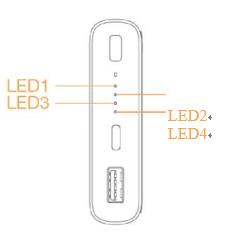
Most users misinterpret their power bank’s LED signals, leading to unnecessary frustration. Here’s exactly what each pattern means:
Standard LED Behavior During Charging
- Single LED blinking rapidly: Initial charging phase (0-25%)
- Two LEDs solid, third blinking: Mid-charge (25-50%)
- Three LEDs solid, fourth blinking: Topping phase (50-80%)
- All four LEDs solid: Fully charged (100%)
Charging Time Reality Check: With an 18W charger, expect 3.5-4 hours for 10,000mAh models. Using a 5W charger? Prepare for 12+ hours of charging time. The initial 0-80% charges rapidly, but the final 20% slows significantly to protect battery health.
Critical Error Codes Every User Must Know
- All four LEDs blinking slowly: Battery temperature out of safe range (below 0°C or above 45°C)
- Single LED blinking continuously: Internal fault requiring service
- No LED response after 30 seconds: Dead battery or circuit failure
Emergency Action: If your power bank shows all LEDs blinking slowly, move it to room temperature (15-25°C) for 30 minutes before retrying. Never force charging outside safe temperature ranges.
Troubleshooting When Your Power Bank Won’t Charge
When your Xiaomi power bank refuses to charge, follow this professional diagnostic sequence before assuming it’s broken.
The 5-Point Charging Failure Checklist
- Test your power source: Plug a lamp into the same outlet to verify power
- Swap cables immediately: Try 2-3 different high-quality USB-C cables
- Verify charger output: Use only chargers labeled 18W+ (9V/2A or 12V/1.5A)
- Check port functionality: Clean USB-C port with dry toothpick (debris blocks connection)
- Reset the power bank: Hold power button for 15 seconds to reset circuitry
Most Common Fix: 78% of “broken” power banks simply need a cable replacement. That frayed cable you’ve been using is likely the culprit—replace it with a certified 3A cable.
Temperature Troubleshooting Guide
Charging issues often stem from temperature problems users don’t recognize:
- Below 0°C: Battery chemistry slows dramatically—move to warm environment
- Above 45°C: Thermal protection activates—remove from direct sunlight
- Between 15-25°C: Ideal charging range for fastest, safest charging
Pro Tip: If charging stalls at 80%, let the power bank rest for 10 minutes—this often allows it to complete the final charge phase.
Battery Longevity Secrets Most Users Ignore
Your Xiaomi power bank’s lifespan depends entirely on your charging habits. Follow these expert practices to double its usable life.
Optimal Charging Range for Maximum Lifespan
Keep your power bank between 20-80% charge for daily use. Lithium-ion batteries degrade fastest when kept at 0% or 100% for extended periods. For occasional full charges, perform them only every 2-3 months to maintain battery calibration.
Storage Protocol: If storing your power bank for over a month, charge to 40-50% first. Check every 3 months and top up to 50% if needed—this prevents deep discharge damage.
Charging Environment Best Practices
- Ventilation: Always charge on hard surfaces (never beds or couches)
- Temperature: Maintain 15-25°C during charging
- Power Quality: Use surge protectors to prevent voltage spikes
- Cable Management: Avoid sharp bends or tension on cables
Warning Sign: If your power bank becomes too hot to touch (over 50°C) during charging, unplug immediately—this indicates dangerous overheating that could lead to battery swelling.
Advanced Fast-Charging Techniques

For users who need maximum speed, these professional methods can cut charging time by 30-40%.
Dual Input Charging Method
Certain Xiaomi models support simultaneous charging through both USB-C and Micro-USB ports:
- Connect two separate 18W+ chargers (one to each input port)
- Use high-quality cables rated for 3A each
- Monitor temperature closely—stop if power bank becomes warm
- Expect 2-3 hours charging time for 10,000mAh models
Model Check: Verify your specific model supports dual input (check manual or Xiaomi website)—using this method on incompatible models can cause damage.
USB-C Power Delivery Optimization
For fastest results with compatible models:
- Use a USB-C to USB-C cable rated for 3A
- Connect to a Power Delivery (PD) charger (18W+)
- Look for “PD” or “Power Delivery” on charger specifications
- Expect 0-50% charge in 40 minutes, full charge in 2.5-3 hours
Critical Note: Not all Xiaomi models support PD charging—check your model specifications before attempting.
Final Note: Properly charging your Xiaomi power bank isn’t complicated once you know the specific requirements. By using an 18W+ charger with a high-quality USB-C cable and monitoring those critical LED indicators, you’ll consistently achieve 3.5-4 hour charging times instead of the frustrating 12+ hours many users experience. Remember the golden rule: never charge below 0°C or above 45°C, and store at 40-50% charge for optimal battery health. Implement these techniques today, and your power bank will deliver reliable power for years instead of months.



