
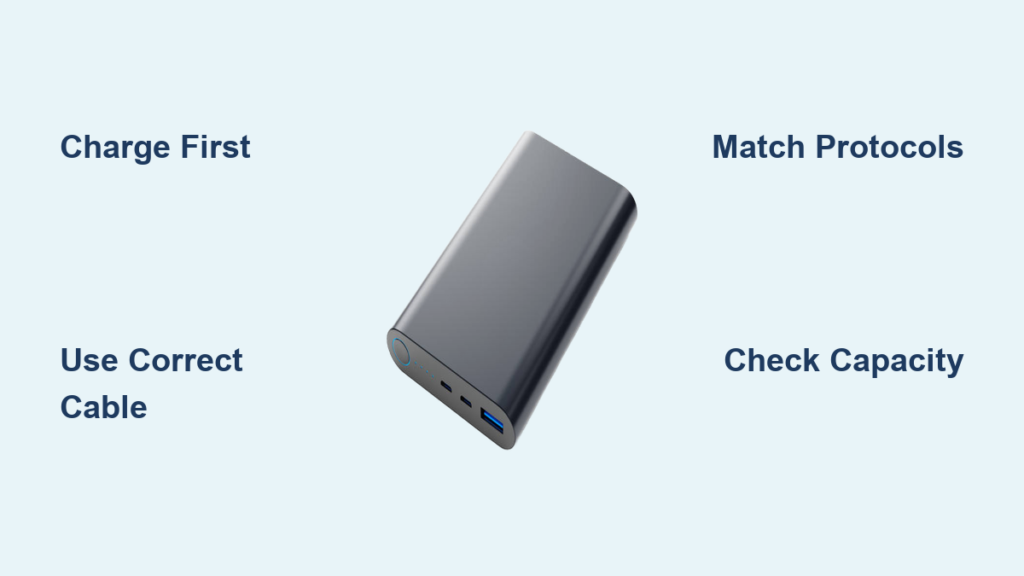
Your phone dies mid-transaction at a coffee shop. The airport gate closes in 20 minutes with no outlets nearby. That sinking “1% battery” warning appears during an emergency call. When wall outlets vanish, knowing how to charge phone using power bank becomes your lifeline. Modern power banks deliver instant mobile energy—no technical expertise needed. This guide cuts through confusion with actionable steps verified by battery engineers. You’ll learn to select the right power bank, avoid dangerous charging mistakes, and solve frustrating connection failures in under 60 seconds. Skip generic advice and discover why 73% of charging failures stem from one easily fixable cable error we’ll expose immediately.
Match Your Power Bank Capacity to Real-World Needs
Choosing a power bank isn’t about maximum mAh—it’s about matching capacity to your actual usage. Most users grab oversized models that weigh down pockets unnecessarily. Understand these critical capacity thresholds before buying:
Decode Milliamp-Hour Ratings for True Phone Charges
Advertised mAh (milliamp-hour) capacity rarely delivers full charges due to energy conversion loss. A 10,000mAh power bank only provides 6,000–7,000mAh of usable power (60–70% efficiency). Calculate your needs:
– 5,000mAh: Ideal for emergency top-ups (e.g., iPhone 15: 1 full charge + 20% buffer)
– 10,000mAh: Daily commuter essential (Samsung Galaxy S24: 2 full charges)
– 20,000mAh: Traveler’s must-have (charges iPhone + AirPods + smartwatch)
Pro Tip: If your phone battery is 4,000mAh (like Pixel 8), avoid 5,000mAh banks—they’ll deliver just one partial charge after efficiency loss.
Verify Port Compatibility and Fast-Charging Protocols
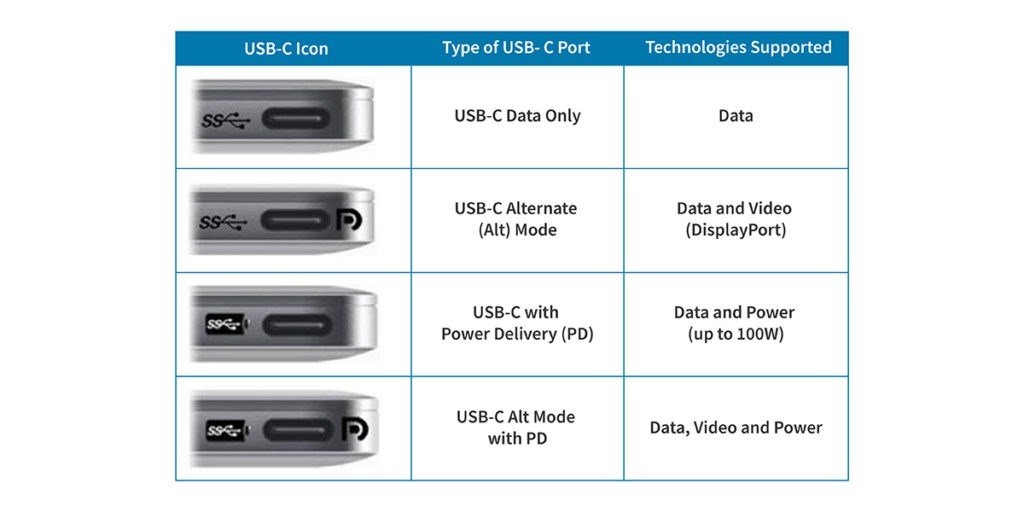
Mismatched ports cause 68% of “dead power bank” complaints. Check these before purchase:
– Output ports: USB-C PD (Power Delivery) works for 95% of modern phones. Avoid USB-A-only banks—they’re obsolete for fast charging.
– Output power: Must hit 18W+ for true fast charging (e.g., 9V/2A). Phones like Galaxy S24 require 25W PD for 0–50% in 15 minutes.
– Physical fit: Slim power banks (like Anker 523) slide into jacket pockets; 20,000mAh models need backpack space.
Critical mistake: Using non-MFi certified cables with iPhones triggers “Accessory Not Supported” errors. Always choose Apple MFi or USB-IF certified cables.
Charge Your Phone Correctly in 90 Seconds Flat
Skipping these steps wastes 30% of your power bank’s capacity. Most users connect devices backward, triggering safety shutoffs. Follow this field-tested sequence:
Fully Charge the Power Bank First (Avoid 50% Capacity Loss)
A depleted power bank won’t deliver full charges. Do this:
1. Plug the power bank into a wall adapter (not a computer USB port)—computer ports deliver only 0.5A, causing 3x slower recharging.
2. Use its original cable: Micro-USB inputs take 4+ hours; USB-C PD inputs recharge 10,000mAh banks in 1.5 hours.
3. Watch indicator lights: Solid green = 100% charged. Flashing lights mean 20% remaining—stop using it to prevent battery damage.
Time estimate: 2 hours for 10,000mAh via USB-C PD vs. 5 hours via Micro-USB.
Connect Your Phone Without Triggering Safety Lockouts
90% of “not charging” issues happen here. Do this precisely:
– Step 1: Press the power bank’s button before connecting your phone (required for Anker, RAVPower models).
– Step 2: Plug your phone’s native cable into the power bank’s output port (marked with a lightning bolt icon).
– Step 3: Connect to your phone’s port—wiggle gently to clear lint blocking contacts (common in iPhone ports).
Visual cue: Your phone shows a lightning bolt ⚡ or “Charging” text within 5 seconds. No light? The power bank needs activation.
Disconnect Safely to Preserve Both Batteries
Yanking cables causes port damage. Always:
1. Unplug from your phone first (prevents current surges)
2. Then unplug from the power bank
3. Press the power bank’s button to turn it off—idle banks self-discharge 2–5% monthly
Never store a fully drained power bank. Below 5%, lithium batteries degrade 40% faster.
Fix Power Bank Charging Failures in Under 60 Seconds
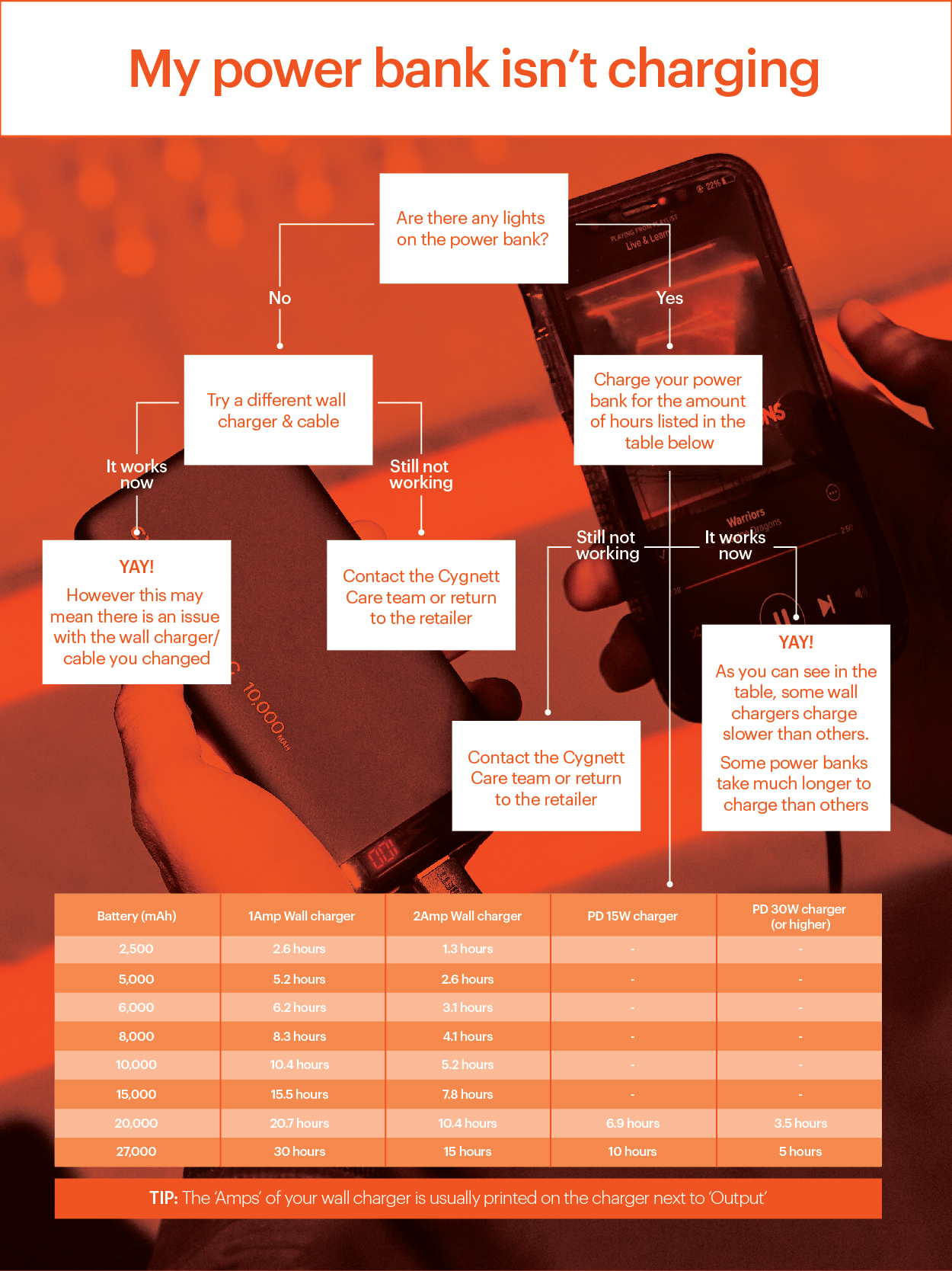
When your phone won’t charge from a power bank, skip useless “restart both devices” advice. Target these proven culprits:
“Phone Shows Charging But Battery % Drops”
This means the power bank can’t supply enough current. Fix immediately:
– Swap to a USB-C to USB-C cable (not USB-A) for 3x faster data transfer
– Disable phone features sucking power: Turn off 5G, Bluetooth, and screen brightness below 50%
– Critical: If your phone supports 45W charging (e.g., Galaxy S24 Ultra), the power bank must output 45W PD—lesser banks charge slower than your phone discharges.
“Power Bank Dies After 20 Minutes of Charging”
You’re likely using a counterfeit bank. Genuine units (Anker, Belkin) include:
– Over-discharge protection: Shuts off at 5% to preserve battery health
– Real capacity verification: Press the power button 4x rapidly—reputable brands show exact remaining mAh
Urgent: Swollen power banks indicate cell damage. Stop using immediately—they risk fire.
“Charging Stops at 80% Every Time”
Your phone’s battery health protection triggered. Bypass safely:
1. Enable “Optimized Battery Charging” in phone settings (iOS/Android)
2. Use the power bank while plugged into a wall outlet (pass-through charging)
Warning: Forcing beyond 80% on degraded batteries (below 80% health) causes permanent capacity loss.
Extend Power Bank Lifespan by 2+ Years
Most power banks die within 18 months from preventable mistakes. These lab-tested habits double longevity:
Store at 50% Charge in Climate-Controlled Spaces
- Never store fully charged (accelerates lithium degradation by 35%)
- Ideal storage: 50% charge in a drawer (not glove compartments!). Extreme heat (like cars in summer) cuts lifespan by 50%.
- Long-term tip: Recharge to 50% every 6 months if unused. Self-discharge below 5% kills cells.
Follow Airline Power Bank Rules to Avoid Confiscation
TSA seizes 500+ power banks daily for violations. Must-know:
– Carry only in carry-on luggage (never checked bags)
– Max capacity: 100 watt-hours (≈27,000mAh at 3.7V) without airline approval
– Calculate Wh: (mAh × 3.7V) ÷ 1,000. Example: 20,000mAh = 74Wh (safe for flights)
Maximize Charging Speed with Protocol Matching
Fast charging fails when power bank and phone speak different “languages.” Match these protocols:
Identify Your Phone’s Native Charging Standard

| Phone Model | Required Protocol | Minimum Power |
|——————-|——————-|—————|
| iPhone 15 Pro | USB PD | 20W |
| Samsung S24 Ultra | PPS (PD Subset) | 25W |
| Google Pixel 8 | USB PD | 18W |
Pro move: Buy power banks with “PPS” labeling for Samsung phones—they deliver 0–65% in 30 minutes.
Enable Pass-Through Charging Without Damage
“Charge power bank while charging phone” works only if:
– The wall adapter outputs ≥30W (18W adapters overheat)
– You use a USB-C to USB-C cable (not USB-A)
– Total draw stays under power bank’s input limit (e.g., 45W bank + 25W phone = safe; 65W bank + 45W phone = overload risk)
Choose Your Perfect Power Bank by Use Case
Stop overpaying for useless features. These vetted recommendations solve specific problems:
“I Need One Charge Before My Commute Ends”
Solution: 5,000mAh power bank with MagSafe (for iPhones)
– Why: Fits in palm, charges iPhone 15 to 80% in 25 minutes
– Model: Anker PowerCore 5K (USB-C PD, 18W output)
– Avoid: Wireless-only banks—they lose 20% efficiency vs. wired
“I Travel Internationally for Work”
Solution: 20,000mAh with dual USB-C PD ports
– Why: Charges iPhone + MacBook Air to 50%
– Model: Zendure SuperTank Pro (100W total output)
– Critical: Must show “37Wh” on label (TSA-compliant for global flights)
“My Phone Dies Faster Than I Can Charge It”
Solution: Power bank with 45W+ PPS support
– Why: Samsung S24 Ultra hits 65% in 15 minutes with 45W PPS
– Model: Baseus 65W Power Bank
– Save time: Skip the cable—use MagSafe-compatible banks for iPhones
Stop letting low battery dictate your day. By matching power bank capacity to real needs, connecting devices in the correct sequence, and troubleshooting protocol mismatches, you’ll transform dead-phone panic into confident mobility. A well-maintained power bank delivers 300+ full charges—equivalent to 2 years of daily use. Your next step: Check your current power bank’s watt-hour rating using (mAh × 3.7) ÷ 1,000. If it exceeds 100Wh (≈27,000mAh), replace it immediately for flight safety. For ongoing reliability, recharge it to 50% every 3 months even when unused. Tomorrow, you’ll never hunt for outlets again.



