
Your ASUS laptop battery is dying and you cannot find the original charger. This is a frustrating situation, but you have several viable options to power up your device. The solution depends entirely on your specific ASUS model, its charging port type, and whether it supports USB-C Power Delivery. Some laptops can charge via USB-C, while others are limited to barrel plug connections and require different approaches.
This guide covers every working method to charge your ASUS laptop without the original charger, from universal adapters and USB-C PD chargers to portable power banks and car charging solutions. You will learn exactly what works for your model, what equipment you need, and which methods to avoid entirely.
Check Your ASUS Model and Power Specifications First
Before attempting any alternative charging method, you must verify your laptop’s power requirements. Using the wrong voltage or amperage can permanently damage your motherboard or charging circuit.
Find Your Laptop’s Power Requirements
Every ASUS laptop needs specific voltage, amperage, and wattage specifications. These must match exactly for safe charging.
To find your specs, check the bottom label of your laptop or the original charger. Look for input ratings like 19V DC, 2.37A, 45W. The voltage must match exactly, even 1V difference can cause permanent damage. Amperage can be equal or higher on your power source, never lower. Most ASUS laptops use center-positive polarity.
Use the ASUS Support website for accurate information. Enter your model number, then navigate to Specifications to find power input details.
Confirm USB-C Power Delivery Support
Not all USB-C ports on ASUS laptops support charging. Look for a lightning bolt symbol or battery icon next to the USB-C port. Check official specs for “USB-C with Power Delivery” or “Supports charging via USB-C.”
The ASUS VivoBook X512JA has a USB-C port but does NOT support charging through it. This is a common limitation on budget models. Always verify before purchasing equipment.
Use a Universal Laptop Charger for Barrel Plug Models
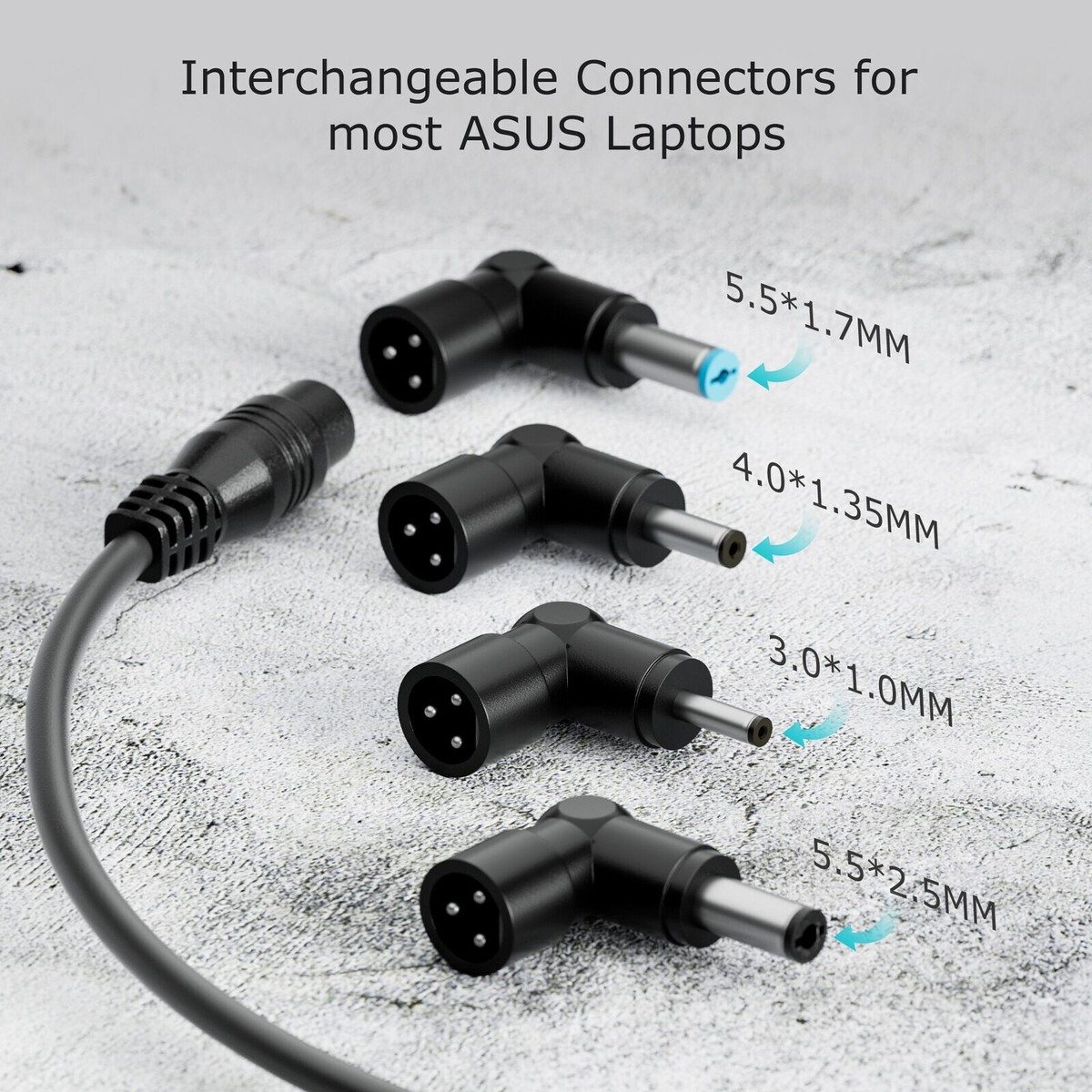
If your ASUS laptop uses a DC barrel jack, a universal adapter is your most reliable option. This method works for most ASUS VivoBook, ROG, and older ZenBook models.
Choose the Right Universal Adapter
Select a universal adapter with adjustable voltage between 15V and 20V. It must include interchangeable tips to match your connector size. Look for over-current and short-circuit protection built in.
The output wattage should meet or exceed your laptop requirement. Use 45W for standard models and 65W for gaming or performance laptops. Recommended options include the Cable Matters Universal Adapter, Targus 65W Universal Charger, and StarTech 90W Universal Charger.
Match the Connector Size
Common ASUS barrel sizes include 6.5mm x 4.5mm for many VivoBooks, 5.5mm x 2.5mm for older models, and 4.0mm x 1.35mm for compact designs. Using the wrong tip causes loose connections or port damage.
Set Voltage and Connect Safely
Set the universal adapter to exactly 19V or 20V as specified for your model. Insert the matching tip firmly into the laptop port. Plug the adapter into a wall outlet. Connect to your laptop and watch for the charging indicator.
Never guess the voltage setting. A 12V setting on a 19V laptop will not charge. A 20V setting on a 19V system may damage your motherboard.
Charge Via USB-C Power Delivery for Compatible Models
If your ASUS laptop supports USB-C Power Delivery, this is the fastest and most portable alternative charging method available.
Confirm USB-C PD Support
Check your official ASUS specifications for USB-C charging capability. Look for the lightning bolt symbol on the port itself. Test with a known 65W PD charger if uncertain.
Models that support USB-C charging include the ZenBook 14, ROG Zephyrus G14, VivoBook S Series variants, and ProArt Studiobook. Budget VivoBook models like the X512JA do not support this feature.
Use a 65W or Higher USB-C PD Charger
Use at least 45W for basic charging, though 65W or 100W is ideal for gaming or heavy workloads. Low-wattage chargers like 18W phone chargers may power the laptop but will not charge the battery under load.
Pick a Certified USB-C to USB-C Cable
Use only USB-IF certified, E-Marked cables that support PD 3.0 or higher. Cheap, unbranded cables fail under high power and can overheat. Recommended brands include Anker, Cable Matters, and official ASUS USB-C cables.
Steps to Charge
Plug the PD charger into a wall outlet. Connect the certified USB-C to USB-C cable. Plug into your laptop’s PD-capable USB-C port. Check the battery icon for charging status. Some models charge faster when powered off or in sleep mode.
Power Bank Charging: Emergency On-the-Go Solution

For travel, power outages, or working remotely, a high-wattage power bank can keep your ASUS laptop alive.
Requirements for Power Bank Charging
Your power bank must have USB-C PD output of at least 45W, with 65W being ideal. The capacity should be 20,000mAh or higher for meaningful charging. Use an E-Marked cable for proper communication.
Wireless power banks do not work. They deliver only 5-15W, which is insufficient for laptops.
Expected Charge Capacity
A 26,800mAh power bank provides approximately 1.5 full charges for ultrabooks. A 25,600mAh model provides about 1 full charge. Higher capacity options like the Anker 737 can provide up to 2 full charges with fast charging.
Steps to Use
Fully charge the power bank before leaving home. Use a certified USB-C to USB-C cable. Connect to your laptop’s USB-C port. Press the power button on the bank if required. Monitor charging and watch for overheating.
Car Charging: Power Up on the Road
You can charge your ASUS laptop from a vehicle using two different approaches.
Option 1: USB-C Car Charger
This direct method requires a USB-C PD-capable laptop. Use a 65W or higher USB-C car charger like the Anker PowerDrive III Elite. Connect using a certified USB-C to USB-C cable.
Start your engine first, then plug in the charger. Connect to your laptop and monitor charging. This method will not work on laptops without USB-C charging support.
Option 2: Power Inverter
A power inverter converts 12V DC to 110V AC, letting you use any charger. Use at least 300W with pure sine wave output for sensitive electronics.
Plug the inverter into the car socket. Connect your original or universal charger. Start the engine. Avoid extended use with the engine off, as this drains the car battery in 30-60 minutes.
This is the only viable method for charging ASUS laptops like the X512JA that lack USB-C charging support.
Portable Power Station: Ultimate Off-Grid Solution

For long power outages, camping, or emergency preparedness, a portable power station is the most versatile option.
Why Power Stations Work Best
Portable power stations include AC outlets, USB-C PD ports, and 12V car ports. They can run your laptop overnight and recharge quickly. Many use LFP batteries with 3,000+ cycles for enhanced safety and longevity.
How to Use
Use AC mode by plugging in your original or universal charger. Use USB-C PD mode for direct charging if your laptop supports it. Use car port mode with an inverter or 12V accessories.
Top models include the EcoFlow RIVER 2 with 768Wh capacity and 60W PD, the Anker 757 with 1229Wh and 100W PD, and the Jackery Explorer 500 with 518Wh and 100W PD.
External Battery Charging for Older Models
If your ASUS laptop has a removable battery, you can charge it outside the device.
Check if Your Battery is Removable
Most modern ASUS laptops have sealed batteries. This method only works on older models manufactured before 2018.
Steps to Charge Externally
Power off and unplug the laptop. Remove the battery using the service manual for guidance. Check the label for voltage and connector specifications. Use a compatible external charger like the Noco Genius G750. Reinstall the battery after charging completes.
Smartphone Reverse Charging: Last Resort Only
Some Android phones support reverse charging via USB-C, but this should only be used in emergencies.
Requirements and Limitations
Your phone must support reverse wireless or USB-C PD output. Use a USB-C to USB-C cable. Your laptop must accept USB-C PD input.
The reality is sobering. Ten percent phone battery translates to only 5-10 minutes of laptop runtime. This method drains your phone extremely fast and can overheat both devices. Only use this in true emergencies.
Dangerous Methods to Avoid
Some popular hacks promise charging miracles but risk permanent damage to your laptop.
Never Try These Methods
DIY USB-A to barrel cables risk overheating and short circuits that destroy your laptop. Using the wrong voltage charger with just 1V mismatch can brick your motherboard. Wireless charging pads do not work because no laptop supports this method. USB-A ports max out at 7.5W and cannot charge laptops. HDMI charging is a myth because HDMI does not carry power.
No ASUS laptop can be charged via HDMI, USB-A, or wireless charging pads.
Troubleshoot Charging Issues
Even with the right equipment, problems can occur.
Fix Software and Driver Issues
Update battery drivers through Device Manager. Navigate to Batteries, right-click Microsoft ACPI-Compliant Control Method Battery, and select Update driver. Reset power plans by running powercfg /restoredefaultschemes in Command Prompt as administrator. Update your BIOS from the ASUS Support website.
Check Battery Health
Run powercfg /batteryreport in Command Prompt. Open the generated battery-report.html file. Check the design capacity versus full charge capacity. Note the cycle count and battery wear percentage. Replace the battery if full charge capacity is less than 50% of design capacity.
Best Replacement Chargers and Accessories
Having the right equipment ensures you are never without power.
Recommended Options
For OEM replacement, the ASUS ADP-45HB provides 19V, 2.37A at 45W for X512JA and VivoBooks. The Cable Matters Universal Adapter offers 15-20V output with multiple tips for various models. The Anker 65W Nano II provides 65W USB-C PD for compatible laptops. The Anker 737 Power Bank delivers 70W PD with 27,650mAh capacity for emergency charging. The EcoFlow RIVER 2 serves as a power station with 768Wh and 60W PD for all models. The BESTEK 300W Inverter provides universal car charging capability.
Final Tips for Safe Charging
Immediate Solutions
For X512JA and similar models, buy an OEM charger or universal adapter. For USB-C PD models, use a 65W or higher GaN charger or power bank.
Long-Term Preparedness
Keep a portable power station at home for emergencies. Store a universal adapter in your travel bag. Carry a car inverter if you drive frequently. Test all backup equipment before you actually need it.
Battery Care Tips
Keep your battery charge between 20% and 80% for optimal lifespan. Run the battery report monthly to monitor health. Store chargers in protective cases to prevent damage.
Frequently Asked Questions About Charging ASUS Laptops Without a Charger
Can I charge my ASUS laptop with a phone charger?
Phone chargers typically deliver only 18-25W, which is insufficient for most ASUS laptops. A 45W minimum is required for basic charging, and 65W is recommended for effective power delivery. Some laptops may power on but will not charge the battery under load with low-wattage chargers.
Why doesn’t my ASUS VivoBook X512JA charge via USB-C?
The X512JA has a USB-C port but does not support Power Delivery charging. This is a hardware limitation, not a software issue. You must use a barrel plug charger, either the original OEM or a universal adapter with the correct voltage and connector size.
Is it safe to use a universal charger on my ASUS laptop?
Yes, universal chargers are safe when you match the voltage exactly and use the correct connector tip. The voltage must match your laptop requirement precisely. Use a tip that fits securely without wobbling. Choose a model with over-current and short-circuit protection.
How long does it take to charge an ASUS laptop with a power bank?
Charging time depends on the power bank capacity and your laptop battery size. A 26,800mAh power bank typically provides 1-1.5 full charges for ultrabooks. Charging takes 2-4 hours depending on whether you are using the laptop while charging.
What is the best way to charge my ASUS laptop in a car?
For USB-C PD capable laptops, use a 65W USB-C car charger. For non-PD models like the X512JA, use a 300W power inverter with your original or universal charger. Always start the engine before connecting your laptop to prevent battery drain.
Key Takeaways for Charging Your ASUS Laptop Without the Original Charger
Charging your ASUS laptop without the original charger is absolutely possible, but success depends entirely on understanding your specific model and its capabilities. USB-C Power Delivery support varies significantly across the ASUS product line, so always verify your laptop’s specifications before purchasing alternative charging equipment. For models like the X512JA that lack USB-C charging, stick with OEM replacements or universal adapters with exact voltage matching. For modern USB-C PD-capable laptops, invest in a quality 65W or higher charger, a certified power bank, or a portable power station for maximum flexibility. Avoid dangerous myths like HDMI charging or DIY USB cables, as these will damage your device. Prioritize certified equipment, match your power specifications exactly, and maintain your battery health through regular monitoring and proper charging habits.





