
You’ve invested in a high-capacity Anker PowerCore 20000 PD power bank, but when you plug it in, the charging seems painfully slow. This isn’t normal—your 20,000mAh power bank should charge in about 6-7 hours, not the 12+ hours you’re experiencing. The culprit is almost always using the wrong charger or cable. Most users don’t realize that this powerful power bank requires specific equipment to unlock its full 18W charging capability.
If you’re using a standard phone charger or non-PD cable, you’re stuck with painfully slow 5W charging instead of the rapid 18W charging your Anker PowerCore 20000 PD was designed for. This guide will show you exactly how to charge your power bank correctly using USB Power Delivery technology—so you can get back to 100% faster and extend your device’s lifespan.
Why Your Anker PowerCore 20000 PD Needs Specific Charging Gear
Your PowerCore 20000 PD isn’t just another power bank—it’s engineered for USB Power Delivery (PD) technology, which requires compatible equipment to work properly. Unlike standard power banks that charge at 5W using basic USB-A ports, this model needs a specific charging setup to reach its maximum 18W input capacity.
Using the wrong charger or cable forces your power bank into “fallback mode,” charging at just 5W instead of the full 18W. This means your charging time jumps from 6-7 hours to over 12 hours—more than double the time. The difference comes down to whether your equipment supports the USB Power Delivery handshake protocol that enables higher voltage charging.
How USB Power Delivery Actually Works for Your Power Bank
USB Power Delivery isn’t just about wattage—it’s a communication protocol between devices. When you connect your PowerCore 20000 PD to a compatible charger:
- The power bank and charger negotiate the optimal voltage (9V or 12V instead of standard 5V)
- The power bank requests the maximum 18W it can accept (9V/2A or 12V/1.5A)
- The charger confirms it can deliver this power level before increasing voltage
Without this handshake, your power bank defaults to standard 5V/2A (10W) or even slower charging modes. This is why many users report “slow charging” when their equipment technically has USB-C ports but lacks true PD support.
How to Identify a Compatible USB-C Power Delivery Charger

Not all USB-C chargers can deliver the 18W your PowerCore 20000 PD needs. Many chargers have USB-C ports but don’t support Power Delivery at all, while others support PD but can’t deliver the specific 9V/2A or 12V/1.5A profile your power bank requires.
What to Look for on Your Charger Label
Check the output specifications printed on your charger. For optimal charging of your Anker power bank 20000mAh, you need to see “PD” along with “9V/2A” or “12V/1.5A” in the output specifications. A charger labeled simply “USB-C 18W” isn’t enough—the PD protocol must be explicitly supported.
Recommended chargers that work reliably:
– Anker Nano II 30W (ideal size/performance balance)
– Anker PowerPort III 65W (for future-proofing)
– Apple 30W USB-C Power Adapter
– Samsung 25W USB-C Fast Charging Adapter
Why Higher Wattage Chargers Are Actually Better
Contrary to what you might think, using a 30W, 45W, or even 65W PD charger is perfectly safe and often preferable. Your PowerCore 20000 PD will only draw the 18W it needs—no more. Higher-wattage chargers typically have better voltage regulation and can maintain stable 9V/12V output even with minor power fluctuations.
Pro Tip: If your high-wattage charger has multiple ports, plug your power bank into the port labeled “PD” or with the highest single-port output. Many multi-port chargers can’t deliver full PD wattage on all ports simultaneously.
Selecting the Right USB-C to USB-C Cable for Maximum Speed
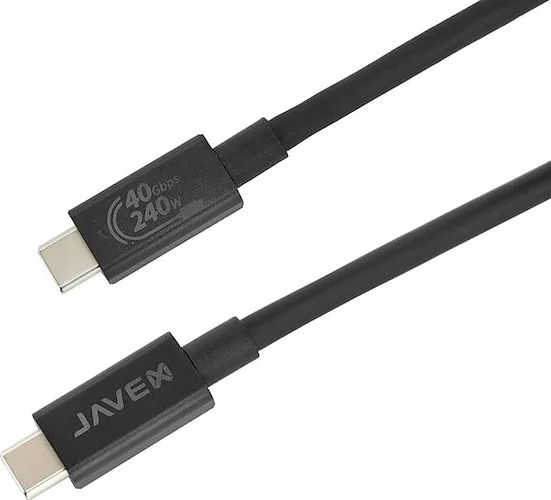
Your cable is just as critical as your charger—many users waste money on expensive PD chargers only to use a non-PD cable that bottlenecks their charging speed. The PowerCore 20000 PD requires a USB-C to USB-C cable that explicitly supports Power Delivery.
How to Verify Your Cable Supports PD
- Check for certification labels – Look for “USB-IF Certified” or “E-Marked” on the cable or packaging
- Test charging speed – With a proper PD setup, your power bank should show a red flashing light within 10 seconds
- Use the original Anker cable – The cable included with your power bank is guaranteed to support 18W PD
Warning: Many cheap USB-C cables look identical but can’t handle the higher voltages of PD charging. These will limit you to 5W charging even with a perfect PD charger.
Step-by-Step: Charging Your PowerCore 20000 PD in 3 Simple Steps
Follow this exact sequence to ensure you’re getting maximum 18W charging speed for your Anker power bank 20000mAh. Skipping any step could result in significantly slower charging.
Step 1: Prepare Your Charging Equipment
Gather these three essential items:
– A certified USB-C Power Delivery charger (minimum 18W, 30W recommended)
– The original USB-C to USB-C cable that came with your power bank (or a certified PD cable)
– A reliable wall outlet (avoid power strips with surge protection that might interfere)
Common mistake: Using a laptop’s USB-C port to charge your power bank. While technically possible, most laptops limit USB-C port output to 15W or less for charging external devices, slowing your charging time.
Step 2: Connect Everything in the Correct Order
- Plug your PD charger into the wall outlet first
- Connect the USB-C cable to the charger
- Finally, connect the other end to your PowerCore 20000 PD’s USB-C port
Why this order matters: Connecting the power bank first can confuse the PD handshake protocol. Starting with the charger ensures proper voltage negotiation from the beginning.
Step 3: Verify Proper Charging Has Started
Within 10 seconds of connection, check the LED ring around the power button:
– Correct: Flashing red light (0-25% charge)
– Problem: Solid red, blue, or no light at all
If you don’t see a flashing red light within 30 seconds, disconnect everything and restart the process. If the issue persists, try a different outlet first before suspecting equipment failure.
Understanding Your Power Bank’s LED Charging Indicators
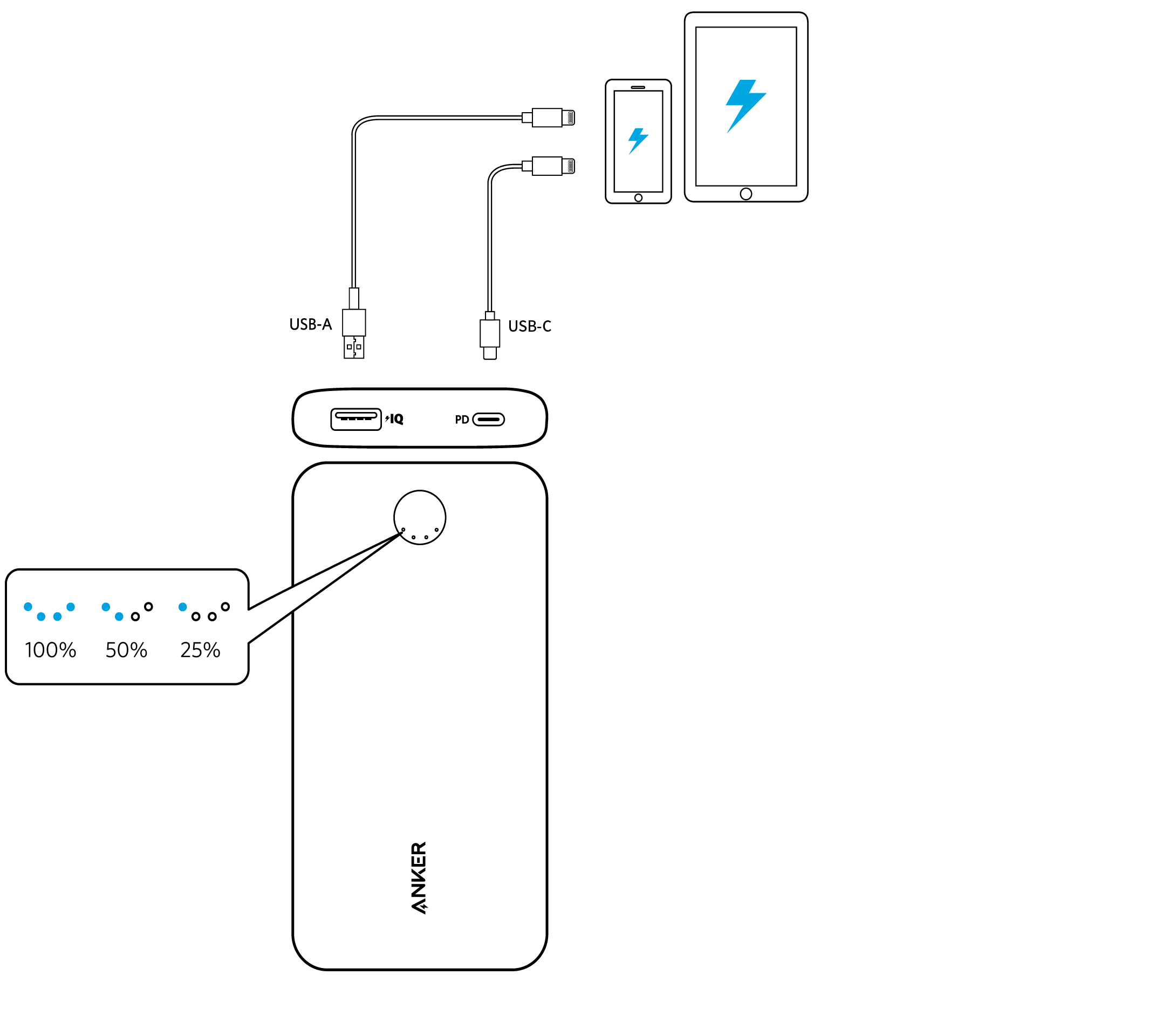
The multi-color LED ring on your PowerCore 20000 PD provides real-time feedback about your charging status—learning to read these signals prevents unnecessary worry about “slow charging” when everything is actually working correctly.
What Each LED Color Means During Charging
- Flashing Red: 0-25% charged (fast charging phase)
- Solid Red: 25-50% charged (still in rapid charging)
- Flashing Blue: 50-75% charged (transition to moderate speed)
- Solid Blue: 75-100% charged (trickle charging phase)
- Solid Green: 100% fully charged (safe to unplug)
Critical insight: When your power bank reaches 80%, the charging speed intentionally slows down. This isn’t a malfunction—it’s a battery protection feature. The final 20% takes longer to preserve your battery’s long-term health.
How Long It Actually Takes to Fully Charge (0% to 100%)
With proper PD equipment, your Anker PowerCore 20000 PD follows this predictable charging curve:
- 0-50%: Approximately 3 hours (fast charging phase)
- 50-80%: Approximately 2 hours (moderate speed)
- 80-100%: Approximately 1-2 hours (slower trickle charge)
This 6-7 hour total charging time assumes you’re starting from 0% with a compatible 18W+ PD setup. If you’re charging from 50%, expect about 3-4 hours to reach full capacity.
Time-saving tip: For everyday use, top off your power bank when it reaches 20-30% rather than waiting for complete discharge. Partial charges from 30-80% take only 3-4 hours and are better for long-term battery health.
Troubleshooting: Why Your Power Bank Charges Slowly or Stops
When your Anker power bank 20000mAh charges slower than expected, 95% of issues come from three specific problems. Here’s how to diagnose and fix them quickly.
Red Flashing Light That Never Changes Color
Cause: Your charger or cable doesn’t support USB Power Delivery handshake
Fix: Test with a different PD-certified charger and cable combination. Many “USB-C” chargers lack true PD support.
Power Bank Stuck at 80% for Hours
Cause: This is normal behavior! The power bank intentionally slows charging above 80%
Verification: Check if the LED changed from flashing blue to solid blue—this indicates it’s in the final charging phase
No Lights or Intermittent Charging
Most likely causes:
1. Faulty wall outlet (try a different one)
2. Damaged cable (inspect for bends or frays)
3. Deeply discharged battery (leave plugged in for 30+ minutes)
Critical step: If your power bank is completely dead, it may take 15-30 minutes before any LED appears. Don’t assume it’s broken—give it time to “wake up” the battery.
Battery Health: Best Practices for Long-Term Power Bank Performance
Maximizing your PowerCore 20000 PD’s lifespan requires proper charging habits beyond just getting it to 100% quickly. Follow these manufacturer-recommended practices.
Optimal Charging Environment Conditions
- Temperature: Charge between 68-77°F (20-25°C)—avoid hot cars or cold garages
- Location: Place on a hard, flat surface (not on bedding or fabric that traps heat)
- Timing: Unplug when solid green appears (though overcharge protection exists)
Storage Recommendations for Extended Non-Use
If storing your power bank for more than a month:
1. Charge to 50-60% (not 100%)
2. Power it down completely
3. Store in a cool, dry place away from metal objects
4. Recharge to 50% every 3-4 months
Warning: Never store your power bank fully discharged for extended periods—this can permanently damage the lithium-polymer battery cells.
What NOT to Do When Charging Your Anker PowerCore 20000 PD
Avoid these common mistakes that could damage your power bank or significantly shorten its lifespan:
- Using USB-A to USB-C cables (forces 5W charging at best)
- Charging in direct sunlight or hot environments (triggers thermal protection)
- Leaving it plugged in for days after full charge (accelerates battery degradation)
- Using cheap, uncertified “fast charging” cables (can deliver unstable voltage)
Critical warning: If your power bank becomes uncomfortably hot during charging (too hot to hold), unplug immediately and let it cool. Continued use in this state could create a safety hazard.
Final Note: Properly charging your Anker PowerCore 20000 PD power bank isn’t complicated once you understand its USB Power Delivery requirements. By using a certified PD charger, the correct cable, and following these specific steps, you’ll consistently achieve the 6-7 hour full charge time while maximizing your power bank’s lifespan. Remember that the intentional slowdown above 80% isn’t a problem—it’s Anker’s battery protection system working as designed. Keep your charging equipment organized in a dedicated pouch so you’re always ready to power up quickly when needed.



