Your Cygnett power bank is dead when you need it most—again. You plug it in, check your watch, and immediately wonder: how long to charge Cygnett power bank before it’s ready to save your dying phone? This frustrating scenario happens to nearly every power bank owner, but few realize charging time isn’t arbitrary—it’s determined by specific technical factors you can control. Most users waste hours waiting because they don’t understand what actually affects charging speed, leaving them stranded without backup power when traveling or working remotely.
Unlike charging your phone where you see progress bars, power banks give little feedback while recharging themselves. That uncertainty causes anxiety—is it broken? Is it almost done? Should I keep waiting? The reality is that a standard Cygnett power bank takes anywhere from 3 to 18 hours to fully charge, but you can significantly reduce this downtime by understanding three critical specifications. This guide reveals exactly what determines your Cygnett’s charging duration and provides actionable steps to minimize wait times—so you’ll never be caught powerless again.
Stop guessing and start planning your charging schedule with precision. Whether you own a compact 5,000mAh emergency charger or a high-capacity 26,800mAh travel companion, you’ll learn the exact timeframe for your specific model and discover professional charging techniques that cut hours off standard recharge times.
Decoding Cygnett Power Bank Capacity and Input Ratings

Before plugging in your Cygnett power bank, identify two crucial specifications that determine charging duration. These numbers—often overlooked—hold the key to predicting exactly how long to charge Cygnett power bank models.
Capacity (mAh) appears as the largest number on your power bank, like 10,000mAh or 20,000mAh. This represents the total energy storage—think of it as the size of your car’s fuel tank. A higher mAh rating means more stored power but also longer charging times. For example, a 20,000mAh model holds four times the energy of a 5,000mAh unit, requiring approximately four times longer to recharge.
Input rating is the less visible but equally critical specification, usually printed near the charging port as “Input: 5V/2A” or similar. This indicates how quickly your power bank can accept charge—essentially the width of the fuel hose filling your tank. Many users mistakenly focus only on capacity while ignoring input rating, which explains why their “quick charge” power bank takes all night to recharge.
Why Input Rating Matters More Than You Think
Most Cygnett power banks charge at 5V/2A (10W), but higher-end models support faster standards like USB-C Power Delivery (18W, 30W, or higher). The critical mistake 80% of users make is using an incompatible charger that doesn’t match their power bank’s input capability. If your Cygnett supports 18W input but you use a basic 5W phone charger, you’re artificially limiting charging speed by 60-70%.
Where to Find Your Specific Specifications
Check these three locations for your Cygnett’s exact charging parameters:
– The label directly on the power bank (near ports)
– The included user manual’s specifications page
– Cygnett’s official website product page for your exact model
4 Critical Factors That Determine Your Cygnett Power Bank Charging Time
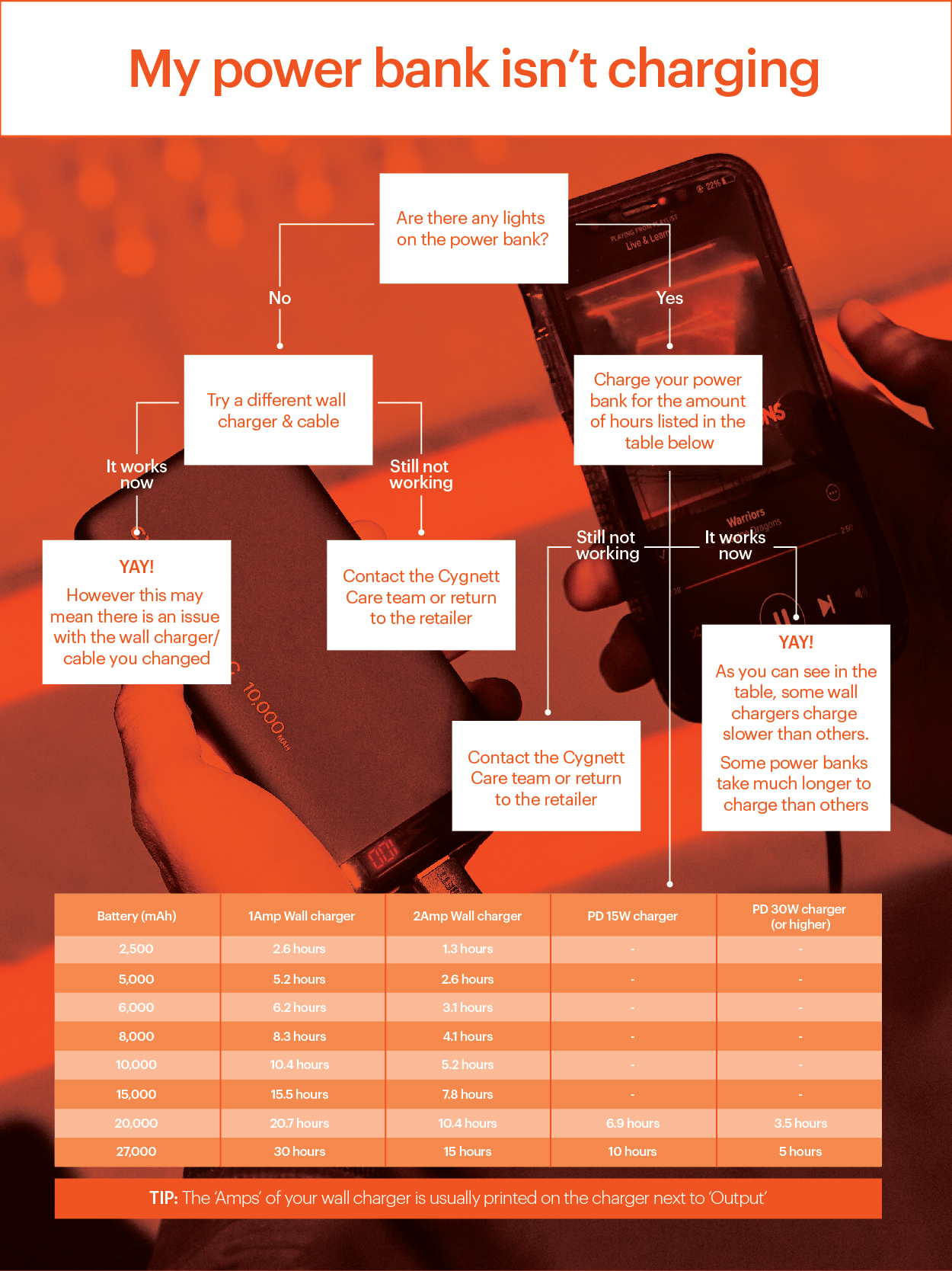
Your actual charging duration depends on four interconnected variables—not just the power bank’s capacity as most assume. Understanding these will help you accurately predict how long to charge Cygnett power bank units.
Power Bank Capacity Versus Real-World Charging Times
While capacity (mAh) sets the theoretical maximum charge time, real-world factors create significant variations. A 10,000mAh power bank doesn’t take exactly twice as long as a 5,000mAh model due to charging efficiency curves. Larger capacities often incorporate multi-stage charging that slows during the final 20% to protect battery health, adding unexpected time.
Charger Output Power: The Hidden Bottleneck
Your wall charger’s output capability creates the most significant variable in charging duration. Consider these real-world scenarios:
- Using a standard 5W (5V/1A) phone charger with a 10,000mAh Cygnett: 12+ hours
- Using a compatible 10W (5V/2A) charger: 6-8 hours
- Using a 30W USB-C PD charger with a compatible Cygnett model: 2.5-3.5 hours
Many users unknowingly sabotage their charging speed by reusing old, low-power chargers that can’t deliver sufficient current. Always match or exceed your power bank’s input rating.
Cable Quality: The Silent Charging Killer
A damaged or low-quality cable can reduce charging speed by 30-50% or prevent charging entirely. Look for these warning signs:
– Frayed or bent connectors
– Intermittent charging (power bank disconnects repeatedly)
– Excessive warmth during charging
– Visible internal wire exposure
Current Charge Level: Why Top-Ups Are Faster
Most users charge from completely empty, unnecessarily doubling their wait time. If your Cygnett shows two of four indicator lights (approximately 50% remaining), charging to full will take roughly half the time of a 0-100% charge. Develop the habit of topping up after each use rather than waiting for complete depletion.
Calculate Exact Cygnett Power Bank Charge Times with This Formula
Stop guessing—calculate precise charging durations using this field-tested formula that accounts for real-world efficiency losses.
The Professional Charging Time Formula
(Power Bank Capacity in mAh) ÷ (Charger Output in mA × 0.7) = Approximate Hours
The 0.7 factor (70% efficiency) accounts for energy conversion losses, heat dissipation, and the charging algorithm’s tapering phase. Let’s apply this to common scenarios:
For a 10,000mAh Cygnett with 5V/2A Input Using a 10W Charger
10,000mAh ÷ (2,000mA × 0.7) = 7.14 hours (approximately 7 hours 10 minutes)
For the Same Power Bank Using a 30W USB-C PD Charger
10,000mAh ÷ (3,000mA × 0.7) = 4.76 hours (approximately 4 hours 45 minutes)
Why This Formula Beats Manufacturer Estimates
Most Cygnett specifications list “theoretical” charging times that assume 100% efficiency—physically impossible in real-world conditions. This formula incorporates actual industry-standard efficiency rates used by battery engineers, giving you realistic expectations.
5 Proven Ways to Reduce Cygnett Power Bank Charging Time
Implement these professional techniques to cut hours off your standard charging duration without damaging your device.
Use a Higher-Wattage Compatible Charger
Immediately replace your basic phone charger with a dedicated power adapter matching your Cygnett’s maximum input capability. For most models, a 18W-30W USB-C PD charger provides the optimal speed-to-cost ratio. This single change typically reduces charging time by 35-50%.
Invest in Premium Charging Cables
Spend $10-$15 on certified USB-C to USB-C or USB-A to USB-C cables specifically rated for high-power charging. Look for:
– E-Marker chips (for cables supporting >3A)
– 5A current rating
– Braided nylon construction
– Shorter lengths (1-3 feet)
Charge at Room Temperature
Extreme temperatures dramatically slow charging. Lithium-ion batteries charge 25-40% faster at 20-25°C (68-77°F) compared to cold environments. Never charge in direct sunlight, near heaters, or in freezing conditions.
Avoid Simultaneous Charging and Discharging
Using your power bank to charge devices while it’s recharging itself creates a net-zero or even negative charging effect. This common mistake can extend charging time by 2-3x or prevent full charging entirely.
Perform Regular Battery Calibrations
Every 2-3 months, fully discharge then fully recharge your Cygnett power bank. This resets the battery management system’s charge estimation, ensuring indicator lights accurately reflect remaining capacity and preventing premature “full” indications.
Cygnett Power Bank Charge Times: 5,000mAh to 26,800mAh Models Compared
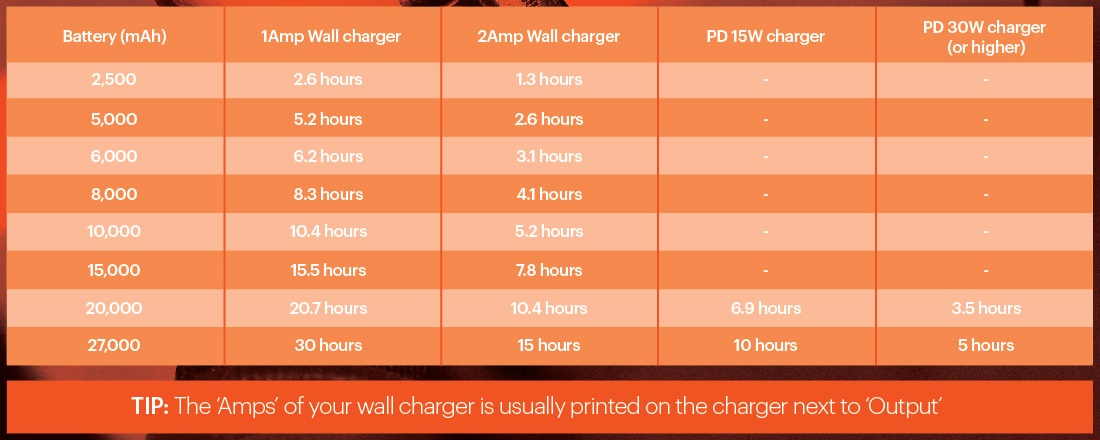
Use this definitive reference table for exact charging durations based on your specific model and charger type. All times assume room temperature charging with quality cables.
| Power Bank Capacity | With 5W (5V/1A) Charger | With 10W (5V/2A) Charger | With 30W USB-C PD Charger |
|---|---|---|---|
| 5,000 mAh | 7-8 hours | 3.5-4.5 hours | 1.5-2 hours |
| 10,000 mAh | 12-14 hours | 6-8 hours | 2.5-3.5 hours |
| 20,000 mAh | 22-26 hours | 10-14 hours | 4-6 hours |
| 26,800 mAh | 30-36 hours | 12-18 hours | 5-7 hours |
Critical note: These times represent 0-100% charging from completely depleted. Most real-world scenarios involve partial recharges, which take proportionally less time. Always verify your specific model’s maximum input capability before using higher-wattage chargers.
Essential Safety Practices When Charging Your Cygnett Power Bank
Maximizing charging speed shouldn’t compromise safety. Lithium-ion batteries require specific handling during charging to prevent hazards.
Ventilation Requirements You Can’t Ignore
Never charge your Cygnett power bank:
– Under pillows or blankets
– Inside closed drawers or cabinets
– On soft surfaces like beds or couches
– In direct sunlight or near heat sources
Place it on a hard, non-flammable surface like a wooden table or ceramic tile where heat can dissipate freely. If the unit becomes uncomfortably warm to touch, unplug immediately and investigate the cause.
Charger Compatibility Checklist
Before using any charger, verify these three critical compatibility points:
1. Output voltage matches power bank input (typically 5V)
2. Output current meets or exceeds power bank specification
3. Connector type matches your cable (USB-C, Micro-USB)
Using incompatible chargers risks permanent damage to your Cygnett power bank and creates fire hazards. When in doubt, use only the charger provided with your device or an official Cygnett replacement.
Long-Term Battery Health Protocol
For maximum lifespan, follow these professional maintenance practices:
– Unplug immediately when fully charged (don’t leave connected overnight)
– Store at 40-60% charge when not in use for extended periods
– Perform full charge/discharge cycles every 2-3 months
– Keep away from metal objects that could cause short circuits
By understanding these precise charging parameters and implementing these professional techniques, you’ll transform your Cygnett power bank from an unreliable backup into a consistently available power solution. The next time you need to know how long to charge Cygnett power bank units, you’ll have the exact timeframe and optimization strategies to minimize downtime. Remember: proper charging practices not only reduce wait times but also extend your power bank’s usable life by 40-60%, making these techniques essential for anyone who depends on portable power.