A portable power station is your silent guardian during outages, a reliable power hub for outdoor adventures, and an essential tool for off-grid living. But without proper care, lithium-based batteries degrade silently over time due to heat, improper charge levels, and poor storage habits. The good news? You can double or even triple your unit’s lifespan with simple, consistent maintenance. This guide delivers the best tips for maintenance of power stations, covering everything from optimal storage practices to annual servicing, so your unit stays reliable for years.
Whether you own a Jackery, EcoFlow, Anker, or another brand, these practices will help you get the most out of your investment while avoiding common mistakes that lead to premature failure.
Store Your Power Station at 50% Charge
One of the most impactful decisions you make for your power station’s longevity is how you store it. The state of charge (SoC) directly affects battery chemistry and degradation rate.
Why 50% Is the Optimal Storage Level
Storing your unit at 50% state of charge minimizes internal chemical stress on lithium cells. Lithium-ion and LiFePO4 batteries degrade faster when stored at full or empty charge. At 100% SoC, voltage stress increases and accelerates electrolyte breakdown. At 0% SoC, copper dissolution and cell imbalance become risks. The sweet spot is 40% to 60% SoC, which slows aging significantly. Jackery and other manufacturers confirm that storing outside this range can result in up to 20% capacity loss per year.
Check Charge Level Every 3 to 6 Months
Even in storage, batteries self-discharge over time. Standard Li-ion loses about 1% to 2% per month, while LiFePO4 batteries with ZeroDrain technology retain charge better, losing less than 0.5% monthly. Check your charge level every 3 to 6 months. If it drops below 40%, recharge to 50% to 60%. Units with advanced discharge prevention may only need checking annually.
Balance Readiness and Longevity
If you use your power station primarily for emergencies, storing at 70% to 80% is acceptable. For severe weather forecasts, top up to 100% just before the event, then return to 50% afterward. This approach balances usability with long-term battery health.
Protect Your Power Station from Extreme Temperatures

Heat and cold are silent killers of lithium batteries. Temperature management is critical to maintaining performance and extending lifespan.
Ideal Temperature Ranges for Storage and Operation
The best operating temperature range is 32°F to 104°F (0°C to 40°C). For storage, aim for 65°F to 80°F (18°C to 27°C). The best aging conditions are around 50°F (10°C), like a climate-stable basement. For every 10°C increase above 25°C, chemical reaction rates in lithium batteries double, effectively halving expected lifespan.
Heat Damage Risks You Need to Avoid
Above 86°F (30°C), degradation accelerates significantly. At 104°F (40°C), battery lifespan can halve due to doubled chemical reaction rates. Car trunks, garages, and attics can exceed 120°F (49°C) in summer, so never store your unit in these locations. Always store in a cool, dry place away from heat sources.
Cold Weather Precautions
Charging below 32°F (0°C) causes lithium plating, which permanently damages cells. Most units can operate down to -4°F (-20°C), but storage should avoid freezing temperatures. If exposed to cold, let the unit warm to room temperature before charging.
Perform Annual BMS Top-Balancing
Your power station’s Battery Management System keeps cells balanced, but it needs help once a year to maintain optimal performance.
What Is Top-Balancing and Why It Matters
Over time, individual cells in the battery pack drift in voltage. A full charge allows the BMS to equalize cell voltages, extending overall life and performance. This annual process recalibrates the system and ensures all cells work together efficiently.
How to Top-Balance Your Unit
Once per year, charge to 100% and keep it plugged in for 2 to 4 hours to allow full balancing. Afterward, discharge to 80% or lower before returning to storage. Do not perform this monthly, as it adds unnecessary wear. Never routinely discharge to 0%, as this is only acceptable for calibration or actual use.
Clean Vents and Exterior Regularly
Dust and debris reduce cooling efficiency and increase overheating risk. Regular cleaning prevents thermal issues and maintains optimal performance.
Vent Cleaning Steps Every 6 Months
Cooling fans and vents prevent thermal runaway, but dust buildup blocks airflow and forces fans to work harder. Shine a flashlight into vents to check for dust or insect nests. Use compressed air to blow out debris. Gently remove stubborn particles with a plastic toothpick, never metal.
Exterior Wipe-Down Procedure
Wipe the casing with a soft, slightly damp cloth. For grime, use mild soapy water and avoid bleach or ammonia. Never spray water directly on the unit. For solar-compatible units, clean panels every 1 to 3 months using a soft cloth and clean water. Dirty panels can lose up to 30% efficiency.
Inspect Cables and Ports for Damage
Faulty cables are a leading cause of charging issues and device damage. Regular inspection prevents failures when you need your power station most.
What to Check During Inspections
Examine all cables for fraying, exposed wires, and brittle insulation, especially after UV exposure. Look for loose connectors, bent prongs, and corrosion or scorch marks in ports. Check for any signs of wear that could affect performance or safety.
Best Practices for Cable Care
Avoid tight coiling by using loose loops or figure-eight wraps. Never yank cables by the cord; pull by the plug instead. Replace damaged cables immediately. Use only manufacturer-recommended or certified chargers, solar panels, and cables to avoid voltage issues, overheating, or warranty voiding.
Prevent Overheating During Use
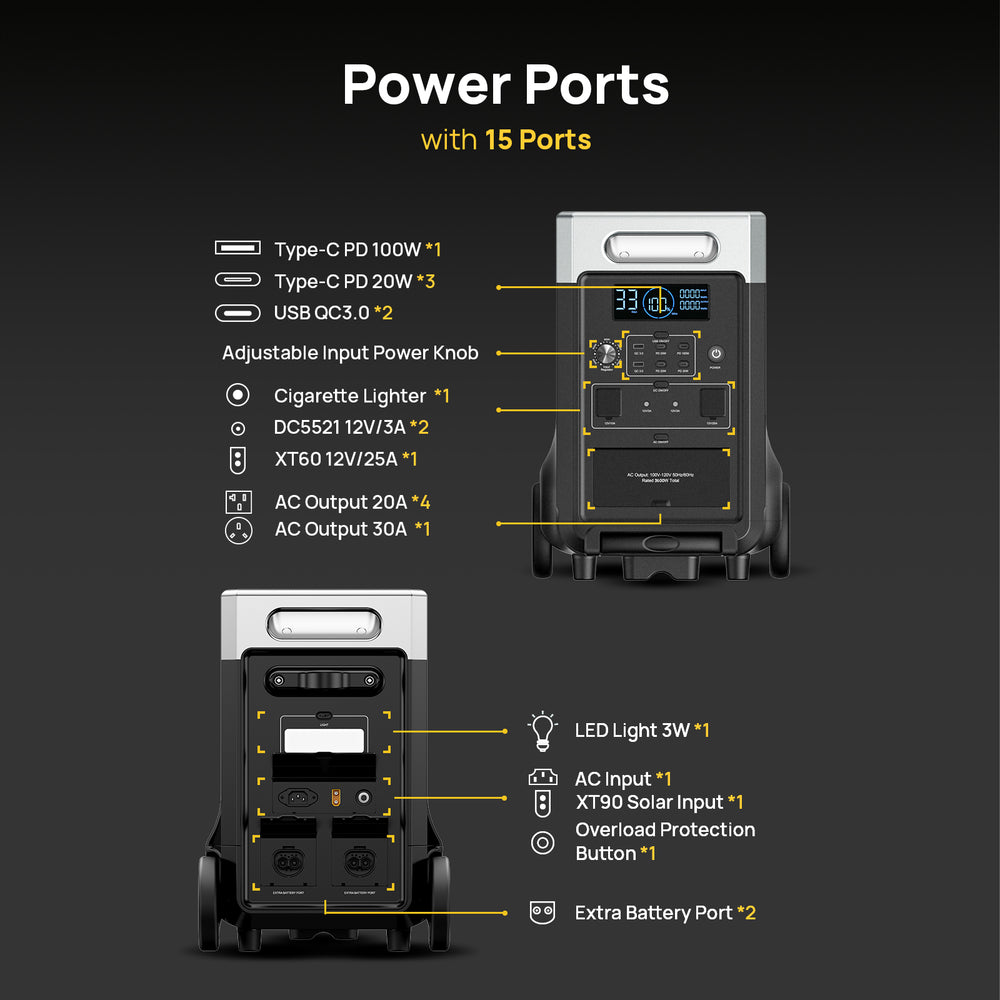
Overloading causes shutdowns and long-term damage. Understanding your power station’s limits keeps it running safely and efficiently.
Know Your Power Limits
Understand the difference between continuous wattage (maximum sustained output) and surge wattage (short burst for motor startups). Never exceed continuous wattage. Remember that appliances like refrigerators or pumps draw 2 to 3 times their rated wattage at startup.
Warning Signs and Response
Watch for automatic shutdowns, hot casing, nonstop fan operation, and error messages like “Overheat” or “Thermal Protection.” If overheating occurs, turn off and disconnect all loads. Let the unit cool in a well-ventilated area for 30 minutes or more before resuming use.
Handle Water Exposure Immediately
Even splash-resistant units are not immune to water damage. Quick action can save your equipment from permanent failure.
Prevention Strategies
Never use in rain or snow unless IP65-rated or higher. Keep away from sinks, pools, and leaky tents. Check your model’s IP rating, as most standard units are not waterproof.
Emergency Response if Water Gets In
Do not turn on the unit if water exposure occurs. Remove it to a dry, ventilated area and allow to air-dry for at least 48 hours. Use a fan to circulate air, but never use hairdryers or heaters, as heat damages electronics. After drying, test all functions. If issues remain, contact the manufacturer rather than opening the unit yourself.
Track Performance Over Time
Early detection of degradation helps avoid surprises and ensures your unit is ready when needed.
Key Metrics to Monitor
Track charge time for increasing duration (indicates battery wear). Monitor runtime under load for reduced time (capacity loss). Watch discharge rate for faster drain under the same load. Log error frequency for potential BMS or cell issues.
Expected Lifespan by Battery Type
Li-ion batteries typically last 500 to 1,000 cycles, equaling about 5 to 7 years. LiFePO4 batteries last 2,000 to 4,000+ cycles, equaling 10 to 15 years. With ideal care, LiFePO4 units may last 20 to 25 years. A few minutes of maintenance every few months can add a decade of life to LiFePO4 models.
Follow a Semi-Annual Maintenance Routine
Even if unused, your power station needs regular checkups to stay in top condition.
6-Month Maintenance Checklist
Check charge level and recharge to 50% if below 40%. Inspect casing, screen, and ports for cracks, swelling, or fogging. Clean vents and exterior using compressed air and soft cloth. Test all ports (AC, USB, DC) with known devices. Verify charging inputs (wall, car, solar). Run a battery exercise by discharging to 10% to 15%, then recharging to 50% to 80%.
Annual Tasks to Complete
Perform top-balance BMS by charging to 100% and staying plugged in for 2 to 4 hours. Check for firmware updates via manufacturer app or website. Log performance data including charge time, runtime, and any errors. Consider downloading or creating a maintenance worksheet to stay consistent.
Frequently Asked Questions About Power Station Maintenance
How often should I charge my power station if not in use?
Check the charge level every 3 to 6 months. If it drops below 40%, recharge to 50% to 60%. Units with advanced low-self-discharge technology may only need annual checks.
Can I leave my power station plugged in all the time?
No, leaving it plugged in constantly at 100% accelerates degradation. Unplug once fully charged unless performing annual BMS balancing. Store at 50% for long-term storage.
What temperature is too hot for storing a power station?
Avoid temperatures above 104°F (40°C). Storage above this threshold can halve battery lifespan. Never store in parked cars, garages, or attics during summer.
Should I completely discharge my power station before storing it?
No, never store at 0% state of charge. This risks copper dissolution and cell imbalance. Store at 40% to 60% for optimal longevity.
How do I know if my power station battery is degrading?
Monitor charge time (increasing duration), runtime under load (reduced time), and discharge rate (faster drain). Frequent error messages also indicate potential degradation.
Can I use third-party solar panels with my power station?
Only use manufacturer-recommended or certified accessories. Mismatched panels may undercharge or overload the system, causing damage and voiding the warranty.
Key Takeaways for Maintaining Your Power Station
Consistent, simple maintenance can extend your power station’s life by 10 or more years, especially for LiFePO4 models. Store at 50% charge in a cool, dry place between 65°F and 80°F. Avoid extreme temperatures by never leaving units in hot cars or freezing sheds. Recharge every 3 to 6 months if unused, and perform annual BMS top-balancing. Clean vents and solar panels regularly, inspect cables for damage, and never overload beyond continuous wattage limits. Use only manufacturer-approved accessories and update firmware when available. Treat your power station like a high-value investment because when the lights go out or adventure calls, it will be the one thing you depend on most.