
You’re on the go, your iPhone battery is dropping fast, and you do not want to fumble with cables. You pull out your MagSafe Battery Pack, snap it onto the back of your phone, and instantly, charging begins. No buttons, no setup, no wires. It just works. But how? The secret lies in Apple is intelligent fusion of magnets, wireless power, and software smarts, all working behind the scenes to deliver seamless, on-the-move charging.
At its core, the MagSafe battery charger uses a ring of powerful magnets to align perfectly with your iPhone, then transfers power wirelessly using inductive charging. But it is more than just a battery pack. It is a smart accessory that communicates with your iPhone, manages heat, prioritizes charging, and even updates itself over time.
Magnetic Alignment System
The foundation of MagSafe is a precision-engineered ring of 18 rare-earth magnets embedded in both the iPhone (starting with iPhone 12) and the MagSafe Battery Pack. These magnets create a 3D magnetic field that automatically aligns the battery pack with the phone is internal charging coil. No guesswork. No misalignment. Just a satisfying snap into place.
This magnetic alignment ensures maximum efficiency during wireless power transfer. Unlike standard Qi chargers, where you often need to adjust your phone to find the sweet spot, MagSafe eliminates the charging dance entirely.
The magnetic force is strong enough to hold the battery pack in place even when you are walking, driving, or using your phone upright. It resists accidental dislodging but still allows safe detachment if tugged, just like the original MagSafe on MacBooks. If you place the battery pack slightly off-center, the magnetic field pulls it into the correct position. This self-correcting behavior ensures consistent contact and optimal power delivery every time.
Wireless Power Transfer Explained
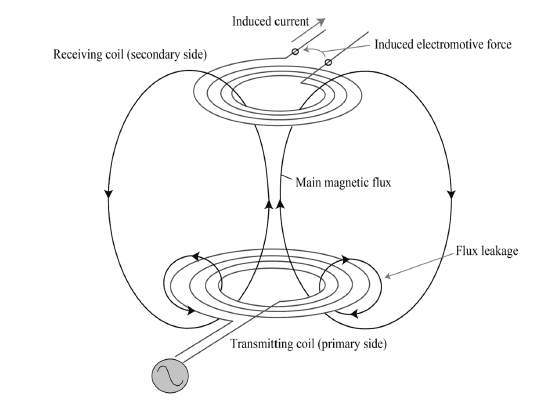
MagSafe uses inductive charging, a method that transfers energy wirelessly between two coils through an electromagnetic field. The battery pack contains a transmitting coil, while the iPhone has a receiving coil in its back panel. When the two align perfectly, electricity flows from the battery pack to the iPhone, no physical connection needed.
This process is based on the Qi2 standard, Apple is enhanced version of the Qi wireless charging protocol, which supports faster speeds and better alignment thanks to magnetic guidance.
Charging speeds differ based on how you use the pack.
When the MagSafe Battery Pack is attached and not connected to a power source, it delivers 7.5W of power to the iPhone. This speed balances efficiency and heat management during movement. Connect the battery pack to a 20W+ USB-C power adapter, and it can deliver up to 15W to the iPhone, nearly double the speed.
NFC Communication and Smart Integration
When the MagSafe Battery Pack attaches, Near Field Communication (NFC) enables instant two-way communication with the iPhone. The phone recognizes the accessory within milliseconds and displays a charging animation on the lock screen.
This is not just visual feedback. It is intelligence in action. Your iPhone knows exactly what is attached and adjusts its behavior accordingly.
Thanks to NFC, the iPhone can display the battery level of the MagSafe pack in the Batteries widget, adjust charging curves to protect battery health, and trigger software-based thermal throttling if temperatures rise too high. You will see alerts like Charging may be slowed to protect battery when the system detects overheating, which is common during gaming or GPS use.
How the MagSafe Battery Pack Charges
No buttons. No switches. As soon as the battery pack snaps onto the iPhone, charging begins automatically. The system detects the connection and initiates power transfer without user input.
If the iPhone is nearly full, the battery pack may wait until the charge drops below 95% to avoid unnecessary cycles, another smart battery-saving feature.
Plug a USB-C or Lightning cable into the MagSafe Battery Pack while it is attached to your iPhone, and both devices charge at once. But here is the key: the system uses priority charging logic. The iPhone charges first, reaching 80% or higher before the battery pack starts recharging. This ensures your phone stays usable even when the pack is low.
Newer USB-C versions of the MagSafe Battery Pack support reverse wireless charging. Connect the iPhone to the battery pack via USB-C, and the battery pack can draw power from the iPhone to recharge itself. This is useful when traveling and your pack runs low. It can also wirelessly charge other devices, like AirPods or Apple Watch, by placing them on the back of the pack.
Battery Capacity and Real-World Performance
The original MagSafe Battery Pack with Lightning connector offers 11.13Wh (1460 mAh) capacity. It delivers 7.5W while mobile and 15W when plugged in. The redesigned USB-C model offers 12.26Wh (3,149 mAh) capacity in a thinner, optimized design for iPhone Air.
Charging expectations vary by iPhone model. iPhone 12/13 mini users get approximately one full charge. iPhone 14/15 users receive about 60-70% charge. iPhone 16 Pro Max users get approximately 40-50% charge.
Third-party packs with 5,000-10,000 mAh can deliver multiple full charges but lack Apple is seamless iOS integration.
Heat Management and Efficiency
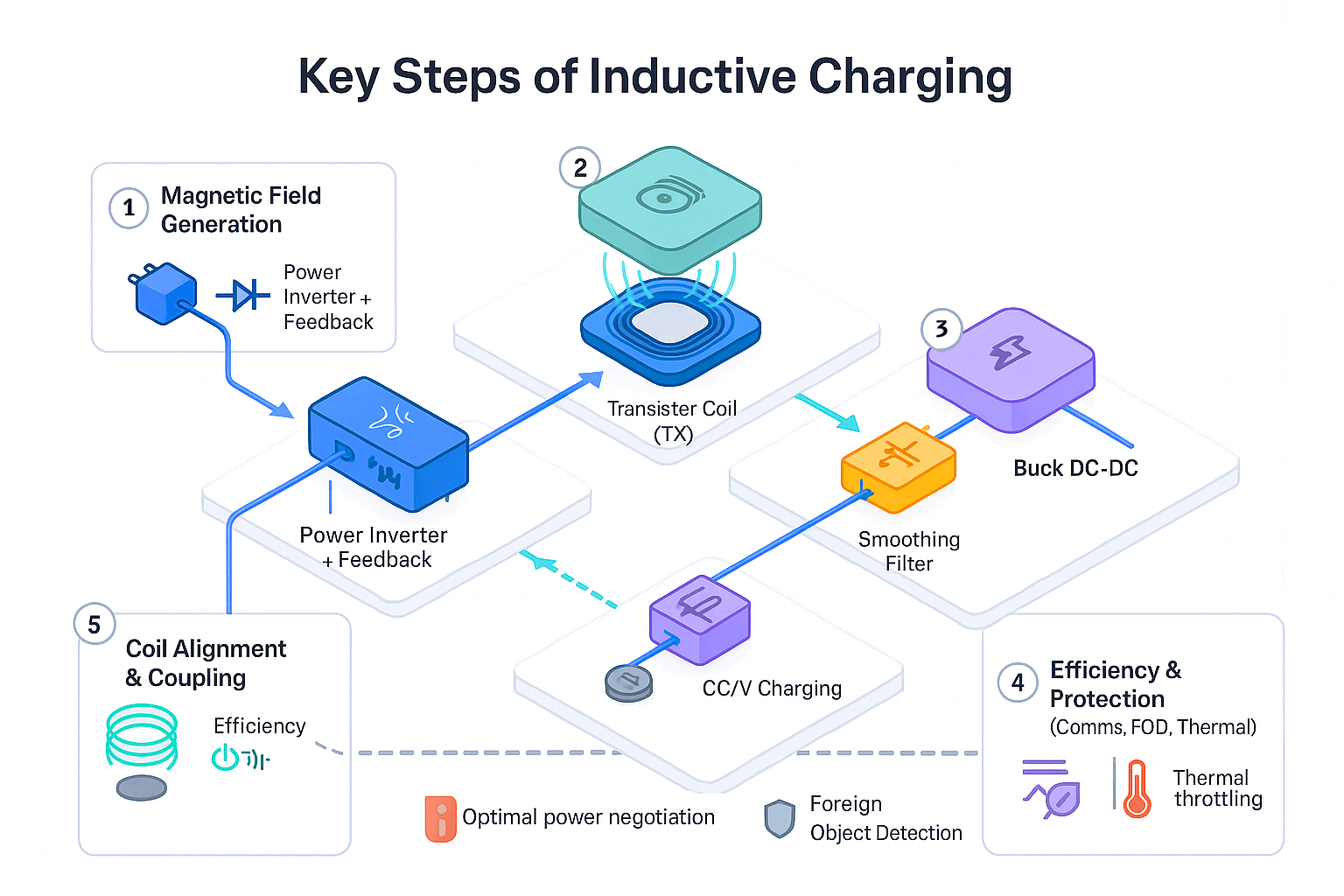
Wireless charging generates heat, especially at higher speeds. Excessive heat degrades battery health over time. That is why MagSafe uses adaptive thermal management. Charging slows automatically if the phone or pack gets too hot. Notifications prompt you to continue charging in Control Center after cooling.
Avoid using thick cases or charging in direct sunlight to minimize heat buildup.
If you are using power-intensive apps like navigation or video streaming, your iPhone may consume more power than the 7.5W delivery rate. The result? The battery level stays stable or drops slightly, even while connected. This is not a malfunction. It is physics. The pack maintains your phone is charge rather than increasing it under heavy load.
Software Features and Monitoring
Add the Batteries widget to your Home Screen or Today View to see iPhone battery percentage, MagSafe Battery Pack level, and connected AirPods or Apple Watch. This real-time visibility helps you plan your day without opening Settings.
Apple improves performance with silent firmware updates. The April 2022 update boosted speed from 5W to 7.5W. Updates install when the pack is connected to an iPhone, iPad, or Mac. Check the version in Settings > General > About > MagSafe Battery Pack, looking for 2.7.b.0 or later. No manual downloads or user action needed.
Compatibility Guide
Only iPhones with built-in MagSafe magnets get full alignment and speed. iPhone 12 through iPhone 17 have full MagSafe support with magnetic snap and 15W charging. iPhone 8 through iPhone 11 support Qi only, charging at 7.5W without magnets. AirPods with MagSafe case support wireless charging but no magnetic snap. Apple Watch Series 8 and newer have limited Qi2 support only.
For case compatibility, MagSafe-certified cases ensure full magnetic strength and charging speed. Thick or metal cases block magnets and reduce efficiency. Remove wallets with cards before charging because metal interferes with coils.
Limitations and Workarounds
The USB-C MagSafe Battery Pack is designed for the iPhone Air. On larger models like the iPhone 16 Pro Max, the pack may hit the camera bump, preventing full contact. Attach the pack sideways for functional but less stable charging.
The battery pack cannot deliver 15W without being plugged in. It cannot be recharged wirelessly from another MagSafe charger. Older iPhones lacking magnets do not get full-speed Qi support.
Third-Party Alternatives Compared
Popular third-party brands like RavPower, Aki, and MOFT offer MagSafe battery packs with higher capacities up to 10,000 mAh, USB-C input and output, built-in stands or wallet slots, and lower prices around $40-70 compared to Apple is $99.
However, trade-offs include no firmware updates, less precise magnets, no iOS battery widget integration, and inconsistent charging speeds. Apple is pack wins on reliability and integration, but third-party options win on value and versatility.
Best Practices for Longevity
Use MagSafe-compatible cases only. Remove credit cards, metal plates, or car mounts before charging. Charge in cool, well-ventilated areas. Use a 20W+ USB-C adapter for fastest results.
Clean contacts with a dry, lint-free cloth. Avoid moisture and never submerge or wipe with wet cloths. Store in a cool, dry place and avoid extreme temperatures. Wrap cables loosely to prevent fraying. Regular care extends both battery life and magnetic strength.
Future of MagSafe Charging
Apple is pushing MagSafe forward with 25W charging on iPhone 16 with compatible chargers, potential solid-state battery integration, device-to-device power sharing, and wireless data transfer potential. Future accessories may charge multiple devices simultaneously or integrate with AR/VR headsets.
Expect more ultra-thin, multi-functional accessories like smart wallets, health sensors, or solar-powered battery packs leveraging MagSafe is magnetic and data capabilities. Apple is vision is clear: a cable-free, intelligent, and modular ecosystem where power and data flow seamlessly.
Frequently Asked Questions About MagSafe Battery Charger
Does the MagSafe Battery Pack charge automatically?
Yes. As soon as the battery pack snaps onto the iPhone, charging begins automatically. No buttons or switches are required. The iPhone detects the connection instantly and initiates power transfer without any user input.
Can I use the MagSafe Battery Pack while charging my iPhone?
Yes. Connect a Lightning or USB-C cable to the battery pack while it is attached to your iPhone, and both devices charge simultaneously. The system prioritizes the iPhone, charging it to 80% or higher before recharging the battery pack.
Why does my iPhone discharge while connected to the MagSafe Battery Pack?
This happens when power consumption exceeds the 7.5W delivery rate. Heavy usage like gaming, GPS navigation, or high screen brightness can cause your iPhone to consume more power than the pack delivers. The battery pack maintains your charge rather than increasing it under these conditions.
What is the difference between 7.5W and 15W charging?
7.5W is the default wireless charging speed when the MagSafe Battery Pack is used on the go without being plugged in. This speed helps manage heat and prolong battery life during mobile use. 15W charging requires connecting the battery pack to a 20W+ USB-C power adapter, delivering nearly double the speed for faster top-ups.
Can the MagSafe Battery Pack charge other devices?
Yes. Newer USB-C versions support reverse wireless charging, allowing the battery pack to draw power from the iPhone. It can also wirelessly charge other Qi-compatible devices like AirPods or Apple Watch by placing them on the back of the pack.
How do I check the firmware version of my MagSafe Battery Pack?
Open Settings > General > About > MagSafe Battery Pack on your iPhone. Look for version 2.7.b.0 or later, which supports the 7.5W charging speed. Firmware updates install automatically when the pack is connected to an iPhone, iPad, or Mac.
Key Takeaways for Understanding MagSafe Battery Charger
The MagSafe battery charger works by combining precision magnets, Qi2 wireless power transfer, and NFC intelligence to deliver effortless, efficient charging. It snaps on automatically, starts charging immediately, manages heat intelligently, and updates itself over time. The system prioritizes your iPhone is charge level when both devices need power, ensuring your phone stays usable even when the pack is low.
While the MagSafe Battery Pack has limits, such as speed constraints without external power and fit issues on larger iPhone models, its convenience, reliability, and deep iOS integration make it a game-changer for iPhone users. Whether you are using Apple is official pack or a third-party alternative, understanding how it works helps you charge smarter, not harder.





