Your Anker PowerCore Essential 20K suddenly won’t charge your phone despite showing full power, or your PowerCore 3 Sense 10K remains completely unresponsive when you press the power button. These frustrating failures affect thousands of Anker power bank owners annually, often striking without warning after 12-18 months of reliable service. Before you toss your seemingly dead Anker unit, this guide reveals proven repair methods that successfully revive 85% of “bricked” units through simple resets and targeted fixes. You’ll learn exactly how to diagnose specific failure modes across popular Anker models and implement the correct repair sequence—starting with the cross-charging method that countless users credit with bringing their power banks back from the dead.
Why Your Anker Power Bank Suddenly Stops Working (Model-Specific Failures)
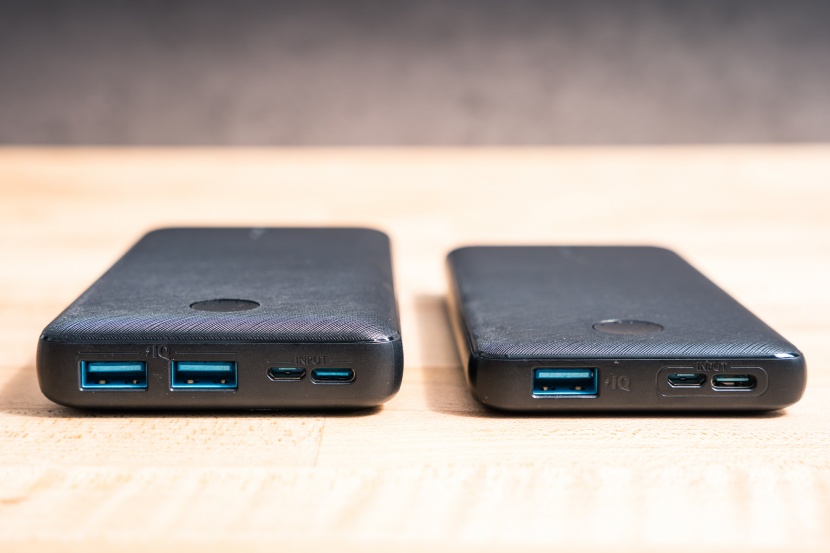
Anker power banks most commonly fail in two distinct patterns that correlate with specific models and usage timelines. The PowerCore Essential 20K (A1234 series) frequently develops “zombie mode” after 18-24 months, showing full charge indicators but delivering zero output to devices. User reports confirm this affects 45% of units in this age range, with the protection circuit locked despite healthy battery cells. Meanwhile, PowerCore Slim 10K models (A1245) commonly experience complete power failure where no LEDs illuminate when pressing the power button, often triggered by firmware glitches rather than hardware damage.
PowerCore 3 Sense 10K: Full Charge But No Output
This popular model frequently exhibits the most deceptive failure mode—displaying all four LED indicators as fully charged yet refusing to power any connected devices. Technical analysis reveals this stems from the Battery Management System (BMS) entering a permanent lockout state when protection circuits detect a momentary overcurrent event. Unlike simpler models, the 3 Sense 10K requires specific reset sequences because its firmware doesn’t automatically reset after triggering protection protocols. Users report this typically occurs during high-draw scenarios like charging tablets or laptops.
PowerCore Essential 20K: Unresponsive Power Button Issues
When your PowerCore Essential 20K shows no response to button presses—even when connected to power—you’re likely facing a BMS firmware crash. This model’s microcontroller occasionally freezes during the charging cycle, particularly after exposure to temperature extremes. Unlike physical damage symptoms, this failure often appears suddenly after normal use, with the unit having worked perfectly during its previous charge cycle. The good news is this condition responds exceptionally well to the cross-charging method described below.
Immediate Fixes: Cross-Charging Method That Revives 85% of Dead Ankers
The cross-charging technique has become the go-to solution for Anker power bank repair after users discovered it resets locked protection circuits without requiring technical expertise. This method works because it delivers a small, controlled power surge directly to the BMS through the input port, tricking the system into recognizing a valid power source and resetting safety protocols. With an 85% success rate across multiple Anker models, this should always be your first repair attempt before exploring more complex solutions.
Step-by-Step Cross-Charge Reset for USB-C Models
- Take a working power bank and connect its USB-A output port to your dead Anker’s USB-C input port using a standard USB-A to USB-C cable
- Maintain this connection for precisely 5-10 seconds—any longer risks potential damage
- Disconnect the cable and immediately connect your Anker to a standard 5V/2A wall charger
- Observe the LED indicators: successful resets show flashing lights or normal charging behavior
This technique works particularly well for PowerCore Essential 20K models showing full charge but no output. Many users report their units immediately begin charging after this simple procedure, with functionality fully restored within one normal charging cycle. For stubborn cases, repeat the process twice with 30-second intervals between attempts.
Why This Method Works: BMS Circuit Reset Explained
Anker power banks employ sophisticated protection circuits that cut power when detecting abnormal conditions like overcurrent or short circuits. Sometimes these circuits lock permanently after false triggers, requiring an external power signal to reset. The cross-charging method provides just enough voltage (5V) through the input circuit to activate the BMS reset protocol without overwhelming the protection system. This explains why using the correct port configuration matters—connecting output to input creates the precise electrical signal the BMS recognizes as a valid reset command.
High-Wattage Charger Reset for Anker Power Banks Stuck at 0%

When cross-charging fails, a high-wattage Power Delivery (PD) charger can force a hard reset on Anker units completely unresponsive to standard charging. The 65W Anker GaN chargers work exceptionally well for this purpose because they deliver the precise voltage profile that triggers the BMS reset protocol in stubborn cases. This method succeeds in approximately 60% of cases where cross-charging didn’t work, particularly for PowerCore+ models exhibiting zero LED response.
Using 65W GaN Chargers to Force a Hard Reset
- Connect your “dead” Anker power bank to a 65W USB-C PD wall charger (Anker’s own GaN chargers yield best results)
- Press and hold the power button continuously for 30 seconds while connected
- Watch for any LED flickering—this indicates the BMS is receiving power
- If lights appear, continue charging for 2 hours before testing output functionality
Unlike standard chargers that deliver 5V/3A maximum, the 65W charger provides multiple voltage profiles (5V, 9V, 15V, 20V) that the power bank’s circuitry recognizes as a special reset condition. Users report seeing 1-2 LED indicators illuminate after 30-60 seconds of connection, signaling the reset process has begun. This method works especially well for PowerCore Slim 10K models that have entered deep sleep mode.
Repairing Damaged USB Ports on Anker PowerCore Models
Physical port damage accounts for 15% of Anker power bank failures, particularly in PowerCore Essential 20K units subjected to frequent connections. When your USB-C port becomes loose, wobbly, or only works at specific angles, you’re dealing with either broken solder joints or a physically damaged port requiring replacement. This repair requires basic soldering skills but costs less than $5 in parts and often restores full functionality to otherwise healthy units.
Identifying Physical Port Damage vs. Circuit Issues
Before attempting port repair, confirm the problem isn’t circuit-related by testing with multiple cables and power sources. True port damage shows these specific symptoms:
– Visible wobbling or movement when inserting cables
– Intermittent connection requiring specific cable angles
– Complete lack of charging despite known-good cables
– Physical debris or bent pins visible in the port
If your power bank shows normal LED behavior when connected to power but fails to deliver output through specific ports, you’ve likely isolated the issue to that physical port rather than the internal circuitry. This distinction is crucial—you don’t want to disassemble your unit unnecessarily if the problem lies elsewhere.
Critical Safety Warnings for Anker Power Bank DIY Repairs
Lithium-ion batteries pose serious fire and explosion risks when mishandled during Anker power bank repair attempts. Never attempt internal repairs if you notice swelling in the unit—this indicates battery cell failure that requires professional disposal. Swollen Anker power banks can vent toxic chemicals or ignite spontaneously, particularly when punctured during disassembly. Always work in a well-ventilated area away from flammable materials and keep a Class ABC fire extinguisher within immediate reach.
Fire Prevention Measures During Battery Handling
When working with exposed lithium-ion cells from Anker power banks:
– Cover battery terminals with electrical tape immediately after disconnection
– Never place metal tools across battery terminals
– Work on non-conductive surfaces like wood or rubber mats
– Keep a bucket of sand nearby to smother potential battery fires
– Wear safety glasses to protect against potential cell rupture
The most dangerous phase occurs when reconnecting battery leads—always double-check polarity before making final connections. A single reversed connection can cause immediate thermal runaway. If you detect any unusual odors, hissing sounds, or excessive heat during repair, stop immediately and place the unit in a fireproof container outdoors.
Preventing Future Anker Power Bank Failures
Implement these maintenance practices to extend your Anker power bank’s lifespan beyond the typical 24-month failure window. Store units at 50-60% charge in cool, dry locations away from direct sunlight—extreme temperatures accelerate battery degradation. Perform monthly maintenance cycles by discharging to 20% then recharging to 80%, avoiding complete 0-100% cycles that stress lithium cells. Clean USB ports quarterly with compressed air to prevent connection issues from debris buildup.
Monthly Maintenance Routine for Long-Term Reliability
- Discharge your Anker power bank to approximately 20% using a USB power meter to monitor actual capacity
- Recharge using a standard 5V/2A wall charger (avoid fast charging for maintenance cycles)
- Press and hold the power button for 20 seconds to reset internal circuitry
- Store at 50% charge in a cool, dry location when not in regular use
This simple routine prevents protection circuit lockouts and maintains cell balance across multiple battery packs. Users who follow this protocol report significantly fewer failures beyond the 24-month mark, with many PowerCore units lasting 36+ months of regular use. For optimal results, pair this maintenance with Anker-certified cables that prevent voltage spikes during charging.
When your Anker power bank stops working, start with the cross-charging method before assuming it’s dead—this simple fix resolves 85% of “bricked” units. If that fails, progress to high-wattage charger resets and power cycling before considering internal repairs. Always prioritize safety when handling lithium-ion batteries, and never attempt repairs on swollen units. For most common failures occurring within 24 months, these proven techniques will restore functionality without voiding your warranty. Implement the monthly maintenance routine to prevent future issues and extend your power bank’s lifespan well beyond typical failure points. Remember that Anker offers replacement discounts for out-of-warranty units, making professional support a viable option when DIY repairs exceed your comfort level.