
Your phone dies at the worst possible moment – mid-ride-share, during an important call, or while navigating an unfamiliar city. You pull out your power bank only to discover it won’t charge your laptop or barely tops up your phone twice. This frustrating reality stems from misunderstood specs: that 20,000mAh rating isn’t what actually reaches your device, and the wrong port type can slash charging speeds by 70%. This power bank charger information cuts through marketing fluff to reveal exactly how capacity conversion works, which ports deliver real-world speed, and why safety certifications prevent dangerous overheating. You’ll learn to calculate your true charging needs, avoid common pitfalls like incompatible fast-charging standards, and select a portable charger that reliably powers your specific devices – whether it’s a single smartphone or a laptop-tablet combo on back-to-back flights.
Why Your 10,000mAh Power Bank Only Delivers 2 Full Phone Charges
That bold “10,000mAh” label on power banks is technically accurate but misleading for real-world use. This advertised capacity measures the internal battery’s raw energy storage, not what actually reaches your devices. Due to voltage conversion losses (stepping up from 3.7V battery voltage to 5V USB output) and circuit management overhead, you’ll only get 60-80% of the stated capacity. For example, a 10,000mAh power bank typically delivers just 6,000-8,000mAh of usable energy.
How to Calculate Your Exact Phone Charges
Stop guessing – use this formula with your device’s actual battery capacity (found in settings or manufacturer specs):
(Power Bank mAh × 0.75) ÷ Your Device's Battery mAh = Realistic Charges
* Small power banks (2,000-5,000mAh): Perfect for one emergency phone top-up. A 3,000mAh bank gives ~1.2 charges for a 2,500mAh phone battery (3,000 × 0.75 ÷ 2,500 = 0.9, rounded up due to partial charges).
* Medium power banks (5,000-10,000mAh): The sweet spot for most travelers. A 10,000mAh unit reliably charges a 3,500mAh phone battery twice (10,000 × 0.75 ÷ 3,500 ≈ 2.1).
* Large power banks (15,000mAh+): Essential for multi-day trips. A 20,000mAh model powers a 4,000mAh phone 3-4 times but adds significant bulk (often 14+ oz).
Critical mistake to avoid: Assuming higher mAh always means more charges. A 26,800mAh power bank may exceed airline limits (100Wh max), forcing you to check it – where it can’t be used mid-flight.
USB-A vs. USB-C Ports: Which One Actually Charges Your Phone Faster

Your power bank’s port types directly control charging speed and device compatibility. Choosing the wrong port can turn a “fast charger” into a 2-hour slog. Here’s what the labels really mean:
How Port Types Impact Real-World Speed
-
USB-A (rectangular port):
- 5V/1A (5W): Painfully slow – adds 10% charge per 30 minutes on modern phones. Only suitable for older devices.
- 5V/2.4A (12W): Standard “fast charge” for smartphones. Look for “QC” (Quick Charge) labels – but verify your phone supports Qualcomm’s standard.
- Visual cue: If your phone shows “Charging slowly” or takes >2 hours for a full charge, you’re likely using a low-power USB-A port.
-
USB-C (reversible oval port):
- Basic USB-C (5V/3A): Slightly faster than USB-A for phones but lacks laptop support.
- USB-C Power Delivery (PD): The game-changer. Negotiates higher voltages (9V, 12V, 20V) for 3-5x faster charging. Required for laptops – a 60W PD port charges a MacBook Pro at full speed.
- Pro tip: USB-C PD is bidirectional. Use the same cable to recharge the power bank itself in half the time (see next section).
Why Fast-Charging Standards Clash
Your device and power bank must speak the same “fast-charge language”:
* USB Power Delivery (PD): Universal standard for iPhones (8+), Android flagships, and all USB-C laptops. Check your laptop’s wattage requirement (e.g., 30W for MacBook Air).
* Qualcomm Quick Charge (QC): Common on Samsung, LG, and older Androids. QC 3.0/4.0 requires matching ports – a QC phone won’t fast-charge on a PD-only bank.
* Wireless Qi: Convenient but inefficient – expect 20-30% slower charging and noticeable heat buildup. Only use for quick top-ups.
How to Recharge Your Power Bank in 50% Less Time (Without Damage)
Most users overlook input speed – the rate at which your power bank itself recharges. This turns a “quick top-up” into an overnight chore. Standard 5V/2A input takes 6+ hours for a 10,000mAh bank, but these features slash that time:
USB-C PD Input: The Speed Secret
- 18W+ USB-C PD input cuts recharging time by 50-70%. A 10,000mAh bank goes from 6 hours to under 2 hours.
- Check your charger: Must use a USB-C PD wall adapter (not the basic 5W iPhone charger). The power bank’s input port must explicitly state “PD input” – micro-USB ports can’t handle high speeds.
- Pass-through charging: Allows powering devices while recharging the bank. Critical warning: Only use if the manufacturer confirms support – otherwise, it risks circuit damage from simultaneous input/output strain.
Recharging Time Estimates
| Power Bank Capacity | Standard Input (5V/2A) | USB-C PD Input (18W+) |
|---|---|---|
| 5,000mAh | ~2.5 hours | <1 hour |
| 10,000mAh | ~6 hours | ~2 hours |
| 20,000mAh | ~12 hours | ~3.5 hours |
Charging Two Devices? Why Total Output Wattage Is Your Lifesaver

Plugging in your phone and tablet only to see both charge at snail’s pace? This happens when the power bank’s total shared output is too low. A bank advertising “2 USB-A ports” might only deliver 2.4A combined – forcing devices to split power.
Real Multi-Device Scenarios
- Two smartphones: Requires ≥12W total output (5V/2.4A). Most medium banks handle this.
- Phone + tablet: Needs ≥18W total (e.g., 5V/2.4A + 5V/2.1A). Check specs for “simultaneous high-speed” claims.
- Phone + laptop: Impossible without USB-C PD. A laptop demands 45W+ alone – reserve this for high-capacity banks (20,000mAh+).
Pro tip: If your tablet charges slowly when paired with a phone, unplug the phone – the tablet likely needs the full 2.4A current.
Can This Power Bank Charge Your Laptop? The 45W+ Rule Explained
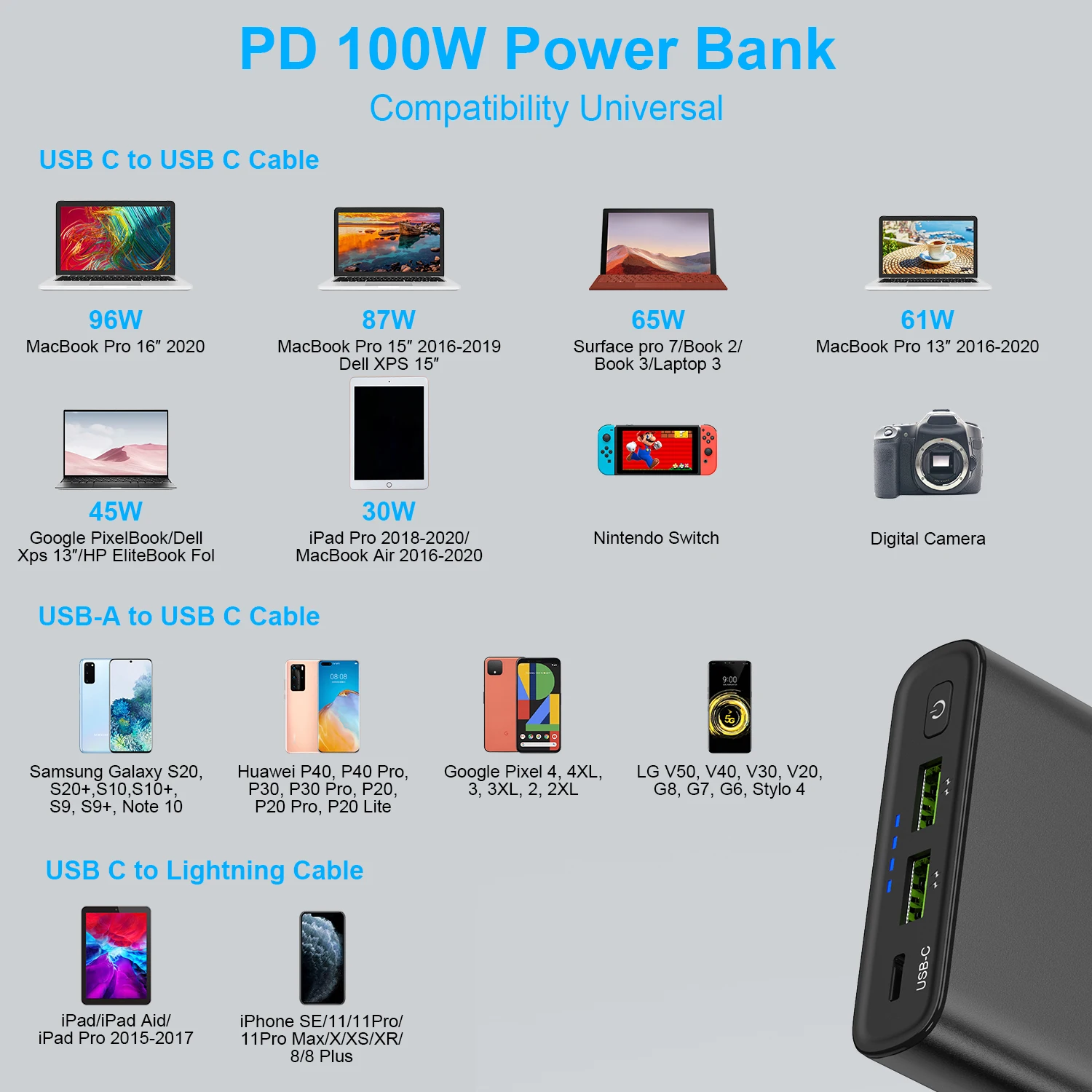
Most “laptop-compatible” power banks fail because they lack sufficient wattage. Unlike phones, laptops have strict power requirements:
- 13-inch MacBook Air: Needs 30W minimum (45W+ recommended for active use)
- 15-inch MacBook Pro: Requires 60W+
- Windows Ultrabooks: Typically 45-65W
USB-C PD is non-negotiable – no USB-A port can deliver laptop-level power. Verify the power bank’s output wattage matches or exceeds your laptop’s charger (e.g., 65W laptop charger → 65W+ power bank). Note: Some banks offer “laptop mode” buttons to activate high-wattage output.
Rugged vs. Slim: How Build Quality Prevents Travel Disasters
Your power bank’s construction impacts reliability more than specs:
* Rugged models feature shock-absorbing corners and IPX4 water resistance – essential for hiking or construction sites. Avoid if pocket carry is priority (adds 30-50% bulk).
* Slim designs fit in jeans pockets but lack drop protection. Visual red flag: Flimsy plastic that bends easily.
* Digital displays show exact remaining capacity (vs. vague LED lights), preventing mid-charge surprises.
Safety First: Why CE, FCC, and RoHS Certifications Prevent Fires
Counterfeit power banks cause hundreds of fires yearly. These certifications are your safety net:
* CE/FCC/RoHS: Mandatory in EU/US for electrical safety and toxic material limits. Always verify physical marks – fake listings often misuse logos.
* Critical protections to demand:
* Overcharge prevention (stops at 100%)
* Short-circuit cutoff (triggers in 0.1 seconds)
* Temperature control (shuts down above 60°C/140°F)
* Warning sign: Power banks that get uncomfortably hot during use likely lack thermal protection.
Step-by-Step: How to Choose Your Perfect Power Bank
Follow this battle-tested process:
1. Identify devices: List all you’ll charge (e.g., iPhone 14: 3,279mAh, iPad: 10,758mAh).
2. Calculate capacity: (Total device mAh × 1.3) ÷ 0.75. For iPhone + iPad: (3,279 + 10,758) × 1.3 ÷ 0.75 ≈ 24,300mAh.
3. Match ports: Laptop? Require USB-C PD output ≥ device wattage. Multiple phones? Ensure ≥18W total output.
4. Verify safety: Only buy CE/FCC-certified models from reputable brands (Anker, RAVPower).
5. Portability check: >15,000mAh needs backpack carry; under 5,000mAh fits pockets.
Final Note: Your ideal power bank charger information boils down to three non-negotiables: realistic capacity (60-80% of advertised), matching fast-charging standards (USB-C PD for laptops), and certified safety protections. Prioritize these over flashy extras like wireless charging, and you’ll avoid the #1 mistake – buying a bank that can’t actually power your devices at full speed. Always store it at 50% charge in cool, dry places, and replace units showing swelling or rapid discharge. For ongoing updates, bookmark FAA guidelines on airline power bank limits (max 100Wh/27,000mAh in carry-ons) and check manufacturer sites for firmware updates that optimize charging efficiency. With this knowledge, you’ll never again be left stranded with a dead device.





