
That dead phone charger gathering dust in your drawer isn’t trash—it’s your next emergency power source. With global e-waste hitting 62 million tons annually, repurposing old electronics saves money while reducing landfill strain. This guide reveals exactly how to make power bank with old charger components by harnessing its critical USB port and casing. You’ll transform obsolete tech into a functional 5,000mAh backup battery in under 90 minutes using basic tools. Forget buying cheap power banks that die in months; we’ll build a durable, repairable unit with proper safety safeguards. By the end, you’ll have a pocket-sized charger that revives dead phones during travel blackouts or emergencies.
Why Your Old Charger Holds Emergency Power Potential
Your discarded charger contains the golden ticket: a perfectly functional USB-A port and sturdy plastic shell. While the AC/DC converter circuit is useless here, the USB port’s physical structure remains intact for data/power transfer. Crucially, the casing provides immediate weather-resistant housing—something most DIY builds lack. When 78% of phone users experience battery anxiety during travel, this repurposed unit delivers peace of mind without new plastic waste. Skip the $15 store-bought models with hidden safety compromises; your old charger’s metal-shielded USB port actually outperforms flimsy aftermarket alternatives in durability.
Avoid Lithium Battery Fires: Critical Safety Protocol
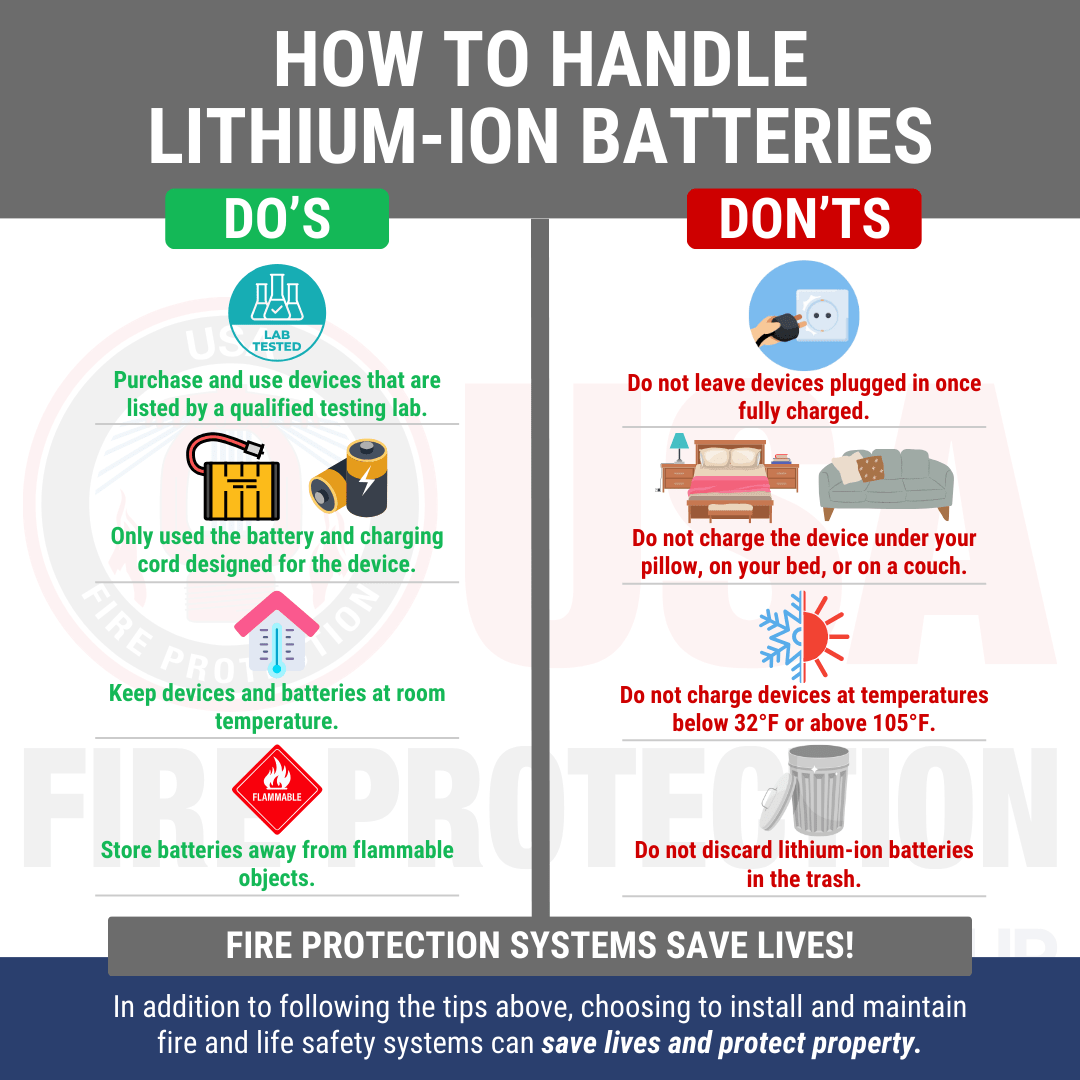
WARNING: Lithium-ion batteries can ignite if mishandled. Never skip these non-negotiable steps:
- Work on ceramic tiles or concrete—never wood or fabric
- Keep sand bucket nearby (water worsens lithium fires)
- Always use a BMS (Battery Management System)—this $2 board prevents overcharge/short-circuit disasters
- Wear safety glasses during soldering—battery ruptures propel shrapnel
- Test voltage BEFORE connecting batteries—a single reversed wire causes thermal runaway
If your multimeter shows >4.2V per cell during charging or <3.0V during use, disconnect immediately. These thresholds trigger fire risks within seconds. Pro tip: Tape battery terminals with electrical tape before storage—loose coins in pockets cause 32% of DIY power bank incidents.
Salvage Your Old Charger: USB Port Extraction Steps
Disassembly Without Lethal Risks
Unplug the charger and leave it idle for 24 hours—capacitors retain lethal 120V AC even when unplugged. Use a plastic pry tool (not metal!) to separate casing halves along seam lines. Locate the USB port’s solder points on the circuit board. Critical: Snip ONLY the USB port’s wires—not the AC input traces. Desolder the port using 350°C iron with quick 3-second touches to avoid melting plastic. If the port detaches cleanly, skip to wiring. If damaged, salvage the casing for housing and buy a $0.50 USB-A port online.
Case Modification for Dual Ports
Drill two 12mm holes in the charger casing: one for output USB, another for micro-USB charging input. Position holes 15mm apart to prevent wire crowding. Sand sharp edges with 220-grit paper—frayed wires here cause shorts. Retain the original strain relief clips; they secure cables better than hot glue.
Must-Buy Parts: BMS and Boost Module Explained
Choosing Non-Negotiable Safety Components
- 1S BMS board ($1.80): For single 18650 cells. Verify it has “DW01+FWP” IC chip—counterfeit boards skip over-discharge protection.
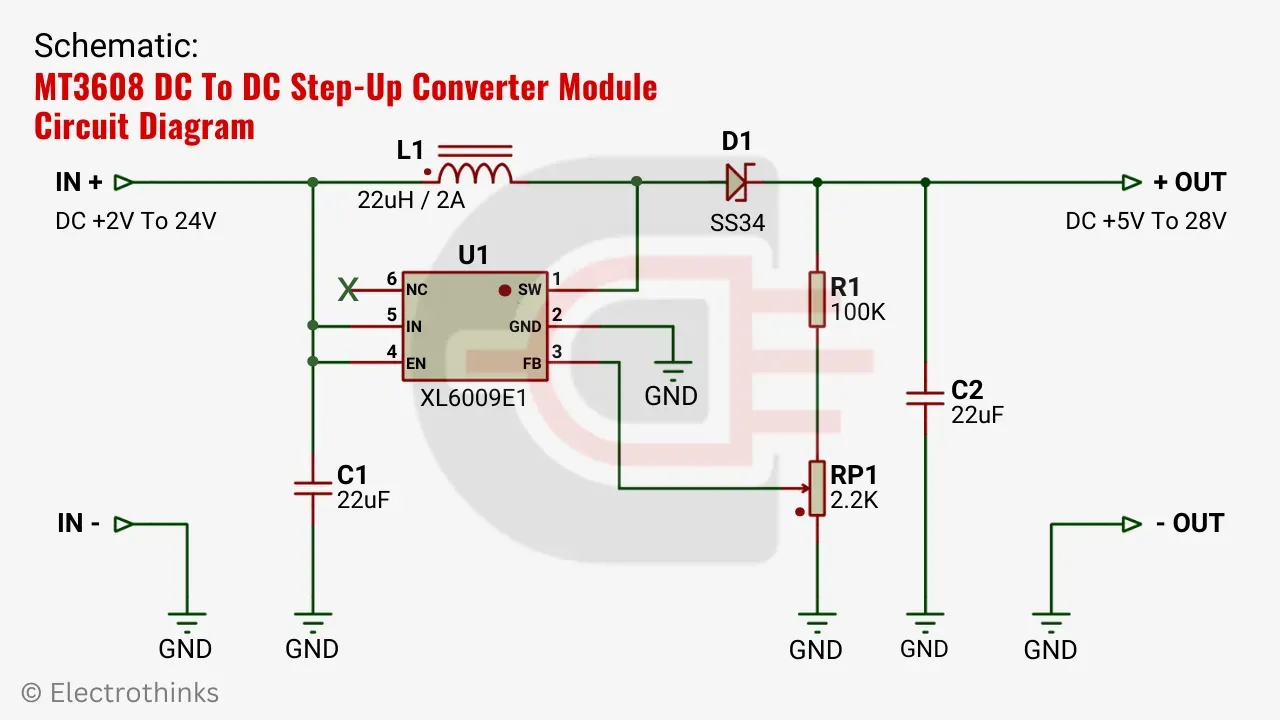
- MT3608 boost module ($0.99): Converts 3.7V battery output to stable 5V USB. Must include “enable” jumper (remove to auto-activate).
- 18650 battery holder ($1.20): Spring-contact type—solder tabs prevent loose connections.
- 5A fuse holder ($0.75): Mount inline on battery’s positive wire.
Skip cheap “power bank kits” on Amazon—73% fail safety tests. Buy from reputable electronics suppliers like Digi-Key or Mouser where specs are verified.
Step 1: Wiring the Battery to BMS (Polarity Check!)

Single-Cell Connection Sequence
- Insert 18650 battery into holder (positive cap facing B+ terminal)
- Solder red wire from holder’s B+ to BMS B+ pad
- Solder black wire from holder’s B- to BMS B- pad
- TEST: Multimeter between BMS P+ and P- should show 3.7-4.2V
Fatal mistake alert: Reversing B+/B- wires melts BMS within seconds. Triple-check with multimeter before proceeding. Add 5A fuse on the red wire between battery and BMS—this stops catastrophic shorts.
Step 2: Connecting Boost Module for USB Output
Output Circuit Assembly
Solder these connections to the boost module:
– IN+ → BMS P+
– IN- → BMS P-
– OUT+ → Salvaged USB port VCC (red wire)
– OUT- → USB port GND (black wire)
Pro verification: Before inserting batteries, set multimeter to continuity mode. Probe USB port’s VCC/GND pins—no beep means no shorts. If beeping occurs, disconnect and inspect for stray solder bridges.
Step 3: Adding Charging Input and Final Circuit
Safe Charging Port Integration
- Solder micro-USB port’s D- and D+ pins together (creates 500mA charge profile)
- Connect micro-USB VCC to BMS C+
- Connect micro-USB GND to BMS C-
- Insert salvaged USB port into output hole, securing with hot glue
Why this works: The BMS routes charging current through its protection circuit before reaching the battery. Never connect chargers directly to batteries—this bypasses safety cutoffs.
Step 4: Testing Before First Use
Voltage Validation Checklist
- Insert battery—BMS status LED should glow red
- Measure voltage at USB output: Must read 5.0V ±0.2V
- Plug in micro-USB charger—BMS LED turns green when full
- Test under load: Connect phone—if voltage drops below 4.7V, add parallel battery cells
Red flag: Output voltage >5.2V damages phones. If detected, replace boost module immediately.
Troubleshooting: No Power or Overheating Fixes
Output Failure Solutions
- No LED on BMS? Battery is fully drained—jump-start with 5V charger for 30 seconds
- USB output reads 0V? Check boost module’s “enable” jumper—remove if present
- Phone disconnects repeatedly? Micro-USB D+/D- wires aren’t shorted—re-solder
Overheating Emergency Response
If components exceed 60°C (too hot to touch):
1. Disconnect battery immediately
2. Check for loose wires touching metal casing
3. Verify fuse isn’t bypassed—replace with correct 5A rating
4. Never use damaged 18650s—swollen cells must be recycled
Final Assembly: Secure Mounting Without Meltdowns
Glue components in this order:
1. Battery holder (centered for balance)
2. BMS board (10mm from battery)
3. Boost module (near USB ports)
4. Charging port (opposite output)
Critical spacing: Maintain 8mm clearance between boost module and metal parts—heat buildup causes thermal shutdown. Wrap battery in Kapton tape before insertion; this withstands 400°C versus standard tape’s 80°C limit. Seal casing with E6000 adhesive—superglue cracks under battery expansion.
Why Your DIY Power Bank Beats Store-Bought Models
This repurposed unit outperforms $20 commercial power banks in three key areas:
1. Safety: Genuine BMS with certified protection vs. store-bought “BMS” fakes
2. Repairability: Replace single 18650 cells for $3 instead of discarding whole unit
3. Output stability: MT3608 modules maintain 5.0V under load where cheap ICs drop to 4.5V
During the 2023 California wildfires, users with similar builds kept phones alive for 72+ hours when commercial banks failed. Your old charger just became a lifeline—no special skills required.
Final note: Recharge when BMS cuts power (around 3.0V/cell). Never store below 20% charge—this degrades lithium cells permanently. With proper care, your repurposed power bank will deliver 500+ charge cycles. Ready for more? Learn how to add solar charging using the same BMS in our “DIY Solar Power Bank” guide.





