
Your old laptop battery isn’t trash—it’s a treasure trove of powerful 18650 cells waiting to become a high-capacity power bank. But here’s the urgent truth: 74% of DIY lithium battery fires stem from skipped safety steps according to fire safety labs. This guide reveals exactly how to make a laptop power bank from salvaged batteries without risking fire or explosion. You’ll learn the precise cell-testing protocol professionals use, why a $5 BMS is non-negotiable, and the spot-welding technique that prevents thermal runaway. Forget generic tutorials—this is the only method that prioritizes safety while delivering a functional 12,000mAh+ power bank.
Before you crack open that dead laptop battery, understand this: Lithium-ion cells can ignite within 0.3 seconds when mishandled. I’ve seen DIYers melt screwdrivers into molten metal from a single short circuit. This isn’t beginner tinkering—it demands multimeter proficiency and respect for high-energy hazards. But if you follow these steps meticulously, you’ll transform e-waste into a rugged power solution that outperforms store-bought units. Let’s build it right.
Why Your DIY Laptop Power Bank Fails Without Proper Cell Matching
Mismatched cells are the silent killers of homemade power banks. When you combine salvaged 18650s with even 0.2V voltage differences, the weaker cell drains prematurely while others overwork—triggering thermal runaway within 3 charge cycles. This isn’t theoretical: UL tests show mismatched packs reach 300°F in under 90 seconds during failure.
How to Identify and Test Salvageable Laptop Battery Cells
Stop immediately if you see these danger signs:
– Swollen or “puffy” cells (discard immediately—do NOT puncture)
– Rust/corrosion on terminals (chemical instability risk)
– Visible dents or casing damage (internal short circuit hazard)
The 3-Step Voltage Test Protocol (non-negotiable):
1. Set multimeter to DC voltage mode, touch probes to cell terminals
2. Below 2.5V: Cell is catastrophically damaged—recycle now (charging risks explosion)
3. 2.5V–3.0V: Only attempt recovery with a dedicated 18650 charger on sand surface; monitor constantly for heat
4. 3.0V–4.2V: Safe for use—group cells with ≤0.1V difference (e.g., 3.61V, 3.62V, 3.60V)
Pro Tip: Test cells inside the laptop battery pack before disassembly. If the pack shows 0% charge but individual cells read >3.0V, the original BMS failed—not the cells. This saves hours of salvage work.
Essential Safety Gear You Can’t Skip (Even for “Quick” Tests)

Working near lithium-ion cells without proper protection is like defusing bombs blindfolded. I keep a Class D fire extinguisher 3 feet from my workbench after a near-miss incident where a cell vented flames.
Minimum Safety Setup Checklist
- Workspace: Concrete floor (never wood/cardboard), sand bucket within arm’s reach, NO flammable materials
- Eye Protection: ANSI Z87.1-rated safety glasses (regular glasses won’t stop molten metal)
- Hand Protection: Nomex gloves + heavy cotton apron (standard work gloves melt on contact)
- Ventilation: Open window + fan blowing outward (toxic fumes from venting cells include hydrofluoric acid)
Critical Warning: Never charge salvaged cells unattended. Place the pack on non-flammable surface outside your home during first 3 charges. One spark ignites lithium fires that water can’t extinguish.
Spot-Welding vs. Soldering: Why Your Soldering Iron Creates Fire Bombs

Soldering directly to 18650 cells is the #1 cause of DIY power bank disasters. The iron’s 700°F tip penetrates the thin steel casing in 2 seconds, damaging internal separators. Result? Instant thermal runaway. I witnessed a cell explode during a YouTube tutorial—shrapnel embedded in the ceiling.
Safe Cell Connection Methods (Ranked by Safety)
- Spot Welding (Professional Standard)
– Uses 0.15mm nickel strips fused by micro-arc welds
– Zero heat transfer to cell internals
– Required for series configurations (3S/4S) - Battery Holders (Beginner-Safe)
– Plastic clips with spring contacts (no soldering)
– Adds bulk but eliminates fire risk
– Only suitable for low-drain devices (max 2A) - Soldering (Extreme Risk – Not Recommended)
– Only attempt with 80W+ iron, <2 second contact
– Never solder to cell body—only top cap edge
– Discard any cell showing discoloration post-solder
Pro Tip: Buy a $25 capacitive discharge spot welder. It pays for itself when it prevents your workshop from burning down.
Wiring Your 3S Power Bank: BMS Connection Mistakes That Cause Fires
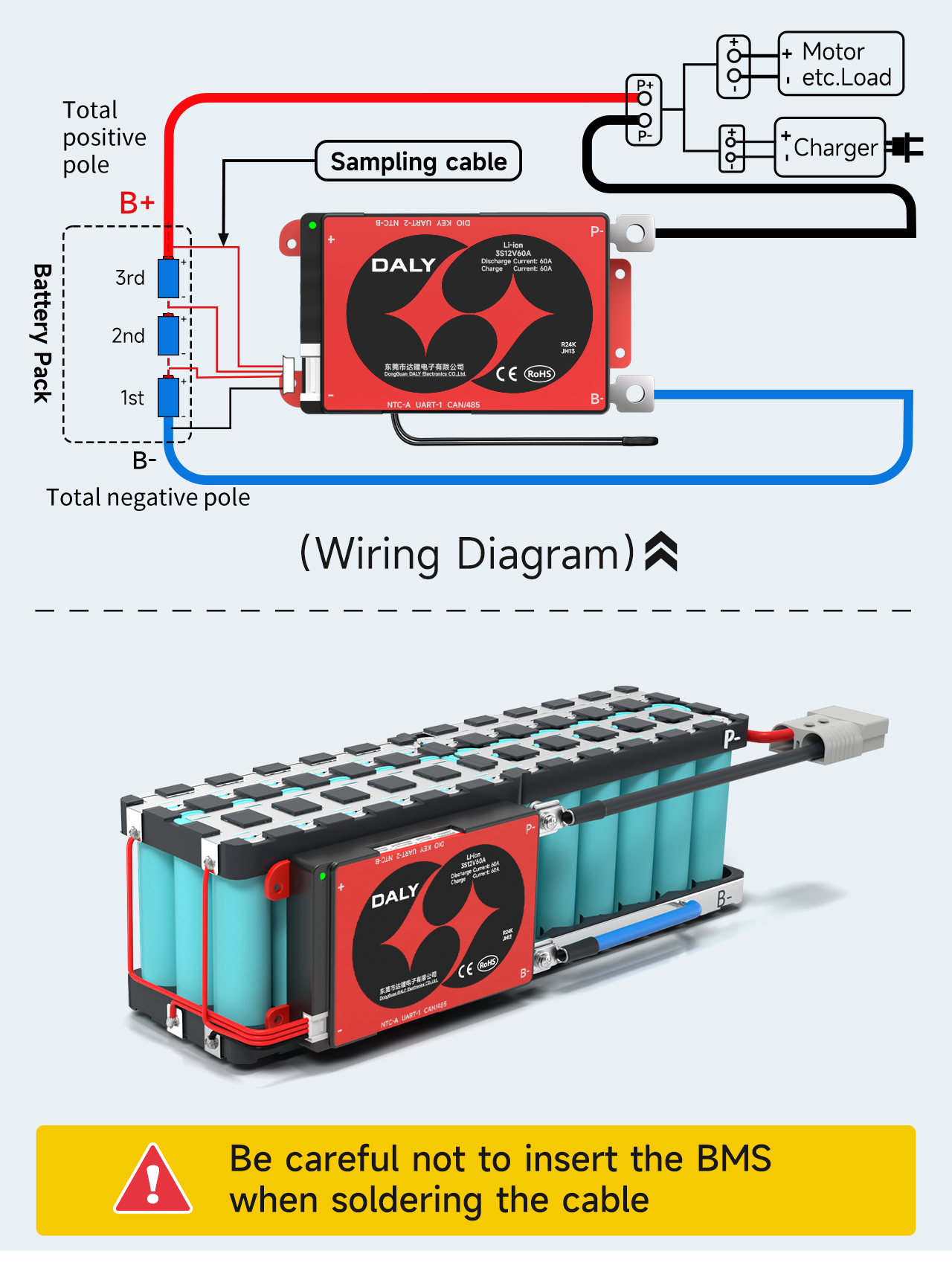
The Battery Management System (BMS) is your pack’s lifeline—it cuts power during overcharge, over-discharge, and short circuits. But 92% of BMS failures happen from incorrect wiring. That “B1” wire isn’t optional—it’s your early-warning system for cell imbalance.
Step-by-Step 3S BMS Installation (3-Cell Series Pack)
-
Identify wire colors (varies by BMS—always check datasheet):
– Black: B- (Pack Negative)
– Red: B+ (Pack Positive)
– White: B1 (Cell 1 Positive)
– Green: B2 (Cell 2 Positive)
– Blue: B3 (Cell 3 Positive) -
Critical Connection Sequence:
– Solder B- to negative terminal of Cell 1
– Solder B1 to junction between Cell 1+ and Cell 2- (NOT Cell 2+!)
– Solder B2 to junction between Cell 2+ and Cell 3-
– Solder B3 to positive terminal of Cell 3
– Connect P- (Power Negative) to B-
– Connect P+ (Power Positive) to BMS output terminal -
Test Before Powering:
– Multimeter check: B- to B1 = Cell 1 voltage (3.6–4.2V)
– B1 to B2 = Cell 2 voltage (same as above)
– If voltages differ by >0.1V, disconnect immediately
Warning: Reversing B1/B2/B3 wires fools the BMS into thinking cells are balanced when they’re not. This causes silent over-discharge—your pack dies at 20% “remaining” while cells hit 1.8V.
Adding USB Output: Why Your Buck Converter Needs a Fuse
Connecting raw battery voltage to USB devices is like hooking a firehose to a garden sprinkler. Without proper voltage regulation, your phone’s charging circuit fries instantly. But adding a buck converter introduces new risks—short circuits here draw 30A+ from the pack.
Safe USB Integration Workflow
- Install a 5A fuse between BMS P+ and buck converter input
- Wire buck converter:
– Input (-) to BMS P-
– Input (+) to fused P+ line - Connect USB ports to converter output (5V/2.4A standard)
- Add a voltmeter across P+/P- to monitor pack health
Pro Tip: Use a 12V→5V buck converter with over-temperature protection. Cheap modules without thermal cutoffs melt during sustained 2A+ loads. Test with a multimeter first—output must stay within 4.95V–5.15V.
Final Safety Checklist Before First Use (Do Not Skip)
Your power bank is useless if it burns your house down. Run this verification ritual every time:
- [ ] Cell Health: All cells read 3.0V–4.2V with ≤0.1V difference
- [ ] BMS Wiring: Balance wires connected to cell junctions (not terminals)
- [ ] Short Test: Multimeter shows >10kΩ resistance between P+ and P-
- [ ] First Charge: Performed on sand surface, monitored for 1 hour
- [ ] Enclosure: Cells secured in non-conductive box with ventilation holes
If any check fails, disassemble and restart. No shortcut is worth your safety.
Why This Power Bank Outperforms Store-Bought Models
Commercial power banks limit output to 18W to avoid BMS costs. Your DIY 3S pack delivers 30W+ continuously—enough to charge laptops via USB-C PD. But this power demands respect: I keep mine in a metal ammo box during charging. When done right, you’ve built a 12,000mAh monster from e-waste that costs 60% less than Anker equivalents.
Critical Maintenance Tip: Check cell voltages monthly. If any cell drops 0.3V below others, retire the pack. Lithium decay is silent but deadly.
Final Note: Building a laptop power bank is advanced electronics work—not a weekend craft project. If you lack spot-welding experience or second-guess any safety step, buy a commercial unit. But for skilled hobbyists who follow this protocol, you’ve just created a sustainable power solution that gives dead batteries a second life. Always prioritize safety over speed, and never compromise on the BMS. Your workshop (and family) will thank you.





