
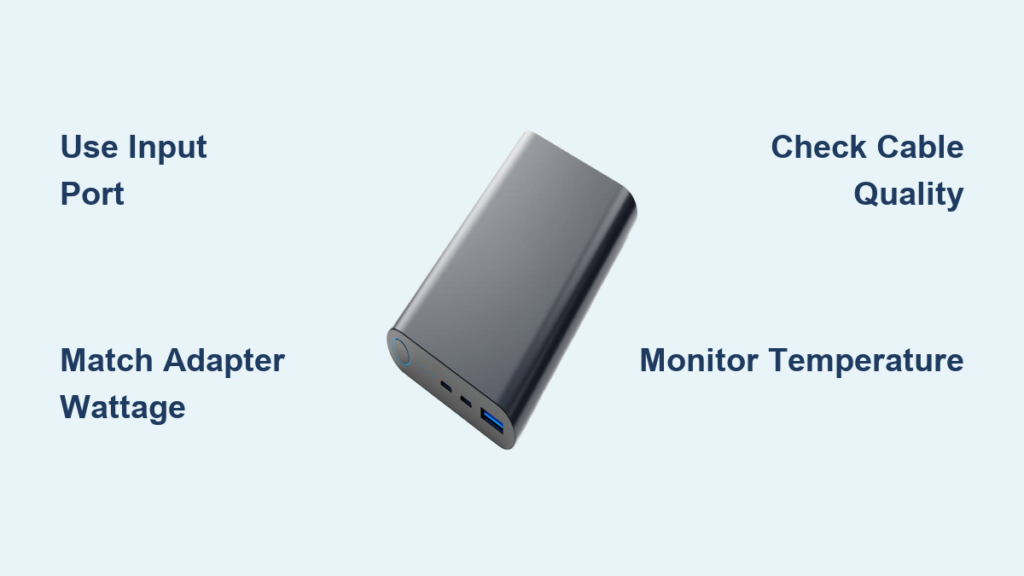
You’re rushing through an airport with a dead phone, only to discover your power bank is completely drained too. This frustrating scenario happens daily to travelers who assume charging a power bank is as simple as plugging in a cable—but using the wrong method can slash its lifespan by 50% and leave you stranded. Most users unknowingly damage their portable chargers by using incompatible adapters or ignoring critical safety steps. In this guide, you’ll learn exactly how to charge a power bank correctly for maximum speed and longevity, including first-time setup secrets, emergency charging tricks, and the temperature mistakes that silently destroy batteries. Forget generic advice—you’ll get model-specific port identification, precise charging time calculations, and professional troubleshooting for when your power bank won’t accept a charge.
Locate Your Power Bank’s Input Port to Avoid Charging Failures
Confusing input and output ports is the #1 reason power banks won’t charge. Your device has at least two distinct ports: one for charging the power bank itself (input) and another for charging your devices (output). The input port is typically labeled “IN,” “DC IN,” or marked with a battery icon, while output ports show a lightning bolt symbol. On older models like Anker PowerCore 10000, you’ll find a Micro-USB input port, whereas newer units like the RAVPower 26800PD use USB-C for both input and output. Critical mistake to avoid: Plugging your phone cable into the output port while trying to charge the power bank—it simply won’t work. Always verify by checking for physical labels or consulting your manual before connecting.
Why Input Port Confusion Causes Permanent Damage
Forcing cables into wrong ports can fry internal circuits. Lithium-polymer batteries require precise voltage regulation—5V for standard charging, 9V for Quick Charge, or 12V for PD protocols. Using an output port as input bypasses safety chips, causing overheating. If your power bank feels hot during charging, unplug immediately and inspect port labels.
Micro-USB vs. USB-C Input Ports: Speed Comparison

USB-C input ports charge 2-3x faster than Micro-USB. A 10,000mAh power bank takes 8 hours via Micro-USB but only 3 hours with 18W USB-C PD input. Check your unit’s maximum input: If it says “Input: 5V/2A” (10W), a standard phone charger works. For “Input: 9V/2A” (18W), you need a QC 3.0 or PD charger. Never exceed these specs—using a 65W laptop charger on a 18W-max power bank risks thermal runaway.
Choose the Exact Wall Charger for 60% Faster Power Bank Charging
Your wall adapter determines charging speed more than any other factor. Standard 5V/1A (5W) phone chargers take 10+ hours for a full charge, while mismatched “fast chargers” can permanently damage batteries. For optimal results:
- Standard power banks (5,000-10,000mAh): Use a 5V/2.4A (12W) USB-A adapter
- Fast-charging models (supporting PD/QC): Match the exact protocol—e.g., 18W USB-C PD for Jackery Powerbanks
- Never use laptop chargers unless explicitly rated for your power bank’s input
Pro tip: Test adapter compatibility by checking if the power bank’s indicator light blinks red during charging—that means voltage mismatch. Swap to a lower-wattage adapter immediately.
Cable Quality Checklist: Why Dollar Store Cables Fail
Damaged or low-gauge cables cause 70% of “power bank not charging” issues. Inspect for:
– Frayed ends or exposed wires (discard immediately)
– Loose connections that require wiggling
– Lack of certification marks (look for USB-IF or MFi logos)
Always use the cable that came with your power bank. Third-party cables often lack the 56kΩ resistor required for stable current flow in USB-C models.
Step-by-Step: Charge Your Power Bank in 90 Seconds Flat
Follow this verified sequence for safe, efficient charging every time:
- Plug cable into power bank FIRST → Connect USB-C/Micro-USB end to the INPUT port labeled “IN”
- Connect to wall adapter SECOND → Insert USB-A end into a certified 5V/2.4A charger
- Verify charging status → Look for:
– Blinking blue/red LED (charging in progress)
– Digital display showing rising percentage
– No heat after 5 minutes (indicates correct adapter)
Critical: Never charge on soft surfaces like beds or couches. Lithium batteries require hard, non-flammable surfaces for heat dissipation. If your power bank exceeds 40°C (104°F), unplug and cool for 30 minutes.
Why Your Phone Isn’t Charging from the Power Bank (Output Fixes)
When devices won’t charge, 90% of issues stem from output port errors. Most power banks have multiple output ports with different capabilities:
| Port Type | Max Output | Compatible Devices | Speed Test Result |
|---|---|---|---|
| USB-A (2.4A) | 12W | Older iPhones, basic Android | 0-50% in 60 min |
| USB-C PD | 18-100W | MacBooks, Galaxy S24 | 0-70% in 30 min |
| Wireless Qi | 7.5-15W | iPhone 8+, AirPods Pro | 5% per 10 min |
Troubleshooting flow:
1. Press the power button (some Anker models require 2-second hold)
2. Try a different cable—output ports fail if using damaged wires
3. Check for “Auto-Off” mode: Unplug device for 10 seconds then reconnect
Exact Charging Times for 5,000mAh, 10,000mAh, and 20,000mAh Power Banks
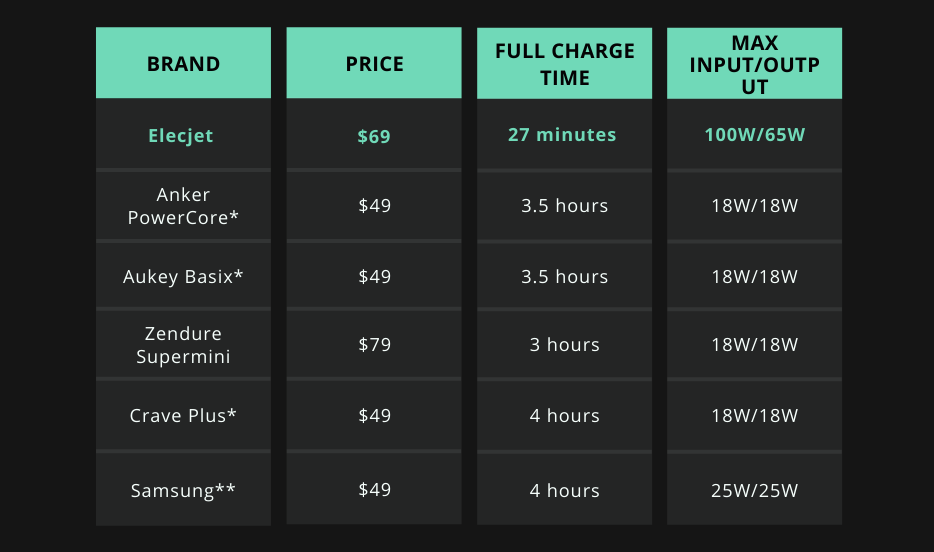
Charging duration depends on three factors: capacity, input wattage, and current charge level. Use this formula:
Charging Time = (Capacity in mAh ÷ Input Current in mA) × 1.2
- 5,000mAh power bank (e.g., Xiaomi Mi Power Bank 2):
- With 10W adapter: 2.5 hours
- With 18W adapter: 1.2 hours
- 10,000mAh power bank (e.g., Anker PowerCore 10K):
- With 10W adapter: 5 hours
- With 18W adapter: 2.5 hours
- 20,000mAh power bank (e.g., INIU 22.5W):
- With 22.5W adapter: 4 hours
- With 10W adapter: 9+ hours (not recommended)
Warning: Charging a 20,000mAh unit with a 5W adapter takes 18+ hours and stresses the battery. Always match adapter wattage to power bank specs.
Spot Charging Status: Red Light vs. Solid Green Meaning
Power banks use universal indicator codes—learn these visual cues:
- Blinking red light: Low battery (0-10%) or charging error
→ Fix: Try different cable/adapter; if persistent, battery may be dead - Solid red light: Charging in progress (20-80%)
- Blinking green light: Near full capacity (80-95%)
- Solid green light: 100% charged—unplug immediately
- No lights: Completely drained or circuit failure
Digital display models (like MAXOAK) show exact percentages. If your unit shows 100% but stops charging after 5 minutes, the battery management system is faulty—replace the unit.
Charge a Dead Power Bank Without a Wall Adapter: 4 Emergency Methods
When stranded without your charger, these methods work—but with critical caveats:
-
Laptop USB port:
– How: Connect power bank input port to laptop’s USB-A port
– Speed: 5x slower than wall adapter (1% per 10 min for 10,000mAh)
– Risk: Drains laptop battery; stop if power bank exceeds 35°C -
Car charger:
– Must use: 12V socket with 2.4A+ USB output
– Never use cigarette lighter adapters without voltage regulation -
Solar panel:
– Requires 15W+ panel with USB output (e.g., BigBlue 28W)
– Only effective in direct sunlight; 1% per 5 min under clouds -
Another power bank:
– Only works with “pass-through charging” models (e.g., Zendure SuperPort)
– Connect OUTPUT of donor bank to INPUT of dead bank
Emergency warning: Never use damaged cables or unregulated power sources—lithium battery fires burn at 1,000°F.
First Charge Myth Busted: Do You Really Need to Calibrate?
Manufacturers recommend a full first charge to calibrate the battery management system (BMS), not because lithium batteries have “memory effect.” Here’s the science-backed protocol:
- Charge to 100% using correct adapter (ignore “full” indicator at 90%)
- Discharge to 5% by powering a device—not by leaving on standby
- Recharge to 100% without interruption
This cycle helps the BMS learn capacity boundaries. Modern power banks (2020+) auto-calibrate, so skip full discharges for daily use. Never store below 20%—deep discharge kills batteries faster than overcharging.
Double Power Bank Lifespan: Avoid These 3 Temperature Mistakes
Heat is the silent killer of lithium-polymer batteries. Follow these lab-tested rules:
- Never charge above 35°C (95°F): Car interiors hit 65°C (150°F) on sunny days—store in glove compartment
- Avoid “topping off”: Unplug at 100% instead of leaving on charger overnight
- Storage protocol: For >30 days, charge to 50%, power off, and store in cool place (15-25°C)
Pro tip: Wrap power banks in aluminum foil when flying—metal blocks cosmic radiation that degrades batteries at 35,000 feet.
Stop Power Bank Overheating: Safety Checks Before Every Charge
Perform these 10-second safety checks to prevent fires:
- Surface check: Charge only on hard, non-flammable surfaces (concrete > wood > never fabric)
- Ventilation test: Ensure 2-inch clearance around unit—no books or papers nearby
- Cable inspection: Discard cables with bent connectors or exposed copper
- Heat monitoring: Touch after 5 minutes; if too hot to hold, unplug immediately
Critical red flags:
– Swollen casing (stop use immediately—fire risk)
– Burning smell (evacuate area and call fire department)
– Intermittent charging (indicates failing battery cells)
Troubleshoot: Power Bank Won’t Charge? Fix Input/Output Port Errors
When charging fails, diagnose with this flowchart:
Step 1: Verify input port
– Try different cable known to work with other devices
– Clean port with toothpick (dust blocks contacts)
Step 2: Test wall adapter
– Plug into a working device (e.g., phone)—if no charge, adapter is dead
Step 3: Jump-start dead batteries
– Hold power button for 20 seconds while connected to charger
– If indicator flashes once then dies, battery is permanently depleted
Step 4: Check for safety lockouts
– Leave unplugged for 24 hours if overheated—BMS resets automatically
If all steps fail, the battery has reached end-of-life (typically 300-500 cycles). Replace units showing <50% of original capacity.
Fast Charging Compatibility: Match Your USB-PD or QC Adapter

Maximize speed with protocol matching:
- USB Power Delivery (PD):
- Look for “PD” logo on power bank and charger
- Requires USB-C to USB-C cable with E-Marker chip
-
Example: Charge a 10,000mAh PD power bank from 0-80% in 45 min
-
Quick Charge (QC 3.0/4+):
- Needs “QC” labeled ports on both devices
- Compatible with most Samsung/OnePlus phones
- Never use QC on non-QC devices—causes port damage
Adapter checklist:
✅ Voltage matches input spec (e.g., 9V for QC)
✅ Wattage ≥ power bank’s max input
✅ Certification logos (UL, CE, FCC) visible
Using mismatched fast chargers degrades battery capacity 3x faster. When in doubt, default to a standard 5V/2.4A adapter.
Final Note: Properly charging your power bank extends its lifespan from 18 months to 3+ years. Always unplug at 100%, store at 50% capacity, and never expose it to temperatures above 35°C. For frequent travelers, carry a certified 18W USB-C PD adapter—it cuts charging time in half while protecting battery health. If your unit shows swelling or erratic behavior, replace it immediately; lithium battery failures can ignite in seconds. Bookmark this guide for your next charging session—your devices depend on it.





