
You’ve probably stared at your power bank wondering: How many volts is a power bank actually delivering? That simple question hides a critical misunderstanding—power banks don’t have one fixed voltage. They operate across two voltage stages that directly impact how many times you can recharge your devices. If your 20,000mAh power bank only gives your phone one full charge instead of five, voltage conversion is why. This guide cuts through the confusion by revealing exactly what happens inside your power bank—from the 3.7V lithium cells storing energy to the 5V, 9V, or even 20V outputs your devices actually receive. You’ll learn why advertised capacity lies, how fast charging really works, and how to pick a power bank that won’t leave you stranded with a dead phone.
Understanding how many volts is a power bank requires knowing its dual-voltage nature. The internal battery operates at a fundamentally different voltage than what exits through USB ports. This gap between storage voltage and output voltage explains why your power bank’s “10,000mAh” rating rarely matches real-world performance. By the end of this guide, you’ll confidently decode specs, avoid dangerous cheap models, and maximize every charge cycle—whether you’re powering a smartphone or a laptop.
Why Power Banks Use 3.7V Internally (Not 5V)
Your power bank’s core is built on lithium-ion or lithium-polymer cells, each storing energy at 3.7 volts nominal. This 3.7V represents the average voltage during discharge—not a fixed number. When fully charged, a single cell measures 4.2V; when depleted, it drops to 3.0V. Manufacturers use 3.7V as the standard reference because it’s the midpoint of the usable range. Crucially, this voltage applies to the raw battery cells before any conversion.
How Cell Configuration Affects Voltage Output
Power banks arrange these 3.7V cells in specific configurations to achieve different power goals:
– Single-cell (1S) setups: Most common for 5,000–20,000mAh power banks. All cells connect in parallel, maintaining 3.7V while increasing capacity. Requires a boost converter to reach 5V output.
– Dual-cell (2S) setups: Found in high-wattage models (e.g., 45W+ for laptops). Two cells in series create 7.4V nominal. More efficient for generating 9V/12V/20V outputs with minimal conversion loss.
Pro Tip: Check your power bank’s label for “3.7V” or “7.4V” near the capacity rating—this reveals its internal configuration. If absent, assume 3.7V for models under 27,000mAh.
Why 3.7V Cells Dominate the Market
Lithium chemistry makes 3.7V unavoidable—it’s inherent to how these batteries store energy. Attempts to use other voltages would require completely different (and less efficient) battery tech. This standardization keeps costs low but creates a conversion challenge: your phone expects 5V, so power banks must boost that 3.7V. This isn’t a flaw—it’s physics. Skipping this step would fry your devices.
How Power Banks Convert 3.7V to 5V for Standard Charging
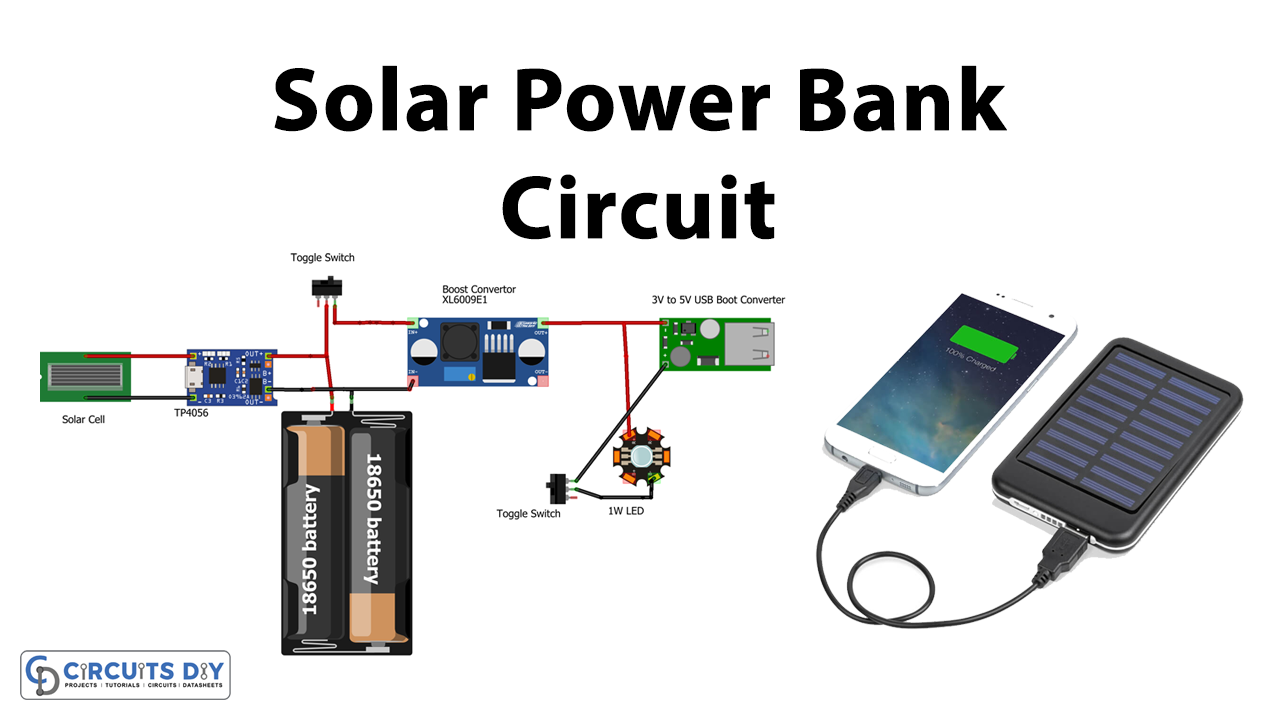
Your USB-A port delivers a steady 5 volts because power banks contain a DC-DC boost converter circuit. This component acts like an electrical transformer, stepping up the internal 3.7V to the USB standard’s 5V. Here’s the step-by-step process:
- Voltage detection: When you plug in a device, the power bank’s controller chip checks if it supports standard 5V charging.
- Boost conversion: The circuit rapidly switches transistors to “pump” the 3.7V input, creating a higher-voltage output.
- Stabilization: Feedback loops maintain exactly 5.0V ±0.25V, even as the internal battery drains from 4.2V to 3.0V.
Critical Warning: Cheap power banks often skip proper voltage regulation. Use a $5 USB tester to verify output—if it reads above 5.25V or below 4.75V, discard the unit immediately. Unstable voltage can permanently damage your phone’s battery.
Why Conversion Efficiency Matters (The mAh Lie)
That “20,000mAh” power bank? Its capacity is rated at 3.7V. But your phone charges at 5V. Physics dictates:
Energy (Wh) = Capacity (Ah) × Voltage (V)
So a 20,000mAh (20Ah) power bank stores:
20Ah × 3.7V = 74Wh
To deliver 5V output, it must convert this energy:
74Wh ÷ 5V = 14,800mAh
But conversion isn’t 100% efficient. Real-world losses (5–15% as heat) mean:
Actual usable capacity = 60–70% of labeled mAh
Thus, a 20,000mAh power bank typically delivers only 12,000–14,000mAh at 5V—enough for ~2.5 full charges of a 4,000mAh phone battery.
Fast Charging Unlocked: 9V, 12V, and 20V Output Explained
When your power bank supports USB Power Delivery (USB-PD) or Qualcomm Quick Charge, it dynamically jumps to higher voltages. This isn’t random—it’s a negotiation between your device and the power bank’s controller chip. Here’s how it works:
How Voltage Negotiation Happens in 30 Seconds
- Connection handshake: Your phone sends a “request” via USB data pins (e.g., “I support 9V/2A”).
- Protocol matching: The power bank checks if it has compatible circuitry (e.g., USB-PD 3.0).
- Voltage ramp-up: If matched, the converter smoothly increases output to 9V/12V/15V/20V within 500ms.
Red Flag Alert: If your phone charges slowly despite “fast charge” claims, check:
– Is your cable USB-IF certified? (Non-certified cables often lack E-Marker chips for >5V)
– Does the power bank specify output wattage? (e.g., “18W” means 9V/2A; “5W” is standard 5V/1A)
Device-Specific Voltage Requirements
| Device Type | Required Voltage | Critical Protocol | Power Bank Must Support |
|---|---|---|---|
| Basic smartphones | 5V | None | Any standard port |
| Modern Androids | 9V/12V | USB-PD or QC 3.0+ | Dedicated PD/QC port |
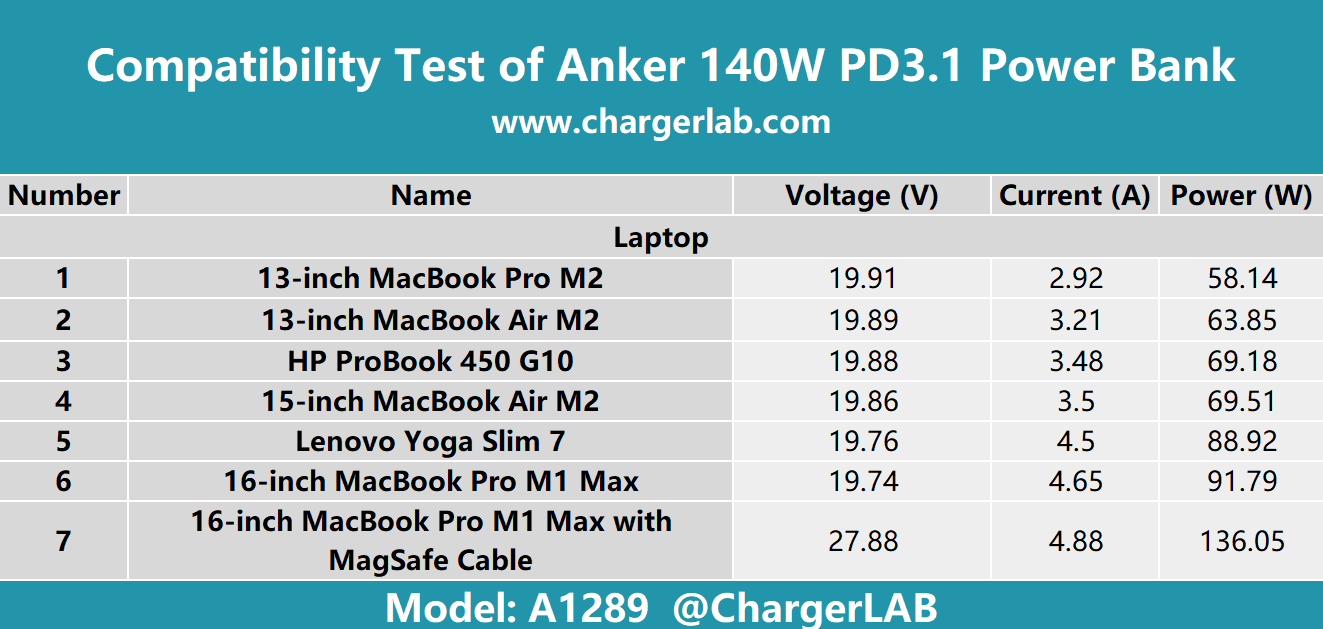
| USB-C Laptops | 15V/20V | USB-PD 3.0+ | 45W+ PD output |
Real-World Example: Charging a MacBook requires 20V. A power bank with only 5V/9V outputs cannot charge it—no amount of “fast charging” will compensate. Always match your laptop’s input voltage (printed on its charger) to the power bank’s specs.
Choosing the Right Voltage Output for Your Devices
Selecting a power bank isn’t about capacity alone—it’s about matching voltage capabilities to your gadgets. Follow this decision tree:
For Smartphones and Tablets
- Basic models (iPhone SE, older Androids): Standard 5V/2.4A ports suffice.
- Fast-charging phones (iPhone 15+, Samsung S24): Must have USB-PD output labeled “9V/2A” or higher. Avoid power banks advertising “Quick Charge” without specifying the protocol version (QC 2.0 won’t work with newer phones).
Time-Saver: Skip power banks with only USB-A ports for modern phones. USB-C PD delivers faster charging and future-proofs your purchase.
For Laptops and High-Power Devices
- Check your laptop’s input specs first (e.g., “20V ⎓ 3A” = 60W).
- Minimum requirement: Power bank must output at least your laptop’s voltage (e.g., 20V) at matching or higher wattage.
- Critical mistake: Assuming “100W power bank” works universally. If it lacks 20V output (e.g., only goes up to 15V), it won’t charge most laptops.
Pro Tip: For travel, prioritize power banks with bidirectional USB-C PD. This lets you recharge the power bank itself at 30W+ (using your laptop’s charger), cutting recharge time from 6 hours to 2.
Safety First: Critical High-Voltage Power Bank Checks
Higher voltages (9V+) introduce real risks. Avoid these dangerous oversights:
Three Non-Negotiable Safety Steps
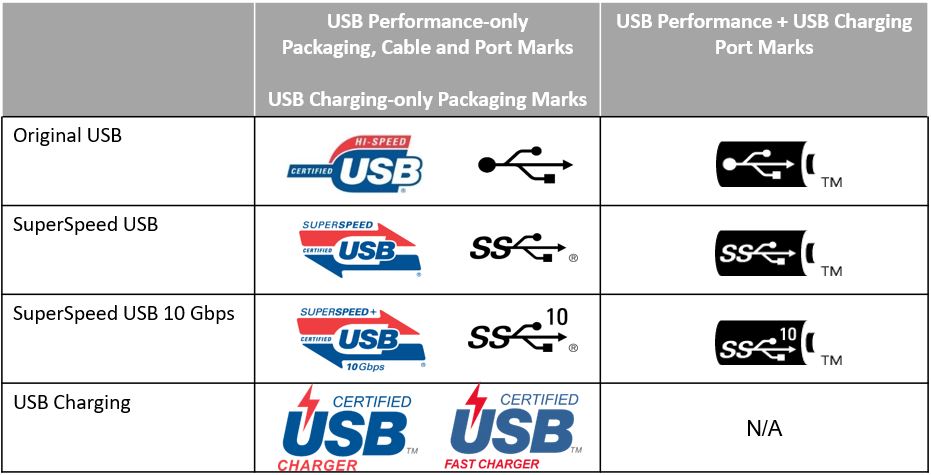
- Verify cable certification: Discard any cable without USB-IF or MFi logos. Uncertified cables lack fuses for high-voltage charging and can overheat.
- Monitor temperature: If the power bank feels >45°C (113°F) during fast charging, unplug immediately. Sustained heat degrades lithium cells.
- Check for safety marks: Legitimate units display CE, FCC, and RoHS logos. Missing these? It likely skipped over-voltage protection (OVP).
Warning Sign: Power banks that charge themselves at >18W (e.g., 20V input) without a cooling fan are fire hazards. Stick to brands with thermal throttling (Anker, Zendure).
Maximizing Power Bank Lifespan: Voltage Management Secrets
How you handle voltage directly impacts longevity. Implement these voltage-smart habits:
Storage and Charging Best Practices
- Never store at 0% or 100%: Lithium cells degrade fastest at extremes. For long-term storage, charge to 50% (3.8V per cell).
- Avoid constant fast charging: Regular 5V/2.4A charging generates less heat than 9V/2A. Reserve high-voltage output for emergencies.
- Recharge every 3 months: Even unused, power banks lose 1–5% charge monthly. Letting voltage drop below 3.0V per cell causes permanent damage.
Lifespan Hack: If your power bank has multiple output ports, use the lowest-voltage port (usually USB-A) for small devices like earbuds. This reduces stress on the boost converter.
Final Note: Understanding how many volts is a power bank reveals why advertised specs lie—it operates at 3.7V internally but delivers 5V+ externally. Always prioritize voltage compatibility over mAh ratings, verify safety certifications, and use USB-C PD for modern devices. For laptops, match the exact voltage requirement (typically 20V). Remember: a quality 10,000mAh power bank with proper voltage conversion will outperform a cheap 20,000mAh model every time. Keep this guide handy when shopping, and never again wonder why your “high-capacity” power bank underdelivers.





