
Your presentation is due in 30 minutes when your laptop battery icon turns red. Airport outlets are occupied, and coffee shop seating is packed. This is where a laptop power bank becomes your lifeline—but promises of “10-hour runtimes” rarely match reality. The truth about how long does a laptop power bank last depends on a precise equation between your device’s hunger, the bank’s true capacity, and your workload. Marketing claims often ignore critical conversion losses and power fluctuations that slash actual runtime. In this guide, you’ll discover exactly how to calculate personalized runtime estimates for your specific laptop and power bank combination—plus proven tactics to maximize every precious minute when outlets vanish.
Why Watt-Hours (Wh) Beat Marketing Claims for Runtime Accuracy

Power bank capacity labeled in milliamp-hours (mAh) misleads laptop users because it ignores voltage differences. Watt-hours (Wh) reveal true energy potential by multiplying voltage (V) by amp-hours (Ah). A 27,000mAh power bank at 3.7V equals 99.9Wh (27,000 × 3.7 ÷ 1,000), hitting the critical 100Wh air travel limit. This metric matters because laptops consume power in watts (W), not milliamps. When comparing power banks, always convert to Wh using this formula: mAh × 3.7V ÷ 1,000 = Wh. A 100Wh bank stores enough energy to theoretically power a 100W laptop for one hour—but physics and circuitry prevent this ideal scenario.
How to Decode Your Power Bank’s True Capacity Label
Manufacturers often highlight mAh while burying Wh in fine print. Locate the Wh rating near battery certifications or safety labels—it’s legally required for air travel compliance. For example, Anker’s 100W Power Bank displays “26,800mAh / 99.99Wh” on its base. If only mAh appears, calculate Wh yourself: multiply mAh by 3.7 (standard lithium-ion voltage) then divide by 1,000. A “20,000mAh” bank is actually 74Wh (20,000 × 3.7 ÷ 1,000), not the 100Wh some assume. This number determines your maximum possible runtime.
The 80% Rule: Why You Never Get Full Advertised Capacity
No power bank delivers 100% of its rated Wh to your laptop. Energy loss occurs during three stages: DC-to-DC conversion (stepping battery voltage to USB-C’s 20V), circuit resistance, and heat generation. This results in 65-80% real-world efficiency—the industry’s unspoken “80% Rule.” A 100Wh power bank typically provides only 65-80Wh to your laptop. High-quality banks with GaN (gallium nitride) technology minimize losses, reaching 85% efficiency, while cheap models may dip below 60%. Always assume 80% efficiency for conservative estimates unless the manufacturer specifies otherwise.
Critical Efficiency Killers You Can Control
Three factors accelerate energy loss beyond the baseline 20%:
– Low-quality cables: Thin wires increase resistance. Use the thick, braided cable included with premium power banks.
– Extreme temperatures: Below 50°F (10°C) or above 95°F (35°C) reduces efficiency by up to 15%. Keep your power bank in an insulated pocket during winter travel.
– Simultaneous charging: Powering multiple devices splits output and increases heat loss. For maximum laptop runtime, connect only your laptop.
Why Your Laptop’s Power Draw Crushes Runtime Estimates
A laptop’s wattage consumption varies wildly based on activity—not just battery size. This is the single largest runtime variable most guides ignore. Your 60Wh laptop battery might deplete in 2 hours during video rendering but last 10 hours while drafting emails. Check your charger’s label: a “65W” adapter means your laptop can draw up to 65W under heavy load. If your power bank’s maximum output (e.g., 65W) matches this, it sustains full performance. A 45W bank on a 65W laptop will only slow battery drain during intensive tasks—it won’t recharge under load.
Spotting Your Laptop’s True Power Appetite
Monitor real-time wattage using these methods:
1. Windows: Open Task Manager > Performance > CPU. Hover over “Power usage” for live wattage.
2. Mac: Install free app coconutBattery. Check “Current Power” under “Power” tab.
3. Universal: Plug a Kill-A-Watt meter between your charger and outlet during different tasks.
Pro tip: Under “High Performance” mode during gaming, some laptops draw 100W+—exceeding even 100W power banks.
How Workload Dictates Your Power Bank’s Effective Runtime
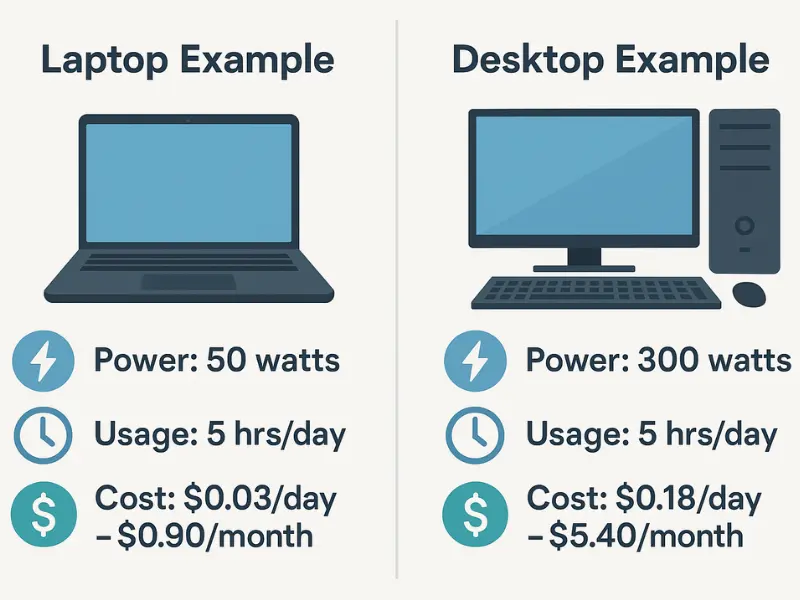
Runtime plummets when shifting from light to heavy tasks. A power bank that lasts 8 hours during document editing may only survive 1.5 hours during 4K video editing. This isn’t battery failure—it’s physics. Your laptop pulls more watts to fuel the GPU and CPU, draining both its internal battery and the power bank faster. Crucially, if your workload exceeds the power bank’s output wattage (e.g., 90W demand on a 65W bank), the laptop battery depletes while connected—a hidden runtime killer.
Runtime Comparison: Light vs. Heavy Tasks (100Wh Power Bank)
| Task Type | Laptop Power Draw | Usable Power Bank Energy (80Wh) | Runtime |
|---|---|---|---|
| Web Browsing | 10W | 80Wh | 8 hours |
| Video Conferencing | 25W | 80Wh | 3.2 hours |
| Photo Editing | 50W | 80Wh | 1.6 hours |
| 4K Video Rendering | 90W | 80Wh | 53 minutes |
Note: Runtime = Usable Energy (Wh) ÷ Power Draw (W)
The 100Wh Air Travel Limit’s Hidden Runtime Impact
FAA regulations cap carry-on power banks at 100Wh (99.9Wh to be safe). This creates a hard ceiling for travel-friendly runtimes. A 99.9Wh bank (like Jackery’s 26,800mAh model) is the largest you can legally take on planes. While 150Wh+ banks exist for home use, they’re useless for travelers. This limit forces trade-offs: a 100Wh bank provides 6-8 hours for ultrabooks during light use but only 1-2 hours for gaming laptops under load. Always verify Wh ratings before purchasing—some brands market “27,000mAh” without clarifying it’s 99.9Wh.
When Bigger Isn’t Better: The Airline Checkpoint Reality
Attempting to board with a 120Wh power bank risks confiscation. Airlines measure Wh at security, not mAh. If your job requires heavy processing (e.g., architecture or video editing), consider:
– Using two 99.9Wh banks (allowed if under 100Wh each)
– Booking lounge access with outlets for long flights
– Prioritizing tasks: Render videos pre-flight, use plane time for light editing
How to Calculate Your Exact Power Bank Runtime in 3 Steps
Stop guessing—calculate personalized runtime using your actual hardware. This method accounts for efficiency loss and real power draw.
Step 1: Determine Your Power Bank’s Usable Energy
Multiply rated Wh by 0.8 (for 80% efficiency):
Example: 100Wh × 0.8 = 80Wh usable
Step 2: Measure Your Laptop’s Average Power Draw
Use the monitoring tools mentioned earlier during your typical workflow. If unavailable, estimate:
– Office work: 10-15W
– Streaming video: 20-30W
– Creative work: 40-60W
– Gaming/rendering: 70-100W+
Step 3: Run the Runtime Formula
Usable Energy (Wh) ÷ Laptop Power Draw (W) = Runtime (hours)
Example: 80Wh ÷ 15W (moderate use) = 5.3 hours of additional runtime
Choosing a Power Bank That Delivers Real-World Runtime

Avoid these common purchasing mistakes that sabotage runtime:
– Ignoring output wattage: A 20,000mAh bank with only 30W output won’t charge a 65W laptop under load. Match or exceed your laptop’s charger wattage.
– Overlooking port types: Ensure USB-C Power Delivery (PD) 3.0/3.1 with 20V output. Older USB-A ports max out at 12W—useless for laptops.
– Trusting mAh alone: A “50,000mAh” power bank at 3.7V is 185Wh—too large for planes and often overstates true capacity.
Minimum Capacity Guidelines by Laptop Type
- Ultrabooks (13-14″): 74Wh (20,000mAh) for 1 full charge during light use
- Standard laptops (15-16″): 99.9Wh (27,000mAh) for 1.5 charges
- Workstations/gaming: 99.9Wh + spare battery or dual-bank setup
5 Pro Tactics to Maximize Every Minute of Power Bank Runtime
Squeeze 30-50% more runtime from your existing setup with these field-tested techniques:
Dim Your Screen to 40% Brightness
The display consumes 25-40% of laptop power. Reducing brightness from 100% to 40% cuts power draw by 5-8W—adding 1+ hour on a 100Wh bank during moderate use.
Activate Low Power Mode Before Connecting
On Windows: Settings > System > Power > “Best power efficiency.”
On Mac: Apple Menu > System Settings > Battery > “Low Power Mode.”
This throttles CPU/GPU before the power bank engages, preventing initial power spikes.
Disconnect All Non-Essential Peripherals
Each USB device (mouse, phone, drive) draws 0.5-2W. During critical runtime, unplug everything except your laptop. A single external SSD can drain 3W—costing 40 minutes on a 100Wh bank.
Avoid Charging While Performing Heavy Tasks
If rendering a video, pause the task while the laptop charges to 80%, then resume. Charging during high load forces the power bank to cover both the laptop’s demand and battery replenishment—doubling power draw.
Recharge Your Power Bank to 90% Before Travel
Lithium-ion batteries degrade fastest at 100% charge. Storing at 90% extends lifespan and maintains higher efficiency. A 5-year-old “100Wh” bank may only deliver 60Wh due to degradation.
When to Consider a Dual-Bank Strategy for Critical Work
For marathon sessions (e.g., transcontinental flights with editing), pair two 99.9Wh banks. Connect Bank A until depleted, then switch to Bank B—avoiding the 15-20 minute recharge gap. This delivers near-continuous power without exceeding airline limits. Brands like EcoFlow and Anker offer matching banks with pass-through charging for seamless transitions.
Final Word: How long does a laptop power bank last? For most users, a 100Wh model provides 4-8 hours during office work but collapses to 1-2 hours during video editing. The key is matching your power bank’s wattage to your laptop’s maximum draw while calculating runtime using your actual power consumption—not marketing claims. By applying the 80% Rule, monitoring real-time wattage, and implementing brightness/peripheral controls, you’ll consistently achieve 30% longer runtimes. Remember: a power bank doesn’t replace outlets—it buys strategic time. Choose capacity based on your heaviest workload, not light-use promises, and you’ll never face a dead laptop in an airport again.





