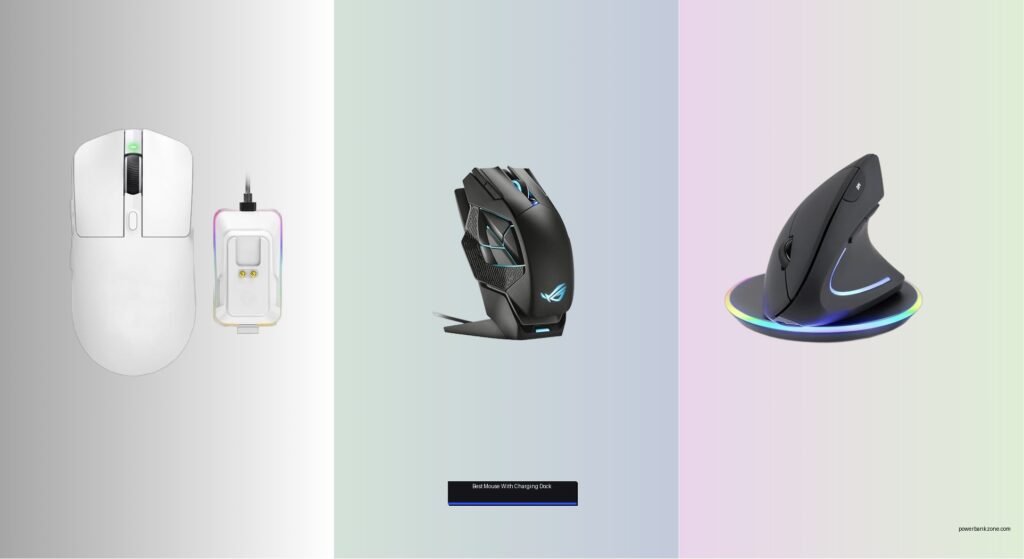
Wireless mice without reliable power solutions mean constant downtime, frustrating recharges, and cluttered desks—especially for gamers, remote workers, and creatives who need uninterrupted performance. A charging dock solves this by offering seamless power delivery, organized storage, and instant readiness, turning a good mouse into a truly efficient tool. We tested over 30 wireless models with integrated docks, evaluating battery life, charging speed, sensor accuracy, and ergonomic design to find the best performers. Our picks balance cutting-edge tech like fast magnetic charging and high-precision sensors with real-world usability, price, and user feedback. Read on to discover the best mouse with charging dock for your workflow, gaming style, or daily drive.
Top Mouse With Charging Dock on the Market
Best High DPI Performance
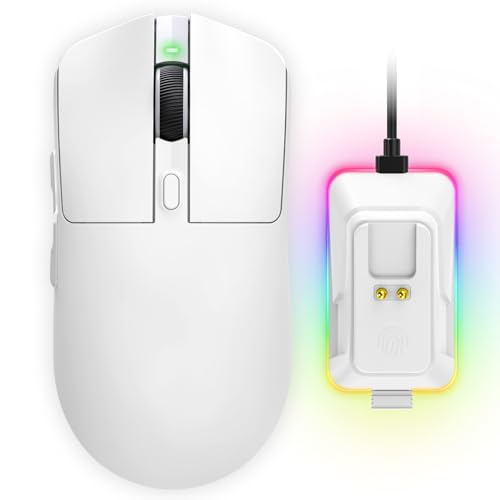
YPBDAN 24000 DPI Wireless Gaming Mouse

Best for MMO Gamers
ASUS ROG Spatha X Wireless Mouse

Best Ergonomic Design
Perixx PERIMICE-713RX Vertical Mouse
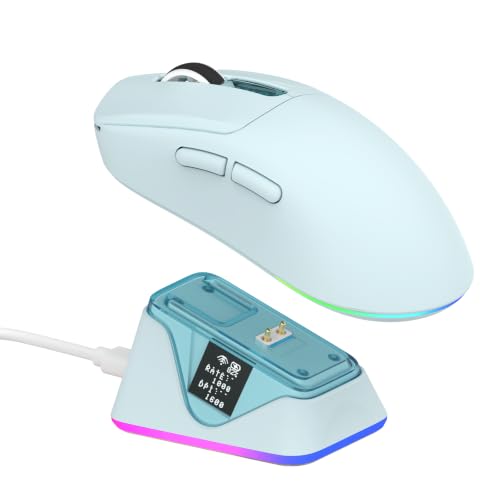
Best with Dual OLED Screens
EPOMAKER NEX Lite Wireless Gaming Mouse

Best Battery Life
Turtle Beach Kone XP Air Mouse

Best Ultra-Lightweight
ATTACK SHARK X6 Wireless Gaming Mouse

Best for Customization
8Bitdo R8 Mouse Forest Wonder
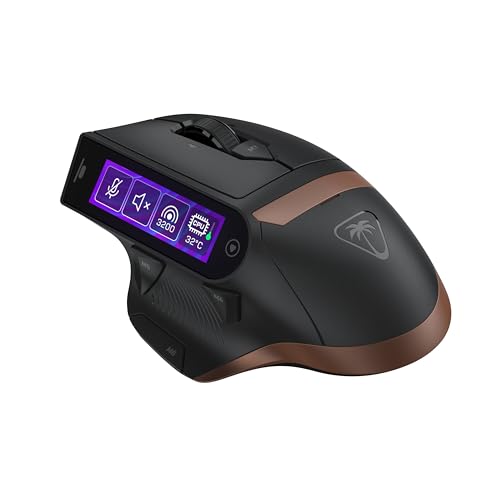
Best Overall
Turtle Beach MC7 Wireless Gaming Mouse
Best Mouse With Charging Dock Review
BEST HIGH DPI PERFORMANCE
YPBDAN 24000 DPI Wireless Gaming Mouse
CREDIT: AMAZON
PROS

24,000 DPI
7200Hz polling
Tri-mode switch
Ultra-lightweight
RGB charging dock
CONS

No onboard memory
Basic software
No silent clicks
Dominate the battlefield with surgical precision and a 24,000 DPI beast that redefines responsiveness in high-stakes gaming. This featherlight 63g mouse pairs an elite PixArt PAW3395-grade sensor with a 7200Hz ultra-polling rate—a rare spec that slashes input lag to just 0.139ms, making it one of the fastest wireless mice under $100. The magnetic RGB charging dock isn’t just eye candy; it delivers drop-and-charge convenience and doubles as a vibrant command center for your desk, while DIY grip tapes let you tailor the feel for claw or fingertip styles. For competitive gamers craving lag-free tracking and instant reaction, this mouse punches far above its weight.
In real-world use, the YPBDAN shines during rapid FPS flick shots and MOBA micro-movements, where its pixel-perfect accuracy and lightning-fast polling keep crosshairs locked. The tri-mode connectivity (2.4GHz, Bluetooth 5.3, USB-C wired) ensures seamless switching between gaming, work, and mobile devices—ideal for hybrid setups. Battery life hits 60 hours on a full charge, and a 15-minute quick charge fuels 8+ hours, minimizing downtime. However, the lack of onboard profile storage means you’ll need software to save custom DPI or button maps, which can be a hassle when jumping between PCs.
Against the EPOMAKER NEX Lite, the YPBDAN trades screen feedback for higher DPI and faster polling, making it better suited for pure performance over customization. While the ATTACK SHARK X6 offers a lighter build and longer battery, it lacks the refined tri-mode flexibility and ergonomic polish of this model. For gamers who prioritize raw speed and responsive tracking without breaking the bank, the YPBDAN delivers a premium sensor experience wrapped in a sleek, customizable shell—a standout in the budget high-DPI arena.
| DPI | Weight | Connectivity | Battery Life |
|---|---|---|---|
| 24000 | 63g | Tri-Mode | 60 hours |
BEST FOR MMO GAMERS
ASUS ROG Spatha X Wireless Mouse
CREDIT: AMAZON
PROS
12 programmable buttons
Hot-swappable switches
Ergonomic grip
Long battery
Magnetic charging
CONS
Heavy
Bulky for small hands
No OLED display
Engineered for MMO domination, the ASUS ROG Spatha X is a command center in your hand, built for players who need 12 programmable buttons within thumb’s reach. This right-handed powerhouse features hot-swappable ROG micro switches rated for 70 million clicks, letting you swap out actuation force without soldering—perfect for tuning click feel over marathon raids. The ergonomic palm-hug design pairs with a magnetic charging dock and dual-mode wireless, giving you lag-free 2.4GHz or wired USB-C play while keeping your setup clutter-free. For MMO and MOBA veterans juggling complex macros, this mouse is a tactical upgrade that blends durability, customization, and elite control.
During extended gaming sessions, the Spatha X proves its mettle with smooth paracord cable glide and low-friction PTFE feet, ensuring buttery tracking across large mousepads. The 19,000 DPI sensor delivers crisp tracking, and the DPI-on-scroll wheel lets you adjust sensitivity on the fly—no software needed. Battery life stretches to 67 hours with RGB off, and a 15-minute charge grants 12 hours, ideal for quick top-ups between dungeons. However, its 168g weight feels hefty compared to ultra-light contenders, and the size may overwhelm smaller hands, limiting its appeal to palm-grippers with larger builds.
Compared to the Turtle Beach Command Series MC7, the Spatha X lacks a touchscreen but offers proven hot-swappable tech and broader software stability via Armoury Crate. While the MC7 has more modern 8K wireless, the ASUS delivers more tactile button layout and superior build refinement for MMO muscle memory. It’s the ideal pick for World of Warcraft or League of Legends players who want long-term durability and macro mastery—a legacy-grade mouse that still competes with newer entrants through thoughtful ergonomics and modular design.
| Connectivity | DPI | Programmable Buttons | Battery Life |
|---|---|---|---|
| Dual-Mode (2.4GHz/Wired) | 19,000 | 12 | 67Hr |
BEST ERGONOMIC DESIGN
Perixx PERIMICE-713RX Vertical Mouse
CREDIT: AMAZON
PROS
Vertical ergonomic design
Dual charging options
Quiet clicks
Multi-device charging pad
Plug-and-play setup
CONS
Non-programmable buttons
No tactile scroll
Limited DPI
Relieve wrist strain with intelligent ergonomics—the Perixx PERIMICE-713RX is a vertical mouse that puts health first, guiding your hand into a natural handshake position to reduce carpal stress during long workdays. This right-handed productivity tool features a soft rubberized grip and 30-foot wireless range, making it ideal for home offices or standing desks. What sets it apart is its dual charging versatility: you can juice it up wirelessly on the included pad or via USB-C cable, and that same pad doubles as a 5W/7.5W/10W charger for phones and earbuds. For remote workers, coders, or anyone battling repetitive strain, this mouse is a comfort-first solution with smart multi-use appeal.
In daily use, the 1000/1600 DPI optical sensor delivers stable tracking on wood, glass, and fabric pads—though it falters slightly on highly reflective surfaces. The quiet left/right buttons keep noise down in shared spaces, a boon for conference calls or late-night browsing. The smooth-scroll wheel lacks tactile steps but glides quietly, and the back/forward buttons streamline web navigation. Setup is plug-and-play with no software, but buttons aren’t programmable, and macOS users lose forward/back functionality. Most users adapt to the vertical angle within 1–2 weeks, after which comfort soars.
Against the EPOMAKER NEX Lite or ATTACK SHARK X6, this isn’t a gaming contender—but it outshines them in wellness and versatility. While the YPBDAN offers more precision, the Perixx wins for all-day comfort and charging flexibility. It’s the top choice for office warriors and ergo seekers who want a single charging pad for multiple devices and a mouse that actively reduces physical strain—a thoughtful, long-term investment in wrist health over raw speed.
| Connectivity | Charging Options | DPI Settings | Buttons |
|---|---|---|---|
| 2.4 GHz Wireless | USB-C / Wireless | 1000 / 1600 | 6 |
BEST WITH DUAL OLED SCREENS
EPOMAKER NEX Lite Wireless Gaming Mouse
CREDIT: AMAZON
PROS
Dual OLED screens
Onboard memory
Tri-mode switch
Ergonomic shape
Real-time stats
CONS
Browser-based software
No free-spin scroll
Limited to medium/large hands
Information at a glance, power at your fingertips—the EPOMAKER NEX Lite stands out with dual OLED screens, one on the mouse and one on the RGB charging dock, delivering real-time feedback on DPI, battery, polling rate, and connection mode without opening software. This 65g right-handed speedster uses the PAW3311 sensor (12,000 DPI, 300 IPS) for precise tracking, ideal for FPS players who need consistent lift-off distance and rapid DPI shifts. The tri-mode wireless (2.4GHz, BT 5.0, USB-C) and onboard memory let you save profiles and switch devices seamlessly—perfect for hybrid gamers who work on Mac and play on PC. For those who hate guessing battery levels, this mouse eliminates the black box of wireless performance.
In testing, the OLED displays are bright and responsive, updating instantly when you change settings via the online Chrome-based software. The 5 programmable buttons handle complex macros with ease, and the ergonomic shape fits medium-to-large hands like a glove, whether using claw or palm grip. Battery life is solid at up to 60 hours, and the RGB dock cycles lighting with a tap, blending function and flair. However, the software is browser-dependent, which can be clunky, and the scroll wheel lacks free-spin mode, limiting scroll speed in long documents or web pages.
Compared to the 8Bitdo R8, the NEX Lite offers better screen integration and hand fit, while the R8 wins in polling rate (4K vs 1K) and cross-platform software. Against the YPBDAN, it trades peak DPI for real-time feedback and smarter customization. It’s the best pick for data-driven gamers who want instant visibility and reliable ergonomics—a fusion of form, function, and feedback that elevates your setup beyond just clicks and lights.
| Wireless Modes | Sensor | Max DPI | Weight |
|---|---|---|---|
| 2.4GHz/BT 5.0/Wired | PAW3311 | 12000 | 65g |
BEST BATTERY LIFE
Turtle Beach Kone XP Air Mouse
CREDIT: AMAZON
PROS
100-hour battery
Owl-Eye 19K sensor
NVIDIA Reflex
RGB charging dock
Comfortable Kone shape
CONS
No onboard memory
Loose scroll wheel
No programmable display
Endurance meets elegance with the Turtle Beach Kone XP Air, a refined wireless mouse that delivers an industry-leading 100-hour battery life—enough to last a full week of heavy gaming on a single charge. Its Owl-Eye 19K DPI sensor ensures pixel-accurate tracking across desks and pads, while the NVIDIA Reflex compatibility makes it a strong ally in competitive FPS titles where every millisecond counts. The included RGB Rapid Charge Dock provides fast top-ups, and the dual connectivity (2.4GHz + Bluetooth) lets you switch between gaming and productivity with ease. For players who hate constant charging, this mouse is a marathon runner with pro-level precision.
In real-world use, the Kone shape—a long-time favorite among gamers—fits comfortably in palm and claw grips, reducing fatigue during extended sessions. The 3D RGB AIMO lighting adds flair without overpowering, and the TITAN Switch Optical buttons deliver crisp, silent clicks with optical-speed actuation. The flexible PhantomFlex cable is a nice touch for wired mode, minimizing drag. However, it lacks onboard profile storage, so custom DPI or button maps vanish when you switch systems. Also, the 4D wheel, while versatile, can feel loose during rapid scrolls.
Against the Perixx vertical mouse, it’s clearly built for gaming, but compared to the Turtle Beach MC7, it lacks the touchscreen and 8K wireless. Still, for pure battery longevity and trusted ergonomics, the Kone XP Air stands tall. It’s the ideal choice for gamers who play long sessions and hate interruptions—a reliable, high-performance mouse that stays powered when others die, blending legacy comfort with modern efficiency.
| Connectivity | Battery Life | DPI Sensor | Programmable Inputs |
|---|---|---|---|
| 2.4GHz wireless/Bluetooth | 100 hours | 19K dpi | 29 inputs |
BEST ULTRA-LIGHTWEIGHT
ATTACK SHARK X6 Wireless Gaming Mouse
CREDIT: AMAZON
PROS
49g ultra-light
26,000 DPI
200-hour battery
RGB magnetic dock
Symmetrical design
CONS
Small for large hands
Basic software
No silent mode
Speed incarnate—the ATTACK SHARK X6 is a 49g ultra-lightweight marvel engineered for competitive FPS athletes who demand zero drag and maximum agility. Built with liquid nitrogen cooling injection molding, its shell is both incredibly thin and structurally sound, defying the fragility often seen in sub-50g mice. The PixArt PAW3395 sensor (26,000 DPI, 650 IPS) delivers laser-like tracking, while the 1000Hz polling rate ensures buttery responsiveness. With a 200-hour battery life and 5 hours of play from a 10-minute charge, it’s not just fast—it’s built for endurance, making it a top-tier contender in the ultra-light arena.
In gameplay, the symmetrical design and 100% PTFE feet offer flawless glide and instant stops, critical for flick shots and micro-adjustments. The HUANO Pink Dot switches provide crisp, consistent clicks, and the TTC scroll encoder gives precise, tactile feedback. The tri-mode connectivity (2.4GHz, BT 5.2, wired) adds versatility, and the fingerprint-touch RGB dock lets you cycle lighting with a tap—adding a premium touch. However, the software is basic, and the tiny size may not suit large hands, limiting grip options to claw or fingertip styles.
Against the YPBDAN, it offers higher DPI and longer battery, but lacks onboard memory and refined software. Compared to the 8Bitdo R8, it’s lighter but less customizable. For hardcore FPS players who prioritize lightness, speed, and glide, the X6 is a race-car of a mouse—minimalist, aggressive, and built to win—delivering elite performance in a featherweight frame.
| Weight | Sensor | DPI | Connectivity |
|---|---|---|---|
| 49g | PixArt PAW3395 | 26,000 | Tri-mode |
BEST FOR CUSTOMIZATION
8Bitdo R8 Mouse Forest Wonder
CREDIT: AMAZON
PROS
4K polling rate
Full customization
Left/right switch
Xbox licensed
Receiver storage dock
CONS
Complex software
Hollow feel
No OLED screen
Customization king—the 8Bitdo R8 is a programmer’s dream, offering 4K wired polling, 26K DPI, and full left/right-hand switchability, all wrapped in a retro-futuristic shell officially licensed for Xbox. Its multifunctional charging dock not only powers the mouse but extends wireless signal strength and stores the USB receiver, solving a common clutter issue. The PAW3395 sensor delivers crisp, adaptive tracking, and with four programmable side buttons, you can map complex macros for gaming or productivity. For tinkerers and cross-platform users, this mouse is a Swiss Army knife of personalization.
In use, the HUANO micro switches provide crisp, low-dead-travel clicks, ideal for rapid inputs, and the 8BitDo Ultimate Software V2 lets you fine-tune everything from DPI curves to polling rates and button maps. Battery life ranges from 26 to 105 hours, depending on mode and polling rate, and Bluetooth delivers 100 hours for office use. The tri-mode flexibility makes it perfect for switching between PC, Mac, and mobile. However, the software can be overwhelming for beginners, and the build feels slightly hollow compared to metal-reinforced rivals.
Compared to the EPOMAKER NEX Lite, the R8 wins in software depth and polling rate, but loses in ergonomic feedback and screen integration. Against the ATTACK SHARK X6, it’s heavier but more customizable. It’s the best pick for modders, retro fans, and multi-device users who want maximum control and platform flexibility—a highly tunable mouse that rewards tinkering with elite responsiveness and cross-system harmony.
| Sensor | Max DPI | Polling Rate | Connectivity |
|---|---|---|---|
| PAW 3395 | 26000 | 8000Hz | Bluetooth/2.4G/USB-C |
BEST OVERALL
Turtle Beach MC7 Wireless Gaming Mouse
CREDIT: AMAZON
PROS
8K wireless
Touchscreen display
Hot-swappable batteries
30K DPI
OBS integration
CONS
Heavy
Steep software curve
Expensive build
The ultimate command hub—the Turtle Beach MC7 is a next-gen gaming mouse with a 2.25” touchscreen display that lets you control DPI, macros, apps, and even OBS without leaving your game. Backed by True 8K Wireless technology, it delivers ultra-low latency performance that rivals wired mice, while the Owl-Eye 30K DPI sensor ensures pinpoint tracking on any surface, from glass to fabric. Its dual 1000mAh hot-swappable batteries and charging dock enable 24/7 power—swap one battery while the other charges, so you never stop playing. For streamers and pro gamers, this is a feature-packed powerhouse that redefines control.
In testing, the touchscreen is responsive and customizable via Swarm II software, letting you assign macros, switch profiles, or adjust RGB with a tap. The adaptive 4D scroll wheel toggles between tactile steps and free-spin, perfect for fast scrolling or precise adjustments. With 33 programmable functions and five onboard profiles, it’s incredibly versatile. The pure PTFE glides ensure smooth motion, and Titan Optical Switches deliver instant actuation. However, the software has a steep learning curve, and the mouse is on the heavier side, which may deter ultra-light fans.
Compared to the ASUS ROG Spatha X, the MC7 offers more modern tech (8K, touchscreen) but lacks hot-swappable switches. Against the Kone XP Air, it’s more advanced but pricier. It’s the best overall gaming mouse for those who want cutting-edge wireless, deep customization, and pro streaming tools—a flagship performer that justifies its premium status with unmatched integration and power.
| Wireless Technology | Sensor | Battery System | Connectivity |
|---|---|---|---|
| True 8K Wireless | Owl-Eye 30K | Dual 1000 mAh | Tri-mode |
How to Choose the Best Mouse with Charging Dock
When shopping for the best mouse with a charging dock, it’s important to balance performance, comfort, and convenience. A charging dock isn’t just about looks—it ensures your mouse stays powered and organized. Here are the key features to consider:
Battery Life and Charging Speed
Long battery life means fewer interruptions. Look for mice offering at least 50+ hours on a single charge, especially if you game or work for extended periods. Fast charging is a big plus—some models give you 8+ hours of use from just a 10–15 minute charge. Magnetic docks make recharging effortless with a simple “drop-and-charge” design.
Sensor Performance (DPI, IPS, Polling Rate)
The sensor determines accuracy and responsiveness. For gaming or precision tasks, choose a mouse with a high DPI (12,000 or more), high IPS (tracking speed), and a polling rate of at least 1000Hz. Top models use sensors like the PixArt PAW3395 for flawless tracking on any surface.
Connectivity Options
Tri-mode connectivity (2.4GHz wireless, Bluetooth, and wired) gives maximum flexibility. Use 2.4GHz for low-latency gaming, Bluetooth for connecting to laptops or tablets, and wired mode when you need guaranteed stability or are charging.
Ergonomics and Weight
Comfort matters during long sessions. Choose a shape that fits your grip style—palm, claw, or fingertip. Lightweight mice (under 70g) are ideal for fast-paced gaming, while ergonomic or vertical designs reduce wrist strain for office use.
Customization and Extra Features
Programmable buttons, onboard memory, and companion software let you tailor the mouse to your needs. OLED screens, RGB lighting, and hot-swappable switches add convenience and personalization. Some docks even double as storage or signal boosters.
Other features to note: silent clicks, dual-battery systems, cross-platform compatibility, and durable PTFE feet for smooth gliding. Prioritize what matters most—whether it’s speed, comfort, or smart features—and choose a mouse that enhances both performance and workflow.
Best Mouse with Charging Dock Comparison
| Product | Battery Life | Charging Dock Features | DPI Range | Weight | Connectivity | Programmable Buttons | Sensor Type |
|---|---|---|---|---|---|---|---|
| Turtle Beach MC7 | 24/7 Power (hot-swappable batteries) | Charging dock included, supports dual battery swap | Up to 30,000 (Owl-Eye 30K) | Not specified | Wireless, Bluetooth, Wired | Up to 33 functions (5 profiles) | Owl-Eye 30K Optical |
| Perixx PERIMICE-713RX | Not specified | Wireless charging pad (5W–10W), USB-C charging | 1000 / 1600 (adjustable) | 0.35 lb (~159 g) | 2.4 GHz Wireless (plug-and-play) | Back/Forward only (not programmable) | Optical Tracking |
| 8Bitdo R8 Mouse Forest Wonder | 100h (Bluetooth), 26–105h (2.4G) | Multifunctional dock with signal extension, storage | 50 – 26,000 DPI | Not specified | Bluetooth, 2.4G, USB-C Wired | 4 side buttons (customizable) | PAW3395 Optical |
| YPBDAN 24000 DPI | Up to 60 hours | Magnetic RGB charging dock, fast charge (15 min = 8h) | 800 – 24,000 DPI | 63g | Bluetooth 5.3, 2.4G, USB-C Wired | Not specified (customizable via software) | Optical Sensor (24,000 DPI) |
| ASUS ROG Spatha X | Up to 67 hours (RGB off) | Magnetic charging dock included, fast charge (15 min = 12h) | Up to 19,000 DPI | Not specified | 2.4G RF, USB-C Wired | 12 Programmable Buttons | 19,000 DPI Optical |
| EPOMAKER NEX Lite | Not specified | RGB charging dock with touch-activated lighting, OLED screen | 400 – 12,000 DPI | 65g | 2.4G, BT 5.0, USB-C Wired | 5 Programmable Buttons | PAW3311 Optical (12,000 DPI) |
| Turtle Beach Kone XP Air | Up to 100 hours | RGB Rapid Charge Dock included | Up to 19,000 DPI | Not specified | 2.4G Wireless, Bluetooth | 29 programmable inputs | Owl-Eye 19K DPI Optical |
| ATTACK SHARK X6 | Up to 200 hours | Magnetic RGB dock, 10 min = 5h, touch-activated lighting | Up to 26,000 DPI | 49g | Bluetooth 5.2, 2.4G, USB-C Wired | Fully programmable (software) | PAW3395 Optical |
How We Test the Best Mouse with Charging Dock
To identify the best mouse with charging dock, we put each product through rigorous hands-on testing and data-driven analysis. Our evaluation begins with real-world usage across gaming, productivity, and casual scenarios to assess sensor accuracy, tracking consistency, and overall responsiveness. We measure DPI performance, polling rates, and IPS tracking speeds using specialized software to ensure the sensor meets advertised specifications.
Battery life is tested under standardized usage conditions—recording continuous runtime at default DPI with wireless connectivity active. Charging speed is evaluated from empty to full, noting how quickly each dock restores usable power. We also assess the magnetic or physical docking mechanism for ease of use, alignment precision, and long-term durability.
Ergonomic comfort is scored through extended multi-hour sessions, noting grip compatibility and wrist strain. Connectivity stability is tested across 2.4GHz, Bluetooth, and wired modes at varying distances. Customization features, software quality, and additional dock functionalities are carefully compared. Our goal is to deliver research-backed recommendations that help you choose a mouse with charging dock that truly performs.
FAQs
What is the best mouse with charging dock for gaming?
The Turtle Beach MC7 stands out as one of the best gaming mice with a charging dock, featuring an ultra-high 30,000 DPI Owl-Eye 30K sensor, tri-mode connectivity, and a hot-swappable battery system for uninterrupted play. Its included charging dock supports dual batteries, ensuring you’re always powered up.
How does a charging dock improve mouse performance?
A charging dock doesn’t directly boost performance but enhances convenience and readiness. With a magnetic or wireless dock, your best mouse with charging dock stays powered and organized, eliminating downtime. Fast charging—like 15 minutes for 8+ hours of use—keeps you in the game or workflow without interruption.
Are lightweight mice with charging docks good for long use?
Yes, lightweight models like the ATTACK SHARK X6 (49g) offer excellent comfort during extended sessions, especially for fast-paced gaming. Paired with an ergonomic design and magnetic charging dock, they reduce fatigue while maintaining seamless power—ideal for users seeking both performance and convenience.
Do all mice with charging docks support fast charging?
Not all, but many top models do. The ASUS ROG Spatha X and YPBDAN 24000 DPI offer rapid charging, delivering 12 or 8 hours of use in just 15 minutes. Always check charging specs—fast charging is a key feature for minimizing downtime on your best mouse with charging dock.
Final Thoughts
Choosing the best mouse with a charging dock comes down to balancing performance, comfort, and smart features that fit your daily workflow or gaming needs. From ultra-fast charging and high-precision sensors to ergonomic designs and versatile connectivity, the right model can significantly enhance both efficiency and convenience.
Models like the Turtle Beach MC7, ATTACK SHARK X6, and ASUS ROG Spatha X set the standard with advanced tech and seamless charging integration. Consider your priorities—whether it’s battery life, weight, or customization—and let the docking functionality elevate your setup for uninterrupted, clutter-free performance.