
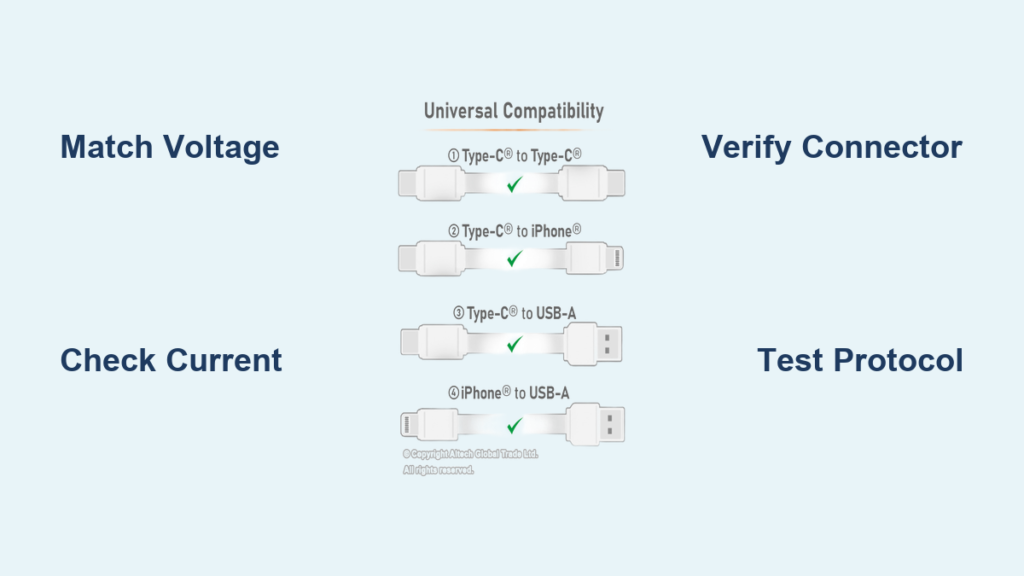
You’re in a rush, your phone battery is at 1%, and all you have is a random charger from another device. Will it work? More importantly, is it safe? The answer depends on more than just whether the plug fits. Modern charging involves voltage, current, connector types, and communication protocols that determine not only if your phone charges, but how fast, safely, and efficiently.
This guide gives you the exact steps to determine charger compatibility. You’ll learn how to match voltage and current, identify fast-charging standards, test chargers safely, and avoid dangerous knockoffs. Whether you’re using an iPhone, Android, or gaming phone, this is your definitive resource.
Match Voltage Exactly
Voltage is the electrical pressure a charger supplies, and your phone expects a specific voltage, usually 5V for standard charging. If the charger delivers too much or too little, problems arise.
Why Voltage Must Be Identical
Using a charger with the wrong voltage can damage your phone. Over-voltage, such as 9V instead of 5V, can fry circuits, destroy the battery, or cause overheating. Under-voltage, like 3V, may prevent charging entirely or make the phone unstable.
Things to remember:
• Only use a charger with the same output voltage as your phone’s input requirement
• Most phones require 5.0V, though fast charging may temporarily use 9V, 12V, or 15V if both devices support the protocol
• Never assume a charger is safe just because it fits the port
Check Labels for Voltage Specs
Look at the output side of the charger, not the input side. It should say something like “5V⎓2A.” Compare this to your phone’s input specification, which you can find on the original charger, in the manual, or under Settings on some Android models.
Small deviations, like 4.8V or 5.1V, are usually within tolerance, but never intentionally use a mismatched voltage.
Ensure Sufficient Current

Current measured in amps is how much power the charger can supply. Your phone only draws what it needs, so higher amperage is safe while low amperage causes problems.
Why Higher Amperage Is Safe
A 3A charger is perfectly safe for a phone needing 1.5A. The device will simply draw the lower amount it requires. However, a 0.5A charger may fail to charge your phone, especially if you’re using it while charging.
Risks of low-current chargers include extremely slow charging, battery drain during use, and charging that stops completely under load. Older USB ports on computers often max out at 500mA, which works for emergency top-ups but is not ideal for modern smartphones.
Know Your Phone’s Current Needs
Most smartphones require at least 1.5A to 2A at 5V for efficient charging. Check your original charger: if it says 5V⎓2A, aim for replacements with equal or higher current.
A phone needing 5V⎓2A (10W) used with a 5V⎓0.85A charger (4.25W) will charge very slowly and may not power on while charging.
Verify Connector and Port Type
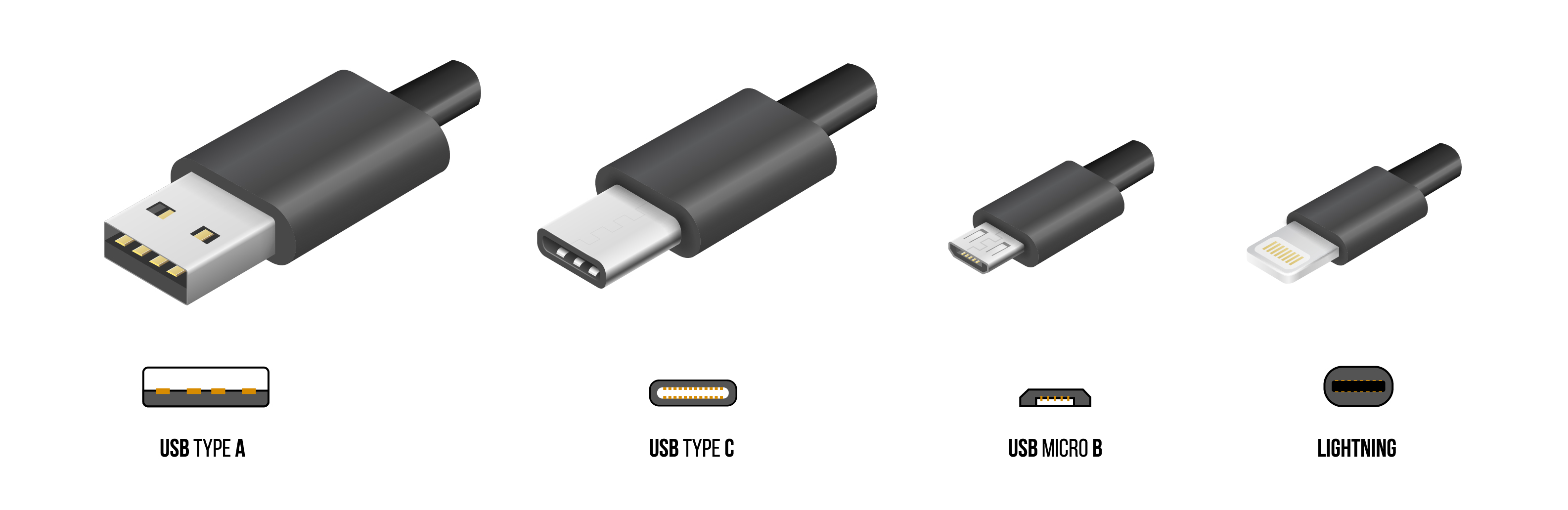
The physical plug must fit, but fitting doesn’t mean it works. There are three main charging ports to consider.
USB-C, Lightning, or Micro-USB
The port type must match your phone. USB-C is used by most Android phones, iPhone 15 and newer, and tablets. Lightning is for iPhones before iPhone 15 and older iPads. Micro-USB is found on budget phones and older models.
USB-C is now mandatory in the EU and used by Apple starting with iPhone 15. Even if a USB-C cable fits, pin configuration and protocol support matter. Some chargers deliver power on data lines, which can risk damage.
Watch for Proprietary Cable Requirements
Some brands use specialized cables for fast charging. OnePlus Warp Charge and SuperVOOC require specific cables with extra conductors. Huawei SuperCharge may not work with generic USB-C cables.
When in doubt, use the original cable that came with the fast charger.
Check Power Output (Wattage)
Power in watts equals voltage multiplied by current. Higher wattage means faster charging, but only if your phone supports it.
Wattage Determines Charging Speed
A 5V × 2A charger delivers 10W and provides standard charging that takes 2 or more hours. A 9V × 2A charger delivers 18W and provides fast charging that takes about 1 hour.
Quick reference by device type:
• iPhone 12 and up: 20W+ USB-PD recommended
• Android flagship: 18W to 65W+ depending on brand
• Budget Android: 10W to 18W
• Tablets: 20W to 45W
Using a 65W laptop charger on a 20W phone is safe because the phone only takes what it can handle. Using a 5W charger on a 65W phone will result in painfully slow charging.
Avoid Fake Wattage Claims
Many cheap chargers advertise 65W but only deliver 5V⎓2A (10W). True high-wattage charging requires USB Power Delivery or brand-specific protocols. Look for USB-IF certification or reputable brands like Anker, Belkin, or UGREEN.
Confirm Charging Protocol Support
Modern fast charging isn’t just about power. It’s about communication. The charger and phone must talk to agree on voltage and current.
Common Fast Charging Standards
USB Power Delivery (USB-PD) is the most universal standard, supporting iPhones, Pixels, Galaxy phones, and laptops with up to 240W. Qualcomm Quick Charge works on older Android phones with up to 100W and is backward compatible. Samsung Adaptive Fast Charging supports Galaxy phones at 15W to 25W. Oppo SuperVOOC and OnePlus Warp Charge support Oppo, OnePlus, and Realme devices at 65W to 150W but need special cables. Apple Fast Charging works on iPhone 8 and later at 18W to 29W and requires USB-PD plus a USB-C to Lightning cable.
Most phones fall back to USB-PD when using third-party chargers, even if they support proprietary fast charging. An Oppo phone with 80W SuperVOOC will still fast-charge at 18W via USB-PD with a generic charger.
Finding Your Phone’s Supported Protocols
Check the manual or specs page for supported protocols. Look at the original charger output for protocol labels. Search online for your specific phone model. Use a USB power meter to detect the active charging mode.
Test Charger Compatibility Safely
If you’re unsure about a charger, test it safely before relying on it.
Compare with Original Charger Specs
Match or exceed the voltage (must match exactly), current (equal or higher), and wattage (equal or higher). If your original charger is 5V⎓2A (10W), the replacement should be 5V⎓2A or 5V⎓3A.
Use a Known-Compatible Charger
Ask a friend with the same phone model if their charger works. If it does, yours likely will too. A Samsung Galaxy S23 user’s 25W USB-PD charger is safe for another S23.
Observe Real-World Behavior
Plug it in and check for the charging icon. Verify the phone charges while in use. Confirm fast charging is activated in battery settings. Stop immediately if the phone gets hot or stops charging after a few minutes.
Use a USB Power Meter
A $10 USB-C power meter shows real-time voltage, current draw, power, and charging protocol. If your phone should be fast-charging at 18W but the meter shows 5W, the charger or cable isn’t supporting the protocol.
Avoid Safety Risks
Low-quality or counterfeit chargers often lack overvoltage protection, fail to regulate voltage under load, and can overheat or catch fire.
Look for Safety Certifications
Buy chargers with USB-IF certification for USB-PD. Look for UL, CE, and FCC marks indicating safety testing. Stick to reputable brands like Anker, Belkin, UGREEN, Apple, and Samsung.
Avoid no-name chargers from unknown brands, especially on marketplaces with poor oversight.
What to Do If Something Feels Wrong
If you notice a burning smell, the charger getting very hot, the phone not turning on after charging, or a swollen battery, stop using it immediately and disconnect both devices.
Follow Manufacturer Advice
When in doubt, use the original charger. Manufacturers optimize chargers for maximum charging speed, battery health, and thermal management.
Choosing Third-Party Options
If not using the original, use USB-PD chargers for iPhones and most Android phones. Use QC 3.0 or 4.0+ for older Qualcomm-based phones. Use brand-specific chargers for Oppo, OnePlus, and Huawei. Use certified cables for the specific protocol.
Trusted brands include Anker, Belkin, UGREEN, Spigen, and Baseus.
Frequently Asked Questions About Charger Compatibility
Can I use any USB-C charger for my phone?
Not necessarily. While USB-C is the standard connector, the charger must support the right voltage, current, and charging protocol. A USB-C charger that only outputs 5V without USB-PD may not fast-charge your phone.
Does fast charging damage my battery?
No, when using a compatible charger. Fast charging generates more heat, but modern phones have thermal management systems. Using certified chargers from reputable brands ensures safe fast charging without significant battery degradation.
What happens if I use a charger with lower wattage?
Your phone will charge slower. It may charge at the base 5V rate instead of fast charging. If the wattage is too low, the phone may charge very slowly or drain while in use.
Can I use my laptop charger to charge my phone?
Yes, if the laptop charger supports USB Power Delivery. A 65W USB-C laptop charger can safely charge phones, tablets, and laptops. The phone will only draw the power it supports.
How do I know if a charger is certified?
Look for USB-IF certification marks, UL, CE, or FCC symbols on the charger. Reputable brands typically certify their products. Avoid chargers with no branding or missing certification marks.
Is it safe to use cheap third-party chargers?
No. Cheap chargers often lack safety features like overvoltage protection and overcurrent protection. They may deliver unstable voltage, overheat, or damage your phone. Invest in certified chargers from reputable brands.
Key Takeaways for Charger Compatibility
Voltage must match exactly between your charger and phone. Never use a higher-voltage charger without proper negotiation protocols.
Current can be higher than what your phone needs. Your device only draws the current it requires.
USB-C doesn’t guarantee compatibility. The charging protocol matters more than the connector type.
USB Power Delivery is the most universal fast-charging standard across different brands and devices.
Test with a USB power meter if you’re unsure about a charger’s actual output.
Avoid uncertified, no-name chargers. The fire and damage risk outweigh any cost savings.
Physical fit does not equal electrical safety. Always check the specifications before plugging in.
By following these guidelines, you can confidently use any charger knowing it’s safe, efficient, and compatible with your phone. Whether you’re traveling, borrowing a charger, or upgrading your setup, you now have the knowledge to charge smarter, faster, and safer.





