
You flip off your TV, shut down your computer, and head to bed, thinking everything is powered down. But behind the scenes, devices like your soundbar, gaming console, or printer are still quietly sipping electricity. This hidden drain, known as phantom load, can cost you over $100 per year. The solution is an advanced power strip, a smart device that automatically cuts standby power without you lifting a finger.
In this guide, you will learn exactly how to use an advanced power strip for maximum efficiency, avoid common mistakes, and get the most out of your investment. You will discover which outlets to use for which devices, how to test your setup, and how to track real savings on your electric bill.
Understand the Three Outlet Types
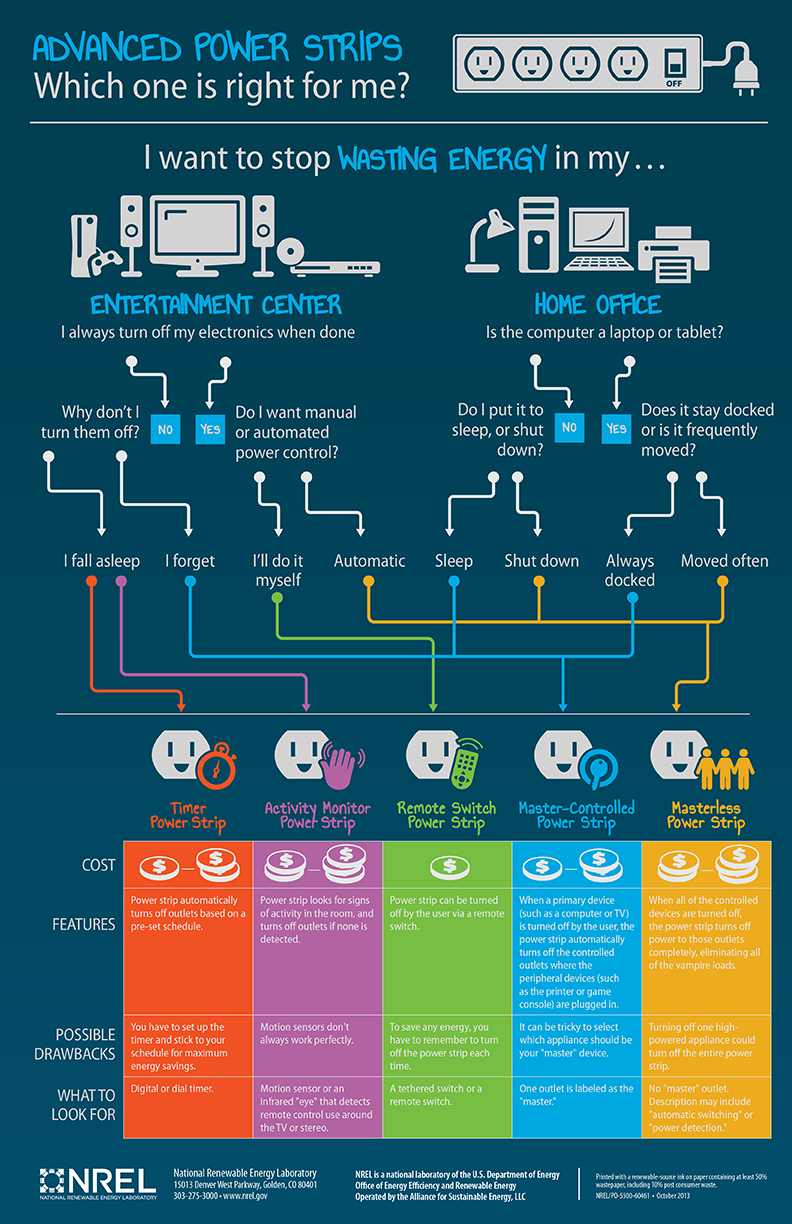
An advanced power strip divides its outlets into three functional groups. Knowing how each works is the key to proper setup and maximum energy savings.
Master or Control Outlet
This outlet is the brain of the strip. Plug your main device, such as a TV or desktop computer, into this specific port. When it powers on, the strip signals the switched outlets to energize. When turned off, those accessories lose power automatically.
Look for labels such as Control, Master, or Primary. Some models use color coding, with black or green indicating this control port.
Switched Outlets
These outlets only receive power when the master device is on. They are perfect for devices used alongside your primary device but not needed when idle.
These outlets work well for gaming consoles, soundbars and speakers, Blu-ray players, printers and scanners, and external hard drives. When you turn off the TV or PC, these devices shut down automatically within 1 to 5 seconds.
Always-On Outlets
These provide continuous power regardless of the master device status. Use them for equipment that must stay active at all times.
Devices that belong in always-on outlets include Wi-Fi routers and modems, DVR or cable boxes for recording, network-attached storage drives, and smart home hubs. Never plug medical devices or refrigeration units into switched outlets.
Plug Into a Grounded Wall Outlet First
Always start by connecting the advanced power strip directly to a grounded wall outlet. This ensures optimal surge protection and safe operation.
Key Setup Steps
Insert the power cord firmly into the wall. Confirm the wall outlet has a ground, which means three prongs. Flip the main power switch to ON if your model includes one.
Avoid daisy-chaining power strips or using extension cords. This increases fire risk and may void warranties. A grounded circuit allows the strip to safely divert voltage spikes during storms or power surges, protecting your connected electronics.
Assign Your Primary Device to the Control Outlet

The success of your advanced power strip depends on correct placement of the master device. Choosing the right primary device ensures reliable triggering of the switched outlets.
Best Choices for Master Devices
For home theater setups, use the TV as the master device. For office setups, use the desktop PC or monitor. For gaming stations, use the console or gaming PC.
Choose a device with consistent power draw when on. Avoid lamps or low-wattage devices because they may not trigger the strip reliably. If your TV uses very little power in standby, test with a watt meter to ensure the power drop is enough to trigger shutdown.
Connect Peripherals to Switched Outlets
Now plug in accessories that only operate when your primary device is active. This automates your power management without any daily effort.
Common Peripheral Devices
Streaming boxes such as Apple TV or Roku belong in switched outlets. Sound systems and subwoofers work well here. DVD and Blu-ray players should be connected to switched outlets. Printers, scanners, USB hubs, and docking stations also belong in this category.
When you turn on the TV or PC, all devices in switched outlets power up. When you turn it off, they cut out after a 1 to 5 second delay. Use a plug-in watt meter to verify phantom load elimination. You should see near-zero draw from switched outlets when the master device is off.
Reserve Always-On Outlets for Critical Devices
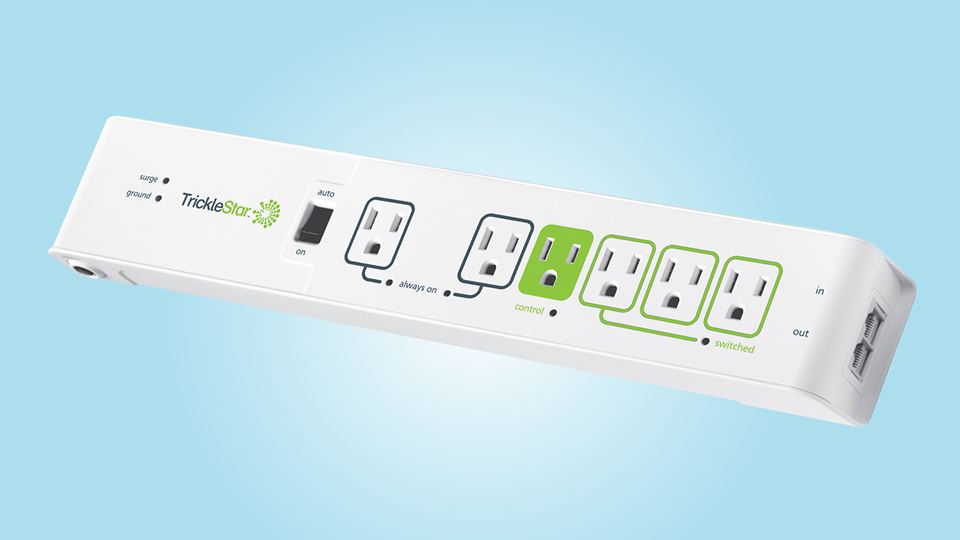
Misplacing devices in the wrong outlet type is the number one user error. Always-on outlets keep equipment running 24 hours a day, 7 days a week.
Devices That Belong Here
A router and modem belong in always-on outlets to maintain your internet connection. A DVR or cable box needs constant power to record scheduled shows. A network-attached storage drive keeps files accessible remotely. A smart hub supports voice assistants and automations that require continuous operation.
Never put these devices in switched outlets. Your Wi-Fi would go down every time you turned off the TV. Some models offer two always-on ports, giving you flexibility for both modem and router.
Test the System After Setup
Never assume it is working. Verify that your setup functions correctly to ensure you are actually saving energy.
Step-by-Step Test Process
First, turn on the master device such as the TV. Second, confirm all peripherals such as soundbar and console power up. Third, turn off the TV. Fourth, wait 5 seconds and check that accessories shut down. Fifth, use a watt meter to measure total strip consumption.
Success looks like this. Draw drops from say 80 watts to 10 watts, with only the always-on devices remaining active. If peripherals stay on, double-check that the master device is plugged into the correct outlet, that the device draws enough power to trigger detection, and that no switches on the strip are disabled.
Avoid Common Setup Mistakes
Even small errors reduce effectiveness or cause frustration. Knowing what to avoid saves time and prevents problems.
Top Errors and Fixes
Placing the router in a switched outlet causes internet drops when the TV turns off. Move it to an always-on port. Using a lamp as the master device fails to trigger switching reliably. Use a TV or PC instead. Overloading the strip risks overheating or tripped breakers. Stay under 15 amps or 1875 watts. Daisy-chaining strips creates a fire hazard and voids warranties. Plug only into wall outlets.
Never plug high-draw appliances like space heaters, microwaves, or refrigerators into any power strip. Also avoid placing the strip in enclosed spaces because heat buildup shortens lifespan.
Maximize Energy Savings Automatically
One advanced power strip can save $8 to $15 per month by cutting phantom loads across multiple devices. This adds up to significant annual savings.
Devices That Waste the Most Standby Power
Older game consoles consume 120 to 150 watts even when turned off. AV receivers and amplifiers draw substantial standby power. Desktop computers with multiple monitors continue consuming energy. Printers with network connectivity waste power while idle.
By automating their shutdown, you eliminate this waste without changing your habits. A home theater with TV, soundbar, and PlayStation might save over $100 annually using an advanced power strip. Many users report noticeable bill reductions within one billing cycle.
Choose a Model With Surge Protection
Not all advanced power strips are equal. Prioritize surge protection for sensitive electronics to protect your investment.
What to Look For
Look for a surge protection rating of 1000 joules or higher, with 2000 to 3000 joules being ideal. The clamping voltage should be below 400 volts. Response time should be less than 1 nanosecond. The voltage protection rating should be 400 volts or less. EMI and RFI filtering is recommended because it improves audio and video quality.
Look for UL 1449 certification, which is a safety standard for surge protectors. Some models include a protection indicator light. If it goes out, the surge components are depleted and you should replace the unit.
Maintain and Replace Every 3 to 5 Years
Advanced power strips degrade over time, especially after absorbing surges. Regular maintenance extends their useful life.
Maintenance Tips
Inspect the strip monthly for discoloration, warmth, or buzzing sounds. Keep vents clear of dust and debris. Do not cover the strip with rugs or furniture. Replace immediately if the casing feels hot.
Most units last 3 to 5 years depending on local power quality and surge events. Mark your calendar for replacement. Some manufacturers offer lifetime warranties or connected equipment coverage up to $50,000. Surge protection is not permanent. It wears out after absorbing voltage spikes.
Compare APS vs Smart Plugs and Basic Strips
Understanding how an advanced power strip stacks up against alternatives helps you make the right choice.
Advanced Power Strip
These strips offer automatic operation with no app needed. They work without Wi-Fi. They provide high surge protection. They have lower long-term cost. They deliver reliable hardware-based control.
Smart Plug System
Smart plugs offer remote control via app. They provide scheduling and voice control. However, they require stable Wi-Fi. They have slower response and potential glitches. They often lack robust surge protection.
Standard Power Strip
Standard strips are cheap and simple. However, they offer no automation. All outlets stay live, so phantom load remains.
Advanced power strips win for plug-and-forget energy savings and reliability. There are no setup headaches, no login issues, just automatic power management.
Use Watt Meters to Track Real Savings
Want proof that your advanced power strip is working? Measure it with a watt meter.
How to Use a Plug-In Watt Meter
Plug the advanced power strip into the watt meter. Turn on all devices. Record total consumption. Turn everything off. Check standby draw.
Before installing an APS, standby draw might be 30 to 50 watts. After APS installation, it drops to 5 to 10 watts because only always-on devices remain active. This data validates your savings and helps identify other energy hogs in your home.
Get Rebates From Utility Companies
Many utilities offer discounts or rebates on energy-saving devices like advanced power strips. Take advantage of these programs to reduce your purchase cost.
How to Find Offers
Visit your local power provider website. Search for energy efficiency rebates. Check programs like Efficiency Vermont, Energy Star, or state-run initiatives. Call customer service for available offers.
Some companies mail free or heavily discounted advanced power strips to customers. Even without rebates, most units pay for themselves in under a year through energy savings.
Frequently Asked Questions About Advanced Power Strips
Does an advanced power strip really save money?
Yes. Most users save $8 to $15 monthly on their electric bills, which adds up to over $100 per year. The savings come from eliminating phantom load from gaming consoles, AV equipment, and other devices that consume power even when turned off.
Can I use a smart TV as the master device?
You can, but test it first. Some smart TVs draw so little power in standby that they may fail to trigger the strip reliably. If your TV does not trigger the switched outlets consistently, use an AV receiver or gaming console as the master device instead.
What happens if the surge protection wears out?
When surge protection components degrade, the indicator light typically goes out. Some strips have auto-shutoff features that cut power when protection is lost. Replace the unit immediately if surge protection is depleted, as your devices are no longer protected from voltage spikes.
Can I plug a refrigerator into an advanced power strip?
No. Never plug refrigerators, freezers, medical equipment, or security systems into any power strip, including advanced models. These devices require continuous power and draw too much current. They belong directly into a dedicated wall outlet.
How long do advanced power strips last?
Most units last 3 to 5 years, depending on power quality in your area and how many surge events they absorb. Replace the strip after a major lightning storm or power surge, even if it appears undamaged.
Do advanced power strips work with gaming consoles?
Yes, they work excellently with gaming consoles. Older consoles like Xbox 360 and PlayStation consume 120 to 150 watts in standby. An advanced power strip eliminates this waste completely by cutting power when the console is not in use.
Key Takeaways for Using Your Advanced Power Strip
An advanced power strip is one of the easiest and most effective ways to reduce household energy waste. With zero daily effort, it slashes phantom loads, protects your gear, and lowers your electric bills.
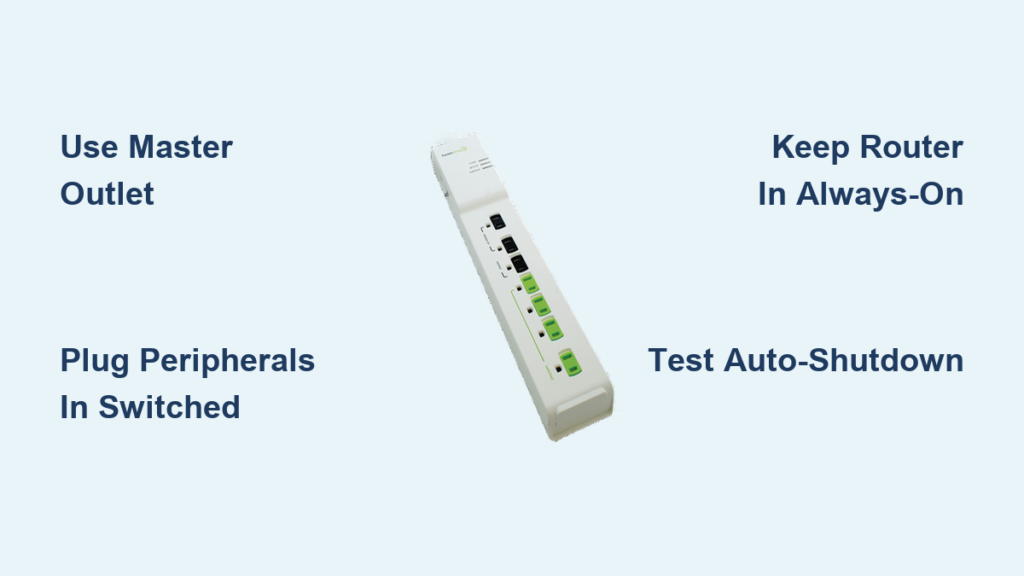
Follow these best practices for optimal performance. Plug the APS into a grounded wall outlet. Connect your primary device such as TV or PC to the master outlet. Assign peripherals to switched outlets. Keep routers, DVRs, and modems in always-on outlets. Test operation to verify auto-shutdown works. Use a watt meter to confirm savings. Avoid overloading or daisy-chaining strips. Replace every 3 to 5 years or after major surges. Look for UL 1449 certification and high joule rating. Check for utility rebates before buying.
Once set up correctly, your advanced power strip runs silently in the background, making energy savings effortless. Start today. Plug it in, assign your devices, test the system, and enjoy automatic efficiency. Learning how to use an advanced power strip is not complicated. It is just smart.





