
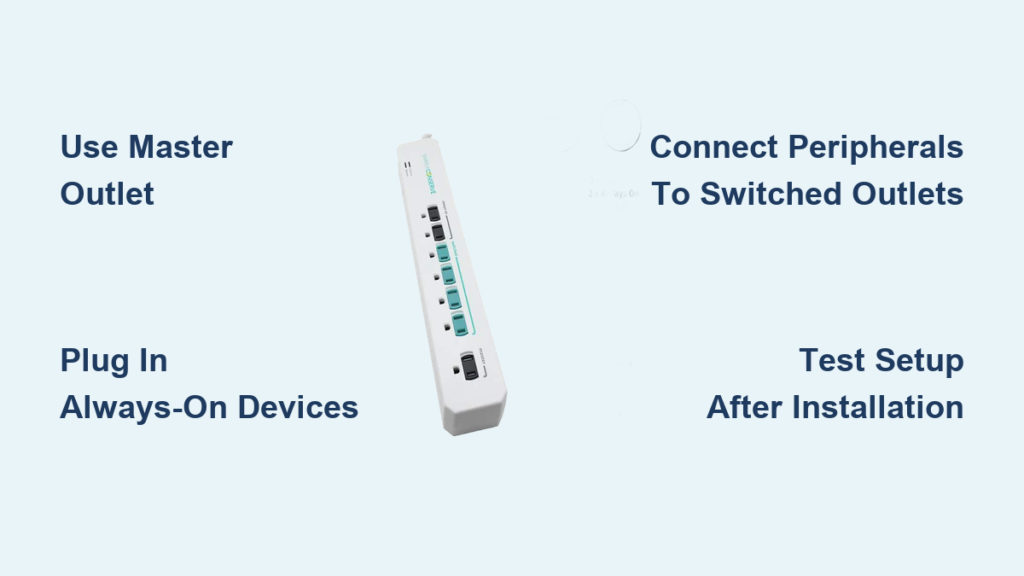
If you’re looking to cut down on energy waste and lower your electricity bill, the Simply Conserve power strip is a smart solution designed to eliminate phantom load. This advanced power strip automatically powers down peripherals when your main device is turned off, using intelligent load-sensing technology rather than timers or Wi-Fi. Whether you’re setting up a home office, entertainment center, or gaming station, learning how to use a Simply Conserve power strip correctly ensures you get the full benefits of energy savings, surge protection, and convenience.
In this guide, you’ll learn exactly how to set up and optimize your Simply Conserve power strip (Model SC73T1), avoid common mistakes, troubleshoot issues, and maximize long-term energy efficiency.
Setting Up Your Simply Conserve Power Strip
Before connecting any devices, you need to properly install the power strip to ensure it functions correctly.
Plug Into a Grounded Wall Outlet
Start by plugging the 3-foot cord into a grounded wall outlet. The angled plug design allows for tight spaces behind desks or entertainment centers, so position it where it’s accessible but out of the way. Make sure the outlet is easily reachable for testing purposes.
Turn On the Main Power Switch
Locate the black power switch on the side of the unit and set it to ON. This activates the internal circuitry and enables the load-sensing feature. Without this step, the strip will not function, even if devices are plugged in.
Pro Tip: Test the switch by plugging a lamp into an always-on outlet. If it lights up, the strip is powered and ready for setup.
Understanding Your Outlet Types
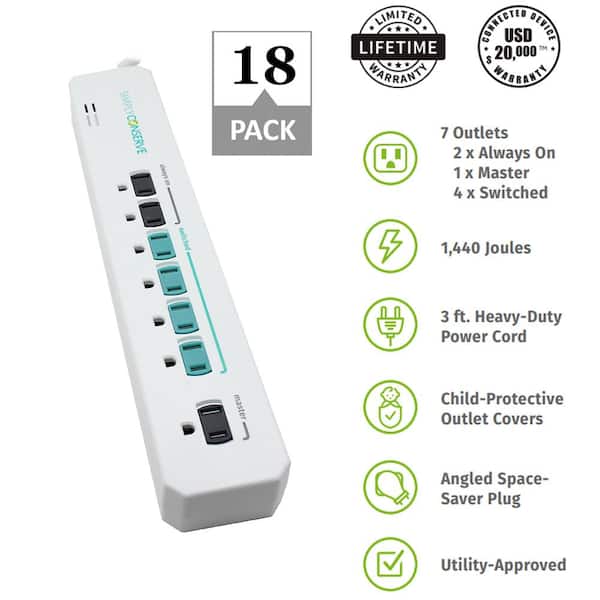
The Simply Conserve power strip features seven total outlets, each serving a specific purpose. Understanding the difference between these outlets is key to maximizing your energy savings.
Master Outlet Function
The black-labeled master outlet (transformer-spaced) controls the entire system. This outlet constantly monitors power draw from your primary device. When that device pulls enough current, typically over 5 watts, it signals the switched outlets to turn on.
Always-On Outlets
The two black-labeled always-on outlets stay powered at all times, regardless of whether your master device is on or off. These outlets provide continuous electricity to devices that must remain active.
Switched Outlets
The four teal-labeled switched outlets turn on and off automatically based on the master device’s status. These outlets are designed for peripherals that don’t need constant power, allowing them to shut down completely when not in use.
Connecting Your Primary Device to the Master Outlet
Choosing the right master device is crucial for reliable operation. The master outlet controls when the entire system activates and deactivates.
Ideal master devices include:
• Desktop computer
• Smart TV
• Gaming PC
• Laptop docking station
Avoid using low-power devices like streaming sticks or phone chargers as the master. They may not draw enough power to trigger the system reliably.
The master device should have clear on/off states and draw at least 5-10 watts when turned on. Use a plug-in power meter to verify your chosen device meets this requirement.
Plugging Critical Devices Into Always-On Outlets
Always-on outlets ensure your essential devices remain powered regardless of your master device status.
Use these outlets for devices that must stay active:
• Internet modem
• Wi-Fi router
• Cable or satellite box (if recording)
• Smart home hub
• Network-attached storage (NAS)
These outlets maintain your network connectivity and ensure scheduled functions continue uninterrupted, even when you shut down your computer or TV.
Linking Peripherals to Switched Outlets
The switched outlets are where the real energy savings happen. When you turn off your master device, these outlets cut power within 5-10 seconds.
Perfect peripherals for switched outlets:
• Monitor
• External speakers
• Printer
• Soundbar
• Blu-ray player
• Gaming console (secondary)
• Desk lamp (with adapter)
Example Setup: Master: Desktop PC, Always-On: Modem plus router, Switched: Monitor, printer, speakers, and lamp. When you shut down your computer, all accessories lose power instantly.
How Load-Sensing Technology Saves Energy
The Simply Conserve strip uses real-time current detection, not infrared signals or timers, to manage power delivery.
How the system works:
1. Your master device turns on and draws power through the master outlet
2. Current exceeds the threshold and activates the internal relay
3. Switched outlets power on and peripherals receive electricity
4. Master device shuts down and current drops below threshold
5. After a 5-10 second delay, switched outlets turn off automatically
This eliminates standby power, which can account for 5-10% of household electricity use. A single strip can save up to $100 per year in energy costs across multiple setups.
Real-World Setup Configurations

Home Office Setup
Master (black): Desktop computer
Always-on (black): Modem, network switch
Switched (teal): Dual monitors, printer, desk fan, speaker system
Benefit: After work hours, non-essential devices shut off completely without manual unplugging.
Entertainment Center Setup
Master (black): 65″ Smart TV
Always-on (black): Cable box (DVR), Wi-Fi router
Switched (teal): Soundbar, streaming box, game console, subwoofer
Benefit: Turning off the TV cuts power to audio and video gear while the DVR stays on to record shows.
Gaming Station Setup
Master (black): Gaming PC
Always-on (black): Router, NAS drive
Switched (teal): Monitor, RGB lights, headset charger, external SSD
Benefit: Post-gaming, idle components power down and reduce energy waste overnight.
Troubleshooting Common Issues
Switched Outlets Won’t Turn On
Possible causes:
• Master device in sleep or standby mode (not fully off)
• Low power draw from the master device
• Faulty connection
Fixes:
• Fully shut down the master device, not just sleep mode
• Test with a high-draw device like a lamp in the master outlet
• Ensure the main power switch is set to ON
Diagnostic Tip: Plug a desk lamp into a switched outlet. Turn the master device on and the lamp should light within seconds.
Switched Outlets Stay On After Shutdown
Cause: Your master device draws too much power in standby mode, keeping the sensor active.
Solutions:
• Disable Fast Startup on Windows PCs
• Turn off Quick Start on Samsung or LG TVs
• Move the current master device to an always-on outlet and choose a different master device
Some modern TVs use 15-20 watts in standby, which is enough to keep the system active.
Surge Protection Status Unknown
The unit has no indicator light showing surge protection status. Replace the strip after a known power surge or consider replacing every 5-7 years for optimal safety. Keep your receipt for the $20,000 connected equipment warranty.
Maximizing Long-Term Performance
Choose the Right Master Device
Pick a device with clear on/off states and consistent power draw. Desktops and large TVs work best.
Avoid these as master devices:
• Streaming sticks (low wattage)
• Phone chargers (intermittent draw)
• Devices with instant-on features
Prevent Outlet Blocking
Use the transformer-spaced outlet (wider slot) for bulky adapters. This prevents blocking adjacent ports, which is a common issue with power strips.
Avoid Overloading the Strip
Maximum load is 15 amps or 1875 watts at 125V.
High-wattage devices to avoid:
• Space heaters (1500W) – never plug in
• Microwaves and hair dryers – not suitable
• Multiple monitors plus PC plus speakers – generally safe if under 1400W total
Rule of Thumb: Add up all device wattages and stay below 1400W for a safety margin.
Test Your Setup After Installation
After initial setup, perform these steps:
1. Turn on the master device – switched outlets should power up
2. Shut down completely – switched outlets should turn off within 10 seconds
3. Restart and verify the cycle repeats
If it fails, recheck your device assignments and power settings.
Warranty and Support Information
Product Warranty Coverage
The Simply Conserve power strip includes a 10-year product warranty covering defects in materials and workmanship. No registration is required. It also includes $20,000 connected equipment coverage for damage from power surges, subject to terms and conditions.
Return Policy
Return window: Request within 30 days of delivery
Must be received: Within 45 days of invoice
Condition: New, unopened, in original packaging
Shipping costs: Free for defective items, $10 fee for change-of-mind returns
Customer Support Contacts
For general returns and support, contact AMC Conservation at 877-510-7234. For branded components, contact the respective manufacturers: Ecobee at 1.877.932.6233, Honeywell Home at 1.800.633.3991 (Prompt 3), or Google Nest through their manufacturer process.
Inspection Rule: Report damaged or missing items within 2 business days using FedEx tracking as proof.
Frequently Asked Questions About Simply Conserve Power Strips
How does the Simply Conserve power strip know when to turn devices on and off?
The strip uses load-sensing technology that monitors the electrical current flowing through the master outlet. When your primary device turns on and draws more than approximately 5 watts, the internal relay activates and supplies power to the switched outlets. When the device turns off or drops below that threshold, power to the switched outlets cuts off after a 5-10 second delay.
Can I use any device as the master device for my power strip?
You should choose a device with clear on/off states and sufficient power draw. Ideal master devices include desktop computers, televisions, and gaming consoles. Avoid low-power devices like streaming sticks, phone chargers, or devices that remain in a high-power standby mode, as they may not trigger the system reliably.
What happens if my master device uses too much power in standby mode?
If your master device draws significant power in standby, the switched outlets may stay on even when you think the device is off. Fix this by disabling features like Fast Startup on Windows or Quick Start on modern TVs, or choose a different device as your master.
Is surge protection still effective after several years?
The surge protection uses MOV (metal oxide varistor) technology that can degrade over time, especially after absorbing multiple surge events. While there is no indicator light showing status, manufacturers recommend replacing surge-protected power strips every 5-7 years or after a known major surge event.
Can I plug a space heater into the Simply Conserve power strip?
No, you should never plug high-wattage heating devices into the power strip. The maximum load capacity is 15 amps or 1875 watts. Space heaters typically draw 1500 watts and can overload the strip, creating a fire hazard.
Does the Simply Conserve power strip require Wi-Fi or an app to work?
No, the Simply Conserve power strip operates completely independently without Wi-Fi, Bluetooth, or smart home integration. It works immediately after setup with no apps, firmware updates, or network connections required.
Final Thoughts on Saving Energy with Simply Conserve
The Simply Conserve power strip is a set-it-and-forget-it tool for slashing standby energy in your home or office. Once configured correctly with the right master device, always-on peripherals, and switched accessories, it runs automatically and saves money without any ongoing attention.
Key takeaways for optimal use:
• Choose a desktop PC or large TV as your master device for reliable triggering
• Keep routers and modems on always-on outlets to maintain internet access
• Reserve switched outlets for monitors, speakers, printers, and other peripherals
• Test your setup after installation to confirm automation works properly
• Replace the strip every 5-7 years to maintain surge protection
By pairing this power strip with LED lighting and ENERGY STAR-rated devices, you can reduce your household energy consumption by up to 20%. Start saving today by plugging in, assigning your devices correctly, and letting the Simply Conserve power strip do the rest.





