
Placing your iPhone on a charging pad and watching it power up feels like magic, but the technology behind wireless charging is rooted in physics and engineering. At its core, a wireless iPhone charger works by using electromagnetic induction to transfer power from a charging pad to your phone without any physical connection. Since the iPhone 8, Apple has integrated wireless charging into every model, supporting standards like Qi and later enhancing the experience with MagSafe and Qi2.
This guide explains the science behind wireless charging, how different standards compare, what happens inside your phone during charging, and how to use the system safely and efficiently.
The Science Behind Electromagnetic Induction
Wireless charging for iPhones relies on electromagnetic induction, a process discovered by Michael Faraday in the 1830s. This phenomenon allows energy to transfer wirelessly between two coils using a fluctuating magnetic field.
How Power Transfers Wirelessly
The charging pad contains a copper transmitter coil. When powered, alternating current flows through this coil and creates a constantly changing magnetic field. This field extends just a few millimeters above the pad surface. When you place your iPhone on the charger, the magnetic field passes through the phone’s back and reaches the receiver coil inside.
Because the magnetic field is fluctuating, it induces an alternating current in the receiver coil according to Faraday’s Law. This generated electricity is then converted into usable power for your battery. The entire process requires close proximity, typically less than 5mm between the coils.
Why Alignment Matters for Charging Efficiency
Efficiency drops significantly when the coils are not properly aligned. Misalignment means less magnetic flux reaches the receiver coil, resulting in slower charging or no charging at all. This is why newer systems like MagSafe and Qi2 use magnets to snap your phone into perfect position every time.
Understanding Qi, Qi2, and MagSafe Standards

Apple supports multiple wireless charging standards, each offering different speeds, alignment methods, and compatibility levels.
Standard Qi Charging
The Qi wireless standard was developed by the Wireless Power Consortium and works with any Qi-certified charger. All iPhones from the iPhone 8 onward support this standard.
Standard Qi has several limitations. The maximum charging speed is 7.5W, which is slower than wired charging. There is no magnetic alignment, so you must carefully position your phone on the pad. Efficiency drops even with slight misalignment, making it less convenient for daily use.
MagSafe: Apple’s Magnetic System
MagSafe was introduced with the iPhone 12 and enhances the basic Qi standard with a ring of magnets surrounding the receiver coil. These magnets align perfectly with MagSafe chargers, ensuring optimal coil positioning every time.
MagSafe delivers up to 15W of power, which is twice as fast as standard Qi. The secure magnetic attachment also works with accessories like wallets, battery packs, and car mounts. However, MagSafe only works on iPhone 12 and newer models.
Qi2: The Universal Future
Qi2 launched in 2023 as the next-generation standard, bringing MagSafe-like features to all smartphones. Backed by Apple’s influence, Qi2 includes the Magnetic Power Profile, a magnetic alignment system nearly identical to MagSafe.
Qi2 offers 15W fast charging with magnetic snap alignment. It reduces energy loss from misalignment by up to 30% compared to older Qi chargers. iPhone 15 models and later support Qi2, making it the best choice for future-proof charging.
What Happens Inside Your iPhone During Charging
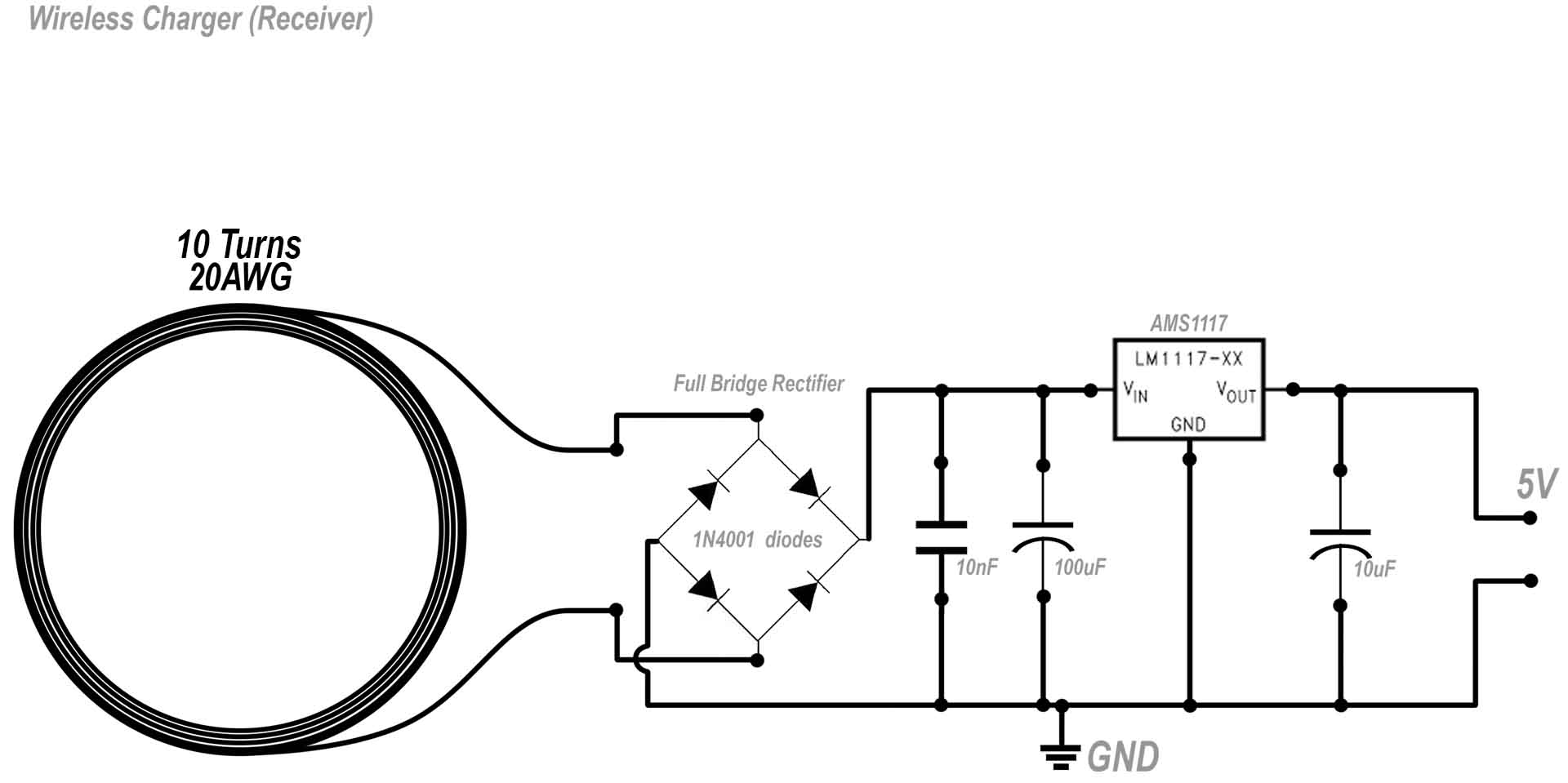
Your iPhone is not passively receiving power. It actively manages the entire charging process with precision hardware components.
Receiver Coil and Rectifier Circuit
Behind the glass back of your iPhone sits a copper receiver coil, precisely positioned to match the transmitter coil in the charger. When the magnetic field hits this coil, it induces an alternating current. However, batteries require direct current, so the phone uses a rectifier circuit to convert AC into DC.
This conversion is not 100% efficient. Some energy is lost as heat, especially during fast 15W charging sessions.
Power Management and Temperature Control
The Power Management IC regulates voltage and current before sending power to the battery. It ensures safe charging by avoiding overvoltage or excessive current that could damage the cells. The PMIC also communicates with the charger to adjust power levels in real time.
Multiple temperature sensors monitor heat during charging. If temperatures rise too high, the system slows down or pauses charging to protect the battery.
Wireless Charging Speeds and Real-World Performance
Charging speed depends on the charger type, power adapter, and iPhone model you are using.
Charging Speeds by Standard
| Charger Type | Maximum Output | Full Charge Time |
|---|---|---|
| Standard Qi | 7.5W | Approximately 2 hours |
| MagSafe or Qi2 | 15W | Approximately 90 minutes |
| Wired USB-PD | 20-27W | Approximately 45-60 minutes |
Even though MagSafe and Qi2 advertise 15W, actual power delivered varies based on battery level, ambient temperature, case thickness, and whether you are using the phone while charging. For example, streaming video while charging can reduce speed by up to 50% due to heat buildup.
Achieving 50% Charge in 30 Minutes
With a MagSafe charger and a 20W or higher USB-C adapter, an iPhone 15 can reach 50% in about 30 minutes. However, this requires perfect alignment from the magnets, no heavy app usage, room temperature environment, and a thin or MagSafe-optimized case. Using a weak power adapter like 5W will result in much slower charging.
Why Your iPhone Gets Hot on a Wireless Charger
Heat is the biggest byproduct of wireless charging and the main reason for slower speeds and potential battery wear over time.
Sources of Heat Generation
Several factors contribute to heat during wireless charging. Energy loss in the conversion process means only 60-80% of input power reaches the battery, with the rest becoming heat. Fast charging at 15W generates more heat than slower speeds. Coil misalignment, even slight offset, increases resistance and heat. Thick or metal cases block heat dissipation and interfere with magnetic fields. Foreign objects like coins, keys, or credit cards with metal strips trap heat and can be dangerous.
Is Heat Dangerous for Your Phone
Normal warmth during charging is fine and expected. However, excessive heat above 35°C can trigger thermal throttling, which slows charging to protect components. It can also accelerate long-term battery degradation and cause discomfort or damage to surfaces. Apple’s Optimized Battery Charging feature helps by delaying full charge when heat is detected or when you are not using the phone.
Does Wireless Charging Harm Your iPhone Battery
Wireless charging itself does not damage the battery. The real issue is heat, not the method of charging.
Battery Wear Factors to Consider
Frequent fast charging under high heat contributes to capacity loss over time. Keeping the battery at 100% for hours, such as overnight charging, adds minor stress. Poor-quality chargers without proper safety features can overcharge or overheat the battery.
Modern iPhones protect themselves with adaptive charging logic, thermal throttling, and automatic shutoff at 100%. Using Qi2 or MagSafe-certified chargers minimizes risks and ensures safe, efficient charging.
Built-In Safety Features in Wireless Chargers
All certified wireless chargers include multiple layers of protection for safe daily use.
Foreign Object Detection
If a metal object like a key or coin is between the phone and charger, the system detects it and stops charging immediately. This prevents overheating, fire hazards, and damage to the object or phone. FOD works by measuring power absorption. If it does not match expected values, charging halts.
Overheat and Overcharge Protection
Both the charger and iPhone monitor temperature and voltage continuously. If thresholds are exceeded, power output is reduced, charging pauses temporarily, and full charge triggers automatic stop. This prevents overcharging and protects battery health.
Voltage and Short-Circuit Protection
Built-in circuits guard against power surges, faulty cables, and low-quality adapters. These protections are standard in Qi-certified, Qi2-certified, and MFi-certified chargers.
Is Overnight Wireless Charging Safe
Yes, it is safe to leave your iPhone on a wireless charger overnight.
When you charge overnight, the battery charges to 100%, then charging stops completely. The system enters trickle mode, topping off only when the battery drops slightly. Optimized Battery Charging delays full charge until you wake up based on your usage patterns.
However, keeping the battery at 100% for long periods can slightly accelerate aging. For best battery health, enable Optimized Battery Charging in Settings, avoid daily overnight charging if possible, and use wireless charging for convenience rather than constant top-offs.
Choosing the Right Wireless Charger for Your iPhone
Not all chargers are created equal. Here is what to look for when selecting a wireless charger.
Certification Matters
Qi2 or MagSafe certification provides the best performance. MFi certification means Apple has approved the charger for safety and compatibility. Avoid uncertified third-party brands that lack proper safety features.
Safety Features to Prioritize
Ensure the charger includes foreign object detection, overheat protection, and voltage regulation. These features protect your phone and battery during charging.
Match Charger to Your Needs
For nightstand use, try a vertical stand with clock display. For desk use, a 3-in-1 charging station works well. For travel, choose a foldable, compact pad. Use Apple’s official MagSafe charger or trusted brands like Anker, Belkin, and Mophie for reliable performance.
What the Future Holds for Wireless Charging
Wireless charging is evolving beyond pads and stands into new applications and technologies.
Embedded Charging Everywhere
Furniture, cars, and public spaces are integrating wireless charging. Desks and nightstands have built-in pads. Cars offer MagSafe-compatible dash mounts. Airports and cafes provide drop-and-charge tables. Apple MagSafe has pushed the industry toward universal magnetic alignment.
Emerging Technologies
Resonant charging works through materials and allows slight misalignment. Long-distance charging aims to power devices over inches or feet but remains experimental. These technologies are still in early stages, but the goal is true cable-free environments.
Environmental Benefits
Wireless charging helps reduce cable clutter and wear, port damage from frequent plugging, and e-waste from broken cables. As efficiency improves, it could become the default charging method for millions of users.
Frequently Asked Questions About Wireless iPhone Charging
Does wireless charging work with any iPhone model?
All iPhones from iPhone 8 onward support wireless charging. However, iPhone 12 and newer models support MagSafe for faster 15W charging. iPhone 15 and later also support Qi2 for universal fast charging.
Why is my wireless charger not fast charging my iPhone?
Slow charging usually results from using the wrong power adapter, a non-MagSafe Qi charger, thick phone cases, or misalignment. Use a 20W or higher USB-C adapter and ensure your case is MagSafe-compatible.
Can wireless charging damage credit cards in phone cases?
Yes. Avoid storing credit cards with metal strips in MagSafe wallet accessories during charging. The magnetic field and heat can damage the card chip or strip.
Does using wireless charging drain battery faster in the long term?
No evidence suggests wireless charging degrades batteries faster than wired charging. Heat is the primary factor, so using certified chargers and avoiding fast charging while using heavy apps helps maintain battery health.
Can I use my iPhone while it is wireless charging?
Yes, but using resource-intensive apps while charging generates more heat and slows charging speed. For fastest results, let the phone charge without active use.
What happens if I place my iPhone incorrectly on the charger?
With standard Qi chargers, charging may be very slow or not start at all. With MagSafe or Qi2, the magnets snap the phone into alignment automatically, ensuring proper charging every time.
Key Takeaways for Understanding Wireless iPhone Charging
Wireless charging works through electromagnetic induction, where a magnetic field generated by the charger induces an electrical current in your iPhone receiver coil. This current is converted to DC power, regulated by your phone’s power management system, and used to charge the battery.
The three main standards offer different experiences. Standard Qi provides universal compatibility at 7.5W. MagSafe delivers 15W fast charging with magnetic alignment for iPhone 12 and newer. Qi2 brings MagSafe-like features to all smartphones, making it the future standard.
Heat is the main consideration when using wireless charging. While normal warmth is expected, excessive heat from misalignment, thick cases, or fast charging can affect battery health over time. Using certified chargers, removing thick cases, and enabling Optimized Battery Charging helps maintain long-term battery health.
For the best experience, use Qi2 or MagSafe-certified chargers with a 20W or higher USB-C adapter. Choose chargers with foreign object detection and overheat protection. Consider your usage patterns when selecting between a charging pad, stand, or multi-device station.





