
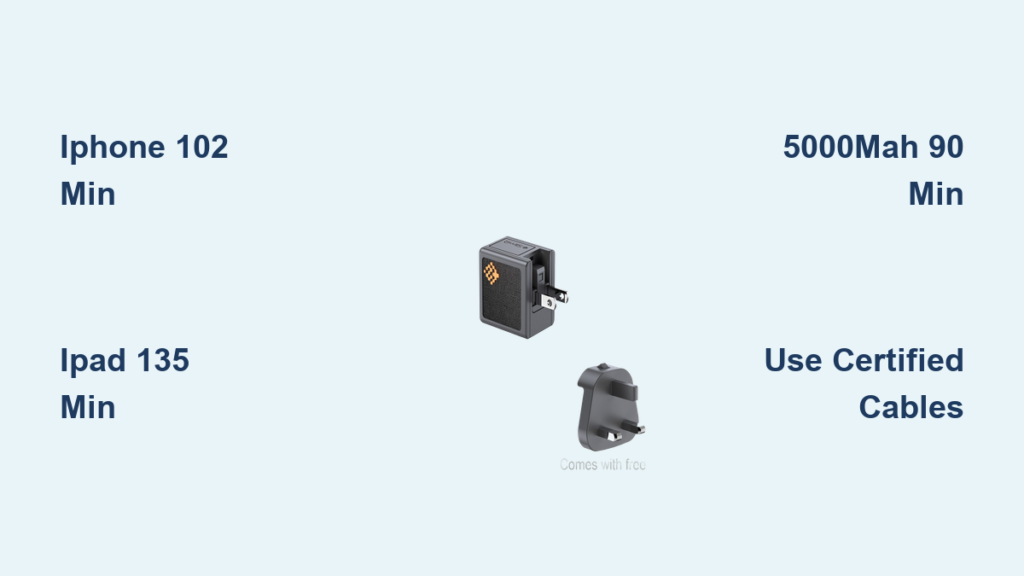
You plug in your phone, glance at the battery percentage, and wonder: How long until it’s ready? If you are using a 30W charger, the answer is not just about wattage. It depends on your device, battery size, and charging efficiency. A 30W charger delivers noticeably faster speeds than lower-wattage options, especially for tablets and laptops, but the real-world gains vary widely by device.
For an iPhone 12, a 30W charger takes 1 hour and 42 minutes to reach 100%, which is only 2 minutes faster than a 20W charger. But for an iPad Pro, that same 30W adapter can cut charging time by nearly half compared to a 20W. This guide breaks down exactly how long a 30W charger takes to charge smartphones, tablets, and other devices, using real data and technical insights.
Fast Charging Explained: How 30W Works
A 30W charger supplies more power than standard 18W or 20W models, enabling quicker energy transfer, especially during the 0 to 80 percent phase. Most modern devices use a two-stage charging curve. They fast charge up to 80 percent, then switch to slower trickle charging to protect battery health. The 30W advantage shows up early, but only if the device can draw that much power.
Not all devices support 30W input. iPhones cap at around 22 to 23W peak, so a 30W charger will not push beyond that limit. However, iPads and some Android phones can utilize higher power, making 30W a smarter upgrade. USB Power Delivery compatibility is key. Without it, even a high-wattage charger will not deliver fast speeds.
What Affects Charging Speed
Several factors determine how fast your device charges with a 30W adapter.
• Device hardware limits: Your phone may not accept more than 20W.
• Battery capacity: Larger batteries take longer, even with 30W.
• Cable quality: Non-certified cables can bottleneck power delivery.
• Heat and usage: Charging slows if the device gets hot or runs apps in the background.
iPhone 12: 30W vs 20W Charging Time
The iPhone 12 supports fast charging up to about 22W, meaning a 30W charger will not drastically outperform a 20W. Real-world tests show minimal differences between these two wattages.
30W Charging Timeline for iPhone 12
Here is the breakdown of charging progress with a 30W adapter.
• 10 minutes: 20 percent
• 30 minutes: 58 percent
• 60 minutes: 85 percent
• 90 minutes: 98 percent
• 100 percent: 102 minutes
20W vs 30W: Is There a Difference?
The difference between 20W and 30W for iPhone 12 is negligible. The 20W charger reaches full charge in 104 minutes, while the 30W reaches 100 percent in 102 minutes. That is only a 2-minute difference. The reason is hardware throttling. Once the iPhone hits peak power draw, it stabilizes, making extra wattage irrelevant.
Should You Use a 30W Charger for iPhone?
Yes, but not for speed. The benefit lies in versatility. If you own multiple devices like an iPad, MacBook, or iPhone, a 30W charger offers better value than a 20W. For iPhone-only use, a 20W charger is more cost-effective.
Pro Tip: Always use an MFi-certified Lightning cable. Cheap cables often fail to trigger fast charging, reducing effective power to 12W or less.
iPad Pro: 30W Delivers Real Gains

Unlike the iPhone, the iPad Pro, especially the M4 model, can take full advantage of higher wattage. Apple includes a 20W charger, but users report it is underpowered.
Charging Speed Comparison for iPad Pro
With a 30W charger, the iPad Pro gains 10 percent more charge every 30 minutes compared to 20W. With 20W, you get about 16 percent every 30 minutes. With 30W, that jumps to 26 percent every 30 minutes. This means the iPad Pro can reach approximately 52 percent in 60 minutes with 30W, compared to just 32 percent with 20W.
M4 iPad Pro: Built for Faster Charging
The M4 iPad Pro supports up to about 38W peak input. The 20W charger is below optimal. Users call it a joke. A 30W improves speed but still does not reach maximum potential. Seventy-watt or 35W dual-port chargers deliver the fastest results.
User Feedback: “I use my MacBook 70W charger for my iPad now. Charges in no time.” A real user shared this experience online.
Why Apple Included Charger Falls Short
Apple ships a 20W adapter with the iPad Pro despite supporting higher input. This forces users to buy upgrades separately, sparking frustration.
Expert Note: A 30W charger is a good middle ground, but for true fast charging, consider Apples 35W Dual USB-C Charger or a third-party GaN model.
5000mAh Battery: How Long with 30W?
Many Android phones like Samsung Galaxy, Pixel, and OnePlus feature 5000mAh batteries. While no real-world test data exists in the source, we can estimate based on electrical principles.
Key Assumptions
These estimates assume standard conditions.
• Battery voltage: 3.7V
• Capacity: 5000mAh equals 18.5Wh
• Efficiency loss: about 15 percent from heat and conversion
• Effective input: about 25.5W, which is 85 percent of 30W
• Fast charging up to 80 percent, then taper
Estimated Charging Times
Based on these assumptions, here is what to expect.
• Zero to 50 percent: 30 to 40 minutes
• Zero to 80 percent: 60 to 75 minutes
• Zero to 100 percent: 90 to 120 minutes
Some phones with optimized charging algorithms may hit 100 percent closer to 90 minutes, while others with aggressive thermal throttling may take 2 hours.
Real-World Tip: Disable battery-intensive apps during charging to reduce heat and maintain fast charging longer.
Why Charging Speed Slows After 80 Percent
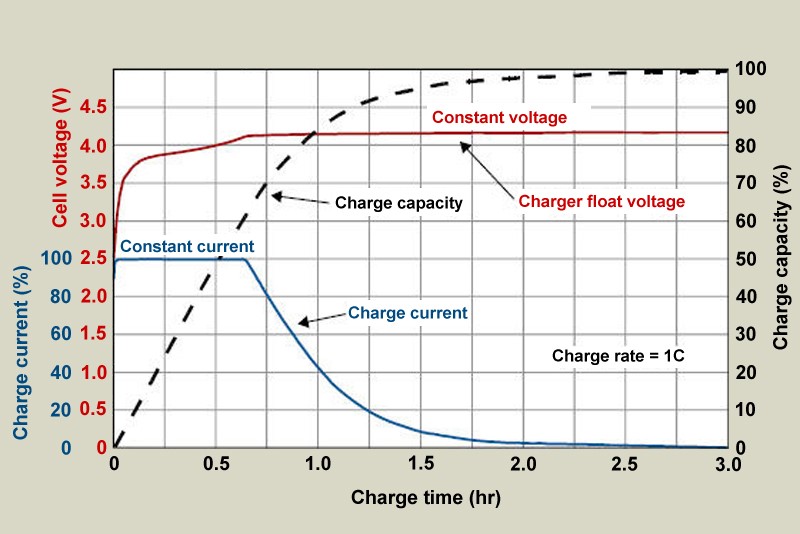
Most devices use a charging curve that prioritizes battery longevity. There are two distinct phases.
Phase 1: Constant Current
From zero to 80 percent, the device draws maximum power. For example, 23W on iPhone or 30W on iPad. This is the fastest charging phase.
Phase 2: Constant Voltage
From 80 to 100 percent, power input drops significantly. This prevents overheating and battery degradation. This is why the last 20 percent often takes as long as the first 50 percent. A 30W charger cannot bypass this safety mechanism.
Myth Busted: Higher wattage does not eliminate slow charging at the end. It only speeds up the initial phase.
Cable and Charger Quality Matters
Even with a 30W charger, poor accessories can cripple performance.
What to Use
Choose the right cables for optimal results.
• USB-C to Lightning for iPhone: MFi-certified only
• USB-C to USB-C for iPad and Android: USB-IF certified and supports USB-PD
• Cable length: Shorter cables like 1m reduce resistance
Common Issues
Watch out for these problems.
• Non-certified cables limit power to 15W or less
• Damaged cables cause intermittent charging
• Cheap chargers lack proper voltage regulation
Warning: Using uncertified gear can damage your battery or void warranty.
Thermal Throttling: The Hidden Speed Killer

Fast charging generates heat. When your device gets too hot, it reduces input power to cool down, which slows charging.
Factors That Increase Heat
Several things can cause your device to overheat during charging.
• Charging while using the phone
• Using a case that traps heat
• High ambient temperature like a car in summer
• Wireless charging, especially MagSafe
How to Avoid Throttling
Follow these tips to keep charging speeds high.
• Remove the case during charging
• Avoid gaming or video calls while fast charging
• Charge in a cool, ventilated area
• Use wired over wireless for speed
Pro Tip: Turn on Airplane Mode for 10 to 15 percent faster charging by reducing background activity.
Wireless vs Wired: 30W Charger Comparison
Using a 30W charger with MagSafe or Qi wireless charging drastically reduces speed.
MagSafe Charging for iPhone 12
MagSafe is powered by a 20W adapter but delivers only 10 to 12W average to your phone. You get about 34 percent in 60 minutes. A full charge takes about 240 minutes, which is 4 hours. Despite the 20W adapter, MagSafe rarely exceeds 15W and throttles quickly due to heat.
Bottom Line: Wireless is convenient but 4 times slower than wired. A 30W charger offers no benefit unless used with a wired connection.
Best Devices for a 30W Charger
Not all gadgets benefit equally from 30W. Here is where it makes the most sense.
Ideal For
A 30W charger works best for these devices.
• iPad Pro all models: Big battery supports higher input
• Older MacBooks 12-inch: Originally shipped with 30W chargers
• Android phones with 5000mAh batteries: Can utilize full 30W if PD-compatible
• Multi-device households: One charger for phone, tablet, and earbuds
Not Worth It For
These devices do not benefit much from 30W.
• iPhone 12 to 15 series: Maxes out at about 23W
• Small-battery phones under 4000mAh: Fast enough with 20W
• Wireless charging: Limited by protocol, not charger wattage
Smart Choice: Use 30W for tablets, keep 20W for iPhones.
Should You Upgrade to 30W?
Cost vs. Benefit Analysis
Consider your situation before upgrading.
• iPhone-only user: Not worth it. Twenty-watt is sufficient.
• iPad plus iPhone user: Yes. Faster iPad charging and compatible with iPhone.
• Frequent travelers: Yes. Faster top-ups and compact GaN options available.
• Multi-device household: Yes. Fewer chargers needed.
Third-party 30W GaN chargers are often cheaper than Apples 20W and more powerful.
Recommendation: If you own an iPad, the upgrade to 30W is justified. For iPhone-only, stick with 20W.
Future-Proofing with 35W or 70W
As devices support higher wattage, 30W may soon feel outdated.
Apple 35W Dual USB-C Charger
This charger charges two devices fast simultaneously. It is better for iPad Pro and iPhone pairing. It is compact, efficient, and future-ready.
70W MacBook Chargers
These can fully leverage iPad Pros about 38W capability. They are ideal for users with both MacBook and iPad.
User Experience: “I upgraded to the 35W dual-port. Both my iPad and iPhone charge fast now.” A user shared this in a forum.
While 30W is solid today, 35W plus is the future for multi-device users.
Summary: Charging Times by Device
Here is a quick reference table for charging times with a 30W charger.
| Device | Battery Size | 0-50% | 0-80% | Full Charge | 30W Worth It? |
|---|---|---|---|---|---|
| iPhone 12 | 2815 mAh | 30 min | 45 min | 102 min | Minimal gain |
| iPad Pro | ~10,758 mAh | 45 min | 75 min | 135-165 min | Yes, clear benefit |
| 5000mAh Phone | 5000 mAh | 35 min | 70 min | 90-120 min | Yes, if PD-supported |
| MagSafe iPhone | Same | 60 min to 34% | 75 min to 44% | 240 min | Avoid for speed |
Final Tips for Faster Charging
Follow these tips to get the most out of your charger.
• Use wired over wireless whenever possible
• Pair 30W with certified cables, MFi or USB-IF
• Charge early. Do not wait until 10 percent.
• Avoid full 0 to 100% cycles daily. Twenty to 80 percent is healthier.
• Keep devices cool during charging
• Upgrade to 35W plus if you own an iPad Pro
Frequently Asked Questions About 30W Charger Charging Times
Does a 30W charger charge my phone faster than a 20W?
For most smartphones like iPhone 12, the difference is minimal. A 30W charger takes about 102 minutes to fully charge an iPhone 12, while a 20W takes 104 minutes. That is only a 2-minute difference. The real benefit shows with tablets and devices that support higher power input.
How long does a 30W charger take to charge an iPad Pro?
A 30W charger takes about 135 to 165 minutes to fully charge an iPad Pro. This is significantly faster than the 20W charger, which takes about 3 hours. Users report getting about 26 percent charge every 30 minutes with 30W, compared to only 16 percent with 20W.
Can a 30W charger damage my phone?
No, a 30W charger will not damage your phone. Modern devices only draw the power they need. Your phone controls the charging rate, not the charger. Using a higher-wattage charger than your device requires is safe. Just make sure you use certified cables to ensure proper communication between charger and device.
Why does charging slow down after 80 percent?
This is a built-in safety feature called the charging curve. Devices use constant current phase from 0 to 80 percent for fast charging, then switch to constant voltage phase from 80 to 100 percent. This prevents overheating and extends battery lifespan. A 30W charger cannot bypass this mechanism.
Is wireless charging with 30W faster than wired?
No, wireless charging is significantly slower than wired, even with a 30W charger. MagSafe wireless charging takes about 4 hours to fully charge an iPhone 12, compared to about 1 hour and 42 minutes with wired charging. Wireless charging generates more heat, which causes throttling and reduces overall speed.
Should I buy a 30W charger for my iPhone?
If you only have an iPhone, a 30W charger is not worth the extra cost. A 20W charger provides nearly identical performance. However, if you also have an iPad or other devices that benefit from higher wattage, a 30W charger offers versatility and faster charging for your tablet.
Key Takeaways for 30W Charger Usage
A 30W charger takes 1 hour and 42 minutes to fully charge an iPhone 12, which is only 2 minutes faster than a 20W charger. The real value of 30W lies in versatility and tablet performance, not iPhone speed. For iPad Pro, a 30W charger cuts charging time by nearly an hour compared to the included 20W adapter. Match your charger to your device limits, use quality certified cables, and consider upgrading to 35W or 70W for future needs, especially if you own multiple devices that benefit from higher wattage.





